





helgrimm
Members
-
Joined
-
Last visited
Everything posted by helgrimm
-
That removed the error in the log. Added one yellow line from a plugin - Feb 12 20:54:51 Tower autotweak: Failed to set ASPM policy Which is probably related to the recent syscfg change. Thanks I appreciate it! The file is on the flash drive - don't look in settings or elsewhere. syslinux/syslinux.cfg label Unraid OS menu default kernel /bzimage append initrd=/bzroot pcie_aspm=off The addition was "pcie_aspm=off". Regards
-
I don't think I've ever looked in my syslog, but just now I realise an error message like this is thrown in there every 3 seconds. The server works as it's supposed to - from my perspective. I'm still curious what this might indicate? Feb 12 19:20:15 Tower kernel: pcieport 0000:00:1a.0: AER: Corrected error message received from 0000:00:1a.0 Feb 12 19:20:15 Tower kernel: pcieport 0000:00:1a.0: PCIe Bus Error: severity=Corrected, type=Physical Layer, (Receiver ID) Feb 12 19:20:15 Tower kernel: pcieport 0000:00:1a.0: device [8086:7ac8] error status/mask=00000001/00002000 Feb 12 19:20:15 Tower kernel: pcieport 0000:00:1a.0: [ 0] RxErr (First) Any help is appreciated. Regards tower-diagnostics-20250212-1830.zip
-
I have no idea what this means or how to remedy it. "Invalid folder cache contained within /mnt" Any help is appreciated. Regrads tower-diagnostics-20250212-1830.zip
-
I could actually see the cpu frequency change switching to "performance". It's usually @ 1600mhz but now its says Intel® Core™ i5-14500T @ 4059 MHz. Thanks!
-
-> settings/system settings/power mode Best power efficiency Balanced operation (unavailable) Best performance The options seem self explanatory. But what do they actually do? I think it's a core function of Unraid. I don't think I've installed it as a plugin. A further question if you want to indulge me: Can this information be found in the Unraid manual? And is there a version of the manual that actually corresponds 1 to 1 to the various options in the Unraid menus? Thanks!
-
Greetings, I have Gluetunvpn running and several dockers working through it. I can confirm in Firefox that I'm behind VPN, but I'm leaking DNS requests. My DNS requests show as originating from Cloudflare. I'm guessing this has to do with the setting "DOT" which is on, and the DOT provider set as Cloudflare. The context help says - The whole purpose of a VPN is privacy, so I'd presume this is beneficial in some way. I don't know what Unbound is - something I additionally have to set up? Or is DNS over TLS up and running with this setting "on"? Who can see my DNS requests now. Cloudflare can, can my ISP? Can others? Why is this beneficial compared to running DNS through the VPN provider? Thanks for making and offering this software
-
1. Integrated backup 2. An android/ios remote to control basic functions like shutdown 3. Better context help all the way through 4. A general strengthening of core functions like file handling to make Unraid more accessible for regular users who's not here to make tinkering a hobby in itself
-
I really appreciate the existence of this docker on Unraid. Roon server has run well for me on my Asustor NAS, on a dedicated machine before this, and now on my Unraid server, which helps me preserve power, shutting down the machine I dedicated to Roon server. I'm behind CG-NAT, but with Tailscale both Roon and Jellyfin work perfectly from outside my LAN. Thank you very much! I really hope this container will continue to exist.
-
The place I'm stuck is at a login in Firefox but I've tried to use them in other places like a text editor. I can produce a @ by using ALT as a special key in the little VNC box hovering left and pressing "2" but that doesn't help fills from a password manager. Ideally I'd like to use the keyboard like normal.
-
Hi there, I've gotten an Ubuntu VM up and running but I'm dumbfounded by the fact that I can't seem to use special characters at all. If I let my password manager fill in a string with characters like @ and & they become substituted with 2's and 6's and so forth. I can't type them either. What's the deal here?
-
Whew. I solved this one. When setting up the individual shares I'd set "case-sensitive names" to "force" under SMB Security Settings. I vaguely remember thinking that would help avoid problems. I didn't know what I was doing. Reading the help actually sounds like it's a good thing for new shares. Changing it to "auto" immediately gives me the expected access to all the files in all of my shares. Hooray!
-
Thanks for your suggestion. I ran it on all three disks to give it a go: No difference
-
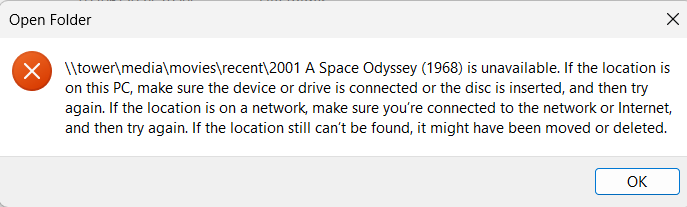
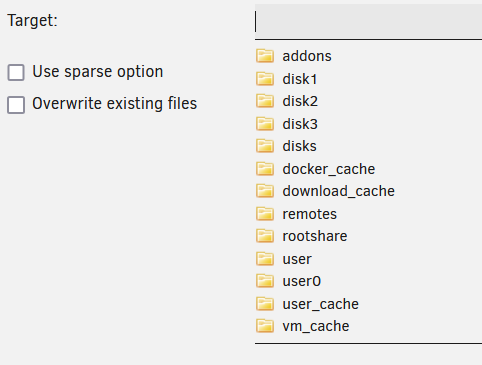
Hi there Access problems are so trivial and yet so frustrating. After several days of copying data to my new Unraid server from my trusty Asustor 5304T NAS, I can't access any of it. I've already been at it, reading a lot of posts in here and out there. I've focused on Windows and the problems regarding SMB server signing, but also a lot of other possibilities. So many that I've lost track myself. I'm not having fun. I got the idea to try to establish a connection from my Kodi media center running on Ubuntu Linux. No access there either! Generally speaking on both systems I can see the shares and I can enter them and see the folders. But I can't open any of the folders in the underlying folder structure. Occasionally and rarely I can open a file. I can for instance copy files to the root of a share from Windows and read it back from Windows. But I don't have access to the folders in that share. What did I do wrong? I mounted my existing SMB shares in Unraid and I used the Dynamix File Manager to queue up jobs copying folders in the existing shares to the newly created shares. For the destination of the copy all shares and disks are listed, and my user share names were found under both "user" and "user0". I copied them to the share names listed under "User". What could be the problem? I'm attaching a screenshot of the resulting error on Windows. And one of the target selection for the initial copy.
-
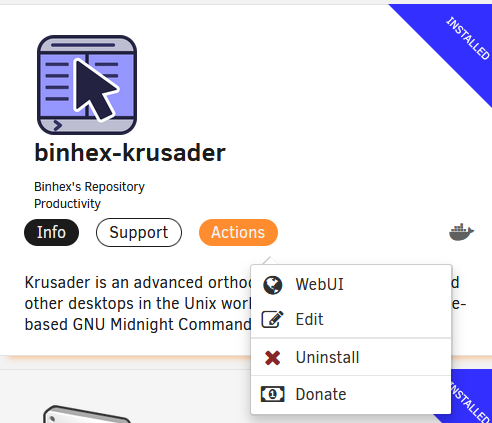
Thanks for replying to my post it's well appreciated. I have only a few days of experience with Unraid and I think I figured out why I couldn't access the WebUI. I had no regard for whether the apps were running or not. I intuitively regarded clicking on "WebUI" as a way of starting the app and displaying its GUI in the browser. As far as I can see now, if the app is actually started, the WebUI is also selectable from the "actions" menu button. I also were not aware that the WebUI button were available from both the Dockers tab and the Main tab apart from the Apps tab where I had found it. Clicking the word and clicking the icon leads to different results and is maybe not the most intuitive design. I'll observe again of course, but I think this is probably the explanation for the randomness in the availability of the WebUI function. Sometimes I had the docker app running and sometimes not. The server is brand spanking new and I'm not using it "in production" yet but merely experimenting.
-
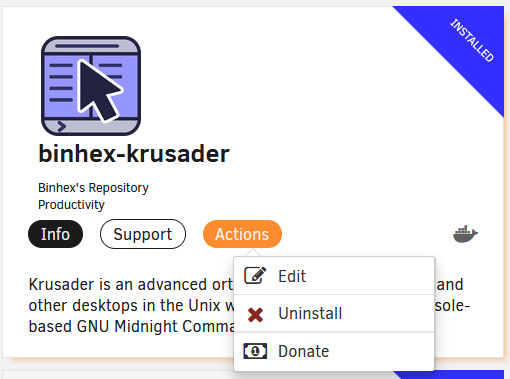
The WebUI menu item disappears
-
I have a new server which has been running for a couple of days. The primary activity right now is copying data to the array. I've installed a few apps that have WebUI's - binhex-krusader, binhex-deluge and Firefox. I haven't quite uncovered a pattern but the WebUI option under "actions" disappears at random, it seems. There's one solution that works every time: Editing the preferences and changing the Network Type. It doesn't matter to what - if it's currently at "Host" then use "Bridge" or "Custom" or vice versa. Web searches reveal that this behavior is not uncommon according to various users. Is there a way to eliminate this behavior once and for all? Thanks in advance
-
Thanks for replying. I already had Dynamix. I guess I needed the Unassigned Drives plugin to get the option to add SMB shares from the Main tab.
-
Solution: Installing the "unassigned devices" plugin opens an option to add and mount SMB shares on the network. It is pretty neat. Hi I have a spanking new Unraid server up and running. I can now access my Unraid user shares on the network, for instance from a Windows machine. Only to realise I have no idea how to access my existing NAS shares from inside Unraid. I've installed the file manager Krusader in Unraid, and I don't know how to open my existing SAMBA shares in order to move files between old and new locations.

