RaidPC
Members
-
Joined
-
Last visited
Everything posted by RaidPC
-
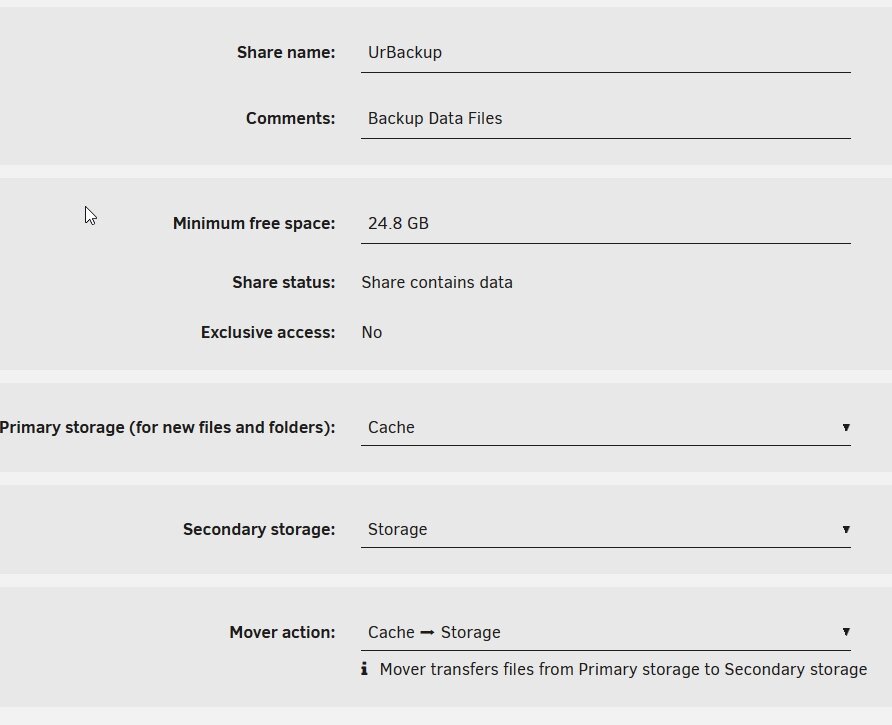
My smaller UnRaid server has the same share settings, compared side-by-side as the large server. Yet the share is not able to be assigned to the larger server for remote access and clicking on the server name as it shows up in network explorer gives the typical "windows cannot access error." This share was for the docker UrBackup. Additionally, as a test, I have tried to create new shares, and after fill in the share name, primary storage and secondary storage, when I select done, it closes out, but no share is created. Tried this several times. Would The setup on this smaller UnRaid is there is no parity drive. Cache drive is a 256 gb nvme drive and the second drive called Storage is a 1TB mechanical drive. Been a long day, but I remember creating the UrBackup share. Export is enabled. Security is public. But I cannot get to it outside of the UrBackup application and I cannot create any new shares on this smaller UnRaid server. Is this not possible with this unique setup or what am I missing? As always, I appreciate the great support. My large UnRaid with 8 drives works flawlessly. Only thing I see in the log is attached which just keeps repeating itself.

-
The solution is to go to the docker settings, advance view tab on the right, and enter under WebUI: http://[IP]:[PORT:your port number]/ For some reason, this field was left blank despite the many re-installs.
-
New problem on complete re-install of Immich. WebGui option is missing on the docker tab. I had Immich running perfectly, but my wife's pictures needed to be cleaned up so I uninstalled Immich and re-installed Immich. What I cannot figure out after 4 re-installs is why the WebGUI option is not showing up in the docker tab with the other options like Start, stop, etc. The IP address and port work fine in a browser. What did I configure wrong for it to be missing? It was available in my first successful installation.
-
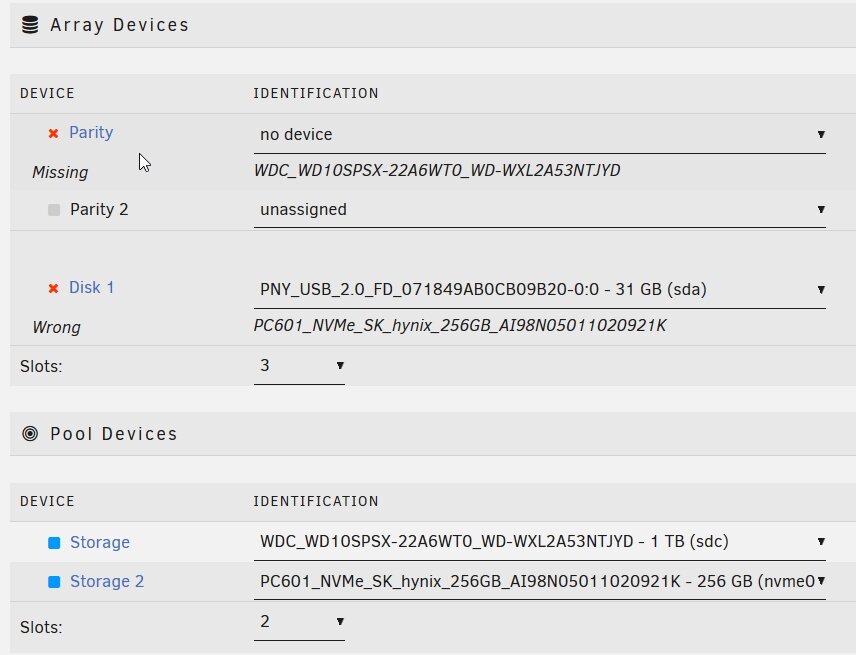
Great, thank you. I am curious, what there a reason it was suggested in another post to add a flash drive for the array? "I would assign both as pools, so that trim is supported, and assign an old flash drive as the required array device." Also, the 256 gb drive is showing up with three entrees 1, 2, 3. What does the mean and it won't affect adding it to the pool will it?

-
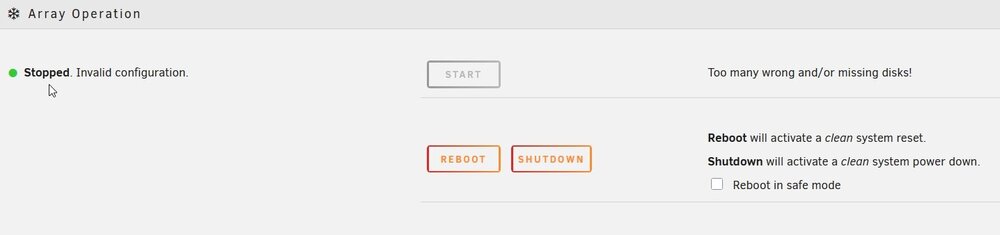
Do I need to wipe my UnRaid flash drive and start over? I have a micro pc I want to use strictly as backup. Going to put Urbackup on it. I already have a beast UnRaid server for my main operations. I purchased a new starter license for the Micro PC. It only has a 256GB nvme disk and a 1 TB mechanical disk. I made the mistake of forgetting it would set/need the largest disk for parity. That was last night. Today I read I could operate it with both disks as a storage pool and put in a flash drive for the array. I've done that, but after several reboots, the UnRaid Micro PC won't start. Red X at Parity missing; Red X Disk 1 even though I pointed it the flash drive. The pool is now set the two drives above, 256 and 1TB. Since rebooting many times won't fix the problem, and I see no options within UnRaid to fix it, will wiping the UnRaid flash drive and re-creating it fix the problem?
-
Great explanation. Helped a Lot! I am leaning towards using {{y}}/{{#if album}}{{album}}{{else}}Other/{{MM}}{{/if}}/{{filename}} since my wife has all her pictures already in folders by year and she has been setting up in Albums. I assume is would look like something like this: 2025 (folder)/Sunsets (folder) /Sunrise this morning.jpg. Follow-up question is on the path. UPLOAD_LOCATION/library/admin/2022/Album Name/IMAGE_56437.jpg It wants it appears to put them in a sub-folder called admin. Not sure why. My wife has a login and I have a login. Her name is Annette. It doesn't seem to allow me to change that admin out for Annette. IE. path field is not editable. Is this where under the User account one adds a Storage Label? If not what is that for and how do I get her photos in folder unique to her?
-
I am running Immich on my UnRaid box and am being trusted with my wife's 60k pictures. So I tread lightly. Two key questions have come up as she uploads them and works on them. 1) All her pictures are showing up properly within the Immich application. Going to where the files are actually on the array, they all fall under a folder structure photos > upload and then in a bizarre folder called "7a99e5fd-d30c-4913-b70a-42e84369d3d5." Inside that folder are ton of sub-folders and the filenames in them are unrecognizable from the original files. I assume that is normal??? 2) I think I read there is some "Storage Template" that can or should be invoked that moves these files (photos) out of the upload folder to the library folder. The storage template is also I think supposed to rename the files as it moves them so they are recognizable by their filenames. Is that correct??? 3) If I need to do this, how is that setup in within the docker in Unraid? What edit do I need to do to my template??? All of this precludes my real concern that these are backed up. All insight to someone new to this application would be greatly appreciated.
-
I was hoping UnRaid's Settings > Management Access > Use SSL/TLS set to "Yes" and Provisioning a Self-signed or user-provided certificate would solve the SSL issue I am having with NextCloud's "Talk" app. SpaceInvader on Youtube has a video "3 Different Ways to Connect to Unraid over HTTPS." I am opting to try his first method which utilizes the above process. Though this isn't flawless, as clicking on the generated Provisioned URL https://xxx-xxx-xx-xxx following by a long sequence of numbers.myunraid.net gives me a Server Not Found (works for SpaceInvader). It is documented that NextCloud Talk app has an issue without a "proper" ssl. https://github.com/nextcloud/talk-android/issues/5509 "Since v22.0.0 the talk android app requires every HTTPS certificate to list the server’s name in a special field called the Subject Alternative Name (SAN). Older certificates sometimes listed the server name only in another field called the Common Name (CN). That used to work, but modern systems no longer accept it because it can cause security problems and confusion. If your certificate does not have a Subject Alternative Name, the app will not trust it, even if the name in the CN looks correct. Which I indeed get their referenced error, "Error: Hostname example.com not verified" I have an internal only UnRaid setup as well as all my dockers. I was really hoping UnRaid's SSL/TLS setting would be the solution. Hours I have spent on CA's and other 'solutions' for internal only certificates. None of them seem to work without some domain name needed or external presence. Do I have the purpose and the intent wrong of this UnRaid Use SSL/TS setting??
-
I decided to reboot the server and it now working. When in doubt, reboot.
-
I have three shares that were labeled TV Shows Volume 1, TV Shows Volume 2 and TV Shows Volume 3. After the recent update, there was a orange message stating the names were not proper. So I renamed them. Tv-Volume_1, Tv-Volume_2 and Tv-Volume_3. The mover works fine on 1 and 2, but on Tv-Volume_3, the files do not move out of cache. I also see a log message on all the files when I manually invoke the Mover. "No medium found." Like below. "Nov 5 16:38:37 UnRaid shfs: assign_disk: /Tv-Volume_3/Death Valley Days (1952)/Season 7/Death Valley Days - S07E01 - Head of the House.nfo No medium found Everything looks the same as far as settings for Volume 3 as was set for Volume 1 and Volume 2. Outside of changing the names, nothing else was changed on the server. The only reference I found on this forum to a similar error was someone named the share, "share." (Which not sure why that would be an issue, but since my other new share names work, I do not think that is the issue. Not sure how to resolve this issue?
-
I just installed this plugin a few days ago believing from what someone recommended, that it would delete empty folders from cache after the files were moved. I do not believe I am seeing that accomplished despite having Clean empty folders set to Top Folders. Reading this recent thread activity I see others are mentioning it. Forgive my ignorance in asking, but is this not an option? I am new to UnRaid overall, but I really am not sure why the Unraid mover doesn't have a method to automatically delete empty folders per a schedule or something. Which is why I was interested in this plugin.
-
Perfect! I took your insight into looking into the .xml and found the exact file. A bit of humor at my lack of Linux knowledge forthcoming. In attempting to copy the file, fd file, I tried several syntax before getting it right. What is weird, I didn't get any errors with the wrong syntax and could not find the file. Example: cp 05d39e4c-9ff1-13a9-6f12-2aea24d52b24_VARS-pure-efi-tpm.fd /mnt/"file depot" cp 05d39e4c-9ff1-13a9-6f12-2aea24d52b24_VARS-pure-efi-tpm.fd /mnt/user/movies Never error-ed so if a file copy was made, I cannot find it in either File Depot or Movies. Finally this worked: cp 05d39e4c-9ff1-13a9-6f12-2aea24d52b24_VARS-pure-efi-tpm.fd /mnt/user/File\ Depot/ My OCD wishes I could find the file copied incorrectly (since there was no error), but even using Krusader, I see to evidence the file was copied. Thank you for all your help. Without it I couldn't have done it.
-
Well, I only have one VM (Windows 10) on my UnRaid server (several dockers). Of those .fd files I listed above, I do not see how I identify the one for my Windows 10 VM. I must be missing something. Those long sequence of numbers and letters do not mean anything to me at this point.
-
Do I copy all of the .fd files? root@UnRaid:/etc/libvirt/qemu/nvram# ls 05d39e4c-9ff1-13a9-6f12-2aea24d52b24_VARS-pure-efi-tpm.fd 891869d1-1ff9-9bea-826c-e5ba9dd9bfbf_VARS-pure-efi.fd e75dcfa4-abd3-8f95-5744-1016b0dde970_VARS-pure-efi-tpm.fd 13eb866d-bd0a-256d-faa9-e4bd2db87172_VARS-pure-efi.fd 94cba630-47d5-7ac2-bbfe-e613c40f2045_VARS-pure-efi.fd e7c9ab6c-e11d-1362-dd8a-d1de20f1ec90_VARS-pure-efi.fd 654553d5-6806-a9dd-f8fc-3dcab7a31677_VARS-pure-efi.fd b58c5f0f-d94c-1844-462e-265f436103d1_VARS-pure-efi-tpm.fd 7d027364-eb2a-3300-77a3-8eb676beb708_VARS-pure-efi.fd c80ce1ad-fcd0-1053-1e92-d414035effbd_VARS-pure-efi.fd
-
I was able to use virsh and export the xml file. Working on the getting the other file. Thank you again for your help.
-
Thank you, yes using ls -la /etc/libvirt/qemu/ I seem them now. 10.xml for example. Too bad a GUI will not allow me to just copy them. :-) I'll have to look up my linux commands (admit I know just enough to trip over my feet). I don't assume copying the entire libvirt.img file would accomplish the same thing?
-
I discovered my mounted My Passport was spinning 24/7. So I opted to hook up a WD Easystor which I know supports spinning down. Only attached to my UnRaid server it is not. I've tried to do my homework by first running the following to see if I could spin it down manually with it unmounted. root@UnRaid:~# hdparm -C /dev/WD3TbExt /dev/WD3TbExt: No such file or directory With no success, I tried the id instead. root@UnRaid:~# hdparm -C /dev/sdk1 /dev/sdk1: SG_IO: bad/missing sense data, sb[]: f0 00 01 00 50 40 ff 0a 80 00 00 00 00 1d 00 00 00 00 00 00 00 00 00 00 00 00 00 00 00 00 00 00 drive state is: unknown My goal was to use this script Unassigned Device settings for this drive, but I was stuck on what to put for Device Script and User Script fields. I thought I could paste the text below in the Device Script content. Is it a lost cause to use an USB external drive as a backup without it having to spin 24/7? Thank you in advance. #!/bin/bash # Define the device path for your USB drive # Replace /dev/sdX with the actual device identifier of your USB drive (e.g., /dev/sdb) USB_DEVICE="/dev/sdX" # Check if the drive exists if [ -e "$USB_DEVICE" ]; then # Spin down the drive hdparm -y "$USB_DEVICE" echo "USB drive $USB_DEVICE has been put into standby mode." else echo "USB drive $USB_DEVICE not found." fi
-
Very neatly written up. I finally had a chance to backup these files. The .img file was easy. :-) But I have had no success in finding the other two files. /etc/libvirt/qemu/Win_Test.xml /etc/libvirt/qemu/nvram/d8218b75-3545-bc84-d0d9-1a194625d4a9_VARS-pure-efi-tpm.fd I found the etc directory, but the folder libvirt was not in it. I did find the directory libvirt, under a folder called system. But nothing was inside the libvirt directory. I used Krusader to dig into the folder structure and was not able to find the path etc\libvirt\gemu. I made sure the VM was running in case that had anything to do with it.
-
Is there a current recommended solution for backing up an Unraid VM? I have spent some time tonight and most posts are old. The one recommendation was Easy Backup, but the app community where it is available reports issues with it. It was not updated since 2023. I have appdata installed for my dockers, but not seeing much noise on using it for capturing an entire VM. IE. Qnap allows a person to export an entire VM to another location. I have a Windows 10 VM running that I want to keep a backup in case it decides to migrate to Windows 11 automatically or by accident.
-
I found the file and installed it within the Windows VM. Interesting. It resolved the Requires Guest Agent Installed and the IP show up in Unraid. -That is until I stopped the VM and restarted it. Then the message is back. I tried several times to re-install it, stop and start. And it appears only to work until I stop the VM. Once I start the VM again, it no longer shows the IP and the message is back. Everything seems to work, just not sure of the logic of why it isn't being resolved after the install.
-
I thought I did, with running Guest Agent (gemu-ga-x86_64) within the Windows VM from the cdrom disk that showed up in Explorer. I ran gemu-gax86_64. Didn't see anything happen, but I ran it. Ironically, those cdrom drives are not showing up in explorer now.
-
Windows 10 Pro ISO. Not sure how to answer the file I am running? Which one and sorry in advance for my lack of knowledge on that question.
-
I have stopped and started the Windows 10 VM several times and this message still shows up in Unraid under IP Address. I cannot RDP to it fine, but after looking at several posts, it seems once I run the file stated above within the Windows VM, it should go away. What am I missing? This is m first real VM on UnRaid.
-
That did it, thank you. I documented this for future reference.
-
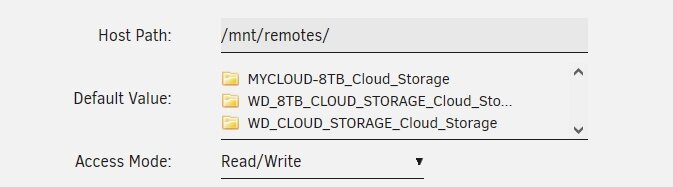
How do I get rid of old smb shares still listed as available? I had to rename my MyCloud 8TB NAS and the two old names still show up. The last name in the list of three is current, the first two are old names. I tried using Krusader to remove them, but it cannot.