dinosaurthug
Members
-
Joined
-
Last visited
-
Case Icon Request: I would love if someone could make an icon for the Rosewill RSV-R4012. Its a 4U server chassis case that is very similar to the RSV-L4500 which already has an official icon. The difference is that the RSV-R4012 has only two fans in the front (right and left) with the case I/O centered in the middle instead! And here it looks with the front panel opened:
-
Here are more updated diagnostics. I am lost. Would appreciate any help! Will donate if you successfully help! oracle-diagnostics-20260213-2134.zip
-
Doing the first command gave me this error. I did not try the second command since this gave an error. I am trying to be extra cautious. How should I proceed? Thank you very much. root@oracle:~# btrfs balance start -f -dconvert=single -mconvert=dup /mnt/cache-nvme WARNING: Conversion with missing device(s) can be dangerous. Please use 'btrfs replace' or 'btrfs device remove' instead. Safety timeout skipped due to --force ERROR: error during balancing '/mnt/cache-nvme': Read-only file system There may be more info in syslog - try dmesg | tail root@oracle:~#
-
Here are new diagnostics, friend. Thank you! oracle-diagnostics-20260213-1302.zip
-
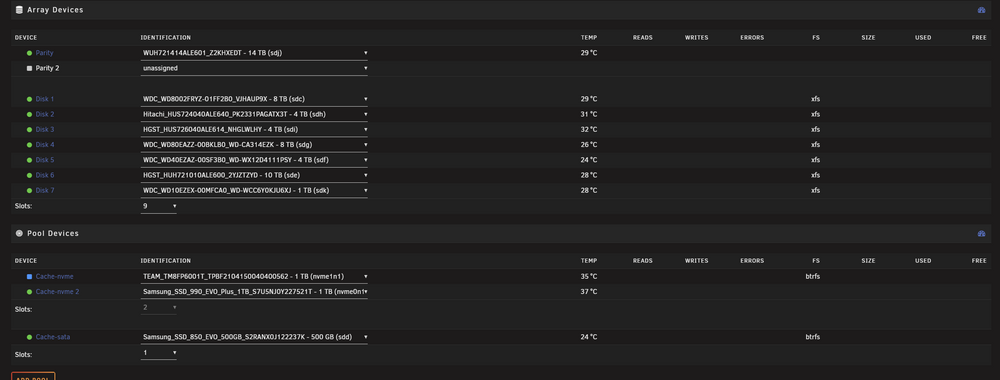
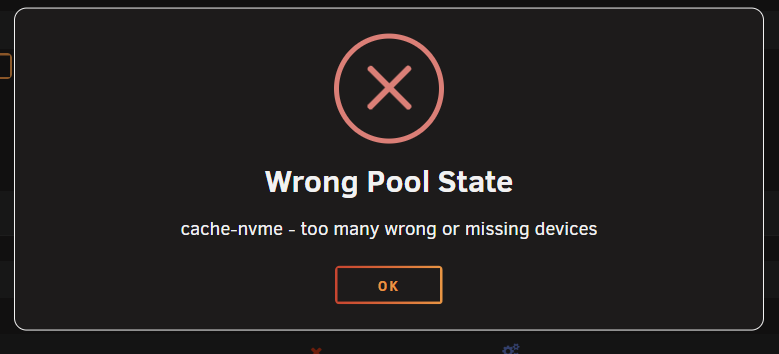
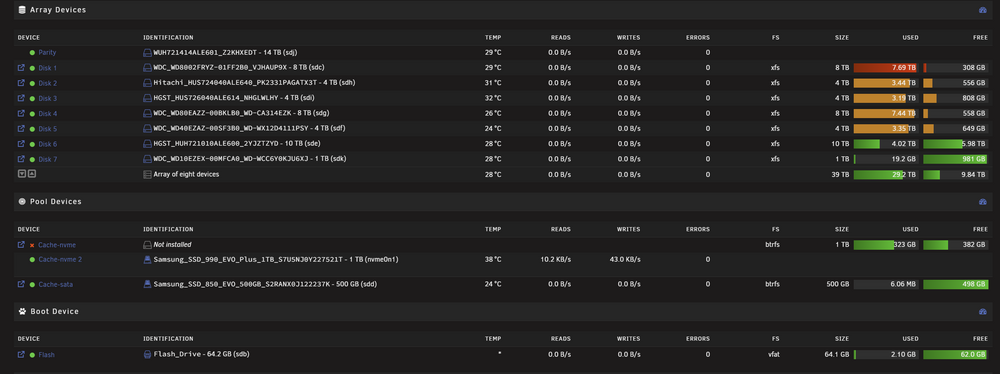
Here is a pic of my Main screen: Then I turned my array off and unassigned both of my Cache-Nvme pool devices and now it won't even let me start the array. Now it says this error: I've tried doing several things mentioned online including a rescue command which seemed to partially work but I don't fully understand it. I still cannot get it to work. I want to keep all my data if possible and am entirely unsure if this is a bug or if my drives are failing (I doubt both failed at the same time since they were mirrored). I want to prevent any data loss if possible so I have avoided reformatting. Here are my diagnostics: oracle-diagnostics-20260213-1228.zip Edit: I was able to do a New Config and start the array like this so it seems like my data is intact. Docker still fails to start though. I do not know how to fix my other drive. After stopping the array I used this command but again am not too sure if i did this properly btrfs rescue zero-log /dev/nvme0n1p1
-
I agree. If the devs want to integrate rclone into Unraid shouldn't the configuration NOT be reset on reboot? Furthermore, is there any official documentation I can reference to see how the rclone integration into Unraid works?
-
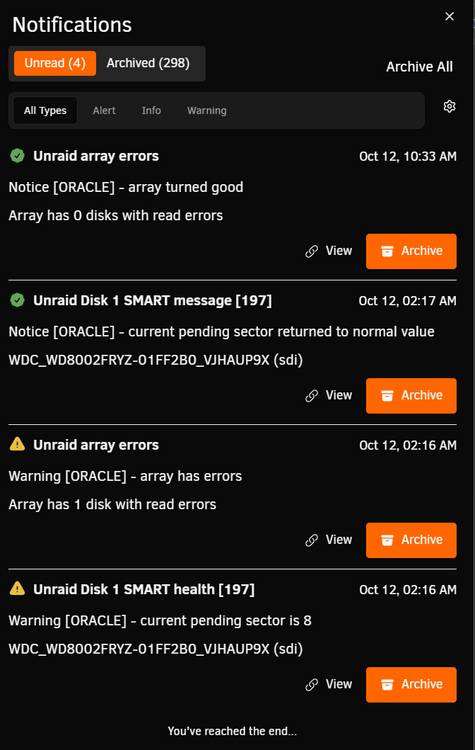
This morning I awoke to my 8TB Disk 1 having 171 read errors and the following notifications that I had current pending sectors: Once I rebooted my server, all the read errors were gone. I then did an extended self test that "Completed without error". I am new to NAS and Unraid so I am unsure when is the best time to replace a drive. Even though the extended SMART self test had no errors, I still had 7 Reported Uncorrectable Errors in my Device Statistics Error when I used the smartctl -x command. Heres is the output: root@oracle:~# smartctl -x /dev/sdi smartctl 7.4 2023-08-01 r5530 [x86_64-linux-6.12.24-Unraid] (local build) Copyright (C) 2002-23, Bruce Allen, Christian Franke, www.smartmontools.org === START OF INFORMATION SECTION === Model Family: Western Digital Gold Device Model: WDC WD8002FRYZ-01FF2B0 Serial Number: VJHAUP9X LU WWN Device Id: 5 000cca 261d303a4 Firmware Version: 01.01H01 User Capacity: 8,001,563,222,016 bytes [8.00 TB] Sector Sizes: 512 bytes logical, 4096 bytes physical Rotation Rate: 7200 rpm Form Factor: 3.5 inches Device is: In smartctl database 7.3/5706 ATA Version is: ACS-2, ATA8-ACS T13/1699-D revision 4 SATA Version is: SATA 3.1, 6.0 Gb/s (current: 6.0 Gb/s) Local Time is: Sun Oct 12 14:27:03 2025 EDT SMART support is: Available - device has SMART capability. SMART support is: Enabled AAM feature is: Unavailable APM feature is: Disabled Rd look-ahead is: Enabled Write cache is: Enabled DSN feature is: Unavailable ATA Security is: Disabled, frozen [SEC2] Wt Cache Reorder: Enabled === START OF READ SMART DATA SECTION === SMART overall-health self-assessment test result: PASSED General SMART Values: Offline data collection status: (0x82) Offline data collection activity was completed without error. Auto Offline Data Collection: Enabled. Self-test execution status: ( 0) The previous self-test routine completed without error or no self-test has ever been run. Total time to complete Offline data collection: ( 101) seconds. Offline data collection capabilities: (0x5b) SMART execute Offline immediate. Auto Offline data collection on/off support. Suspend Offline collection upon new command. Offline surface scan supported. Self-test supported. No Conveyance Self-test supported. Selective Self-test supported. SMART capabilities: (0x0003) Saves SMART data before entering power-saving mode. Supports SMART auto save timer. Error logging capability: (0x01) Error logging supported. General Purpose Logging supported. Short self-test routine recommended polling time: ( 2) minutes. Extended self-test routine recommended polling time: (1250) minutes. SCT capabilities: (0x003d) SCT Status supported. SCT Error Recovery Control supported. SCT Feature Control supported. SCT Data Table supported. SMART Attributes Data Structure revision number: 16 Vendor Specific SMART Attributes with Thresholds: ID# ATTRIBUTE_NAME FLAGS VALUE WORST THRESH FAIL RAW_VALUE 1 Raw_Read_Error_Rate PO-R-- 100 100 016 - 0 2 Throughput_Performance P-S--- 134 134 054 - 104 3 Spin_Up_Time POS--- 180 180 024 - 365 (Average 365) 4 Start_Stop_Count -O--C- 100 100 000 - 79 5 Reallocated_Sector_Ct PO--CK 100 100 005 - 0 7 Seek_Error_Rate PO-R-- 100 100 067 - 0 8 Seek_Time_Performance P-S--- 128 128 020 - 18 9 Power_On_Hours -O--C- 096 096 000 - 31985 10 Spin_Retry_Count PO--C- 100 100 060 - 0 12 Power_Cycle_Count -O--CK 100 100 000 - 79 22 Helium_Level PO---K 100 100 025 - 100 192 Power-Off_Retract_Count -O--CK 099 099 000 - 1390 193 Load_Cycle_Count -O--C- 099 099 000 - 1390 194 Temperature_Celsius -O---- 200 200 000 - 30 (Min/Max 18/41) 196 Reallocated_Event_Count -O--CK 100 100 000 - 0 197 Current_Pending_Sector -O---K 100 100 000 - 0 198 Offline_Uncorrectable ---R-- 100 100 000 - 0 199 UDMA_CRC_Error_Count -O-R-- 200 200 000 - 0 ||||||_ K auto-keep |||||__ C event count ||||___ R error rate |||____ S speed/performance ||_____ O updated online |______ P prefailure warning General Purpose Log Directory Version 1 SMART Log Directory Version 1 [multi-sector log support] Address Access R/W Size Description 0x00 GPL,SL R/O 1 Log Directory 0x01 SL R/O 1 Summary SMART error log 0x02 SL R/O 1 Comprehensive SMART error log 0x03 GPL R/O 1 Ext. Comprehensive SMART error log 0x04 GPL,SL R/O 8 Device Statistics log 0x06 SL R/O 1 SMART self-test log 0x07 GPL R/O 1 Extended self-test log 0x08 GPL R/O 2 Power Conditions log 0x09 SL R/W 1 Selective self-test log 0x10 GPL R/O 1 NCQ Command Error log 0x11 GPL R/O 1 SATA Phy Event Counters log 0x12 GPL R/O 1 SATA NCQ Non-Data log 0x15 GPL,SL R/W 1 Rebuild Assist log 0x21 GPL R/O 1 Write stream error log 0x22 GPL R/O 1 Read stream error log 0x24 GPL R/O 256 Current Device Internal Status Data log 0x25 GPL R/O 256 Saved Device Internal Status Data log 0x30 GPL,SL R/O 9 IDENTIFY DEVICE data log 0x80-0x9f GPL,SL R/W 16 Host vendor specific log 0xe0 GPL,SL R/W 1 SCT Command/Status 0xe1 GPL,SL R/W 1 SCT Data Transfer SMART Extended Comprehensive Error Log Version: 1 (1 sectors) Device Error Count: 7 (device log contains only the most recent 4 errors) CR = Command Register FEATR = Features Register COUNT = Count (was: Sector Count) Register LBA_48 = Upper bytes of LBA High/Mid/Low Registers ] ATA-8 LH = LBA High (was: Cylinder High) Register ] LBA LM = LBA Mid (was: Cylinder Low) Register ] Register LL = LBA Low (was: Sector Number) Register ] DV = Device (was: Device/Head) Register DC = Device Control Register ER = Error register ST = Status register Powered_Up_Time is measured from power on, and printed as DDd+hh:mm:SS.sss where DD=days, hh=hours, mm=minutes, SS=sec, and sss=millisec. It "wraps" after 49.710 days. Error 7 [2] occurred at disk power-on lifetime: 31973 hours (1332 days + 5 hours) When the command that caused the error occurred, the device was active or idle. After command completion occurred, registers were: ER -- ST COUNT LBA_48 LH LM LL DV DC -- -- -- == -- == == == -- -- -- -- -- 40 -- 43 00 00 00 00 00 00 00 00 00 00 Error: UNC at LBA = 0x00000000 = 0 Commands leading to the command that caused the error were: CR FEATR COUNT LBA_48 LH LM LL DV DC Powered_Up_Time Command/Feature_Name -- -- -- == == == -- -- -- -- -- --------------- -------------------- 60 01 00 00 10 00 03 9f 99 53 00 40 08 16d+04:23:54.053 READ FPDMA QUEUED 61 00 10 00 b8 00 03 11 32 2b a8 40 08 16d+04:23:50.901 WRITE FPDMA QUEUED 61 00 a0 00 b0 00 03 11 32 2b 08 40 08 16d+04:23:50.901 WRITE FPDMA QUEUED 61 00 e0 00 a0 00 03 11 32 2a 28 40 08 16d+04:23:50.901 WRITE FPDMA QUEUED 61 01 a8 00 90 00 03 11 32 28 80 40 08 16d+04:23:50.901 WRITE FPDMA QUEUED Error 6 [1] occurred at disk power-on lifetime: 31973 hours (1332 days + 5 hours) When the command that caused the error occurred, the device was active or idle. After command completion occurred, registers were: ER -- ST COUNT LBA_48 LH LM LL DV DC -- -- -- == -- == == == -- -- -- -- -- 40 -- 43 00 00 00 00 00 00 00 00 00 00 Error: UNC at LBA = 0x00000000 = 0 Commands leading to the command that caused the error were: CR FEATR COUNT LBA_48 LH LM LL DV DC Powered_Up_Time Command/Feature_Name -- -- -- == == == -- -- -- -- -- --------------- -------------------- 60 00 68 00 08 00 03 9f 99 4c 98 40 08 16d+04:23:49.803 READ FPDMA QUEUED 61 04 08 00 f8 00 02 9d 3b 28 90 40 08 16d+04:23:46.800 WRITE FPDMA QUEUED 61 04 00 00 d8 00 02 9d 3b 24 90 40 08 16d+04:23:46.799 WRITE FPDMA QUEUED 61 04 00 00 d0 00 02 9d 3b 20 90 40 08 16d+04:23:46.798 WRITE FPDMA QUEUED 61 04 00 00 88 00 02 9d 3b 1c 90 40 08 16d+04:23:46.797 WRITE FPDMA QUEUED Error 5 [0] occurred at disk power-on lifetime: 31973 hours (1332 days + 5 hours) When the command that caused the error occurred, the device was active or idle. After command completion occurred, registers were: ER -- ST COUNT LBA_48 LH LM LL DV DC -- -- -- == -- == == == -- -- -- -- -- 40 -- 43 00 00 00 00 00 00 00 00 00 00 Error: UNC at LBA = 0x00000000 = 0 Commands leading to the command that caused the error were: CR FEATR COUNT LBA_48 LH LM LL DV DC Powered_Up_Time Command/Feature_Name -- -- -- == == == -- -- -- -- -- --------------- -------------------- 60 01 00 00 30 00 03 9f 98 fb 00 40 08 16d+04:23:43.844 READ FPDMA QUEUED 60 03 58 00 a8 00 03 11 31 48 80 40 08 16d+04:23:40.953 READ FPDMA QUEUED 60 04 00 00 a0 00 03 11 31 44 80 40 08 16d+04:23:40.953 READ FPDMA QUEUED 60 01 00 00 98 00 03 9f 98 fc 00 40 08 16d+04:23:40.953 READ FPDMA QUEUED 60 04 08 00 90 00 03 11 31 40 78 40 08 16d+04:23:40.953 READ FPDMA QUEUED Error 4 [3] occurred at disk power-on lifetime: 31973 hours (1332 days + 5 hours) When the command that caused the error occurred, the device was active or idle. After command completion occurred, registers were: ER -- ST COUNT LBA_48 LH LM LL DV DC -- -- -- == -- == == == -- -- -- -- -- 40 -- 43 00 00 00 00 00 00 00 00 00 00 Error: UNC at LBA = 0x00000000 = 0 Commands leading to the command that caused the error were: CR FEATR COUNT LBA_48 LH LM LL DV DC Powered_Up_Time Command/Feature_Name -- -- -- == == == -- -- -- -- -- --------------- -------------------- 60 01 00 00 10 00 03 9f 98 f4 00 40 08 16d+04:23:40.253 READ FPDMA QUEUED 61 04 00 00 f8 00 02 9d 3a 20 b0 40 08 16d+04:23:37.338 WRITE FPDMA QUEUED 61 04 08 00 b8 00 02 9d 3a 1c a8 40 08 16d+04:23:37.338 WRITE FPDMA QUEUED 61 00 10 00 b0 00 02 9d 3a 1c 98 40 08 16d+04:23:37.337 WRITE FPDMA QUEUED 61 04 08 00 a8 00 02 9d 3a 18 90 40 08 16d+04:23:37.336 WRITE FPDMA QUEUED SMART Extended Self-test Log Version: 1 (1 sectors) Num Test_Description Status Remaining LifeTime(hours) LBA_of_first_error # 1 Extended offline Completed without error 00% 31983 - SMART Selective self-test log data structure revision number 1 SPAN MIN_LBA MAX_LBA CURRENT_TEST_STATUS 1 0 0 Not_testing 2 0 0 Not_testing 3 0 0 Not_testing 4 0 0 Not_testing 5 0 0 Not_testing Selective self-test flags (0x0): After scanning selected spans, do NOT read-scan remainder of disk. If Selective self-test is pending on power-up, resume after 0 minute delay. SCT Status Version: 3 SCT Version (vendor specific): 256 (0x0100) Device State: Active (0) Current Temperature: 30 Celsius Power Cycle Min/Max Temperature: 30/34 Celsius Lifetime Min/Max Temperature: 18/41 Celsius Under/Over Temperature Limit Count: 0/0 SCT Temperature History Version: 2 Temperature Sampling Period: 1 minute Temperature Logging Interval: 1 minute Min/Max recommended Temperature: 0/60 Celsius Min/Max Temperature Limit: -40/70 Celsius Temperature History Size (Index): 128 (24) Index Estimated Time Temperature Celsius 25 2025-10-12 12:20 32 ************* ... ..( 37 skipped). .. ************* 63 2025-10-12 12:58 32 ************* 64 2025-10-12 12:59 31 ************ ... ..( 12 skipped). .. ************ 77 2025-10-12 13:12 31 ************ 78 2025-10-12 13:13 30 *********** ... ..( 72 skipped). .. *********** 23 2025-10-12 14:26 30 *********** 24 2025-10-12 14:27 32 ************* SCT Error Recovery Control: Read: Disabled Write: Disabled Device Statistics (GP Log 0x04) Page Offset Size Value Flags Description 0x01 ===== = = === General Statistics (rev 2) 0x01 0x008 4 79 --- Lifetime Power-On Resets 0x01 0x018 6 325510502989 --- Logical Sectors Written 0x01 0x020 6 674668127 --- Number of Write Commands 0x01 0x028 6 1778393275929 --- Logical Sectors Read 0x01 0x030 6 3290329868 --- Number of Read Commands 0x01 0x038 6 115147713650 --- Date and Time TimeStamp 0x03 ===== = = === Rotating Media Statistics (rev 1) 0x03 0x008 4 31879 --- Spindle Motor Power-on Hours 0x03 0x010 4 31879 --- Head Flying Hours 0x03 0x018 4 1390 --- Head Load Events 0x03 0x020 4 0 --- Number of Reallocated Logical Sectors 0x03 0x028 4 6786570 --- Read Recovery Attempts 0x03 0x030 4 0 --- Number of Mechanical Start Failures 0x04 ===== = = === General Errors Statistics (rev 1) 0x04 0x008 4 7 --- Number of Reported Uncorrectable Errors 0x04 0x010 4 0 --- Resets Between Cmd Acceptance and Completion 0x05 ===== = = === Temperature Statistics (rev 1) 0x05 0x008 1 30 --- Current Temperature 0x05 0x010 1 31 N-- Average Short Term Temperature 0x05 0x018 1 31 N-- Average Long Term Temperature 0x05 0x020 1 41 --- Highest Temperature 0x05 0x028 1 18 --- Lowest Temperature 0x05 0x030 1 37 N-- Highest Average Short Term Temperature 0x05 0x038 1 25 N-- Lowest Average Short Term Temperature 0x05 0x040 1 35 N-- Highest Average Long Term Temperature 0x05 0x048 1 25 N-- Lowest Average Long Term Temperature 0x05 0x050 4 0 --- Time in Over-Temperature 0x05 0x058 1 60 --- Specified Maximum Operating Temperature 0x05 0x060 4 0 --- Time in Under-Temperature 0x05 0x068 1 0 --- Specified Minimum Operating Temperature 0x06 ===== = = === Transport Statistics (rev 1) 0x06 0x008 4 9 --- Number of Hardware Resets 0x06 0x010 4 109 --- Number of ASR Events 0x06 0x018 4 0 --- Number of Interface CRC Errors |||_ C monitored condition met ||__ D supports DSN |___ N normalized value Pending Defects log (GP Log 0x0c) not supported SATA Phy Event Counters (GP Log 0x11) ID Size Value Description 0x0001 2 0 Command failed due to ICRC error 0x0002 2 0 R_ERR response for data FIS 0x0003 2 0 R_ERR response for device-to-host data FIS 0x0004 2 0 R_ERR response for host-to-device data FIS 0x0005 2 0 R_ERR response for non-data FIS 0x0006 2 0 R_ERR response for device-to-host non-data FIS 0x0007 2 0 R_ERR response for host-to-device non-data FIS 0x0008 2 0 Device-to-host non-data FIS retries 0x0009 2 8 Transition from drive PhyRdy to drive PhyNRdy 0x000a 2 6 Device-to-host register FISes sent due to a COMRESET 0x000b 2 0 CRC errors within host-to-device FIS 0x000d 2 0 Non-CRC errors within host-to-device FIS I feel that it is too early to replace this drive because I still have parity protection. However, I'd like the community's opinion on whether it's smarter to replace now.
-
Would really appreciate if someone made one for the Darkrock Classico Storage Master! Edit: I made one using AI. Its pretty good but could definitely be improved a lot!
-
I too am having it when accessing from Chrome on Windows 11. I have Unraid Connect 2025.09.18.1707
-
Looks like its back up and working now!
-
Me too! I was going crazy thinking I messed something up on my end lmao.
-
I agree with this completely! Use the user XML templates first. Then ONLY use docker compose as a fallback or for the apps already installed thru docker compose.
-
Oh wow this looks amazing, thanks for this suggesion. Unfortunately, I being a noob know very little about LXCs and I see that this script uses gravity sync which I think is outdated comparted to nebula sync which supports v6? I am going to err on the side of caution and just stick with my install I talked about above that works for me.
-
Wait can I just use a keepalived docker container on my unraid server instead of this plugin to greatly simplify this? https://github.com/shawly/docker-keepalived Edit: I did exactly this from above using the Docker Compose Plugin and it worked! Putting it here so it helps others who may have done this too (probably not becaue I'm new to unraid but you never know haha): services: keepalived: image: shawly/keepalived:latest container_name: keepalived network_mode: "host" cap_add: - NET_ADMIN - NET_BROADCAST - NET_RAW environment: - KEEPALIVED_CUSTOM_CONFIG=true volumes: - "/mnt/user/appdata/keepalived/keepalived.conf:/etc/keepalived/keepalived.conf:ro" Just make sure the keepalived.conf is placed at the right spot with proper permissions I can share my keepalived.conf files if anyone is interested.
-
Hello, First, thank you for creating this plugin. I think it can do what I am trying to accomplish but I am not sure. I want to use keepalived to make my unraid pihole the master and my raspberry pi the backup. For some reason my backup pihole seems to enter the master state and does not stay in the backup state--making my master pihole useless. While I think my keepalived.conf on both devices is setup appropriately, I think my issue was the setup of the Unraid Replication plugin itself (since the instructions are for setting it up with another unraid server only). Could you please walk me through how to set up the unraid replication plugin so that it properly communicates with the keepalived service on my backup? Or just point me to an alternative that allows me to use keepalived on my unraid if that is simpler (I have no need for the docker, lxc, and vm replication as I am using a docker container called Nebula Sync for syncing my piholes and it works flawlessly). The configuration I want: Virtual IP: X.X.X.100 Master IP (Unraid): X.X.X.99 Backup IP (raspberry pi): X.X.X.98 Unraid Replication plugin configuration Unraid Replicaton - keepalived Configuration vrrp_instance VI_1 { state MASTER interface br0 virtual_router_id 100 priority 101 advert_int 1 unicast_src_ip X.X.X.99 #Unraid pihole's real IP (custom br0 network) unicast_peer { X.X.X.98 } authentication { auth_type PASS auth_pass myrealpassword } virtual_ipaddress { X.X.X.100 } notify_master "/bin/bash /etc/keepalived/scripts/master.sh" notify_backup "/bin/bash /etc/keepalived/scripts/backup.sh" notify_fault "/bin/bash /etc/keepalived/scripts/fault.sh" } Raspberry Pi - /etc/keepalived/keepalived.conf vrrp_instance VI_1 { state BACKUP interface wlan0 virtual_router_id 100 priority 100 advert_int 1 unicast_src_ip 192.168.6.98 # Raspberry Pi's real IP unicast_peer { 192.168.6.99 } authentication { auth_type PASS auth_pass bigballs420 } virtual_ipaddress { 192.168.6.100 } } Raspberry pi - "systemctl status keepalived.service" command admin@pihole-backup:~ $ systemctl status keepalived.service ● keepalived.service - Keepalive Daemon (LVS and VRRP) Loaded: loaded (/lib/systemd/system/keepalived.service; enabled; preset: enabled) Active: active (running) since Sun 2025-08-24 10:42:32 EDT; 27min ago Docs: man:keepalived(8) man:keepalived.conf(5) man:genhash(1) https://keepalived.org Main PID: 796 (keepalived) Tasks: 2 (limit: 173) CPU: 342ms CGroup: /system.slice/keepalived.service ├─796 /usr/sbin/keepalived --dont-fork └─797 /usr/sbin/keepalived --dont-fork Aug 24 10:42:32 pihole-backup Keepalived[796]: Command line: '/usr/sbin/keepalived' '--dont-fork' Aug 24 10:42:32 pihole-backup Keepalived[796]: Configuration file /etc/keepalived/keepalived.conf Aug 24 10:42:32 pihole-backup Keepalived[796]: NOTICE: setting config option max_auto_priority should result in better keepalived perf>Aug 24 10:42:32 pihole-backup Keepalived[796]: Starting VRRP child process, pid=797 Aug 24 10:42:32 pihole-backup systemd[1]: keepalived.service: Got notification message from PID 797, but reception only permitted for >Aug 24 10:42:32 pihole-backup Keepalived_vrrp[797]: (/etc/keepalived/keepalived.conf: Line 29) Truncating auth_pass to 8 characters Aug 24 10:42:32 pihole-backup Keepalived[796]: Startup complete Aug 24 10:42:32 pihole-backup systemd[1]: Started keepalived.service - Keepalive Daemon (LVS and VRRP). Aug 24 10:42:32 pihole-backup Keepalived_vrrp[797]: (VI_1) Entering BACKUP STATE (init) Aug 24 10:42:35 pihole-backup Keepalived_vrrp[797]: (VI_1) Entering MASTER STATE lines 1-24/24 (END) As you can see, my Raspberry Pi enters the master state immediately. I do not know how to check the status with the unraid replication plugin. I would greatly appreciate some help.