





BobPhoenix
Members
-
Joined
-
Last visited
Everything posted by BobPhoenix
-
Sorry to hear that. I can tell you that it works on a SuperMicro X7SBE MB and at least one other SuperMicro Desktop C2SBA+II (if I remember model correctly anyway).
-
Got any older board then that? I flash my controllers on an Intel 775 based MB and have no such errors.
-
Looks like he was using the standard script based on the post read time. Using the fast preclear script might drop it to 56 hours. Here is the time for an HGST NAS 6TB with fast option specified: == Using :Read block size = 1000448 Bytes == Last Cycle's Pre Read Time : 13:03:50 (127 MB/s) == Last Cycle's Zeroing time : 9:12:56 (180 MB/s) == Last Cycle's Post Read Time : 14:30:10 (114 MB/s) == Last Cycle's Total Time : 23:44:06 The post read is just slightly longer than the preread.
-
-
[*]Run the VBoxManage step with VirtualBox running. [*]Copy the raw image to your unRAID server where you want the image to be (if it isn't already) [*]Run QEMU command from unRAID command line [*]Select the qcow2 image in unRAID GUI. That's how I interpreted it anyway.
-
I have 4 of those registered with LimeTech. It should be good as long as the listing and picture is accurate.
-
I always burn in the BIOS. I even go so far as to add the command you propose to take out. I like to see it detect my cards on boot that way I know if I have problems BEFORE unRAID boots - this assumes a monitor or IPMI connection of course. Also the time difference isn't very long and I'm not booting multiple times a day very often so the little extra time it takes to boot with the bios is not a big deal to me. If you run for days/weeks/months between reboots it shouldn't matter if you have the BIOS turned on.
-
As long as you know what drive goes where. Specifically the parity and cache drives but the data drives are nice too. You don't need to worry about starting over. With unRAID v5 I essentially did that every time I upgraded. I would do a backup of the flash drive and then I pulled the key file off of it and then formatted it and installed from scratch each time. As long as I had the drive assignments it was fine. I just re-attached the drives to the correct slots, used the "parity is valid" check box and restarted with the new version. If unRAID didn't automatically start a parity check I would tell it to do one to confirm everything is still OK. I just made sure to do a non-correcting parity check so I could go back if needed.
-
You can use MC (Midnight Commander) to edit files in unRAID as well. It is usually used for moving/copying/deleting files but it also has an editor.
-
Agreed. Better description of the included tools and where they are used. Where are nerds used?
-
You have not loaded the above correctly. "07" is the bus not the slot and you need to load all of them not just one as saarg said. So replace: <hostdev mode='subsystem' type='pci' managed='yes'> <driver name='vfio'/> <source> <address domain='0x0000' bus='0x00' slot='0x07' function='0x0'/> </source> </hostdev> With this: <hostdev mode='subsystem' type='pci' managed='yes'> <driver name='vfio'/> <source> <address domain='0x0000' bus='0x07' slot='0x00' function='0x0'/> </source> </hostdev> <hostdev mode='subsystem' type='pci' managed='yes'> <driver name='vfio'/> <source> <address domain='0x0000' bus='0x07' slot='0x00' function='0x1'/> </source> </hostdev> <hostdev mode='subsystem' type='pci' managed='yes'> <driver name='vfio'/> <source> <address domain='0x0000' bus='0x07' slot='0x00' function='0x2'/> </source> </hostdev> <hostdev mode='subsystem' type='pci' managed='yes'> <driver name='vfio'/> <source> <address domain='0x0000' bus='0x07' slot='0x00' function='0x3'/> </source> </hostdev>
-
The reason I don't worry about bit rot is I have backups of important files. The others are media files and it is unlikely I would notice a single bit change when playing it back. At most it might give a tiny glitch and my recorded media has more glitches than would EVER be caused by bit rot when they are brand new. If I start with pristine media files like DVD or BluRay rips where errors are even less likely - I can just re-rip the media again if it would become unplayable or a glitch in playback becomes noticeable in them.
-
The only time it sould be needed on unRAID is if you wanted to run a command as the user nobody so that it is done the same way as across the network. For instance if you wanted to run MC as the user nobody: "sudo -u nobody mc". Awesome. Learn something new everyday. I always thought of sudo as raising permissions not lowering them or running as another user Correct. It would be different if unRAID ever addresses the security concerns, but in the mean time you can even surf the net using the highest permissions possible (root) in the unraid-gui of 6.2 series. Maybe when they no longer phone home on the betas they will get rid of internet access from the unRAID GUI? Tbh I don't see that. Maybe not running as root perhaps. The problem is that people have the misunderstanding that one computer can take the place of all of them. All well and good and it is a true statement. Until you get to the point that there's a problem and none of your vms work because of trouble with the server. Now you're in the situation of how do I access the gui when I don't own a phone, tablet, or other computer (and its happened at least once here) hence Firefox being included. Sent from my LG-D852 using Tapatalk They can't stop browsing IP addresses outside the network and leave the GUI running as Root?
-
The only time it sould be needed on unRAID is if you wanted to run a command as the user nobody so that it is done the same way as across the network. For instance if you wanted to run MC as the user nobody: "sudo -u nobody mc". Awesome. Learn something new everyday. I always thought of sudo as raising permissions not lowering them or running as another user Correct. It would be different if unRAID ever addresses the security concerns, but in the mean time you can even surf the net using the highest permissions possible (root) in the unraid-gui of 6.2 series. Maybe when they no longer phone home on the betas they will get rid of internet access from the unRAID GUI?
-
The only time it sould be needed on unRAID is if you wanted to run a command as the user nobody so that it is done the same way as across the network. For instance if you wanted to run MC as the user nobody: "sudo -u nobody mc".
-
I've had that before. This is just speculation but what I think happens: The drive could have sectors that didn't meet specs after the drive electronics were installed so some of the spare sectors were remapped and thereby slowing the drive slightly as it has to seek to the spare sectors instead of the original ones.
-
With out the bios you get a faster boot. I always flash the bios too. I want to see it list the drives connected when it boots. I don't mind the longer boot time.
-
If you are trying to move files off and then format the drive why not just COPY the files instead and then format it like you intended?
-
First off you have to pass through all three of these devices it is really only 1 device but it shows up as three. Why I hated USB2.0 and VMWare. It had a 6 device limit on pass through on ESXi 5.0 and a USB controller like this used up 3 of the 6 allowed devices. I would put the following into your VM's XML and remove everything else you changed trying to add this controller. <hostdev mode='subsystem' type='pci' managed='yes'> <driver name='vfio'/> <source> <address domain='0x0000' bus='0x08' slot='0x00' function='0x0'/> </source> </hostdev> <hostdev mode='subsystem' type='pci' managed='yes'> <driver name='vfio'/> <source> <address domain='0x0000' bus='0x08' slot='0x00' function='0x1'/> </source> </hostdev> <hostdev mode='subsystem' type='pci' managed='yes'> <driver name='vfio'/> <source> <address domain='0x0000' bus='0x08' slot='0x00' function='0x2'/> </source> </hostdev>
-
Actually that is not true. Attached is a graphic of a mount on unRAID to the C$ share that Windows automatically creates. But I can certainly create a windows share without the $ in the name. As I said, doesn't work for me. Username and password triple checked. mount -t cifs -o rw,nounix,iocharset=utf8,_netdev,file_mode=0777,dir_mode=0777,username=***,password=********* '//HANDYMAN/C$' '/mnt/disks/DiskC' mount error(13): Permission denied Refer to the mount.cifs( manual page (e.g. man mount.cifs) I don't know how it works for you. I can mount shares without $ in the names. Bottom line is that with this situation and the fact that the $ character is a reserved character in php, it is not worth the effort to pursue it further since you have an alternative. It might have worked for me because I left off the "rw,nounix,iocharset=utf8,_netdev,file_mode=0777,dir_mode=0777" from my mount command. I will see if I get the same error as you got when I put it in and then see what is actually causing it. NOTE I am only curious here. I will just not put the $ in the shares on Windows when I use it. Just wanted to let you know about it and putting in a check and not allowing a $ should be sufficient for me and anybody else that tries it. I will let you know if I determine why I can mount and you cannot as in which mount parameter is causing the problem. Found it I think. For me I get an error if I use iocharset=utf8 in the mount command but when I removed that the mount succeeded. Edit:Of course the error I was getting was different then yours: mount error(79): Can not access a needed shared library. So I wonder do you have UAC turned on or off on your windows box? Mine is turned off. Edit2:well I found out I was WRONG I made a typo when I tried it with the iocharset. I can mount mine with your command specifically I used this: mount -t cifs -o rw,nounix,iocharset=utf8,file_mode=0777,dir_mode=0777,username=sagetv,password=SageTV //HDServer/C$ /mnt/disks/DriveC So I wonder if it is UAC related on the Windows box will try turning it on and see if that makes a difference. The user SageTV I used is an administrator on the box too so I will try a regular user next as well as the UAC turned on. Edit3: Yep when I turned on UAC I get the same as you a "13 permission denied." So mystery solved. Normal windows setup with UAC active prevents connecting to $ shares on a Windows box. Doubt I will find a way to actually connect to one either. Anyway had to find out what was causing the difference.
-
Actually that is not true. Attached is a graphic of a mount on unRAID to the C$ share that Windows automatically creates. But I can certainly create a windows share without the $ in the name. As I said, doesn't work for me. Username and password triple checked. mount -t cifs -o rw,nounix,iocharset=utf8,_netdev,file_mode=0777,dir_mode=0777,username=***,password=********* '//HANDYMAN/C$' '/mnt/disks/DiskC' mount error(13): Permission denied Refer to the mount.cifs( manual page (e.g. man mount.cifs) I don't know how it works for you. I can mount shares without $ in the names. Bottom line is that with this situation and the fact that the $ character is a reserved character in php, it is not worth the effort to pursue it further since you have an alternative. It might have worked for me because I left off the "rw,nounix,iocharset=utf8,_netdev,file_mode=0777,dir_mode=0777" from my mount command. I will see if I get the same error as you got when I put it in and then see what is actually causing it. NOTE I am only curious here. I will just not put the $ in the shares on Windows when I use it. Just wanted to let you know about it and putting in a check and not allowing a $ should be sufficient for me and anybody else that tries it. I will let you know if I determine why I can mount and you cannot as in which mount parameter is causing the problem.
-
Actually that is not true. Attached is a graphic of a mount on unRAID to the C$ share that Windows automatically creates. But I can certainly create a windows share without the $ in the name.
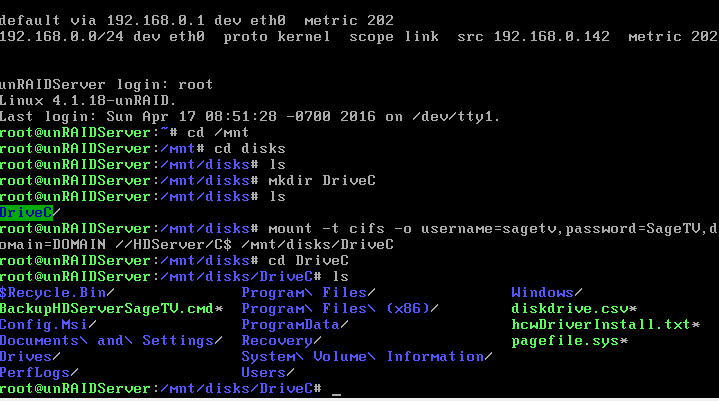
-
So the share with the $ was created on a Windows computer? I know why that is happening and I'll see if I can reproduce. EDIT: Windows doesn't let me share a folder with a $ in the name. How did you set up a smb share with a $ in the name? It is easy to share in Windows 7 just go to advanced sharing and when the default name for the share comes up or if you type in your own name then add the $ to the end and hit apply. That is how you create shares that are hidden from windows machines as far as browsing the network anyway. The dollar sign has to be at the END of the share name only I don't think you are allowed to create a share with a $ anywhere else but the end of the share name. I just shared Input folder on my laptop D drive. I added the dollar sign to the end of the share name and hit apply. This is the PC I am typing this post from. I can't browse the share but I can bring up the share in a Windows Explorer window if I type the share name.
-
Found a problem not sure if it is fixable or not. When I try to map a SMB share that has a dollar sign in it "Drives$" for instance or the Windows created "ADMIN$" I get the following showing up in the GUI. NOTE the error is over printing the headers: Warning: Invalid argument supplied for foreach() in /usr/local/emhttp/plugins/unassigned.devices/include/lib.php on line 751 Device Source Mount point Remove Size Used I am using unRAID 6.1.9 and 2016.04.16a of unassigned devices. Attached is the diagnostics if you want to look at them. Last operation I did was to add "Drives$" as a share. unraidserver-diagnostics-20160417-0845.zip
-
"this controller" could stand for any controller mentioned in this thread so which one ARE you talking about? If "this controller" is LSI SAS2008 based or newer then it would be many times greater then 10TBs maximum drive size I've seen.
