





NLS
Members
-
Joined
-
Last visited
Everything posted by NLS
-
Ok this has happened to me only after the new web interface got released a few weeks (?) ago. I have unraid tab pinned in my browser (for years). I always leave it on dashboard page, even when I visit other pages to do things (change a setting, check disks whatever) - which sometimes I do in a separate tab anyway. Thing is that lately, even when I return to dashboard page, sometimes after reboot of my PC (or closing browser and re-opening it), it reverts to a page I was before. I thought that this GUI version insists on clicking "done" when finishing work on a page (which was not an issue before and clicking "apply" and closing that page was enough) and else reverts to that page anyway (maybe new GUI wants a clear sign that we finished with something), but I am not sure that is enough. It could be a browser issue (I use Edge), but this only happens with UNRAID and only happens relatively recently. Any ideas?
-
Is it "open files v2"?
-
What happened with this? (and not just this plugin of yours)
-
What happened with this? (and not just this plugin of yours)
-
Why this happened?
-
My mongodb stops every time after a few days of working. I can restart it successfully but again after a few days, boom. Any help on how to debug this?
-
Unfortunately I will need to... crash it again (find some time to do it), because the photo I took, I cannot find.
-
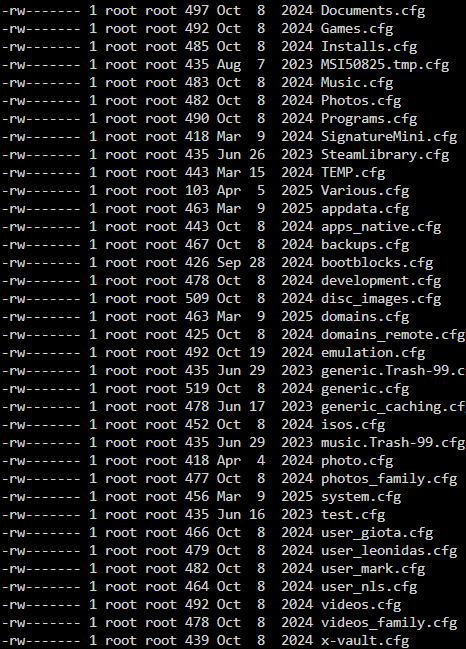
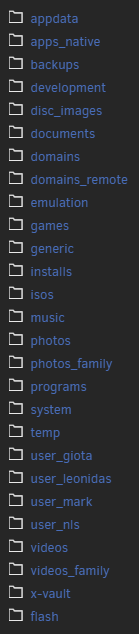
I didn't at first but I attached when I was doing the update, that is why I know the boot process did not reach login prompt. I mean it didn't reach console login prompt.Well the subject says it all. I have a friend with 7.0.1 UNRAID. First updated everything else (no VMs, very few dockers/plugins... like 5-6 total). It is a pretty simple setup. Note that this machine has an issue of not booting to GUI mode (it is a ready made older Dell), but that is not the issue I post here. Also I had to change IP before doing anything else (because someone decided to mess with the network there), which also almost led to issues (I lost connectivity both in old IP and new IP - yes they were free... but in the end it worked). Problem is when I installed 7.2.3, machine did not even reach login prompt. I even tried safe mode. Only thing that "saved" him, was that I removed the USB stick, dropped 7.0.1 over it and so it just returned to a bootable 7.0.1. I am guessing something between 7.0.1 and 7.2.3 cannot be upgraded straightforward. Any ideas?Latest UNRAID version. I just discovered that few of my shares, cannot be edited in GUI or edit the sharing, in fact sharing DOES work even for those shares (probably from since I actually set up the servers years ago), but I cannot make any changes to sharing. In those shares the error it reports is "Case-insensitive Share name is not unique"! But I checked all disks and there are no filename conflicts, all my top shares are lower case. So I checked the second possible source of the problem /boot/config/shares/ ...and boy is it a mess! Here is what I see there: But my real actual shares are those (and those that I indeed see in other computers when I browse UNRAID): Question is, how do I handle this? 1) Do I rename the .cfg files for shares that I don't see conflict? (for example Documents.cfg, while there is no documents.cfg and the real share is "documents") 2) Do I delete shares that don't exist and I don't even know how they showed up there? (example MSI50825) Also do I do this on a live system? Will I just reboot? Should I take down array first? Finally, how did those happen??? Help? EDIT: So I saw this is a new 7.2 thing. Probably those .cfg are back when I recreated shares, renamed manually etc. years ago. But what about those non existent .cfg? Can I delete safely?
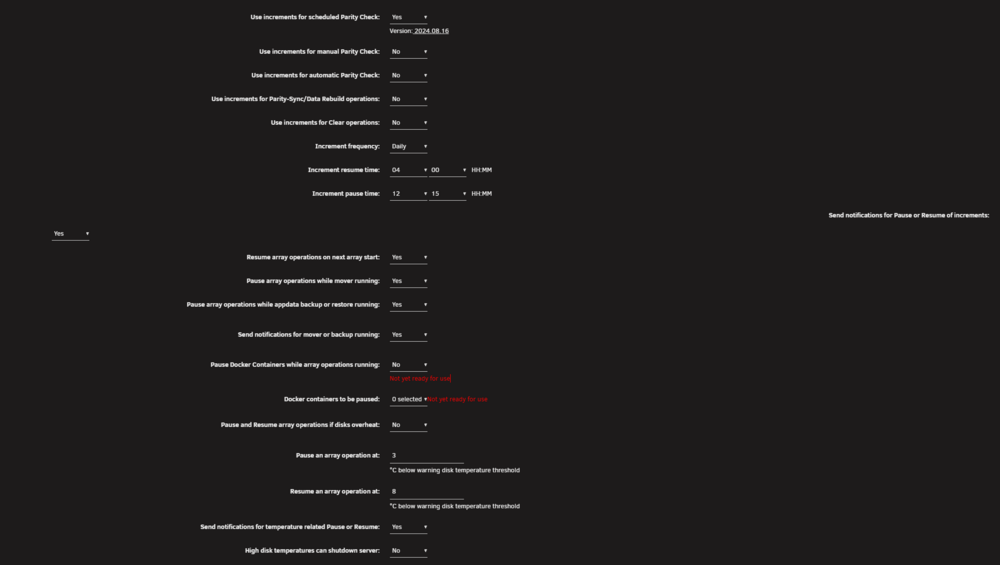
 Two things... I don't know if it was fixed with the update that came today, but at least for the previous version, parity check tuning stopped following the increments. Right now it is 16:10 local and as you can see below, it should have stopped (for the day) at 12:15, but still goes on. (and yes used to work fine with the exact same settings) And a cosmetic thing (plus here you can see my actual settings):
 Right. After reboot it returned to sdl. Thanks for the help - actually the hand-holding, as I wanted an expert's advice to "enhance" my own (I do use UNRAID since almost it existed, way before nice GUI and plugins etc.). It was not even the first time this happened over the years, but I didn't remember exactly how I handled it before (i.e. keeping same disk in), so you helped me take more careful steps. EDIT: Rebuild finished fine, I am actively using the disk again now.Not sure it had any different identifier, looks the same to me in every way. I may look at the logs I sent you, because I suspect it lists it there and I can probably verify. In any case, doesn't matter much, the good thing is that it is still rebuilding with no errors. In a few hours I will know if it was just a hiccup.EDIT: Noticed another thing though. The disk shows in unassigned devices! Even now, before rebooting. So I think it actually just briefly dropped offline. I will remove from array, shuffle cables and reboot anyway. EDIT: ...and did it. It is rebuilding on same disk so I guess if the disk has a problem it will hit again will trying to write it.So I will simply shutdown, as is, check/shift cables etc. and turn back on. If disk is back, at least it will report as existing - but I am not sure if it will go in the array or what. Maybe I need to stop array and remove it from array first and then shutdown? This way if disk is back to life after reboot and I re-add it, it will rebuild it, right? (will probably do the second thing, not just shutdown - a rebuild will be safer anyway, I don't know what didn't go ok while writing - plus it will be a full surface test for the disk) BTW the disks are all connected to my 16i controller, with 3 x 1-to-4 cables.Here... thanks. quasar-ultima-diagnostics-20251001-1810.zipSo I was moving some files to that disk that I very recently moved data AWAY from that disk. While that move was taking place (using UNRAID webui), it reported read errors (not write errors?), 1280 of them and then it disabled that disk and shows it emulated. The good thing is that the data I was copying to the disk (and the few data it already had inside), are easily identifiable and fixable/replaceable. So my issue is what to actually DO as a process. Before attempting to replace the disk (which is a bit old but not the first in line to replace yet), I want to make sure if the disk is maybe ok. NOTE: Do not explain me how to replace the disk. I know that and have done this process many many times. What I need is how to first check if the drive is actually ok and that was a system "fart" (maybe shift some cable or whatever). I tried to do a full SMART test, but it stops immediately after clicking and I didn't get any message if the test happened (or is still happening). SMART logs and history, show nothing. Can someone describe the process of what to do next? Should I stop the array? Should I restart it in maintenance mode? Should I somehow check the disk? ( how?) How do I re-enable the disk. Is it possible that SMART doesn't do anything because the disk is emulated and maybe the filesystem doesn't actually see the physical disk? (something I think I can only verify if I stop the array) Help? (read older such threads but there was some conflicting info, so I am making this fresh thread)How good is this for multi-file archives? I know already that it cannot even see filenames in the form of .7z.XXX (.7z.001). I can see .zip that are the first file of a multi-part archive (rest files being .z01 etc.), but I don't know if it extracts those properly.An idea for a feature: "Skip next scheduled check" Sure you can manually disable it and then enable it after it would start, but a single checkbox (self cleared after a single use), would greatly help people that for some reason want to skip a scheduled parity check "just once". For example, I just swapped an array disk, so that disk got rebuilt from parity, so there is no point to do the scheduled monthly check (which spans 4 days in my case, as I break it in non-working hours) this month. Also now, manually disabling the scheduled parity check, after enabling you need to set again the parameters, doesn't remember it (this is not a problem of this plugin though, just the stock parity check has this issue). So that simple tick, would be great.(not sure if this is actively developed) As for ...they mean it is not implemented yet as a feature - and since it's there for a year or so, I am not sure they will implement it. I have ANOTHER feature request in case someone is reading, a bit weird one: A setting where if parity checking is finishing, but also getting to pause time, to be able to override this, so you don't get another day of check for mere minutes. So for example it would look like this: Do not pause if: Percentage complete over: 95% (manual setting) AND Pause time is less than: 15 minutes away (manual setting) ...this will allow people to split the partial parity check way more easily. In my case, parity check took 5 days, just because the 5th day it needs to cover like 3.5% to finish. Yes I could fine tune manually to increase time a bit, but then do it again if I replace a bigger disk, or some unforeseen traffic in the server slows down parity etc.I don't understand why keep the same name and confuse people.Sorry, I forgot to "close" this subject. You are right of course. I just considered this should probably be core functionality. Didn't notice that plugin until recently. (for someone using UNRAID almost since initial releases 20 years ago)So, my parity check is schedules monthly and split over a few days, because I want it to happen during lower "house traffic" hours. I was two days in, server was just idling (it was not during the parity check hours - but I did reach around 36% the previous nights) and area power went down. My UPS held fine, I happened to be at home, so I made a nice clean early shutdown. Power came up. Server booted fine. But now the system reported that I canceled the parity check - not that it would continue in the next scheduled time of day. Weird since there was no reason not to resume. I didn't actually stop the parity check - it was not happening when I shut down and I shut down cleanly. Is there a way, or should I report this as a bug?So this doesn't need the separate container approach. I trust that I could migrate from the other one by backing up config or something, right?


