





NLS
Members
-
Joined
-
Last visited
Everything posted by NLS
-
😟 that's not possible (maybe a script? maybe just format it again in zfs or non zfs?) see the output https://pastebin.com/TZ9kdcEg in between (and at the bottom) you will see the few existing mount points (in cache there are 11 folders and most are empty)... all the others I don't know if they are needed in any way or how they were created and why if I am going to be honest (and this is a general comment, not sure if it has anything to do with unraid's implementation), I don't really get in my case what benefit I have from this added complexity and what makes zfs so perfect and everybody loves it (all I see are new issues we never thought of having with a fs)
-
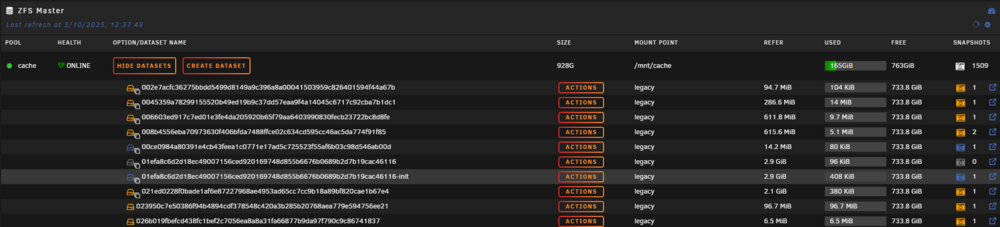
Yes shows this: NAME USED AVAIL REFER MOUNTPOINT cache 163G 737G 61.5G /mnt/cache But... ...this scrolls down forever
-
I am waking this up, because it just happened to me too. Same situation. I replaced a missing failed disk, rebuilding now, already 2 hours in, without problems... and then a 1-2 containers failed and I noticed no shares whatsoever, available! I am not stopping the rebuild, will reboot after it finishes AND HOPE my shares come back. My MAIN tab shows the disks properly with their contents and rebuild shows 0 errors and continues. My server is several years old and I have done a full rebuild of numerous disks (up to 18TB size) without such issue. This is the first time I do it with my current hardware (after server hardware problems): Different motherboard, different CPU (intel coming from AMD) of similar specs though (not underpowered whatsoever), different PCIe SATA controller (supposedly better... I came from two SAS2008 based and move to a single 9400-16i). Also added an extra M.2 and separated my appdata/domains/system from rest of cached data. Is this something I need to get used to with my new hardware? That a full rebuild will kill my shares? Ever anybody found out why this happens to some? I really hope my shares come back after the reboot, but really... why this happens? EDIT: Shared did come back after reboot. I have kept the diagnostics before the reboot. Anybody care to...?
-
Thanks. How? (I am editing first post to clear out my current enquiry)
-
No I mean exactly what I wrote. I ...what you see above, never happened this way in mover (now I set it to primary core and no cache, so no mover action). I will disable validation (as definitely both appdata and system have thousands of tiny files), but the rest of the issues are a big question mark...
-
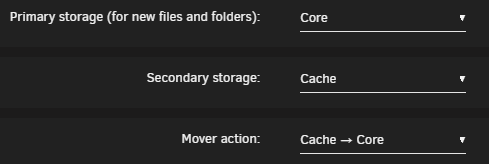
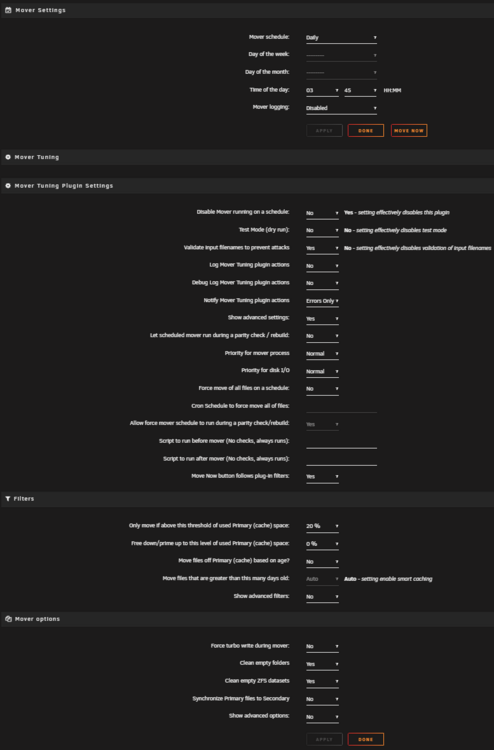
I follow this thread and it is BY FAR the most active thread that bombs my email. (I probably need to change the email settings to not send my multiple mail for this thread if possible) ...thing is I have to post in this thread too. I am not sure my mover works properly. I see weird things happening and I suspect here is where to find solution as I AM using Mover Tuning. Attached I have all my settings. Please read on to see my various issues... 1) I recently added a second pool (named "core"), where I moved my appdata/domains/system folders. I set those three folders, to be primary "core", secondary "cache", and move from cache to core. I started Mover. (note that also in my cache I have other data that need to move to my data disks) It indeed started moving appdata... My appdata is about 10Gbytes. It took HOURS and never fully finished. We are talking about M.2 PCIe4 to M.2 PCIe4. Then just moved appdata which also left residue (and shouldn't as docker service was stopped) and never moved the other two folders. I since Mover apparently stopped (?) - also never moved any of the data files to my array - I just manually moved the little appdata remaining (like 2Mbytes?) and the other two folders by using UNRAID's own file manager. It took 3 minutes (and my VMs are around 200GB). So no idea why mover took ALL this time for a single folder AND stopped. 2) Then I set the three folders to be "core" only (no mover), but then decided to make appdata primary "core", secondary "cache" and move direction to be "cache to core", because 2-3 containers had to be reset to not use /mnt/cache/appdata and instead use /mnt/appdata. So I put it like that as a safeguard. Well tough luck. I started Mover again, honestly to start moving my data from cache to my data array. AND I REALIZED it started moving files from /core/appdata back to /cache/appdata!!! WHY!? At least I was "lucky" that again it took its time (waaaaaaaaaaay slower than UNRAID's own file manager). So I issued a "mover stop" and manually put little appdata it moved back to "core", then set appdata to use only primary storage "core". So HOPEFULLY Mover won't touch it. 3) But the Odyssey continues. I started Mover a third time. It seemed to run a for a while. Only, no data (or no noticeable amount) every moved. They are all there... 450Gbytes of data that need to move to my array. Still there. I am now at a loss. I will manually move everything to my array, ok, but I don't want to remove Mover Tuning (if it's the problem here)... (please tag me if you reply, the thread is very long)
-
@JorgeB That said... my zfs cache pool still shows more than a thousand snapshots (now that appdata/system/domains are not in that pool). Is there a way to clean this up or I shouldn't care?
-
vs ...why not there?
-
To close this, indeed after moving the docker directory, dockers cannot be seen and need to be reinstalled by "Previous Apps".
-
You posted this while I was posting my own reply and I guess you replied to that also without knowing. So I guess after moving docker won't start and will need to delete and re-create the docker directory anyway. Thanks. I insist on keeping docker a directory, because I need more control of the contents (yes I know I must not touch them) and do not like the "black box limited in size" philosophy of docker image - and I am not in love with having one more fs layer (like VMs must have).
-
Yes I understand that. What I am asking is in this specific situation: - docker directory was in a zfs volume and set to "native" (not overlay2)... native for this case is "zfs" (according to help) - I move using mover this directory TO an xfs volume... native in this case means "overlay2" (according to help), but the folder contents were in the zfs volume before, that native means zfs... ...won't that be an issue? I hope I am coming through, sometimes my English are far from perfect. The question is about this specific case, where I move the docker folder to different fs. (and to be honest I am not even sure if docker will work afterwards - if it doesn't then there is an issue I guess... also M.2 to M.2 so slow, mover still in appdata folder which is <10GB is not telling me that this will be without issues)
-
Thanks. I found a second M.2 lying around under my desk so I added a second pool, xfs formated, where mover (slowly?) moves my appdata, domains, system... (yes kvm and docker are disabled, changed primary-secondary storage so that it moves them to new cache pool and then after mover, will switch them to only new pool) I checked in my docker settings and is indeed in "native" mode. In the help it says that for xfs the "native" IS overlay2. Supposing it will succeed moving (not completely sure yet), this will also indeed switch my docker directory to overlay2 or I still need to re-create it? (even if I leave in native that for xfs is overlay2)
-
Yeah my docker is in folder mode (and I prefer it that way except if someone points me at some strong arguments on why not). Should I revert to other fs? (what?) Is the current situation a performance or wear issue?
-
So, my cache disk is ZFS since before 7.X. Is the number of snapshots normal to be so huge? (note that I rebooted the server an hour ago - because of some firmware updates) Also since I remember some discussion about zfs "mode" (or something) that UNRAID prefers (?) in version 7.X (I am in 7.0.1 now)... Where can I check that and what do is that I should see to be ok? This pool now DOES NOT have appdata/domains/system any more (I moved those away, but MAYBE they left behind zfs residue?), it only has temp data for mover to move to array (plus few data that need to remain there). How do I clean up my snapshots/datasets, how do I know what is really obsolete, how can I automate this clean up? (if needed to automate - I am not sure how UNRAID manages this thing itself) I remembered one dataset and it was taken in 2023? (I don't even remember if I had switched to zfs so far back) Note that most datasets have mount point "legacy"... Help?

-
To reply to myself (for future searches)... 1) I indeed need all three firmware. 2) The .bin I mention DOES NOT work in linux console. Needs efi shell. 3) This helped me: https://gist.github.com/buswedg/f94a7978b07c1976e81e6d456ec37853 ...but found latest 24.00.07 and it works!
-
OK so I got the card, installed it and sees my disks fine. In Tools/System Devices it shows: IOMMU group 11:[1000:00ac] 01:00.0 Serial Attached SCSI controller: Broadcom / LSI SAS3416 Fusion-MPT Tri-Mode I/O Controller Chip (IOC) (rev 01) In storcli64 it shows (among other things): Product Name = 430-16i SAS HBA FW Package Build = 09.02.00.07 FW Version = 09.00.07.00 BIOS Version = 09.17.00.00_09.00.01.00 NVDATA Version = 09.00.00.39 Driver Version = 43.100.00.00 What are my next steps? Preferably from within UNRAID command line (probably with array stopped?) and NOT EFI shell. ...Reason being my motherboard (a Colorful branded... don't ask why), doesn't display anything in the first phase of booting UNRAID (it only displays after resolution change that happens midway in the boot process) and it boots it only in legacy (not UEFI) mode (which, this latter part, was also the case with my previous motherboard and with other USB stick... so I tend to believe it is an UNRAID issue, but I don't care for it now)... my last motherboard managed to show the whole boot process from the blue boot menu and onwards. Now I don't have this, I just wait to a black screen until resolution changes and see the rest of UNRAID boot process. So WHICH file I need to get after all? And then using UNRAID's own shell I do what? storcli64 /c0 efibios file=filename storcli64 /c0 bios=filename ...this also confuses me, because I don't know if I need efibios or bios firmware. After I need to see the controller from within UNRAID environment, not some EFI interface (at least with my current motherboard, I don't have that option, I did have it with my older one). Can't I flash something that supports both BIOS and UEFI? What does it have now? BIOS? Sorry for the question attack but I am sure we are slowly building an FAQ here. Thanks @Wody! EDIT: I got 9400_16i_Pkg_P24_SAS_SATA_NVMe_FW_BIOS_UEFI.zip from Broadcom. Is this the one I want? Then which file from in there I want to use? I see that I am to use one of these: HBA_9400-16i_Mixed_Profile.bin (I suspect this supports NVMe? Again what is the reason not to always flash this one? Why would Broadcom not have a single version if there is no reason?) HBA_9400-16i_SAS_SATA_Profile.bin mpt35sas_legacy.rom (maybe I can flash this AND the above? This is only 53KB!... maybe it flashes other part of the firmware chip?) mpt35sas_x64.rom (maybe this too!?!?)
-
So, as you can see disk 9 is not shown at all. Disk 9 is indeed offline (temporarily - in process of replacing) and is indeed shown in "main" tab as offline and with content (i.e. it is emulated). In pre-7.0 (I am in 7.0.1), in dashboard you could clearly see the disk with "emulated" status. Now it doesn't show it at all. I don't know if someone decided to look like that in 7.X but to me looks like a bug and is definitely counter-intuitive. Please fix.
-
In noob terms, are we gonna have something similar to nerdtools again back, through the apps tab?
-
OK this is great. Hope in a future implementation it is fixed to be properly set automatically. (any admin feedback?)
-
A note that this also resolved my fetchmail container issue. (apparently it couldn't find my mail server VM using its FQDN, as it was defined in the DNS it wasn't using)
-
Can you point me to the thread to read it? Thanks for the help.
-
-
Can you point me to how? Also can you point me on any documentation of why this would be a problem with wireguard? (my router does have it's own VPN features, including wireguard, so I might not use this UNRAID feature). BTW I might (and probably have) always had this issue without knowing it. My previous router, was able to manage distinct DNS entries depending on domain (a feature I was using), so probably was used by UNRAID but then transparently still used my own DNS - because my router queried it instead of UNRAID. So I didn't see the problem. The current router (as stupid AVM Fritz by my ISP), cannot do that, cannot even set two DNS in its own DHCP.
-
..it stopped after 10 minutes of trying to stop it (!?). I stopped array, shutdown, moved cables again, rebooted. Now disk shows fine, like it was never removed. I started in maintenance mode without the original ex-disabled disk. Stopped again and added it back. It started rebuilding it from the beggining, with fine reads from all disks and write to the ex-disabled. So, assuming that the above problem, didn't write-back to parity anything (how could it, after all), I probably fixed it. The rebuild is slow because now I was forced to use some of my (deteriorating?) SATA controllers' ports and a couple of on-board SATA ports - but at least if NOTHING else happens (I have disabled mover too for now), I will be back to fully working and protected order in a few days. I expect the last remaining issues to be resolved with the arrival of my new-to-me 9400 16i controller that will take over the ageing dual LSI 2008 compatible controllers. Wish me luck. For whoever read about my Odyssey over 4-5 different threads (for different issues), I think you will do it. Remaining issue (aside from above waiting to be ticked "ok"), is the docker DNS issue I now have (has its own thread).
-
(seems I will monopolize UNRAID support with my system - a system that worked fine for years) So after reaching a "looking stable" state in my UNRAID (you can see other threads of my odyssey), where I have a system that looks like it is notrebooting, has a valid parity, 10 valid data disks and a disk that has been disabled... I decided I will do the proper thing (since the disabled disk was fine and a result of my other issues, to rebuild that (very important) disk, by "removing" it and re-adding it and letting system rebuild it (over the correct data) from the other disks. And a new thing happened! One OTHER disk (that was not part of any of the previous issues), started having thousands of read errors! I suspect cable again, but whatever I suspect I cannot try. Because it DOES NOT cancel my data rebuild! I clicked 4-5 times already, it pops that it will stop data-rebuild, yet IT DOESN'T STOP!!! Rebuild shows like it will take 2.5 years (estimated finish) and I am left without a way out!!! What can I do!? Why doesn't it stop!? With disk's read errors it has messed the rebuild already? How can I stop it, check the disk (cables etc.) and re-start the rebuild!? This is an unbelievable mess!


