





live4soccer7
Members
-
Joined
-
Last visited
Everything posted by live4soccer7
-
I've made a few posts here in regards to a jbod vs full system or what jbod etc.... I've settled on a JBOD/DAS type of setup, but I have a few questions before making that decision final. Will the disks still spin down if they are not being used? If so, will this be common between let's say a SuperMicro JBOD (not a full system setup) or a Netapp DS4246 or DS4486? The other aspect I thought about was making sure the JBOD was turned on prior to booting up unraid. This kind of seems like something that would need to be done manually. Is there a way around the manual aspect or is this something that happens when the "parent" machine turns on?
-
I apologize if I don't have the terminology correct. I am looking to update to a larger system 30 disks + (rack mount) so I can take full advantage of unraid if I want to. I already have around 20. I currently have a "Full system in a case", but I am looking at something like a JBOD (netapp DS4246 or similar). Supermicro and I'm sure other companies also make them, but the netapp seems to be one of the more common ones. I wanted to go with the 6gb/s variation as opposed to the 3gb/s. I have a server I could use an LSA HBA to connect to the JBOD if I go that route. I could also go with something like a supermicro CSE847 which would also contain the mobo and other components. From reading around here it sounds like the supermicro is a much nicer option than the norco for an all in one contained system.
-
Thanks. That answers that question.
-
Unraid makes very few writes to the boot device as it runs in RAM. It's unlikely you'd get failures in either device, but I would rather have a dual sd card configuration because you have a mirrored copy of your boot device and the config files etc.... This is something very common in the enterprise industry. ESXi is run this way a lot of times on these servers.
-
I was wondering about booting from a DELL dual SD card configuration (IDSDM). I will be moving my unraid setup that has been going for about 10yrs to new hardware in the next year or so. I'm doing some planning at the moment on how I want it setup. I recently acquired an R630 with the dual sd card configuration inside. These cards are mirrored (can be changed). There is a primary card that is booted from (slot 1) and then the secondary card is mirrored if anything on the primary card is changed. At boot, they are checked against each other and if anything is different then it will ask you if you'd like to continue to boot of slot 1 or if you'd like to restore card 1 from card 2. I think the reason for wanting to boot in this manner would be to retain a "backup" at all times of your "USB drive", which I've always thought of as an achilles heal because if it fails then you lose very important information regarding the server. I could be wrong, but it seems like you would need a backup of it every moment in order to recover from a failure. So... why could this work? Do SD cards not have a GUID that could be registered for the license? Since the second card wouldn't be registered then would there be write issues to the second card for redundancy? The secondary card is never booted from, so I would think the GUID wouldn't matter in that sense. If the first card were to fail then you could get a new card, register it with Unraid Support and then completely recover the exact configuration before the primary card failed from the secondary card. To me, that seems very advantageous. I'm sure I am missing something here, but I'd love to be enlightened so I can either rule this out or consider a way forward for my move to the new hardware.
-
Anyone have opinions of the following? I have an extra R630 server and could utilize it for bare metal unraid and then use this for storage: NetApp DS4246 Disk Array Shelf 24 3.5" Trays, 4x PSU & 2x IOM6 https://www.ebay.com/itm/313568738383?epid=17031090392&hash=item4902273c4f:g:6x0AAOSwphxgypEK
-
trying to find these cases is kind of difficult and they aren't really on normal marketplaces. I bet getting any kind of replacements parts would be next to impossible.
-
What was the store/url for direct purchase from China?
-
Where did you purchase them at? I'm trying to find some of them, but I don't see their site when I search. I looked on ebay and amazon, but they are non-existent or slim choices
-
Are these the cases you're referring to? https://www.ebay.com/sch/i.html?_from=R40&_trksid=p2334524.m570.l1313&_nkw=Gooxi&_sacat=0&LH_TitleDesc=0&_blrs=spell_check&_osacat=0&_odkw=gooix+case
-
By save space, I mean it will fit neatly in my rack and not have a non-form factor pc laying around that I have to stack on or next to something. My lian li case is HUGE, so it will actually save space in that regard as well. Thanks for the suggestion. I just picked up an APC UPS as well! a few of them, actually.
-
I was hoping to get some opinions on a case? I'd like to get a rack mount case for my unraid setup. It currently has 20 disks. I've looked at the norco 24 disk (I think) in the past, but heard mentions that the quality isn't that fantastic. I've also considered the 36 bay supermicro case as well. I think I'd like to go with a case where I can change out the mobo etc.... as I want to upgrade in the future. I considered a high capacity server (tray wise / dell, hp etc..), but you're not really looking at being able to upgrade the mobo in that scenario. I've had my current supermicro board and lian li case for about 8 yrs. It's great, but I'd like to get something in my rack to save on space instead of having computers sitting all over the place. In short, are the supermicro cases my best option?
-
No matter what I do the changes always revert back to warning and false. I'll change them, save it, load it and check and it'll stick but after a restart i'll load again and they're back to warning and false. Just curious, have you checked your log file. I get things like this that seem like this may not be a good setup for chia: 2021-05-28T21:03:53.497 harvester chia.harvester.harvester: WARNING Looking up qualities on /plots/plot-k32-2021-05-28-04-31-5bf78696718b97d9e9d0495d3812a4fe81d92b96b68024657e5184e2292dfa42.plot took: 13.229008436203003. This should be below 5 seconds to minimize risk of losing rewards. 2021-05-28T21:03:53.511 harvester chia.harvester.harvester: WARNING Looking up qualities on /plots/plot-k32-2021-05-20-22-21-783e1fb28377e91fc5f40e4786ffc7596af172441794fb06874a632df63f0af0.plot took: 13.243207454681396. This should be below 5 seconds to minimize risk of losing rewards. 2021-05-28T21:23:55.414 harvester chia.harvester.harvester: WARNING Looking up qualities on /plots/plot-k32-2021-05-27-23-08-fdc5d3100c1118ebe90a9d7c4a206679252a7ce45cf5ca56575596a0e737dab4.plot took: 13.600364923477173. This should be below 5 seconds to minimize risk of losing rewards. 2021-05-28T21:23:55.444 harvester chia.harvester.harvester: WARNING Looking up qualities on /plots/plot-k32-2021-05-26-14-07-fcc2295c3f7b9b9c02ec5ef2c3d7f73c630ccd63d1798364c0e9dfd7da2c283e.plot took: 13.630274295806885. This should be below 5 seconds to minimize risk of losing rewards. I also see a lot of these: 2021-05-28T21:43:25.317 full_node full_node_server : WARNING [Errno 104] Connection reset by peer 175.21.61.94 2021-05-28T22:14:18.864 full_node full_node_server : WARNING Banning 188.113.237.38 for 10 seconds 2021-05-28T22:14:18.872 full_node full_node_server : WARNING Invalid handshake with peer. Maybe the peer is running old software. 2021-05-28T23:28:26.751 full_node full_node_server : WARNING [Errno 32] Broken pipe 183.28.6.115 2021-05-28T23:36:53.284 full_node full_node_server : WARNING [Errno 32] Broken pipe 156.216.184.183 2021-05-28T23:48:47.946 full_node full_node_server : WARNING Banning 221.222.58.212 for 10 seconds 2021-05-28T23:48:47.958 full_node full_node_server : WARNING Invalid handshake with peer. Maybe the peer is running old software. 2021-05-29T00:22:31.852 full_node full_node_server : WARNING [Errno 32] Broken pipe 183.28.6.115 2021-05-29T00:22:53.453 full_node full_node_server : WARNING [Errno 32] Broken pipe 156.216.184.183 2021-05-29T00:23:42.418 full_node full_node_server : WARNING [Errno 32] Broken pipe 27.224.184.153 2021-05-29T00:56:57.768 full_node full_node_server : ERROR Exception: Failed to fetch block 352913 from {'host': '46.6.14.27', 'port': 8444}, timed out, {'host': '46.6.14.27', 'port': 8444}. Traceback (most recent call last): File "/chia-blockchain/chia/server/server.py", line 526, in wrapped_coroutine result = await coroutine File "/chia-blockchain/chia/full_node/full_node_api.py", line 104, in new_peak return await self.full_node.new_peak(request, peer) File "/chia-blockchain/chia/full_node/full_node.py", line 372, in new_peak if await self.short_sync_backtrack( File "/chia-blockchain/chia/full_node/full_node.py", line 322, in short_sync_backtrack raise e File "/chia-blockchain/chia/full_node/full_node.py", line 307, in short_sync_backtrack raise ValueError(f"Failed to fetch block {curr_height} from {peer.get_peer_info()}, timed out") ValueError: Failed to fetch block 352913 from {'host': '46.6.14.27', 'port': 8444}, timed out 2021-05-29T00:56:57.771 full_node full_node_server : ERROR Exception: Failed to fetch block 352913 from {'host': '46.6.14.27', 'port': 8444}, timed out <class 'ValueError'>, closing connection {'host': '46.6.14.27', 'port': 8444}. Traceback (most recent call last): File "/chia-blockchain/chia/server/server.py", line 536, in api_call response: Optional[Message] = await asyncio.wait_for(wrapped_coroutine(), timeout=timeout) File "/usr/lib/python3.8/asyncio/tasks.py", line 455, in wait_for return await fut File "/chia-blockchain/chia/server/server.py", line 533, in wrapped_coroutine raise e File "/chia-blockchain/chia/server/server.py", line 526, in wrapped_coroutine result = await coroutine File "/chia-blockchain/chia/full_node/full_node_api.py", line 104, in new_peak return await self.full_node.new_peak(request, peer) File "/chia-blockchain/chia/full_node/full_node.py", line 372, in new_peak if await self.short_sync_backtrack( File "/chia-blockchain/chia/full_node/full_node.py", line 322, in short_sync_backtrack raise e File "/chia-blockchain/chia/full_node/full_node.py", line 307, in short_sync_backtrack raise ValueError(f"Failed to fetch block {curr_height} from {peer.get_peer_info()}, timed out") ValueError: Failed to fetch block 352913 from {'host': '46.6.14.27', 'port': 8444}, timed out 2021-05-29T00:56:57.772 full_node full_node_server : WARNING Banning 46.6.14.27 for 10 seconds 2021-05-29T01:10:33.673 full_node full_node_server : WARNING Cannot write to closing transport 108.168.120.158 2021-05-29T01:37:55.532 full_node full_node_server : ERROR Exception Was not able to get peername from <function WSChiaConnection.__getattr__.<locals>.invoke at 0x14af6ee38d30> at 49.88.99.59, exception Stack: Traceback (most recent call last): File "/chia-blockchain/chia/server/server.py", line 235, in incoming_connection connection = WSChiaConnection( File "/chia-blockchain/chia/server/ws_connection.py", line 59, in __init__ raise ValueError(f"Was not able to get peername from {self.ws_witer} at {self.peer_host}") ValueError: Was not able to get peername from <function WSChiaConnection.__getattr__.<locals>.invoke at 0x14af6ee38d30> at 49.88.99.59 2021-05-29T02:20:43.026 full_node full_node_server : ERROR Exception: Failed to fetch block 353171 from {'host': '58.101.159.137', 'port': 8444}, timed out, {'host': '58.101.159.137', 'port': 8444}. Traceback (most recent call last): File "/chia-blockchain/chia/server/server.py", line 526, in wrapped_coroutine result = await coroutine File "/chia-blockchain/chia/full_node/full_node_api.py", line 104, in new_peak return await self.full_node.new_peak(request, peer) File "/chia-blockchain/chia/full_node/full_node.py", line 372, in new_peak if await self.short_sync_backtrack( File "/chia-blockchain/chia/full_node/full_node.py", line 322, in short_sync_backtrack raise e File "/chia-blockchain/chia/full_node/full_node.py", line 307, in short_sync_backtrack raise ValueError(f"Failed to fetch block {curr_height} from {peer.get_peer_info()}, timed out") ValueError: Failed to fetch block 353171 from {'host': '58.101.159.137', 'port': 8444}, timed out 2021-05-29T02:20:43.028 full_node full_node_server : ERROR Exception: Failed to fetch block 353171 from {'host': '58.101.159.137', 'port': 8444}, timed out <class 'ValueError'>, closing connection {'host': '58.101.159.137', 'port': 8444}. Traceback (most recent call last): File "/chia-blockchain/chia/server/server.py", line 536, in api_call response: Optional[Message] = await asyncio.wait_for(wrapped_coroutine(), timeout=timeout) File "/usr/lib/python3.8/asyncio/tasks.py", line 455, in wait_for return await fut File "/chia-blockchain/chia/server/server.py", line 533, in wrapped_coroutine raise e File "/chia-blockchain/chia/server/server.py", line 526, in wrapped_coroutine result = await coroutine File "/chia-blockchain/chia/full_node/full_node_api.py", line 104, in new_peak return await self.full_node.new_peak(request, peer) File "/chia-blockchain/chia/full_node/full_node.py", line 372, in new_peak if await self.short_sync_backtrack( File "/chia-blockchain/chia/full_node/full_node.py", line 322, in short_sync_backtrack raise e File "/chia-blockchain/chia/full_node/full_node.py", line 307, in short_sync_backtrack raise ValueError(f"Failed to fetch block {curr_height} from {peer.get_peer_info()}, timed out") ValueError: Failed to fetch block 353171 from {'host': '58.101.159.137', 'port': 8444}, timed out 2021-05-29T02:59:31.131 full_node full_node_server : ERROR Exception Was not able to get peername from <function WSChiaConnection.__getattr__.<locals>.invoke at 0x14af6ee388b0> at 139.212.199.45, exception Stack: Traceback (most recent call last): File "/chia-blockchain/chia/server/server.py", line 235, in incoming_connection connection = WSChiaConnection( File "/chia-blockchain/chia/server/ws_connection.py", line 59, in __init__ raise ValueError(f"Was not able to get peername from {self.ws_witer} at {self.peer_host}") ValueError: Was not able to get peername from <function WSChiaConnection.__getattr__.<locals>.invoke at 0x14af6ee388b0> at 139.212.199.45 2021-05-29T03:41:18.587 full_node full_node_server : WARNING Cannot write to closing transport 71.38.39.180 2021-05-29T03:47:44.340 full_node full_node_server : ERROR Exception: [Errno 110] Connection timed out with 14.116.68.46 2021-05-29T03:47:44.341 full_node full_node_server : ERROR Exception Stack: Traceback (most recent call last): File "/chia-blockchain/chia/server/ws_connection.py", line 208, in outbound_handler await self._send_message(msg) File "/chia-blockchain/chia/server/ws_connection.py", line 368, in _send_message await self.ws.send_bytes(encoded) File "/chia-blockchain/venv/lib/python3.8/site-packages/aiohttp/web_ws.py", line 307, in send_bytes await self._writer.send(data, binary=True, compress=compress) File "/chia-blockchain/venv/lib/python3.8/site-packages/aiohttp/http_websocket.py", line 685, in send await self._send_frame(message, WSMsgType.BINARY, compress) File "/chia-blockchain/venv/lib/python3.8/site-packages/aiohttp/http_websocket.py", line 656, in _send_frame await self.protocol._drain_helper() File "/chia-blockchain/venv/lib/python3.8/site-packages/aiohttp/base_protocol.py", line 87, in _drain_helper await waiter File "/usr/lib/python3.8/asyncio/selector_events.py", line 846, in _read_ready__data_received data = self._sock.recv(self.max_size) TimeoutError: [Errno 110] Connection timed out 2021-05-29T06:23:14.519 full_node full_node_server : WARNING Cannot write to closing transport 212.62.201.4 2021-05-29T07:39:02.379 full_node full_node_server : ERROR Exception Was not able to get peername from <function WSChiaConnection.__getattr__.<locals>.invoke at 0x14af6fade280> at 175.171.188.207, exception Stack: Traceback (most recent call last): File "/chia-blockchain/chia/server/server.py", line 235, in incoming_connection connection = WSChiaConnection( File "/chia-blockchain/chia/server/ws_connection.py", line 59, in __init__ raise ValueError(f"Was not able to get peername from {self.ws_witer} at {self.peer_host}") ValueError: Was not able to get peername from <function WSChiaConnection.__getattr__.<locals>.invoke at 0x14af6fade280> at 175.171.188.207 I'm only bringing these things up as I don't want to waste my time or money if the configuration isn't optimized for the real chances of "winning xch" and I want others to take this consideration and look into their setups as well. I currently have a node that is syncing on an ubuntu install that I'll move over to once it is finished to see if that makes any difference. Everything is on the same machine, so one would think that times should be pretty fast if the disks are spun up before the lookup happens. All my disks are "green" and spun up all the time now. I just double checked this.
-
If I change the config.yaml file and adjust the log_level to INFO, shouldn't it generate that log in chia/mainnet/log/debug.log? I've confirmed the change and restarted the docker, but still nothing I'm trying to use chiaharvestgraph in the docker in order to make sure that it is working properly and the times are good: https://github.com/stolk/chiaharvestgraph Are you guys telling your disks to NEVER spin down that you use to store plots on? I would imagine this would be VERY IMPORTANT as it can take a bit of time to spin up a disk. I created a share and specified which disks I want that share to use in order to store plots. Basically, I want to make sure that everything is functioning efficiently in regards to connections and time to check plots when necessary.
-
If I visit the document server URL it says that it is setup and working etc..... Nextcloud works just fine. One clue that I have managed to find is if I go into the developer tools in chrome then I can find that it returns 404 file not found. I'm completely stumped here as I have no idea what changed from the last year of it working. Edit: something interested as I've experience some weird behavior with chrome. It works perfectly in firefox. Any insight or others experiencing this? looking at firefox's debug I found the following along with a few complaints about CSPs: Firefox can’t establish a connection to the server at wss://onlyoffice.mydomain.com/6.0.2-5/doc/1150020109/c/181/h13szuxq/websocket. sockjs.min.js:2:21097 Firefox can’t establish a connection to the server at wss://onlyoffice.mydomain.com/6.0.2-5/spellchecker/doc/1150020109/c/513/dger5qoo/websocket. sockjs.min.js:2:21097 Uncaught TypeError: e.classList is undefined hasNodeOrAnyParentClass excludeClickOutsideClasses.js:22 clickOutsideMiddleware excludeClickOutsideClasses.js:22 r v-click-outside.umd.js:1 handler v-click-outside.umd.js:1 excludeClickOutsideClasses.js:22:425
-
I don't think you'll need to open ports on your router. I was able to get my issue resolved. I added the mneomic to text to the respective location in the docker setup. I didn't think that would be necessary since I added the phrase in the cli.
-
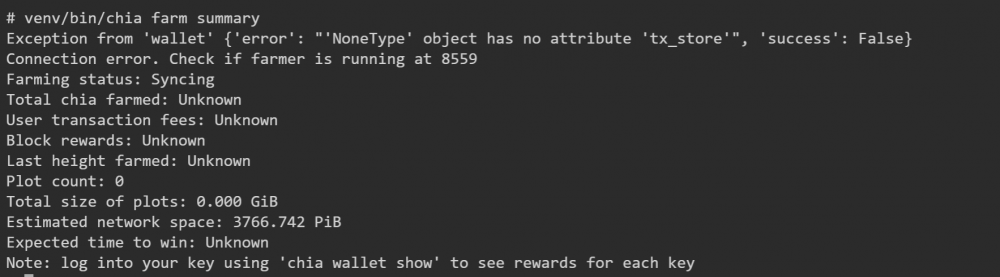
I'm not sure what I'm doing wrong here. I added my mnemonic phrase through chia keys add, however I still get this for the wallet. if I do chia wallet show it shows stuff about my wallet and also provides the fingerprint id as well. if i run: chia start farmer it stays that everything is already running. I'm just a bit confused by the wallet exception and the connection error. Any insight on this?
-
Any idea what may be causing the issue? Everything literally worked for about the last year and I can't seem to find anything that changed to cause this to not work anymore. Any ideas? I am able to access nextcloud, btwarden, and everything else I have setup except onlyoffice. I am on onlyoffice document server 6.0. It is its own separate docker. Again, it literally has been working great for the last year or so. ==> /var/log/onlyoffice/documentserver/docservice/out.log <== [2021-05-07T20:56:44.069] [WARN] nodeJS - Express server listening on port 8000 in production-linux mode [2021-05-07T20:57:23.671] [WARN] nodeJS - Express server starting... [2021-05-07T20:57:23.674] [WARN] nodeJS - Failed to subscribe to plugin folder updates. When changing the list of plugins, you must restart the server. https://nodejs.org/docs/latest/api/fs.html#fs_availability [2021-05-07T20:57:23.782] [WARN] nodeJS - Express server listening on port 8000 in production-linux mode [2021-05-08T20:15:28.620] [WARN] nodeJS - Express server starting... [2021-05-08T20:15:28.622] [WARN] nodeJS - Failed to subscribe to plugin folder updates. When changing the list of plugins, you must restart the server. https://nodejs.org/docs/latest/api/fs.html#fs_availability [2021-05-08T20:15:28.755] [WARN] nodeJS - Express server listening on port 8000 in production-linux mode [2021-05-08T20:16:06.991] [WARN] nodeJS - Express server starting... [2021-05-08T20:16:06.995] [WARN] nodeJS - Failed to subscribe to plugin folder updates. When changing the list of plugins, you must restart the server. https://nodejs.org/docs/latest/api/fs.html#fs_availability [2021-05-08T20:16:07.107] [WARN] nodeJS - Express server listening on port 8000 in production-linux mode ==> /var/log/onlyoffice/documentserver/metrics/err.log <== ==> /var/log/onlyoffice/documentserver/metrics/out.log <== gauges: { 'statsd.timestamp_lag': 0 }, timer_data: {}, counter_rates: { 'statsd.bad_lines_seen': 0, 'statsd.packets_received': 0, 'statsd.metrics_received': 0 }, sets: {}, pctThreshold: [ 90 ] } 8 May 20:15:27 - [904] reading config file: ./config/config.js 8 May 20:15:27 - server is up INFO ==> /var/log/onlyoffice/documentserver/nginx.error.log <== ==> /var/log/onlyoffice/documentserver/spellchecker/err.log <== ==> /var/log/onlyoffice/documentserver/spellchecker/out.log <== [2021-05-07T20:54:05.768] [WARN] nodeJS - Express server starting... [2021-05-07T20:54:05.827] [WARN] nodeJS - Express server listening on port 8080 in production-linux mode [2021-05-07T20:56:42.939] [WARN] nodeJS - start cluster with 1 workers [2021-05-07T20:56:42.953] [WARN] nodeJS - worker 934 started. [2021-05-07T20:56:43.489] [WARN] nodeJS - Express server starting... [2021-05-07T20:56:43.536] [WARN] nodeJS - Express server listening on port 8080 in production-linux mode [2021-05-08T20:15:27.633] [WARN] nodeJS - start cluster with 1 workers [2021-05-08T20:15:27.640] [WARN] nodeJS - worker 955 started. [2021-05-08T20:15:28.244] [WARN] nodeJS - Express server starting... [2021-05-08T20:15:28.357] [WARN] nodeJS - Express server listening on port 8080 in production-linux mode ==> /var/log/onlyoffice/documentserver/metrics/out.log <== Flushing stats at Sat May 08 2021 20:25:27 GMT+0000 (Coordinated Universal Time) { counters: { 'statsd.bad_lines_seen': 0, 'statsd.packets_received': 0, 'statsd.metrics_received': 0 }, timers: {}, gauges: {}, timer_data: {}, counter_rates: { 'statsd.bad_lines_seen': 0, 'statsd.packets_received': 0, 'statsd.metrics_received': 0 }, sets: {}, pctThreshold: [ 90 ] }
-
Anyone get this error when updating? I haven't updated in probably a few years, until now. started connecting [20200528-11:17:41] [INFO ] lib_mod_log_peer: xrdp_pid=144 connected to X11rdp_pid=50 X11rdp_uid=99 X11rdp_gid=100 client_ip=127.0.0.1 client_port=35522 connected ok [20200528-11:17:41] [DEBUG] xrdp_mm_connect_chansrv: chansrvconnect successful [20200528-11:17:41] [DEBUG] returnvalue from xrdp_mm_connect 0 lib_mod_process_message: type 2 len 0 lib_send_client_info: xrdp_wm_login_mode_changed: login_mode is 3 [20200528-11:17:41] [INFO ] The following channel is allowed: cliprdr (0) [20200528-11:17:41] [INFO ] The following channel is allowed: rdpsnd (1) [20200528-11:17:41] [INFO ] The following channel is allowed: rdpdr (2) [20200528-11:17:41] [DEBUG] The allow channel list now initialized for this session [20200528-11:17:47] [INFO ] An established connection closed to endpoint: 127.0.0.1:35522 - socket: 8 xrdp_mcs_disconnect - socket closed [20200528-11:17:47] [DEBUG] xrdp_mm_module_cleanup [20200528-11:17:47] [INFO ] An established connection closed to endpoint: 109.112.47.46:12148 - socket: 11 [20200528-11:17:47] [INFO ] An established connection closed to endpoint: 109.112.47.46:12148 - socket: 12 xrdp:xrdp_encoder [1551967640]: xrdp_encoder_delete: [20200528-11:17:47] [ERROR] Listening socket is in wrong state we terminate listener
-
Try port 443. I know spaceinvader says to change it, however that is the only way I could get mine to work as well. It was weird as it didn't make sense to me because I changed the port in the conf files, but it was like it wouldn't listen to what I was setting. It was like there was another setting somewhere defining which port nextcloud was listening on. I also left the bitwarden on the default port too. I was able to get both working.
-
My question to this would be, would it then use the internet for viewing etc... or would it work over the local LAN. Right now it appears to be utilizing the internet and not the local LAN when accessing it from a local machine.
-
Yes, I always hit save after inputting new settings and then sending a test email after it has saved. What did you do to fix the problem? Are you using port 465 or 587 and do you have TLS checked or not?
-
I'm having some issues setting up smtp on bitwardenrs. I have a dedicated gmail account that I use for another service. I have enabled 2fa and created an app key/password and utilized that within bitwarden, just as I have with my other application (node-red). No matter what I try, it will not send a test email. I thought maybe it was gmail, so I went ahead and created a yahoo account and the result was the same. I just installed the latest version of bitwardenrs for the first time a couple weeks ago and have finished setting it up now. Here is the error I'm receiving. Has anyone else had this experience and if so, what did you do to resolve it? I have tried 587 TLS and 465 without TLS and every combination in between. [CAUSE] Io( Os { code: 11, kind: WouldBlock, message: "Resource temporarily unavailable", }, ) [2020-04-30 09:05:48][response][INFO] POST /admin/test/smtp (test_smtp) => 400 Bad Request [2020-04-30 09:05:53][request][INFO] POST /admin/config/ [2020-04-30 09:05:53][response][INFO] POST /admin/config (post_config) => 200 OK [2020-04-30 09:05:54][request][INFO] GET /admin [2020-04-30 09:05:54][response][INFO] GET /admin (admin_page) => 200 OK [2020-04-30 09:06:00][request][INFO] POST /admin/test/smtp/ [2020-04-30 09:06:01][lettre::smtp][INFO] connection established to 188.125.73.26:465 [2020-04-30 09:06:02][error][ERROR] LetreErr. [CAUSE] Permanent( Response { code: Code { severity: PermanentNegativeCompletion, category: Unspecified3, detail: Five, }, message: [ "5.7.0 (#AUTH005) Too many bad auth attempts.", ], }, ) [2020-04-30 09:06:02][response][INFO] POST /admin/test/smtp (test_smtp) => 400 Bad Request
-
^ definitely a good question. I have another quick question. Once SSL/Letsencrypt is setup and working, should I be able to access the docker at the local address:port (192.168.1.110:444) or will it only be accessible via the URL/Domain that was setup?
-
I'm not sure what to say. I put everything back to the way it downloaded (unchanged) with the exception of commenting out the subfolder aspect in the default conf file within letsencrypt. At that point everything worked as expected and I have also set up to other dockers on subdomains without issues and without having to edit any files other than changing servername to match my subdomain.

