






craigr
Members
-
Joined
-
Last visited
Everything posted by craigr
-
Is there a way to get a more verbose display during boot? Maybe I could track it down than. I don't know when it is hanging up.
-
Right?!?! 😄 Even if I create a brand new Windows 11 VM the same thing happens. I'll just have to live with it for now. Typically unRAID goes months without being rebooted anyway. Just now with the release of 6.10.0, 6.10.1, 6.10.2, and probably more to come there has been more rebooting. Nobody in the house likes it when OPNsense is down even for just 10-15 minutes Thanks for your help, craigr
-
Thanks for your help. Things are improved, but still not quite right. The first boot attempt for Windows 11 now fails and gets stuck on the TianoCore screen and just sits there. I then have to force stop in unRAID. Any subsequent boots after that work and Windows 11 starts every time. When I first adjusted the XML and launched the VM I got Windows diagnostics attempting to repair my computer. I was then prompted to restart and after that it's been working except on first launch after unRAID reboots. Anymore ideas? The NVMe is at the very bottom of the XML on BUS 08. <?xml version='1.0' encoding='UTF-8'?> <domain type='kvm'> <name>Win11 Workstation VM</name> <uuid>2c4db39b-fc53-1762-d1ba-9c768e033e45</uuid> <description>WIN11VM</description> <metadata> <vmtemplate xmlns="unraid" name="Windows 11" icon="windows11.png" os="windowstpm"/> </metadata> <memory unit='KiB'>33554432</memory> <currentMemory unit='KiB'>33554432</currentMemory> <memoryBacking> <nosharepages/> </memoryBacking> <vcpu placement='static'>8</vcpu> <cputune> <vcpupin vcpu='0' cpuset='4'/> <vcpupin vcpu='1' cpuset='12'/> <vcpupin vcpu='2' cpuset='5'/> <vcpupin vcpu='3' cpuset='13'/> <vcpupin vcpu='4' cpuset='6'/> <vcpupin vcpu='5' cpuset='14'/> <vcpupin vcpu='6' cpuset='7'/> <vcpupin vcpu='7' cpuset='15'/> </cputune> <os> <type arch='x86_64' machine='pc-i440fx-6.2'>hvm</type> <loader readonly='yes' type='pflash'>/usr/share/qemu/ovmf-x64/OVMF_CODE-pure-efi-tpm.fd</loader> <nvram>/etc/libvirt/qemu/nvram/2c4db39b-fc53-1762-d1ba-9c768e033e45_VARS-pure-efi-tpm.fd</nvram> </os> <features> <acpi/> <apic/> <hyperv mode='custom'> <relaxed state='on'/> <vapic state='on'/> <spinlocks state='on' retries='8191'/> <vendor_id state='on' value='none'/> </hyperv> </features> <cpu mode='host-passthrough' check='none' migratable='on'> <topology sockets='1' dies='1' cores='4' threads='2'/> <cache mode='passthrough'/> </cpu> <clock offset='localtime'> <timer name='hypervclock' present='yes'/> <timer name='hpet' present='no'/> </clock> <on_poweroff>destroy</on_poweroff> <on_reboot>restart</on_reboot> <on_crash>restart</on_crash> <devices> <emulator>/usr/local/sbin/qemu</emulator> <disk type='file' device='cdrom'> <driver name='qemu' type='raw'/> <source file='/mnt/pool/ISOs/Win11_English_x64v1.iso'/> <target dev='hda' bus='ide'/> <readonly/> <boot order='2'/> <address type='drive' controller='0' bus='0' target='0' unit='0'/> </disk> <disk type='file' device='cdrom'> <driver name='qemu' type='raw'/> <source file='/mnt/pool/ISOs/virtio-win-0.1.217-1.iso'/> <target dev='hdb' bus='ide'/> <readonly/> <address type='drive' controller='0' bus='0' target='0' unit='1'/> </disk> <controller type='usb' index='0' model='qemu-xhci' ports='15'> <address type='pci' domain='0x0000' bus='0x00' slot='0x07' function='0x0'/> </controller> <controller type='pci' index='0' model='pci-root'/> <controller type='ide' index='0'> <address type='pci' domain='0x0000' bus='0x00' slot='0x01' function='0x1'/> </controller> <controller type='sata' index='0'> <address type='pci' domain='0x0000' bus='0x00' slot='0x03' function='0x0'/> </controller> <controller type='virtio-serial' index='0'> <address type='pci' domain='0x0000' bus='0x00' slot='0x04' function='0x0'/> </controller> <interface type='bridge'> <mac address='52:54:00:d6:7f:37'/> <source bridge='br0'/> <model type='virtio'/> <address type='pci' domain='0x0000' bus='0x00' slot='0x02' function='0x0'/> </interface> <serial type='pty'> <target type='isa-serial' port='0'> <model name='isa-serial'/> </target> </serial> <console type='pty'> <target type='serial' port='0'/> </console> <channel type='unix'> <target type='virtio' name='org.qemu.guest_agent.0'/> <address type='virtio-serial' controller='0' bus='0' port='1'/> </channel> <input type='mouse' bus='ps2'/> <input type='keyboard' bus='ps2'/> <tpm model='tpm-tis'> <backend type='emulator' version='2.0' persistent_state='yes'/> </tpm> <sound model='ich9'> <address type='pci' domain='0x0000' bus='0x00' slot='0x08' function='0x0'/> </sound> <audio id='1' type='none'/> <hostdev mode='subsystem' type='pci' managed='yes'> <driver name='vfio'/> <source> <address domain='0x0000' bus='0x01' slot='0x00' function='0x0'/> </source> <rom file='/mnt/pool/vdisks/vbios/My_Inno3D.GTX1650.4096.(version_90.17.3D.00.95).rom'/> <address type='pci' domain='0x0000' bus='0x00' slot='0x05' function='0x0'/> </hostdev> <hostdev mode='subsystem' type='pci' managed='yes'> <driver name='vfio'/> <source> <address domain='0x0000' bus='0x01' slot='0x00' function='0x1'/> </source> <address type='pci' domain='0x0000' bus='0x00' slot='0x06' function='0x0'/> </hostdev> <hostdev mode='subsystem' type='pci' managed='yes'> <driver name='vfio'/> <source> <address domain='0x0000' bus='0x00' slot='0x1f' function='0x3'/> </source> <address type='pci' domain='0x0000' bus='0x00' slot='0x09' function='0x0'/> </hostdev> <hostdev mode='subsystem' type='pci' managed='yes'> <driver name='vfio'/> <source> <address domain='0x0000' bus='0x00' slot='0x14' function='0x0'/> </source> <address type='pci' domain='0x0000' bus='0x00' slot='0x0a' function='0x0'/> </hostdev> <hostdev mode='subsystem' type='pci' managed='yes'> <driver name='vfio'/> <source> <address domain='0x0000' bus='0x00' slot='0x1f' function='0x5'/> </source> <address type='pci' domain='0x0000' bus='0x00' slot='0x0b' function='0x0'/> </hostdev> <hostdev mode='subsystem' type='pci' managed='yes'> <driver name='vfio'/> <source> <address domain='0x0000' bus='0x08' slot='0x00' function='0x0'/> </source> <boot order='1'/> <address type='pci' domain='0x0000' bus='0x00' slot='0x0c' function='0x0'/> </hostdev> <memballoon model='none'/> </devices> <seclabel type='dynamic' model='dac' relabel='yes'/> </domain> Thanks again!
-
I know when I got the BIOS off my cards it was quite a chore and not at all as described. I think I had to do something like create another VM (like OpenELEC) and then I was able to grab the BIOS off the video card in the WindwosVM. It's been too long since I did it last. Sorry. But it was critical to get mine working and the BIOS's for both my cards NEEDED to come from my exact cards as the ones available did not work even after editing. craigr
-
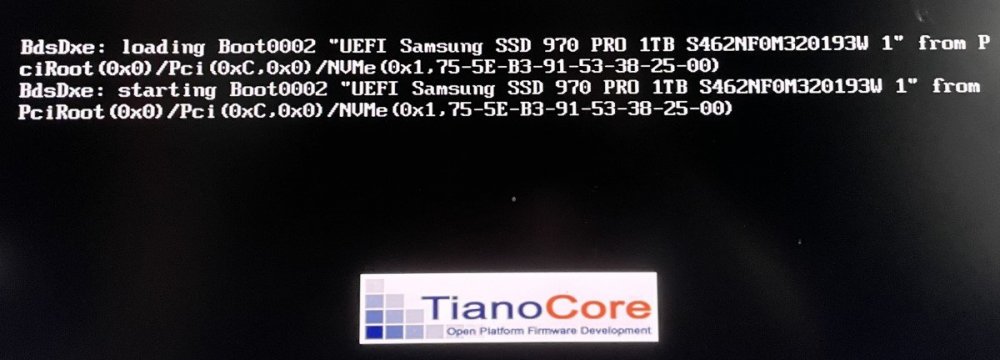
Initially I had Win10 setup on my passed through NVMe drive using Space's windows clover image. After reading, I created a new Windows 11 VM and pointed it to my Windows 10 install directly and stopped using the windows clover image. However, I still had this issue when using the windows clover image as well after updating to Windows11. I've gone into the OVFM BIOS and set the NVMe to the 1st boot drive and I have tried several modifications to my template. If anyone knows what to do to stop the error I would be grateful for assistance. When I first try to boot Windows11 the VM stalls at the error. I then have to Force Stop the VM in unRAID. Then, when I start it the second time I still get the error, but it boots right up into Windows11. If I go into the OVFM bios and tell it to boot from the NVMe it will also boot. I have a feeling this is simple? <?xml version='1.0' encoding='UTF-8'?> <domain type='kvm' id='38'> <name>Win11 Workstation VM</name> <uuid>2c4db39b-fc53-1762-d1ba-9c768e033e45</uuid> <description>WIN11VM</description> <metadata> <vmtemplate xmlns="unraid" name="Windows 11" icon="windows11.png" os="windowstpm"/> </metadata> <memory unit='KiB'>33554432</memory> <currentMemory unit='KiB'>33554432</currentMemory> <memoryBacking> <nosharepages/> </memoryBacking> <vcpu placement='static'>8</vcpu> <cputune> <vcpupin vcpu='0' cpuset='4'/> <vcpupin vcpu='1' cpuset='12'/> <vcpupin vcpu='2' cpuset='5'/> <vcpupin vcpu='3' cpuset='13'/> <vcpupin vcpu='4' cpuset='6'/> <vcpupin vcpu='5' cpuset='14'/> <vcpupin vcpu='6' cpuset='7'/> <vcpupin vcpu='7' cpuset='15'/> </cputune> <resource> <partition>/machine</partition> </resource> <os> <type arch='x86_64' machine='pc-i440fx-6.2'>hvm</type> <loader readonly='yes' type='pflash'>/usr/share/qemu/ovmf-x64/OVMF_CODE-pure-efi-tpm.fd</loader> <nvram>/etc/libvirt/qemu/nvram/2c4db39b-fc53-1762-d1ba-9c768e033e45_VARS-pure-efi-tpm.fd</nvram> <boot dev='hd'/> </os> <features> <acpi/> <apic/> <hyperv mode='custom'> <relaxed state='on'/> <vapic state='on'/> <spinlocks state='on' retries='8191'/> <vendor_id state='on' value='none'/> </hyperv> </features> <cpu mode='host-passthrough' check='none' migratable='on'> <topology sockets='1' dies='1' cores='4' threads='2'/> <cache mode='passthrough'/> </cpu> <clock offset='localtime'> <timer name='hypervclock' present='yes'/> <timer name='hpet' present='no'/> </clock> <on_poweroff>destroy</on_poweroff> <on_reboot>restart</on_reboot> <on_crash>restart</on_crash> <devices> <emulator>/usr/local/sbin/qemu</emulator> <disk type='file' device='cdrom'> <driver name='qemu' type='raw'/> <source file='/mnt/pool/ISOs/virtio-win-0.1.217-1.iso' index='1'/> <backingStore/> <target dev='hdb' bus='ide'/> <readonly/> <alias name='ide0-0-1'/> <address type='drive' controller='0' bus='0' target='0' unit='1'/> </disk> <controller type='usb' index='0' model='qemu-xhci' ports='15'> <alias name='usb'/> <address type='pci' domain='0x0000' bus='0x00' slot='0x07' function='0x0'/> </controller> <controller type='virtio-serial' index='0'> <alias name='virtio-serial0'/> <address type='pci' domain='0x0000' bus='0x00' slot='0x04' function='0x0'/> </controller> <controller type='pci' index='0' model='pci-root'> <alias name='pci.0'/> </controller> <controller type='ide' index='0'> <alias name='ide'/> <address type='pci' domain='0x0000' bus='0x00' slot='0x01' function='0x1'/> </controller> <controller type='sata' index='0'> <alias name='sata0'/> <address type='pci' domain='0x0000' bus='0x00' slot='0x03' function='0x0'/> </controller> <interface type='bridge'> <mac address='52:54:XX:XX:XX:XX'/> <source bridge='br0'/> <target dev='vnet34'/> <model type='virtio'/> <alias name='net0'/> <address type='pci' domain='0x0000' bus='0x00' slot='0x02' function='0x0'/> </interface> <serial type='pty'> <source path='/dev/pts/0'/> <target type='isa-serial' port='0'> <model name='isa-serial'/> </target> <alias name='serial0'/> </serial> <console type='pty' tty='/dev/pts/0'> <source path='/dev/pts/0'/> <target type='serial' port='0'/> <alias name='serial0'/> </console> <channel type='unix'> <source mode='bind' path='/var/lib/libvirt/qemu/channel/target/domain-38-Win11 Workstation VM/org.qemu.guest_agent.0'/> <target type='virtio' name='org.qemu.guest_agent.0' state='connected'/> <alias name='channel0'/> <address type='virtio-serial' controller='0' bus='0' port='1'/> </channel> <input type='mouse' bus='ps2'> <alias name='input0'/> </input> <input type='keyboard' bus='ps2'> <alias name='input1'/> </input> <tpm model='tpm-tis'> <backend type='emulator' version='2.0' persistent_state='yes'/> <alias name='tpm0'/> </tpm> <sound model='ich9'> <alias name='sound0'/> <address type='pci' domain='0x0000' bus='0x00' slot='0x08' function='0x0'/> </sound> <audio id='1' type='none'/> <hostdev mode='subsystem' type='pci' managed='yes'> <driver name='vfio'/> <source> <address domain='0x0000' bus='0x01' slot='0x00' function='0x0'/> </source> <alias name='hostdev0'/> <rom file='/mnt/pool/vdisks/vbios/My_Inno3D.GTX1650.4096.(version_90.17.3D.00.95).rom'/> <address type='pci' domain='0x0000' bus='0x00' slot='0x05' function='0x0' multifunction='on'/> </hostdev> <hostdev mode='subsystem' type='pci' managed='yes'> <driver name='vfio'/> <source> <address domain='0x0000' bus='0x01' slot='0x00' function='0x1'/> </source> <alias name='hostdev1'/> <address type='pci' domain='0x0000' bus='0x00' slot='0x05' function='0x1'/> </hostdev> <hostdev mode='subsystem' type='pci' managed='yes'> <driver name='vfio'/> <source> <address domain='0x0000' bus='0x00' slot='0x1f' function='0x3'/> </source> <alias name='hostdev2'/> <address type='pci' domain='0x0000' bus='0x00' slot='0x09' function='0x0'/> </hostdev> <hostdev mode='subsystem' type='pci' managed='yes'> <driver name='vfio'/> <source> <address domain='0x0000' bus='0x00' slot='0x14' function='0x0'/> </source> <alias name='hostdev3'/> <address type='pci' domain='0x0000' bus='0x00' slot='0x0a' function='0x0'/> </hostdev> <hostdev mode='subsystem' type='pci' managed='yes'> <driver name='vfio'/> <source> <address domain='0x0000' bus='0x00' slot='0x1f' function='0x5'/> </source> <alias name='hostdev4'/> <address type='pci' domain='0x0000' bus='0x00' slot='0x0b' function='0x0'/> </hostdev> <hostdev mode='subsystem' type='pci' managed='yes'> <driver name='vfio'/> <source> <address domain='0x0000' bus='0x08' slot='0x00' function='0x0'/> </source> <alias name='hostdev5'/> <address type='pci' domain='0x0000' bus='0x00' slot='0x0c' function='0x0'/> </hostdev> <memballoon model='none'/> </devices> <seclabel type='dynamic' model='dac' relabel='yes'> <label>+0:+100</label> <imagelabel>+0:+100</imagelabel> </seclabel> </domain>
-
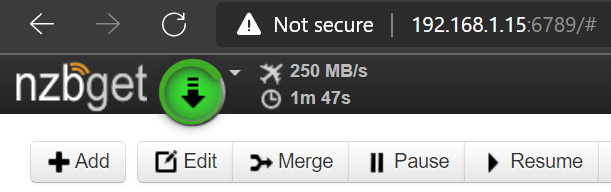
Upgraded the main server from 6.9.2 without issues. OPNsense VM and Win10 VM started fine as well as all my dockers. Time to install Win11 VM One note, I had SSL disabled before the upgrade. Thanks guys! craigrJust hit 330 MB/s. The connection still says "unknown" for my WAN, but based on what I've read that is just the way it is with the Intel X550-T2 NBASE-T when it connects at 2.5Gb or 5Gb. I guess since I am hitting over 300MB/s the connection must be properly negotiating at 5Gb. EDIT: Evidently it's a known issue with the FreeBSD drivers for the Intel X550. The connection is reported 'unknown' when negotiated at 2.5GB or 5GB. I have since hit and maintained 350 MB/s at times when my ISP has the available bandwidth, so I am pretty certain the Intel X550 and modem are connected to each other at 5GB. This is cool! craigrAnd a little bit of tuning
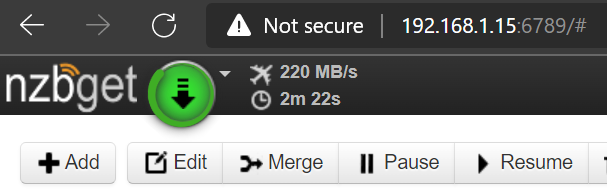
 Welp, tried a lot more and all you suggested for pfsense. No joy. Just now installed opnsense in about five minutes and BAM!!! It was bouncing up to 244 MB/s as well. No more time now, but wow, just wow. I wonder what is wrong with pfsense. craigr
 And this is all very interesting: https://forum.netgate.com/topic/146913/nbase-t-support-for-intel-x550/6 Just info on the drivers.!!! Good thinking! I will try rearranging this later. Great ideas.Just ran these three to prove I'm not nuts. This is simultaneous with my wife working and on video conferencing (she works for the German American Chamber of Commerce). Also, there was torrent activity in the background: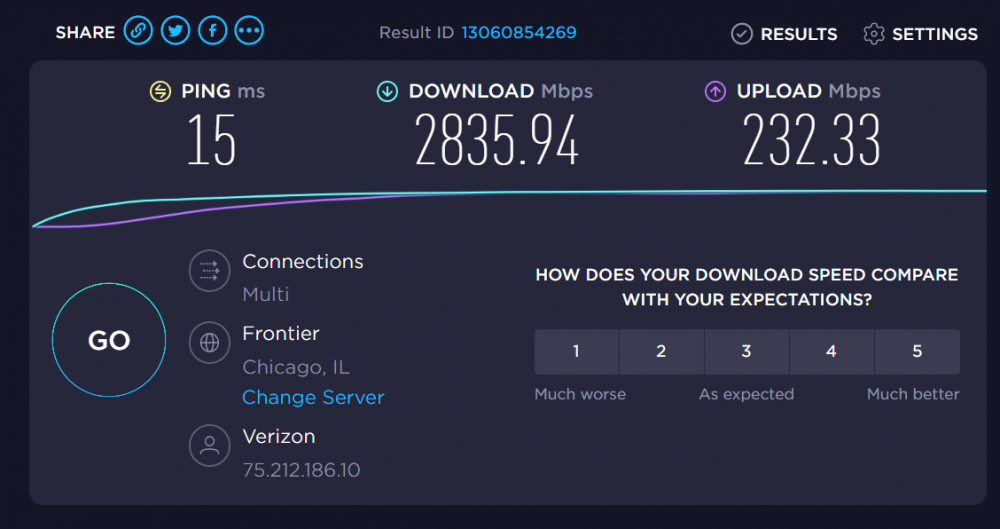
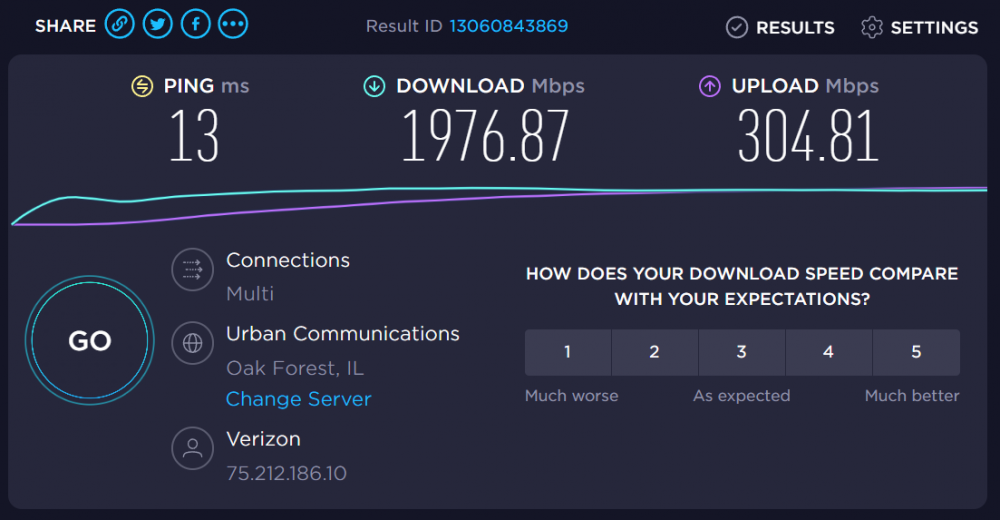
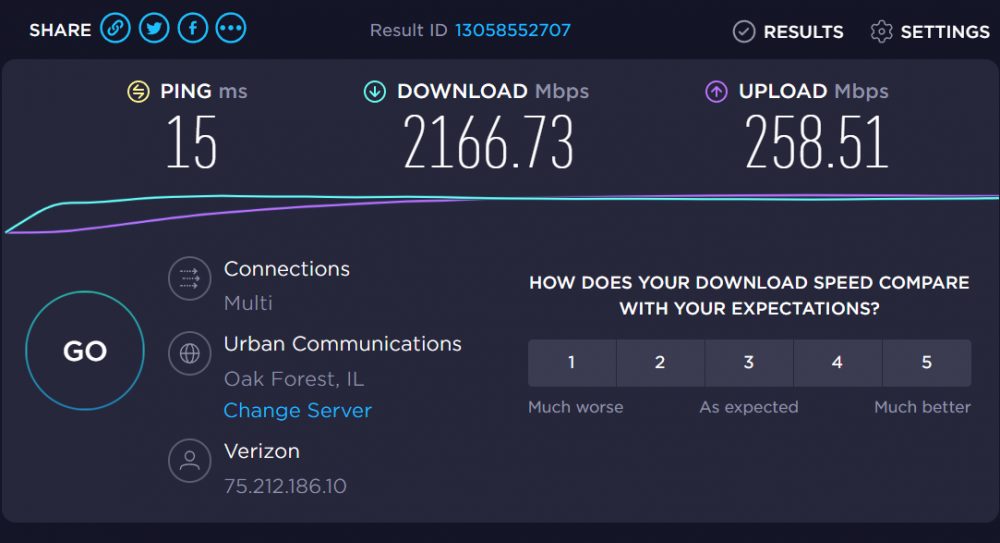 I like ethtool a lot better, but all FreeBSD seems to have is ifconfig instead. I am not proficent in ifconfig as I am in ethtool. "By second thought about your statement for the MAC of the virtio interface....it sounds like you did set the Mac manually? I don't think that this is useful/needed. Just make sure, that you attach the virtio nic to the unraid bridge br0, your LAN." When I created the pfsense VM you can allow it to randomly choose a MAC or enter one manually. I just chase the MAC I did because it's exactly in the middle of my two physical MAC addresses. The both are identical XX:XX:XX:XX:64:48 and XX:XX:XX:XX:64:4A. I figured XX:XX:XX:XX:64:49 would just be easy to remember is all. This has been done in pfsense, I assume you mean also in my dockers? Just for the heck of it, I tried setting nzbget to bro, bridge, and even host. All perform the same. I may give opnsense a try, but I would think my nic should be well supported by pfsense. Both opnsense and pfsense run on FreeBSD so... After hours when the family is asleep I'm going to try my ISP router again to make sure things aren't slow there too. Thanks again for all your help, craigr
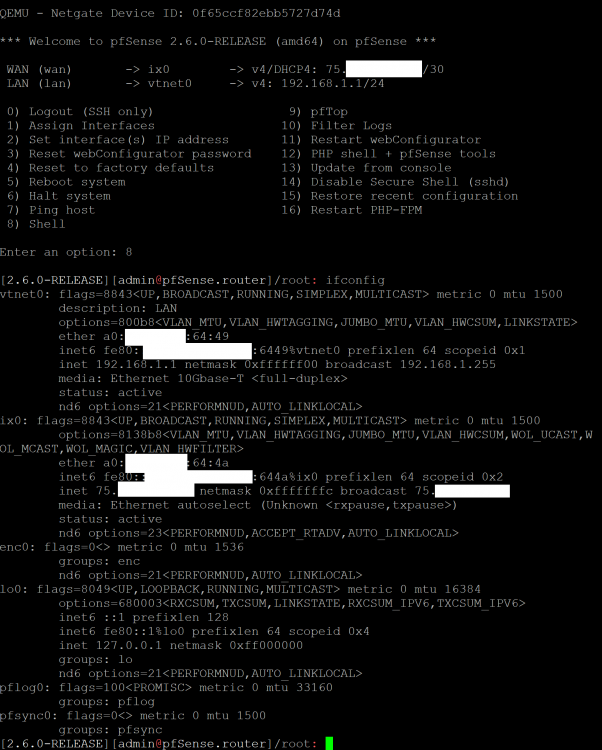 This I find a little weird: WAN showing "unknown" when it's connected to a 10GB port. However, I tried to use ifconfig to set the WAN port to 2500baseTX and tried 5000baseTX and got error messages basically saying what I think means FreeBSD does not understand 2.5GB or 5GB: [2.6.0-RELEASE][[email protected]]/root: ifconfig ix0 ix0: flags=8843<UP,BROADCAST,RUNNING,SIMPLEX,MULTICAST> metric 0 mtu 1500 options=8138b8<VLAN_MTU,VLAN_HWTAGGING,JUMBO_MTU,VLAN_HWCSUM,WOL_UCAST,WOL_MCAST,WOL_MAGIC,VLAN_HWFILTER> ether a0:36:9f:20:64:4a inet6 fe80::xxxx:xxxx:xxxx:644a%ix0 prefixlen 64 scopeid 0x2 inet 75.xxx.xxx.110 netmask 0xfffffffc broadcast 75.xxx.xxx.111 media: Ethernet autoselect (Unknown <rxpause,txpause>) status: active nd6 options=23<PERFORMNUD,ACCEPT_RTADV,AUTO_LINKLOCAL> [2.6.0-RELEASE][[email protected]]/root: ifconfig ix0 192.168.1.1 media 2500baseTX mediaopt full-duplex ifconfig: unknown media subtype: 2500baseTX [2.6.0-RELEASE][[email protected]]/root: I also tried 2500baseT, 5000baseTX, and and 5000baseT (not sure which is correct with new FreeBSD distributions). Did I do this correctly? Is there a way I can actually see the speed that may WAN port auto negotiated with my modem that you know of? The modem has a 5GB port and that is it in bridge mode. I think it's certainly connected at least at 2.5GB or I wouldn't have the speeds that I do at all, but I would like to verify what it is doing.
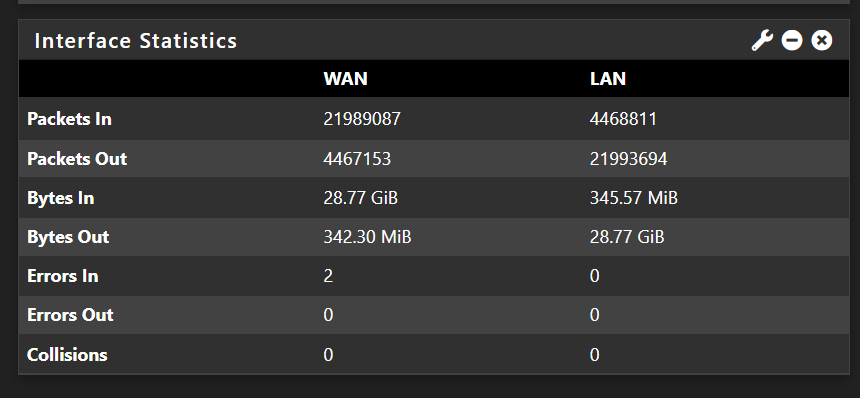
 So I just hit 261 MB/s on a download, fastest than ever. However, it progressively slowed down to around 122 MB/s. This was on a 6.5GB file and I often download 80GB files or larger. Trouble with troubleshooting... I have no other computers on my network that support 10GB and my switches only support 10GB and 1GB. Thus, I must test only on the VM's and dockers themselves to see about full speeds. I have a 2.5GB PCI nic that I could put in another computer, but no switch or router to hook it up to. * WAIT! I could put the 2.5GB nic into a computer and connect that to the LAN port on unRAID for testing! That would be a perfect test I think; direct connection to modem without long cables or switches! The modem is outside and is powered by a PoE injector in my equipment room. The cabling between the PoE injector and model is first rate and is what I have been using since day one. However, with the pfSense setup, I now have a CAT6 cable run from the PoE injector all the way back to the unRAID pfSense VM (about 15 meters). I am suspicious of the 15 meter CAT6 run, but I am getting very few errors showing up in pfSense, so I have trouble believing it's the cable. I also re-terminated it yesterday. Best regards, craigr
 Unrelated but strange; my dual nic Intel X550-T2 has MAC addresses of a0:36:9f:20:64:48 and a0:36:9f:20:64:4A. I wonder why they skipped an address in-between? I assigned my virtio MAC address to a0:36:9f:20:64:49. there shouldn't be a problem with this should there? Just grasping at straws. Also, I am not running nzbget through a VPN, just TLS. With PIA I only get about 100 Mbps. craigrI'm not sure, but perhaps newsdemon is just running slow. After my post las night, there have been times when the speed picked up, but not consistent like most times in the past. I may have to just wait and see over a couple days. With speedtest.net I am indeed able to maintain over 2000 Mbps down. I am on a VM attached to the same unRAID machine running pfSense. I gave pfSense three cores (six with HT) and they are all maintaining low utilization even when downloading at maximum speed. I've tried different amounts of RAM and have settled on 1GB for now as it never seems to go about 25% utilization. I am using virtio as as my network model. "If normal speedtest is OK, check other design "flaws", like running via L3/routing (did you run the test on a single network or maybe two?)." This I am not sure about what you mean. How could my nzbget docker be running L3 routing? And please explain further "on a single network or maybe two." Once again thank you! craigrSo this is working well for me now with only one problem. My binhex-nzbget docker is only downloading around 60MB/s now, where I am getting ~235MB/s with my ISP router. I think I've been at it too long. I'll have to look tomorrow and see what I find. Thanks again, craigrUltimately I think that's the way to do it assuming pfSense works out well for me. Spaceinvader One has a script setup to send a WOL packet when he shuts down unRAID to automatically wake the dedicated pfSense machine. I'm sure I can coble some machine around here together for the purpose. I spoke to a couple sales reps today about the RB5009. They say it's the only MikroTik hardware that has not been coming in at all and has been backordered for months. I was told most of there other products have a 4-6 week lead time, but that the RB5009 has been backordered for over four months now! I suspect that MikroTik may have discovered a hardware problem with the 2.5Gb port and are revising the board. Just my guess anyway. Everyone agrees the 2.5Gb port is only usable at 1Gb if it can be forced to work at all. I'd be holding out even if they were in stock anywhere, which they are not. Something for me to look forward to in the future though I hope. Thanks guys, craigrIt seems like I am trying to do this just a bit too soon and from my experience early adoption can be a nightmare. The RB5009UG literally seems to be the ONLY router that fits the bill at a reasonable price that I am willing to pay. Unfortunately, with supply chain issues they are just out of stock everywhere. Now with this month long lockdown in Shanghai still going on, who knows when they will ever be in stock. I do want to make sure the 2.5Gb port gets fixed. It would be a shame if it happens to be a hardware issue. If they can't fix it for some reason I doubt I'd be able to get my money back out of it. Reading, it's surprising how many people think this is the "perfect" router for their usage case. MikroTik has a hot item on their hands. Hopefully they can catch up building the hardware to maintain market advantage before other companies release similar products. I sent MikroTik a support message asking about the 2.5GB port. I await their response. For now as a stop gap, I think I will setup pfSense on unRAID and see what speeds I get and how well it works. Obvious disadvantage is loss of internet if unRAID goes down, but I typically go months between reboots. Advantage with unRAID would be potentially up to 3.8 Gb download speeds, not just 2.5 Gb. craigrInitial setup for basic router usage doesn't look terribly complicated based on their white paper: https://help.gowifi.co.nz/support/solutions/articles/48001077268-beginners-guide-to-configuring-a-mikrotik-router-from-start-to-finish These routers go deep though. I still haven't mastered FastIron by any stretch 😅. Hardware acceleration would be great. Did you have to manually enable it or did it just start happening with the OS update? Right now the RB5009 isn't in stock anywhere. I found one online seller, but I think their web page may be a scam 🤯The RB5009 sure looks like the best fit at a reasonable price to boot. As far as I am concerned, Mikrotik is very good quality. The RB5009 could be a router that lasts me a very long time. I'll do some more research and/or wait to see how the 2.5Gb port seems to be. If it has a problem, perhaps they may fix it with firmware? I wonder what controler chip it is using. As I think about it, I could connect the RB5009 2.5Gb port to my modem, run the 10Gb SFP+ to my Brocade, and then run just one 10Gb between my Brocade and unRaid. I don't need to sustain 10Gb. Worst possible use case is four simultaneous 4k UHD uncompressed Blu-ray video streams on the LAN while also downloading at 250MB/s from WAN. That will possibly never even happen, or if it does very rarely. That said, fiber is better, but when I bought my unRAID nic I knew I would have to use copper for my router at that time so... I now wish I had gotten the Intel NIC with SFP+ ports and just popped an SFP+ RJ45 module in one of the two ports for WAN. craigrAlso, reading on Amazon and doing a bit of googling, the 2.5Gb port doesn't seem to work well or at all on the RB5009? Do you think it's the router or user error? craigrThank you again! That router looks like it would fit the bill quite well actually. There is only one lacking however that is the same shortcoming I am dealing with now. My current router connects to my home network through 1Gb LAN to my Brocade switch. The 2.5Gb LAN port on the router connects directly to unRAID via one of the 10Gb nics (10BASE-T). unRaid's other 10Gb nic goes back to the Brocade switch so that the media server can feed the whole house at 10Gb. The shortcoming is that there is no way to distribute the 2.5Gb WAN throughout the house as it goes directly to unRAID (does my family care...). With pfSense on unRAID, I can use one 10Gb port for WAN and connect to the modem at 5Gb instead of just 2.5Gb because the modem has a 5Gb ethernet port (this would be cool because my connection is usually actually between 2800-3500Gb). I can then use the other 10Gb port on unRAID to run back to my Brocade switch. This would provide full +2.5Gb internet to be divvied up throughout the house via 1Gb pipes and also still provide 10Gb for media sharing. I'll have to look at the Mikrotik routers though as I think this may really be a better solution. I'm guessing that they make one with a 5Gb or maybe a couple 10BASE-T ports. My Brocade switches require 10Gb only and do not support 10BASE-T too. I don't know how I will find the time for a steep learning curve either, but somehow I always seem to make the time for these sort of projects 🙂 Kind regards, craigr





