





ars92
Members
-
Joined
-
Last visited
Everything posted by ars92
-
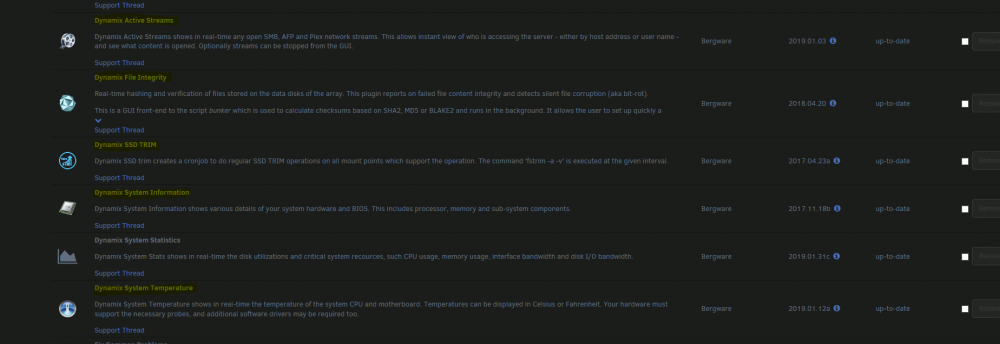
Will we see the icons for the below highlighted plugins be updated anytime soon? Weird that a number of Dynamix plugins have the updated icons, and some don't
-
Qemu 4.0 is out. I wonder if it’ll be on the next rc release for 6.7... Sent from my iPhone using Tapatalk
-
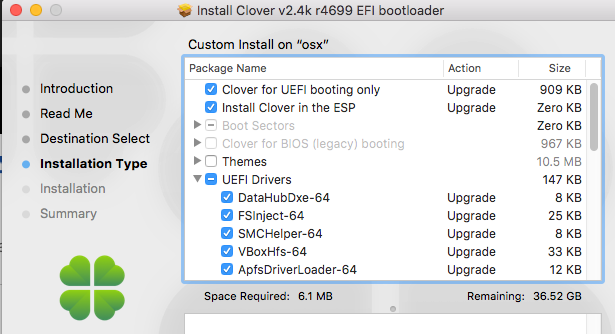
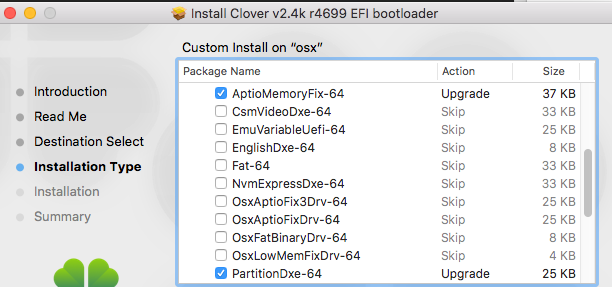
Yup sure. Will get a post up later at night EDIT: So basically I used clover r4699. Mac OS High Sierra 10.13.6 downloaded from the App Store, but using a third party tool as I can't search High Sierra anymore, I guess due to Apple pushing people to use Mojave now. Below is how my clover looks like before installing to the EFI partition while the thumb drive is being prepared. I did not use the two kext file spaceinvader used in his video. Im also using APFS file system, and ensured GUID partition table was used for the thumb drive and also the partition I created on my SSD for the OS vdisk. After its up just I followed spaceinvader's guide to use clover configurator to prepare the config.plist before installing the latest Nvidia web driver for my specific build (based on my About Mac) As for audio, I just got VoodooHDA installed as I just couldn't get the AppleALC to work with it. VoodooHDA works well though with the built in related on the x399, although it can crackle at times. My only issues currently are it can get to a suspend state if I leave the VM idle for too long, and have to use unraid VM menu to resume it. Apart from that Geekbench does not seem to complete, it gets stuck at memory copy for over 15 minutes, before I decided to cancel it. It was causing all my VM assigned cores to get maxed out at 100% My XML is attached too for what its worth, you may notice I removed the topology line, with that line not removed you have to use a "proper" amount of cores assigned like 4 cores or else it will continuously reboot and not get to the installation screen. Got that info from a few pages back. Sent from my SM-N960F using Tapatalk macOS.txt
-
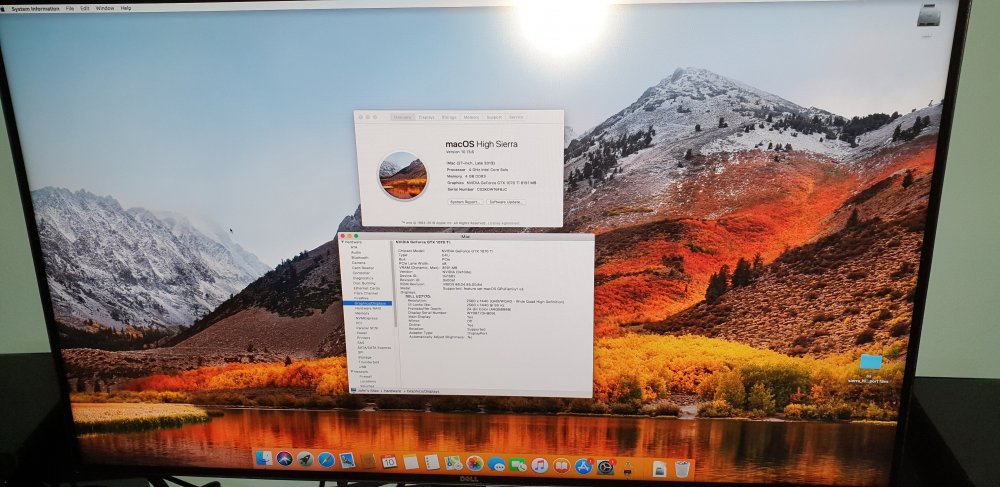
Wow. Thanks to spaceinvader's videos i now have this to play with. Spent close to 6 hours completely on this...glad it works flawlessly While the youtube guide videos may not be exactly the same with the latest clover and all, its still usable definitely...this is coming from a guy who has not touched osx just before noon today!! Threadripper 1920x X399 taichi 3.30 Unraid 6.6.1 Galax gtx 1070ti
-
Hw do we check that on unraid terminal? Since using cpu z to check on windows isn't gonna show it when its a VM. Anyway I don't understand what could be buggy tho, its just flawless for me. I am even able to asily passthrough my built in audio, and USB controllers reliably. Even my Xonar DX is still abl to be passed through nicely. Honestly cant see any issues with it. Also running in NUMA mode now and its stable too.
-
So to run mojave on unraid, the requirement of actually having an actual mac is still there right? Sent from my SM-N960F using Tapatalk
-
Might try this on my 1920x. Wonder if it'll help with my rpcs3 performance as BMS compared to KVM, the performance for rpcs3 on KVM is just so much more worse then BMS for me. Sent from my SM-N960F using Tapatalk
-
Came here right after seeing your post Squid! Nice 6.6 shots! I feel like we might see 6.6 as early as next monday considering jonp's latest post and your screenshots here [emoji14] Sent from my SM-N960F using Tapatalk
-
Thanks for the clarifications. Sent from my LG-H990 using Tapatalk
-
I may be missing something but with this plugin i am able to easily see and get notifications on the pre clear progress. I can also see the progress on UD with this plugin installed (still on 6.3.5) If i used unraid for the preclear all i see is "formatting" and i have no idea on the progress of the preclear. Does unraid's built in preclear show progress and notifications on progress? Really useful when preclearing large drives and you are an unpatient person Sent from my LG-H990 using Tapatalk
-
Is it the same with 6.4.1? Sent from my LG-H990 using Tapatalk
-
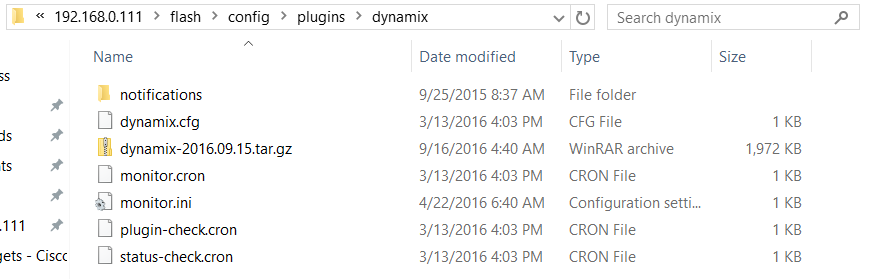
Hi Bonienl, Seems to be this specific update caused my 6.1.9 webGUI to be unusable, the PLG seems to be have been intended for 6.2 and not 6.1.9 Any ideas on how can I roll back? Error: Warning: parse_ini_file(state/network.ini): failed to open stream: No such file or directory in /usr/local/emhttp/plugins/dynamix/template.php on line 43 Warning: extract() expects parameter 1 to be array, boolean given in /usr/local/emhttp/plugins/dynamix/template.php on line 43 Which plugin are you talking about? The plugin Dynamix SCSI devices is/was for unRAID 6.2 only and shouldn't install on 6.1.9. Hi Its the webGUI plugin itself. As can be seen below, there was an update yesterday which was pushed automatically(not sure if I chose auto update, or thats just the way it is) and before that I was happily using the webGUI for various operations. This morning, hen I went in to activate a VM,I was greeted with that error and have not been able to use the webGUI ever since. It responds to my clicks, but doesn't load properly. It seems to be trying to find files which are not supposed to be there, as if the dynamix made for 6.2 was somehow pushed to my 6.1.9 build (or something like that) thanks I responded to your other post on this as well. - Delete the file /config/plugins/dynamix.plg on your flash and reboot - There is no auto-update in stock unRAID, my guess is it was auto updated by CA, but the 6.2 GUI shouldn't have been available for 6.1.9 in the first place... Yep have responded on that thread, deleting the file fixed it. But wow, how the heck would an update for an external plugin update a plugin which is a crucial component of unraid itself....kinda scary Just checked, seems to be dynamix was on auto update, although I seriously do not remember doing that! have reverted all auto updates to manual now. Of all plugins, thats the one I would ensure would be on manual lol.
-
Hi Bonienl, Seems to be this specific update caused my 6.1.9 webGUI to be unusable, the PLG seems to be have been intended for 6.2 and not 6.1.9 Any ideas on how can I roll back? Error: Warning: parse_ini_file(state/network.ini): failed to open stream: No such file or directory in /usr/local/emhttp/plugins/dynamix/template.php on line 43 Warning: extract() expects parameter 1 to be array, boolean given in /usr/local/emhttp/plugins/dynamix/template.php on line 43 Which plugin are you talking about? The plugin Dynamix SCSI devices is/was for unRAID 6.2 only and shouldn't install on 6.1.9. Hi Its the webGUI plugin itself. As can be seen below, there was an update yesterday which was pushed automatically(not sure if I chose auto update, or thats just the way it is) and before that I was happily using the webGUI for various operations. This morning, hen I went in to activate a VM,I was greeted with that error and have not been able to use the webGUI ever since. It responds to my clicks, but doesn't load properly. It seems to be trying to find files which are not supposed to be there, as if the dynamix made for 6.2 was somehow pushed to my 6.1.9 build (or something like that) thanks
-
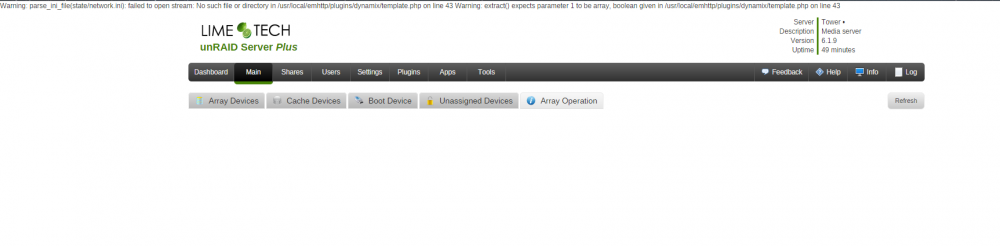
Hi Bonienl, Seems to be this specific update caused my 6.1.9 webGUI to be unusable, the PLG seems to be have been intended for 6.2 and not 6.1.9 Any ideas on how can I roll back? Error: Warning: parse_ini_file(state/network.ini): failed to open stream: No such file or directory in /usr/local/emhttp/plugins/dynamix/template.php on line 43 Warning: extract() expects parameter 1 to be array, boolean given in /usr/local/emhttp/plugins/dynamix/template.php on line 43
-
Since its been two months since the first post, do we have a time frame for when this could be integrated to unRAID? Sent from my SM-N920C using Tapatalk
-
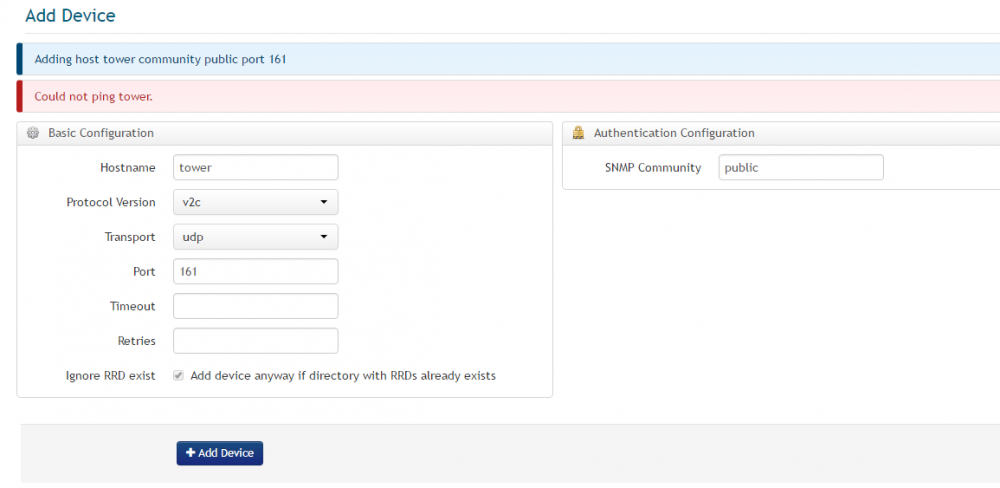
Hi guys, What am I doing wrong? I am using the turnkey version of observium. Initially I was getting the could not resolve tower error, but after adding the private IP manually in the hosts file, now I get this. I have verified that the observium VM is able to ping my unRAID server both by DNS and IP method, but yet observium is saying it cant ping it. Is it because SNMP isn't running properly? How can I verify that SNMP is working fine? I tried starting the snmpd daemon again (./rc snmpd start), but still same results. EDIT:Simple googling told me that I had to run the command "chmod +s /usr/bin/fping" if I wanted to add devices using the webGUI on a turnkey version of Observium....and this is something they wont fix as they dont recommend adding device through the webGUI...weird....
-
Somrething really weird is happening when i was trying to identify the bus my usb ports are on. Ok, so I am connecting a thumbdrive from Kingston to each USB port to identify the bus. SO I plug into this certain port and the below shows when i run the command lsusb root@Tower:~# lsusb Bus 004 Device 002: ID 8087:8000 Intel Corp. Bus 004 Device 001: ID 1d6b:0002 Linux Foundation 2.0 root hub Bus 003 Device 002: ID 8087:8008 Intel Corp. Bus 003 Device 001: ID 1d6b:0002 Linux Foundation 2.0 root hub Bus 002 Device 004: ID 0930:6545 Toshiba Corp. Kingston DataTraveler 102/2.0 / HEMA Flash Drive 2 GB / PNY Attache 4GB Stick Bus 002 Device 001: ID 1d6b:0003 Linux Foundation 3.0 root hub Bus 001 Device 003: ID 0718:0246 Imation Corp. Bus 001 Device 002: ID 046d:c52e Logitech, Inc. MK260 Wireless Combo Receiver Bus 001 Device 001: ID 1d6b:0002 Linux Foundation 2.0 root hub Notice the Kingston thumdrive showing that its connected to Bus 2 right? I connect my APC USB cable to the same port and thsi is what it shows root@Tower:~# lsusb Bus 004 Device 002: ID 8087:8000 Intel Corp. Bus 004 Device 001: ID 1d6b:0002 Linux Foundation 2.0 root hub Bus 003 Device 002: ID 8087:8008 Intel Corp. Bus 003 Device 001: ID 1d6b:0002 Linux Foundation 2.0 root hub Bus 002 Device 001: ID 1d6b:0003 Linux Foundation 3.0 root hub Bus 001 Device 011: ID 051d:0003 American Power Conversion UPS Bus 001 Device 003: ID 0718:0246 Imation Corp. Bus 001 Device 002: ID 046d:c52e Logitech, Inc. MK260 Wireless Combo Receiver Bus 001 Device 001: ID 1d6b:0002 Linux Foundation 2.0 root hub So from bus 002 it became bus 001! I actually want to pas through bus 001 as it seems to have the most ports and I only need two ports for unRAID itself (APC UPS and the OS itself) But if it always changes like this Im afraid im almost definitely gonna end up getting my OS USB controller to pass through... Any ideas as to why would the bus keep on changing? Would it be because both Bus 001 and 002 are connected to the same PCI controller? root@Tower:~# readlink /sys/bus/usb/devices/usb1 ../../../devices/pci0000:00/0000:00:14.0/usb1 root@Tower:~# readlink /sys/bus/usb/devices/usb2 ../../../devices/pci0000:00/0000:00:14.0/usb2 root@Tower:~# Edit: seems to be all the usb ports are under 1 bus/controller. Gonna have to get an external one or try out jonp's suggestion once i have the time....sigh....
-
Easiest way would be to use putty and create the file through it so as to ensure you don't get the permissions wrong. For me I actually couldn't even create the file using windows explorer as I was getting a permission error
-
Strange. Because of the new help file included I did both updates and new installs on 6.0.1 and 6.1 rc5 and never saw anything amiss. Glad you got it going though Yeah, as long as I didn't have to restart the server to get the tab back, I don't think there's anything to worry about
-
After updating to the latest plugin, the docker tab disappeared. Had to restart docker to get it back. No biggie though, just thought of mentioning it.
-
Here Awesome!! Thx
-
I've done the same. Just wondering if there's more temperatures, fan speed, voltages that can be pulled with the Asus H87i-PLUS Actually you don't even have to do this!! Just run detect on the system temp plugin and it will populate the field with "coretemp" But of you are on unraid 6.0.1 then I guess you could just fill the sensor field on the plugin with coretemp and let it do the rest. That's because there is no more perl on the final build of unraid. Trurl, have you tried vt-d with this motherboard yet? Wonder if it's capable of gpu passthrough
-
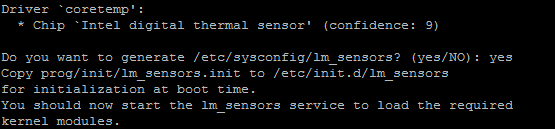
This is what i got after running sensors-detect on my h87i-plus. What do i do now? Do i have to copy that file manually or is the script telling me it has done so? I couldnt find a init.d folder on my /etc folder though. Do i just write modprobe coretemp in my go file like what was written a few posts above?
-
I think the focus right now is at trying to get 64 bit unRAID and also the new unRAID NG to come to life. Only then we would most probably see something about the new webGUI.




