





ChronoStriker1
Members
-
Joined
-
Last visited
-
I seem to be having a problem with the share floor plugin on 6.12.0-rc.4.1, none of the shares below have a file that large in them, so Im not quite sure whats happening. The cache is a two 2TB nvme mirror zfs pool. Share 'Downloads' updated to new floor level: 659.7 GB Share 'retronas' updated to new floor level: 82.5 GB Share 'appdata' updated to new floor level: 82.5 GB Pool 'cache' updated to new floor level: 659.7 GB
-
Right now I doubt the issue is due to being on the rc but as I am using it I figure I should post this here. I had recently replaced most of the hardware on my unraid server but now it seems to be somewhat unstable. The last "crash" happened probably an hour ago, its not really a crash, I have partial access, some dockers will still be running, my ssh session seems to stay up, but some applications (like htop) will just freeze. I think I may loose /mnt/user at the time but Ive only been able to prove it once. Things are usually so bad that I cant run diagnostics or even the shutdown or reboot commands. This was way more prevalent (happening almost daily if not more often) when I first set the server up, but after changing a few hardware around (had a few bad sata cables and an HBA that seemed like it was having issues until I updated its firmware) it seemed like it went away, but I guess thats not the case. I had run memtest but the memory had passed so Im kinda out of ideas. Would appreciate anyones help.
-
The apps page wont load right now. It looks like the json file that its trying to connect to is blank on the github.
-
Can you please add nnn
-
Anyone know how to proxy the novnc with Nginx Proxy Manager? I cant figure out the correct settings for /websockify to get it to forward for sound properly.
-
Ok I think I fixed the issue with sound, at the very least its now working through novnc. The vnc-audio.ini needed to be changed. It looks like tcpserver isnt able to lookup localhost via dns so I changed it to 127.0.0.1. I sent a pull request, but Im somewhat new to git so the build file for the docker needs to be changed back to the main repo from mine.
-
OK I was looking more at the dockerfile on git, I dont think the environmental variables for the ports will change anything as they are currently. The ports are exposes as the actual ports and not the variables. So even if you change the variable the port is still the same. I could be wrong as this is really the first time Im looking at ta dockerfile ment for dockerman. I tested on the fork I made and it seems to work the way I think it should when I do this: # Configure required ports ENV \ PORT_SSH="2222" \ PORT_VNC="5904" \ PORT_AUDIO_STREAM="5905" \ PORT_NOVNC_WEB="18083" \ PORT_AUDIO_WEBSOCKET="32123" # Expose the required ports EXPOSE ${PORT_SSH} EXPOSE ${PORT_VNC} EXPOSE ${PORT_AUDIO_STREAM} EXPOSE ${PORT_NOVNC_WEB} EXPOSE ${PORT_AUDIO_WEBSOCKET} Note I left in port changes I had made for myself but I tested by changing the env variables for vnc and audio for 5908 and 5909. I can say for sure that I can vnc into 5908, I still have no audio so thats still an issue but I dont "think" its related to this. Unless im using port 32123 somewhere and do not realize it.
-
For the life of me I can not get sound to work via vnc with this container. At first I attempted to change the vnc ports as I do have another docker that also used 5901 but when changing the enviormental values, the docker still went with the defaults. I went as far as forking the docker and hardcoding the changes. While it did change the ports sounds still does not work for me. Its the same error in the error log as the other person who had the issue had, "tcpserver: fatal: no IP address for localhost". Any thoughts on things I can try?
-
I to also have the issue where the link has the wrong port. I also have the myserver plugin and due to that when i try going to the qr code with the correct port I get this error An error occurred during a connection to *obfuscated*.myunraid.net:2378. SSL received a record that exceeded the maximum permissible length. Error code: SSL_ERROR_RX_RECORD_TOO_LONG The page you are trying to view cannot be shown because the authenticity of the received data could not be verified. Please contact the website owners to inform them of this problem. For some reason I am unable to get the app to connect manually ether, it just sits and spins.
-
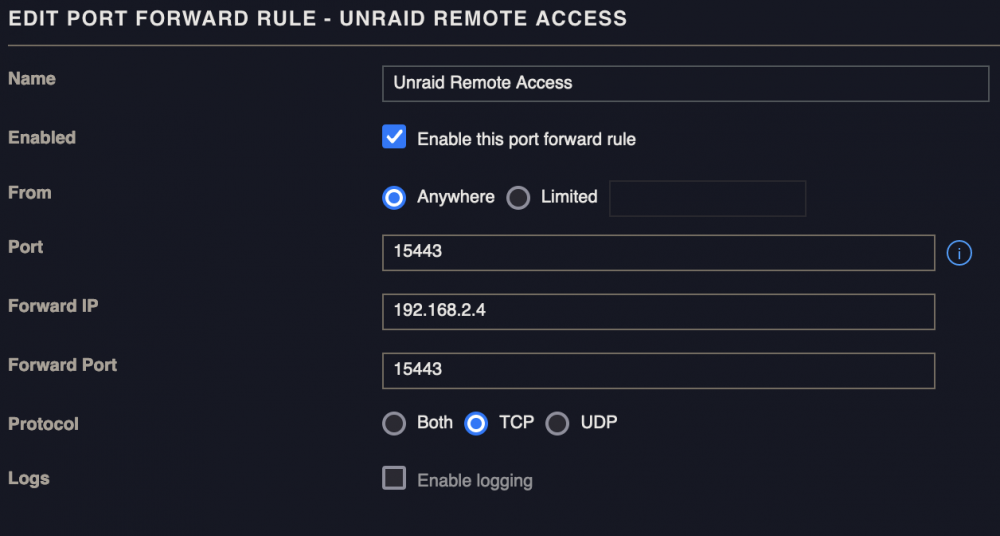
thats an older pic, the forward port is just 5443
-
Also here is my port forward
-
I'm having issues getting remote access working. I don't technically need it but its there and I'd like to figure out why its not working. Diagnostics attached. Also here is the output of php /usr/local/emhttp/plugins/dynamix/include/UpdateDNS.php -v (Output is anonymized, use '-vv' to see full details) Unraid OS 6.10.0-rc4 with My Servers plugin version 2022.03.01.2301 ✅ Signed in to Unraid.net as ChronoStriker1 Use SSL is auto ✅ Rebind protection is disabled Local Access url: https://192-168-2-4.hash.myunraid.net:5443 ✅ 192-168-2-4.hash.myunraid.net resolves to 192.168.2.4 Remote Access url: https://[redacted].hash.myunraid.net:[redacted] ✅ [redacted].hash.myunraid.net resolves to [redacted] IP address changes were detected, nginx was reloaded Request: { "keyfile": "[redacted]", "plgversion": "2022.03.01.2301", "internalhostname": "*.hash.myunraid.net", "internalport": "5443", "internalprotocol": "https", "remoteaccess": "yes", "servercomment": "Media server", "servername": "Tower", "internalip": "192.168.2.4", "externalhostname": "*.hash.myunraid.net", "externalport": "[redacted]", "externalprotocol": "https" } Response (HTTP 200): [] success tower-diagnostics-20220328-2023.zip
-
OK I see part of the problem looking at the docker install instructions from the github of happypandax you need to create the config.yaml and create a plugins directory in the data folder. If you don't it will start creating those files in the docker image itself which you don't want. It should look like bellow. You can do that after the first start up, just stop it and do that then start it up. It will start using the correct folders after that. import: skip_existing_galleries: true transparent_nested_folders: true watch: enable: true dirs: - /content options: /content: import.scan_on_startup: true plugin: plugin_dir: /data/plugins server: host: 0.0.0.0 The last line will allow you to use the desktop client to connect to the server
-
You may want to add the download directory as a configurable path since content appears to only be for uploading things and not where its placing files once they are in your library from what I can tell. Since appdata is on peoples cache drive they will probably want to move those files to somewhere on a share. Honestly this app is a bit confusing on its usage.
-
The config.yaml is not something that is shared in the appdata directory, it really needs to be. Also since the happypandax user the docker runs as is not root you cant install vi or nano in the docker image to edit that file that way ether. Currently I am also seeing that its not following the content directory so everything downloaded seems to live in the appdata folder, but out of the two things that it downloaded from exhentai for me only one shows and the logs are less than helpful.

