





bobbintb
Members
-
Joined
-
Last visited
Everything posted by bobbintb
-
On the warranty info for the drives, it would nice if I could put in the warranty expiration date instead of (or in addition to) the warranty length. It's a little more exact but also with older drives or if you just forgot to put the info in when you bought it, one would have to look up the manufacture date and warranty period, instead of just using a warranty check tool and getting the date it expires and put it in. Also, and less of an issue, it would be nice to have a link to the manufacturer's warranty check page. Sometimes they can be hidden and difficult to find. These suggestions probably don't add a whole lot of value but I think they are nice details to have.
-
docker run -d --name='letsencrypt' --net='bridge' --privileged=true -e TZ="America/Denver" -e HOST_OS="Unraid" -e 'EMAIL'='[email protected]' -e 'URL'='mydomain.com' -e 'SUBDOMAINS'='mysubdomain' -e 'ONLY_SUBDOMAINS'='true' -e 'DHLEVEL'='4096' -e 'VALIDATION'='http' -e 'DNSPLUGIN'='' -e 'PUID'='99' -e 'PGID'='100' -e 'HTTPVAL'='true' -p '8008:80/tcp' -p '443:443/tcp' -v '/mnt/cache/Docker/letsencrypt':'/config':'rw' 'linuxserver/letsencrypt' Although, now that I look in the log, I'm getting an error I hadn't before: ERROR: Cert does not exist! Please see the validation error above. The issue may be due to incorrect dns or port forwarding settings. Please fix your settings and recreate the container Not sure what I changed to get that. I'm losing my mind.
-
I too am in the camp trying to restore individual dockers. I tried untaring manually but because of softlinks, things get messed up. I know I can selectively untar folder via cli but I was hoping there is an easier way.
-
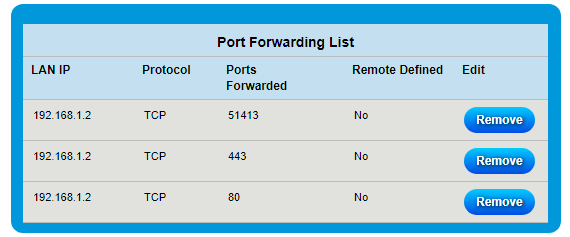
I think it was the only think I changed, at least at first, but I can't be certain. I made some other changes after the fact (had to regenerate the cert, possibly more), lost track of what I did and so am now starting over with only those assumptions I mentioned. Networking isn't my specialty (nor my favorite) but I have a Security+ so I'm pretty competent with networking, for the most part. Here is my router config: There is also a built in "app port forwarding" feature, which is just a bunch of predefined port forwarding settings for common apps and protocols. I tried the one for webserver (forwards 80 and 443) and that didn't work either. 192.168.1.2 is my UnRAID server. I tried one of those websites to check for open ports and 80 and 443 are both open from outside my network. My router/modem is a Zyxel C3000Z from Centurylink. Previously I was using an older modem with the router function disabled and used my Linksys WRT1900AC with DD-WRT. I'm wonder if the port forwarding function on the Centurylink router is just broken. It wouldn't surprise me. I've known routers, especially ones issued from ISPs, to have some of the more advanced features not implemented correctly or not working. As far as my sister only being able to connect, believe me, I know it makes no sense and if I were you I'd be telling me I'm wrong or mistaken because that's impossible... But the site had been down for over a week, I didn't have time to fix it, other family members asked why it was down... Then out of the blue my Ombi phone app said it got a request from my sister. I thought that impossible, maybe and old request got stuck and just went through. I messaged her, she said she just requested it a few minutes ago. The Ombi logs say the same. She confirmed that she still can load the page just fine. I don't remember if she uses the app or website but that shouldn't make a difference. My sister is by no means a computer expert but she is very smart, good with technology, and I trust that she knows enough about computers that she isn't mistaken about it. She is still the only one that can access it. So unless I was sleep walking one night and set up a firewall rule in my router to only allow connections from her IP on that port (which I checked anyway), that shouldn't be possible. That's mostly why I am leaning towards a fault in the router firmware, which is up to date. I have manually updated my domain to point to my IP (can't get crappy ISP router to do it with my provider just yet) but using the IP address doesn't work either. My router doesn't have hairpin NAT in the settings, just NAT and a simple enable/disable that is already enabled. The thing is it's not that it only works from outside my LAN, it that's it only works for my sister, who is outside my LAN. No one else outside my LAN can access it. See the above more more detail.
-
I'm having a little issue. My modem went dead and I got a new one. Previously I was using a separate router but my new modem is a modem/router. I had this docker set up with Ombi and a dynamic DNS. I don't think this is an Ombi issue so I'm asking here. I could access my Ombi page over the internet. Well now I don't know what's going on but nothing seems to be working. I tried so many different troubleshooting steps that now I'm all turned around and can't make any assumptions as to what I did or didn't do. What I do know is: 1. I can't get the dynamic dns to work in my router but that's tabled because... 2. I cannot access Ombi from outside my network just using my ip address either 3. I have port 80 and 443 forwarded to my unraid server 4. I have the letsencrypt docker settings for domain and subdomain correct for my dynamic dns 5. I have the letsencrypt docker ports mapped as 172.17.0.3:443/TCP192.168.1.2:443 172.17.0.3:80/TCP192.168.1.2:8008 6. There are no errors in the letsencrypt docker log 7. If I try to go to the letsencrypt webui through the unraid docker back I get "ERROR_INTERNET_SEC_CERT_REVOKED", which I find strange as there are no errors in the log That happens in Edge. When I use Chrome it says the cert is wrong because it's for my dns subdomain and not my internal IP. I expected that, make an exception, and it loads using my internal IP. 8. I know this sounds crazy but my sister has no problems accessing the Ombi app that this is linked to. I actually got a requests from here the other day. I'm completely baffled why she is the only one that can access it outside my network. 9. I do IT professionally but I really LOATHE networking I'm all sorts of turned around. I might try and just put my old router back and turn off the router features on my modem but I don't think that will help anyway. I'll try as a last resort though. Any ideas?
-
I'm at 43TB and probably about to add another 6TB soon.
-
I've never used that script.
-
My guess would be you are using the python 2 version of xmlrpclib and rutorrent is using version 3 of xmlrpclib. I could be wrong. I just stick ti python 2.7 so I am not familiar with cross version issues.
-
No, you should save the script outside the docker container. There really is no reason for the average user to be messing with the internals of the container. That's what the shared folder that saves config files is for. The docker container is meant to be immutable so that it can easily deployed to other environments or wiped out and recreated. Looking a little closer at the script, a couple of things comes to mind. Does the rutorrent container even have python installed? I'm away from my server so I can't check. I'm fairly certain it does but I'm not 100%. If it does it needs to be the same version, or at least from the 2.x family. Python 2 and 3 are vastly different. I'm fairly certain the container has python 2.7 installed but I'm not able to check right now. If it doesn't have Python installed in the Docker container, installing it with nerdtools won't do anything because it doesn't have anything to do with the Docker container. The other thing is the permissions from the script. It looks like it is importing xlmrpclib and if it doesn't have permissions to do so it may cause issues. Lastly, how did you copy the script? One common issue when dealing with scripts is creating the script in Windows and copying it to Linux. Windows handles line endings differently than Linux. Linux uses what is called a "line feed" for new lines in text files and Windows uses a "carriage return" and "line feed". So the script may look the exact same to the naked eye but break because there could be a line ending that it is breaking on. If you copied it in Windows and pasted it into Notepad and saved it to your server, you should make sure and remove the carriage returns. This may be information you already know but I'm not sure of your skill level so I thought I'd mention it. If that's the case you can Google how to remove the carriage returns (notepad remove carriage return). You'll probably need to download another text editor because I don't think Windows Notepad can do this. That would actually be the first thing I would check. EDIT: I got home and looked. It seems the docker container has python 3.6 installed and your script is for 2.7. However, the error you sent shows 2.7. Do you have a different docker container or something?
-
What I mean is maybe it somehow got corrupted or is incomplete. Since it's a docker, it would have nothing to do with nerdtools or any of the packages it installs. You shouldn't have to do anything outside of docker. Really, the whole point of docker is to be self contained and independent and just work out of the box. Have you tried reinstalling the docker image? Maybe something went wrong when it pulled the docker image.
-
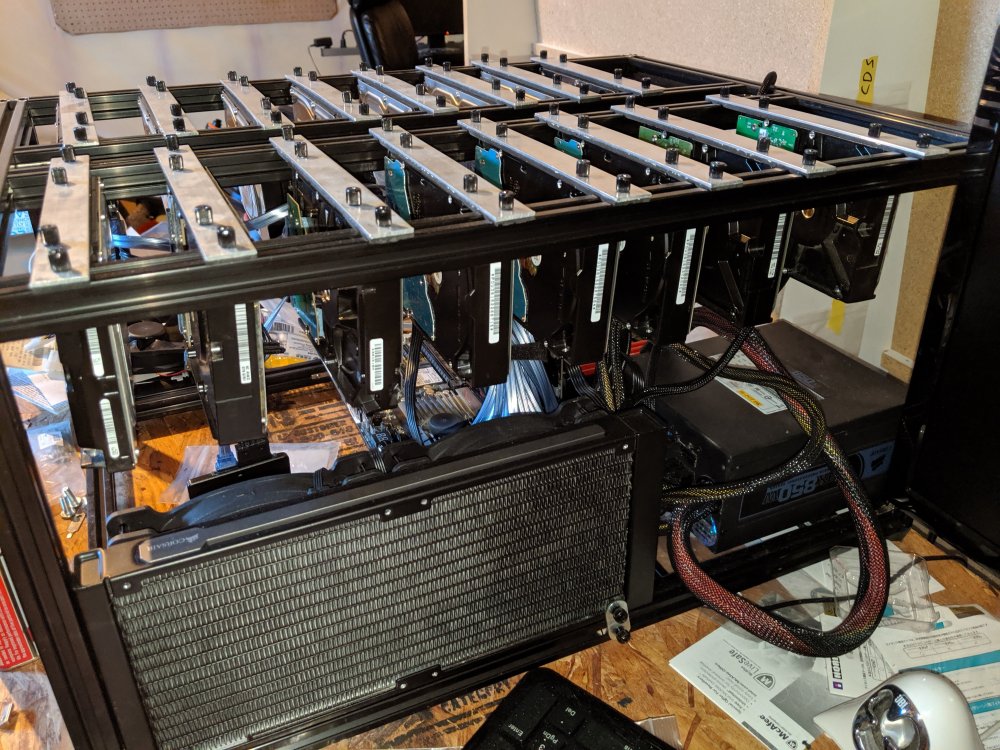
It's been a while since I reguarly paid attention to the temps but they usually stay in the low to mid 30's range. I rarely see one spike above 40. The reason I built the case in the first place was because I had drives overheating in my 4U server rack, of course since it was in my basement and not really in a lower temperature server room. I haven't had a problem since with this. As I mentioned, I'm considering buying 8 140mm PWM fans and mounting four on each row under the drives. I might do it just to see how much better is but they stay plenty cool how they are. There is plenty of space between them to let each one "breath" and being vertical the heat just radiates out and up. Of course, this is just my personal experience. It's not like I have any data points.
-
A bit of an update. I changed the way the drives are attached. You can see it in the new photo. A few other minor improvements. I am thinking about making it a bit taller and putting fans under the drives to cool them by blowing straight up but to be honest the orientation of the drives, the spacing and the open concept seem to be doing a good enough job without fans. It would be cooler though, no pun intended. I have decided to start selling these so if anyone is interested let me know.
-
I think it's more likely the fault at the bottom. Maybe xmlrpclib didn't import correctly.
-
Usually that's an issue with the directory not being accessible by rutorrent but if it is creating the files in the folder, it may be a permissions issue as you said. Have you tried checking the permissions?
-
You edited the rc file directly? If so, not sure why that wouldn't work.
-
I haven't used that script but I've used curl in a bash script to send those same commands to it and it deletes it and removes it. What is the error you are getting?
-
I used the same port as the webui, 90 in my case.
-
Have you tried it yet? It looks like it deletes it to me.
-
Yeah, I figured that. My provider has port forwarding but it is extra. How much extra I don't know. Is there anything I can do without needing port forwarding? Change the port rtorrent uses? Networking was never my strong suit.
-
I'm having trouble getting an open port. I presume it has to do with the VPN. I opened the port on my router. I don't use PIA. Any idea what I need to do?
-
I did notice on the last screenshot you don't have Sonarr enabled (use Sonarr). I doubt that's causing the issue though. Additionally, one of your paths in the screenshot for Sonarr doesn't have a "/" at the end. Believe it or not, I've had programs break before because of that (sloppy programming IMHO). That might be an issue here. Edit: I'm pretty sure that's it because I removed the trailing slash from one of my paths and now it's freaking out about invalid paths and instead of /movies/movie_name it's showing /moviemovie_name. I'll submit a bug on the project page. Again, sloppy programming. Add a trailing slash and that should fix it.
-
Thanks, that fixed it. The template probably needs to be updated.
-
How long does it take to start the docker? It's been a few minutes since I installed it and I still can't access the webui. The log it stuck on "Bazaar starting...". I know a few of the other linuxserver images take a while to start up the first time but those have a lot of activity in the log. It's been over 10 minutes.
-
Additionally, I've had limited success with SubZero for subtitles and Plex will be removing the plug-in system soon, if not already. Plex recently integrated subtitles search natively but I have yet to try it. I'm looking forward to trying Bazaar first.
-
I've had this issue since 6.5.0. The docker page does not get updated when I update, start, stop, etc. If I update the docker image it gets updated but the icon doesn't change. Same thing with the VM page (last I checked). The dashboard page looks fine. I keep hoping it gets fixed with every release but it never does. I have to downgrade to get it to work but for now I live with it because of the security fixes.

