





bobbintb
Members
-
Joined
-
Last visited
Everything posted by bobbintb
-
I'd try re-adding them.
-
Have you tried running docker safe permissions in the unraid menu?
-
That's how you change it. What do you mean it did nothing?
-
Well, it was showing that before I downgraded. It showed the disks but no user shares. I tried rebooting and then it show no assigned disks. That's when I tried downgrading. Still, I don't think it's an upgrade issue so I'll post there. Thanks everyone.
-
It still show no disks assigned. I can reassign them, but then it will rebuild the parity.
-
Well, after trying to roll back my config, now no disks are assigned and I am getting a "stale configuration" message. I haven't had a chance to change the hardlink option yet.
-
Not a clue.
-
I tried that and now it says "stale config" and none of the disks are assigned... I think I'll have to downgrade for the time being. I'm too concerned about data lose.
-
I'll give that I try if I can ever get it to unmount. It's a REALLY old flash drive. It's easily over 10 years old and I think only 2gb.
-
I do have a backup of the flash. I tried stopping the array but it's stuck on retrying to unmount user share. Which is weird because there is none. I tried ps -ef | grep /mnt/user but it doesn't show anything using it, which is expected. Also the log won't load.
-
Upgraded from 6.7.2 and after reboot I cannot access my shares. It says "There are no exportable user shares". I'm not sure if it's related to the update or not but I figured I'd start there. I've attached my diagnostics.tower-diagnostics-20191222-1924.zip
-
Suddenly, I can't get the page to load in Chrome or IE. It's just a blank white page, no login. Works fine in FireFox. I cleared my cache as well.
-
I have a need to access a block level device from unRAID. I don't know a whole lot about iSCSI and AoE. I have been reading about iSCSI on unRAID but it looks like either a custom kernel is needed or a complicated VM solution. What about ata over ethernet (AoE)? Does that need a custom kernel or can I just install a few slackware packages? Any other suggestions?
-
+1 I'm not much of a networking guy. I've heard of iSCSI but once I looked into it I realized it's a feature I've been looking for for years.
-
I did. But I figured a way to get around the issue with the program. I hate networking on Windows. I always have a different issue with any computer I want to connect to the server through Windows.
-
I am having trouble being able to see my unraid server under networks in explorer. I've looked at the other threads but I'm not getting anywhere. I alteady have the drive mapped but the problem is I have a program I am trying to use that doesn't see the mapped drives. So I can only access it through the network part of explorer. I enabled SMB1, allowed insecure logins, but still nothing.
-
That's useful, thanks. I'd still like to keep power button functionality though, if possible.
-
I'm trying to think of a way to power on a specific VM using a power button. I want to get it as close operating a normal PC as possible. Either wake it from the attached mouse/keyboard or some kind on custom made button or something that powers it on. Maybe it sends a WOL packet. I know sending a WOL packet from my phone is an option but that's not quite what I'm looking for. Any ideas? Anyone know what options there are? Maybe even something like a hacked Amazon Dash button or Raspberry Pi Zero or something? Or something less complicated.
-
Ah, ok. Thanks.
-
My Ombi is acting up. I go to the page or the app to request a show and nothing happens. On the site, I click request and that's it. No messages and nothing shows up in Sonarr. It's as if I didn't click anything. In the app, when I hot requests the message pops up from the bottom saying I made a request but nothing happens in Sonarr. Nothing in logs for Sonarr, no errors in either. In the Ombi app, clicking "more" also does nothing. I tried restarting the docker and doing a forced update.
-
This is a forum for UnRAID so I'm not sure if anyone will be able to help with Synology. You should try the Synology forums.
-
Weird, that column is in the stock image but not on my actual router. I did try the remote port settings but I must have done it wrong initially because I tried it just now and it worked. Hopefully I can manage from here. Thanks for the help, I know I wasn't making things easy but I just really needed another set of eyes because I haven't been able to keep things straight lately.
-
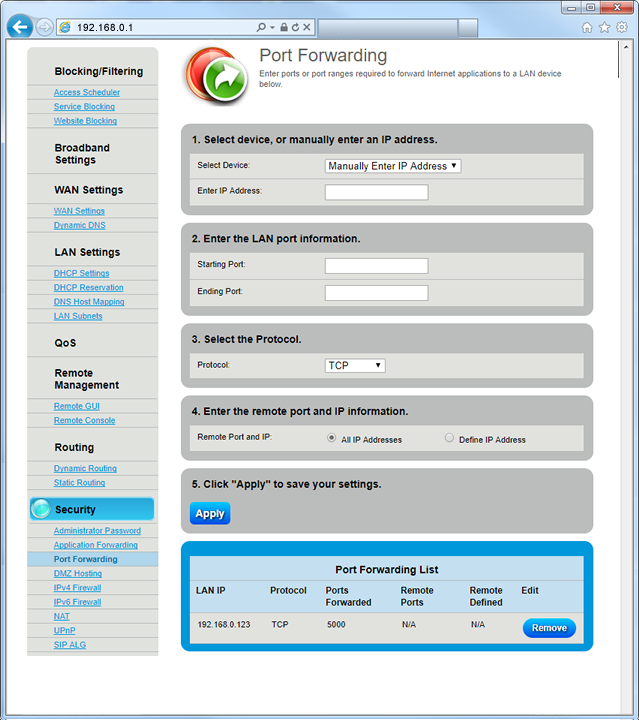
No, I fully understand port forwarding. I'm just really distracted lately and at the risk of getting too personal, I'm on some new ADD meds that are kind of messing with my memory and cognition (and you guys have been super patient with me so thanks). I see what you are saying now, I just didn't notice it before. The router doesn't allow me that level of control like my other did and I just didn't notice it until you said something. It seems I can only forward a port to a specific IP of the SAME port. The layout sucks but it seems start port and end port refers to port range and not source and destination. I included a stock image of the menu (not what I actually have in my settings). So I don't think I can forward port 80 from outside my network to 8008 on my UnRAID server, just 80 to 80. I may have to go back to my previous set up. This is kind of what I meant when I said the feature of ISP branded routers being sub-par.
-
Oops, sorry. It basically says the same thing. "Timeout during connect (likely firewall problem)." I realized that a while after the fact. Thanks for the reminder. I'm all over the place lately. I did have it at one point. I added it. Now I have 443, 80, and 8008 forwarded. Still getting the error.
-
I don't see what post you are referring to. I checked canyouseeme.org and now it seems my port forward is not working. It was working previously but now isn't I'm pretty sure I didn't change anything, the port forward settings are still there and correct. Redid them and rebooted. I'm starting to think my new router is a dud. Given the unexplainable behavior I mentioned with only my sister being able to access the site, that would make sense. In my experience, extremely bizarre/impossible behavior usually indicates a hardware failure.

