





CrashnBrn
Members
-
Joined
-
Last visited
Everything posted by CrashnBrn
-
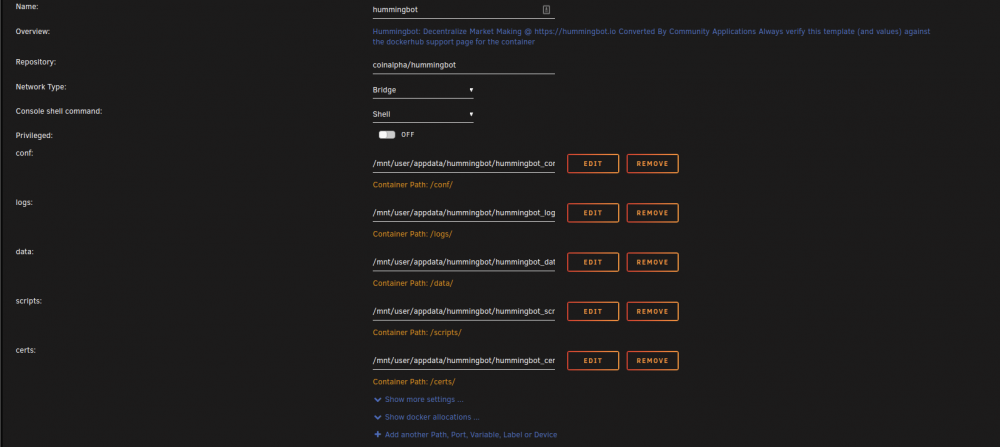
Hi! I'm trying to get the hummingbot container (https://hub.docker.com/r/coinalpha/hummingbot) working. When I try it without any extra parameters I get the below error. Can anyone more familiar with docker point me in the right direction? Thank so much! Edit: It looks like some additional sets need to be taken before the container can be run: https://raw.githubusercontent.com/CoinAlpha/hummingbot/development/installation/docker-commands/create.sh Trying to figure out how to get steps working on unraid. Edit2: I'm thinking if I run the create.sh get the config files needed throw them into my app data and point the container to it I can get this working. I'll post an update if I can. Edit3: I believe I have it working. Here is what my settings page looks like Traceback (most recent call last): File "/home/hummingbot/miniconda3/envs/hummingbot/lib/python3.8/asyncio/selector_events.py", line 259, in _add_reader key = self._selector.get_key(fd) File "/home/hummingbot/miniconda3/envs/hummingbot/lib/python3.8/selectors.py", line 192, in get_key raise KeyError("{!r} is not registered".format(fileobj)) from None KeyError: '0 is not registered' During handling of the above exception, another exception occurred: Traceback (most recent call last): File "bin/hummingbot_quickstart.py", line 144, in <module> main() File "bin/hummingbot_quickstart.py", line 137, in main if not login_prompt(): File "/home/hummingbot/hummingbot/client/ui/__init__.py", line 86, in login_prompt show_welcome() File "/home/hummingbot/hummingbot/client/ui/__init__.py", line 20, in show_welcome message_dialog( File "/home/hummingbot/miniconda3/envs/hummingbot/lib/python3.8/site-packages/prompt_toolkit/application/application.py", line 810, in run return loop.run_until_complete(self.run_async(pre_run=pre_run)) File "/home/hummingbot/miniconda3/envs/hummingbot/lib/python3.8/asyncio/base_events.py", line 616, in run_until_complete return future.result() File "/home/hummingbot/miniconda3/envs/hummingbot/lib/python3.8/site-packages/prompt_toolkit/application/application.py", line 777, in run_async return await _run_async2() File "/home/hummingbot/miniconda3/envs/hummingbot/lib/python3.8/site-packages/prompt_toolkit/application/application.py", line 759, in _run_async2 result = await _run_async() File "/home/hummingbot/miniconda3/envs/hummingbot/lib/python3.8/site-packages/prompt_toolkit/application/application.py", line 682, in _run_async with self.input.attach(read_from_input): File "/home/hummingbot/miniconda3/envs/hummingbot/lib/python3.8/contextlib.py", line 113, in __enter__ return next(self.gen) File "/home/hummingbot/miniconda3/envs/hummingbot/lib/python3.8/site-packages/prompt_toolkit/input/vt100.py", line 176, in _attached_input loop.add_reader(fd, callback) File "/home/hummingbot/miniconda3/envs/hummingbot/lib/python3.8/asyncio/selector_events.py", line 332, in add_reader return self._add_reader(fd, callback, *args) File "/home/hummingbot/miniconda3/envs/hummingbot/lib/python3.8/asyncio/selector_events.py", line 261, in _add_reader self._selector.register(fd, selectors.EVENT_READ, File "/home/hummingbot/miniconda3/envs/hummingbot/lib/python3.8/selectors.py", line 359, in register self._selector.register(key.fd, poller_events) PermissionError: [Errno 1] Operation not permitted
-
-
Any reason to use this over pushover (or similar)?
-
That's a great idea. I did watch Spaceinvader One's video about using unbalance to do that, and that might be a better option for me. Edit: If anyone else is curious:
-
Understood. Thanks @trurl and @Jonathan!
-
Yup that's what I'm doing, I just wanted to convert from RFS to XFS. I don't plan on keeping the external drive in the parity, it's just for the one time move to rsync from RFS to XFS. Then I'd swap the external drive with the internal. So my original question was if it would be ok to rsync internal RFS to external XFS then swap drives once complete. Sorry if I didn't make that clear.
-
Would there be any issues following the converting procedure (https://wiki.unraid.net/File_System_Conversion#Mirroring_procedure_to_convert_drives) but having the larger driver mounted via USB (drive 11 in the guide) rather than internally in the array? I don't have anymore ports to mount the drive internally.
-
I know Lime Tech does offer paid support similar to what you're asking about, but I don't know how in-depth they going troubleshooting 3rd party issues. https://unraid.net/services
-
Awesome! Something to finally look forward too during these crazy times!
-
34" That exceeded the 512kb file size. I'll scale the quality down and give it a try after work today. Thanks!
-
Thanks! That's a great question, when I tried that image it got even more zoomed in! Here is what a part of it looks like.

-
Love this! Anyway to make it widescreen? It looks very stretched out on my 3440x1440 ultrawide.
-
That's a nice looking badge you have there!
-
Sorry I'm a bit confused. If I install docker compose, can I change the docker run command for that container to use docker compose instead of docker run? So I can control the container in the GUI the same way as the other containers (including autostart)?
-
I'd like to see this added as well. I see that it's added to the nerd pack plugin but I would like to be able to do a docker compose from the docker tab. My understanding is through the plugin it's all CLI based.
-
You're 100% correct! I enabled NAT reflection, changed it to a 302 redirect, cleared all my cache and everything started working! Thanks for your help aptalca! Edit: Any danger of leaving NAT reflection on?
-
Here you go. I removed my email and site. The container is currently stopped. Thanks [s6-init] making user provided files available at /var/run/s6/etc...exited 0. [s6-init] ensuring user provided files have correct perms...exited 0. [fix-attrs.d] applying ownership & permissions fixes... [fix-attrs.d] done. [cont-init.d] executing container initialization scripts... [cont-init.d] 10-adduser: executing... ------------------------------------- _ () | | ___ _ __ | | / __| | | / \ | | \__ \ | | | () | |_| |___/ |_| \__/ Brought to you by linuxserver.io We gratefully accept donations at: https://www.linuxserver.io/donations/ ------------------------------------- GID/UID ------------------------------------- User uid: 99 User gid: 100 ------------------------------------- [cont-init.d] 10-adduser: exited 0. [cont-init.d] 20-config: executing... [cont-init.d] 20-config: exited 0. [cont-init.d] 30-keygen: executing... generating self-signed keys in /config/keys, you can replace these with your own keys if required Generating a 2048 bit RSA private key ........................+++ ...............................................................................+++ writing new private key to '/config/keys/cert.key' ----- [cont-init.d] 30-keygen: exited 0. [cont-init.d] 50-config: executing... Variables set: PUID=99 PGID=100 TZ=America/Los_Angeles URL=duckdns.org SUBDOMAINS=mywebsite EXTRA_DOMAINS= ONLY_SUBDOMAINS=true DHLEVEL=2048 VALIDATION=http DNSPLUGIN= EMAIL=myemail STAGING= Created donoteditthisfile.conf Backwards compatibility check. . . No compatibility action needed Creating DH parameters for additional security. This may take a very long time. There will be another message once this process is completed Generating DH parameters, 2048 bit long safe prime, generator 2 This is going to take a long time ................................................................................+...............................+........................+..............+.....................................................................................................................................................................................................................................................................................................................................................................................++*++* DH parameters successfully created - 2048 bits SUBDOMAINS entered, processing SUBDOMAINS entered, processing Only subdomains, no URL in cert Sub-domains processed are: -d mywebsite.duckdns.org E-mail address entered: myemail http validation is selected Generating new certificate Saving debug log to /var/log/letsencrypt/letsencrypt.log Plugins selected: Authenticator standalone, Installer None Obtaining a new certificate Performing the following challenges: http-01 challenge for mywebsite.duckdns.org Waiting for verification... Cleaning up challenges IMPORTANT NOTES: - Congratulations! Your certificate and chain have been saved at: /etc/letsencrypt/live/mywebsite.duckdns.org/fullchain.pem Your key file has been saved at: /etc/letsencrypt/live/mywebsite.duckdns.org/privkey.pem Your cert will expire on 2018-06-23. To obtain a new or tweaked version of this certificate in the future, simply run certbot again. To non-interactively renew *all* of your certificates, run "certbot renew" - Your account credentials have been saved in your Certbot configuration directory at /etc/letsencrypt. You should make a secure backup of this folder now. This configuration directory will also contain certificates and private keys obtained by Certbot so making regular backups of this folder is ideal. - If you like Certbot, please consider supporting our work by: Donating to ISRG / Let's Encrypt: https://letsencrypt.org/donate Donating to EFF: https://eff.org/donate-le [cont-init.d] 50-config: exited 0. [cont-init.d] done. [services.d] starting services [services.d] done. Server ready Signal handled: Terminated. [cont-finish.d] executing container finish scripts... [cont-finish.d] done. [s6-finish] syncing disks.
-
Nope still not working. I removed the container and appdata folder and tried again. I realized I can't even get to the default nginx page (before I change the default file). I just get "Site can't be reached URL took to long to respond". I'm trying to figure out if it's pfsense blocking something or nginx not working properly. I assumed pfsense is good since apache worked without issues. I do see this in my pfsense logs: nginx: 2018/03/23 13:22:58 [error] 33793#100135: *847 open() "/usr/local/www/sonarr" failed (2: No such file or directory), client: 1.1.1.1(changed), server: , request: "GET /sonarr HTTP/1.1", host: "website.duckdns.org(changed)"
-
Hi! I've been trying to get this working all week and have no clue why it's not working for me. My conf file is below. when I go to https://domain.duckdns.org I get nothing. It just spins. I see the request pass through my firewall (pfsense). I'm wondering if there could be something wrong with nginx? I'm NAT'ing 81 and 443 externally. I've replaced my internal IP. I see Server Ready under logs for the container. I'm wondering if nginx is dropping the requests? Can anyone help point me in the right direction for troubleshooting? I've had Apache working no problems for a couple of years. I feel like I'm missing something obvious. TIA upstream backend { server 1.1.1.1:19999; keepalive 64; } server { listen 443 ssl default_server; # listen 80 default_server; root /config/www; index index.html index.htm index.php; server_name _; ssl_certificate /config/keys/letsencrypt/fullchain.pem; ssl_certificate_key /config/keys/letsencrypt/privkey.pem; ssl_dhparam /config/nginx/dhparams.pem; ssl_ciphers 'ECDHE-RSA-AES128-GCM-SHA256:ECDHE-ECDSA-AES128-GCM-SHA256:ECDHE-RSA-AES256-GCM-SHA384:ECDHE-ECDSA-AES256-GCM-SHA384:DHE-RSA-AES128-GCM-SHA256:DHE-DSS-AES128-GCM-SHA256:kEDH+AESGCM:ECDHE-RSA-AES128-SHA256:ECDHE-ECDSA-AES128-SHA256:ECDHE-RSA-AES128-SHA:ECDHE-ECDSA-AES128-SHA:ECDHE-RSA-AES256-SHA384:ECDHE-ECDSA-AES256-SHA384:ECDHE-RSA-AES256-SHA:ECDHE-ECDSA-AES256-SHA:DHE-RSA-AES128-SHA256:DHE-RSA-AES128-SHA:DHE-DSS-AES128-SHA256:DHE-RSA-AES256-SHA256:DHE-DSS-AES256-SHA:DHE-RSA-AES256-SHA:AES128-GCM-SHA256:AES256-GCM-SHA384:AES128-SHA256:AES256-SHA256:AES128-SHA:AES256-SHA:AES:CAMELLIA:DES-CBC3-SHA:!aNULL:!eNULL:!EXPORT:!DES:!RC4:!MD5:!PSK:!aECDH:!EDH-DSS-DES-CBC3-SHA:!EDH-RSA-DES-CBC3-SHA:!KRB5-DES-CBC3-SHA'; ssl_prefer_server_ciphers on; client_max_body_size 0; location = / { return 301 /htpc; } location /nzbget { include /config/nginx/proxy.conf; proxy_pass http://1.1.1.1:6789/nzbget; } location /sonarr { include /config/nginx/proxy.conf; proxy_pass http://1.1.1.1:8989/sonarr; } location /couchpotato { include /config/nginx/proxy.conf; proxy_pass http://1.1.1.1:5050/couchpotato; } # location /radarr { # include /config/nginx/proxy.conf; # proxy_pass http://1.1.1.1:7878/radarr; # } # location /downloads { # include /config/nginx/proxy.conf; # proxy_pass http://1.1.1.1:8112/; # proxy_set_header X-Deluge-Base "/downloads/"; # } location ~ /netdata/(?<ndpath>.*) { proxy_set_header X-Forwarded-Host $host; proxy_set_header X-Forwarded-Server $host; proxy_set_header X-Forwarded-For $proxy_add_x_forwarded_for; proxy_pass http://backend/$ndpath$is_args$args; proxy_http_version 1.1; proxy_pass_request_headers on; proxy_set_header Connection "keep-alive"; proxy_store off; } }
-
I love it! Using it now. Thanks!
-
Edit: I think I have it figured out. This might have been my fault. I forgot to shut down CP so I think the issue was due to that. But for some reason Radarr isn't getting any metadata. Guess I'll work on that one next. Anyone run into that? Edit2: Looks like radarr can't do metadata yet? Just wanted to update regarding the partial file. This only happens with Radarr. Sonarr as well as Couchpotato don't leave any additional files. I've tested with multiple movies and shows. Is anyone else experiencing something similar? Edit: Also getting the following error Import failed, path does not exist or is not accessible by Radarr: My docker paths to my download folder are identical for nzbget and radarr.
-
Yes I see it there as well
-
Hi guys, I have the container set up and working but I noticed once it downloads a movie, along side the movie there is a file with the same name and size that has a .partial~ extension. So it looks like movie.mkv movie.mkv.partial~ Does anyone know why that file is there? Thanks.
-
Not sure what you mean. htaccess is going to use its own user and password list, not related to emby in any way. Have you set up your htaccess password file? http://tools.dynamicdrive.com/password/ Sorry I totally missed an important piece of info. I'm trying to get it to work on the Emby Android mobile app. It works fine in a web browser.
-
Hey guys Sorry if this is a dumb question but I can get Emby to work with my reverse proxy that has htaccess set up. I can't figure out a way to put in a username and password (I tried username:password@url). Any suggestions? Edit: This is for the android emby app




