





RichardU
Members
-
Joined
-
Last visited
Everything posted by RichardU
-
I have two unRaid servers, and I sometimes move a vm from one to the other. Here's how I do it: On the old server: Shutdown the vm. Turn off auto-start if it's on. Edit the configuration to see the name and location of the .qcow2 file (probably in domains). Keep that configuration open. On the new server: Copy the qcow2 file to where you want it (probably in domains). Create a new VM. Fill it out the new configuration exactly the same as the old configuration. Set the Primary vDisk Location to Manual and point it to the new location. Be sure to copy over the Network MAC: address as well. That means your router's DHCP reservation will point to the new location. (You will probably need to reboot your router.) Cheers, Richard
-
I'm getting this as well as "The Syncthing admin interface is configured to allow remote access without a password." Did you ever get an answer?
-
Then what's all this talk about config ... ? Just kidding. It makes perfect sense that /sync = /mnt/user. What threw me off was when you add a folder, it automatically fills in config, and even offers a ~ shortcut for config. Seems like at a minimum they could at least mention /sync there. Should I suggest that in a PR? Thanks for responding.
-
Simple question about Folder Path ... In the Syncthing config, I set Host Path 2 to: /mnt/user/ When I create a folder to share, I set the folder path to: /config/Sync If I understand correctly, that should be the same as /mnt/user/Sync Do I have that right? Cheers, Richard
-
-
Great. How? Could you post any changes to the conf and/or your docker cofiguration setting? Thanks.
-
The new conf also did not work for me. I could get MongoDB to start if I remove "-f /data/db/mongod.conf" from post arguments. Could that be the problem?
-
I really wanted this to work, but when I add "-f /data/db/mongod.conf" to the post arguments it says it's successful, but the MongoDB docker won't start. I tried with and without the quotes. Here's my mongod.conf # mongod.conf # for documentation of all options, see: # http://docs.mongodb.org/manual/reference/configuration-options/ # Where and how to store data. storage: dbPath: /data/db journal: enabled: true # engine: # mmapv1: # wiredTiger: # where to write logging data. systemLog: destination: file logAppend: true path: /var/log/mongodb/mongod.log # network interfaces net: port: 27017 bindIp: 127.0.0.1 # how the process runs processManagement: timeZoneInfo: /usr/share/zoneinfo #security: #operationProfiling: #replication: #sharding: ## Enterprise-Only Options: #auditLog: #snmp: echo -e "replication:\n replSetName: \"rs01\"" | sudo tee -a /etc/mongod.conf
-
There is no consequence that I know of other than the nagging feeling that it is not right.
-
Thanks. I now know where to find the docker run command. Needed to change the port. Cheers.
-
UnRaid Version: 6.6.7. Just tried a fresh install. Set up a new share called nextcloud, with Use cache disk: Yes. The only application values I changed were to set the Host port to 444 and set the Container path to /mnt/user/nextcloud/ The log shows a file error: Thanks, Richard [s6-init] making user provided files available at /var/run/s6/etc...exited 0. [s6-init] ensuring user provided files have correct perms...exited 0. [fix-attrs.d] applying ownership & permissions fixes... [fix-attrs.d] done. [cont-init.d] executing container initialization scripts... [cont-init.d] 10-adduser: executing... ------------------------------------- _ () | | ___ _ __ | | / __| | | / \ | | \__ \ | | | () | |_| |___/ |_| \__/ Brought to you by linuxserver.io We gratefully accept donations at: https://www.linuxserver.io/donate/ ------------------------------------- GID/UID ------------------------------------- User uid: 99 User gid: 100 ------------------------------------- [cont-init.d] 10-adduser: exited 0. [cont-init.d] 20-config: executing... [cont-init.d] 20-config: exited 0. [cont-init.d] 30-keygen: executing... using keys found in /config/keys [cont-init.d] 30-keygen: exited 0. [cont-init.d] 40-config: executing... [cont-init.d] 40-config: exited 0. [cont-init.d] 50-install: executing... % Total % Received % Xferd Average Speed Time Time Time Current Dload Upload Total Spent Left Speed tar: /tmp/nextcloud.tar.bz2: Cannot open: No such file or directory tar: Error is not recoverable: exiting now
-
Coming up on the one year anniversary of this post, I wish the OP would remove the SOLVED tag.
-
I wonder why the thread title starts with (solved).
-
Good call, dlandon. I ran the permissions tool on that share and it worked fine. Cheers, Richard
-
Thanks dlandon, It says access denied by server. The settings for the desired share on the other server are identical to the settings for the share that does work. Further, the desired share can be accessed by Windows computers on the network. Is there anything I need to do on the other server besides create a share and make it public?
-
A while ago, I created an NFS to a share on a remote unRaid server which mounts fine. Now I'm trying to create another NFS to a different share on the same remote unRaid server. Both of the remote shares have NFS security settings set to Export Public. The source for the new NFS is: 192.168.1.200://mnt/user/U2USB When I try to mount, it says mounting, but then fails. Am I missing a step? How would I debug this? Thanks, Richard
-
Thanks for asking. Sadly, no. Still getting the same error. So why is this post marked solved? Should we start a new post?
-
I just did the firmware update. I have two cache drives, so I thought I'd be clever and remove them one at a time. If I ever do this again, I will just shut down the server instead and take them both out at once. The update only takes a few minutes and doesn't affect the data on the drive.
-
Gog, I think I should buy you a Grog. That seems to do it. The conf file needed some gentle persuasion. Cheers, Richard
-
Thanks for your response. I do have label.conf, but my core.conf does not contain "Label" under "enabled_plugins" My permissions are: root@Tower:/mnt/cache/cache_only/appdata# ls -l drwxrwxr-x 1 nobody users 534 Jun 11 00:00 binhex-delugevpn/ root@Tower:/mnt/cache/cache_only/appdata/binhex-delugevpn# ls -l -rw-rw-rw- 1 nobody users 2438 Jun 11 23:12 core.conf -rw-rw-rw- 1 nobody users 2094 Jun 11 00:00 label.conf Do I need to reset permissions somehow? I read that "Docker Safe New Perms" will not work on appdata. What command would I use? Thanks again, Richard
-
Check that the Label plugin is still enabled. Mine will NOT stay enabled. I have asked, but nobody seems to know how to fix this.
-
CHBMB, Thanks for replying. I wish that cleared things up, ... How about this: I want to sync /mnt/user/media. What do I put into: Host Path 2 AppData Config Path Folder Path (while Adding Folder) Thanks.
-
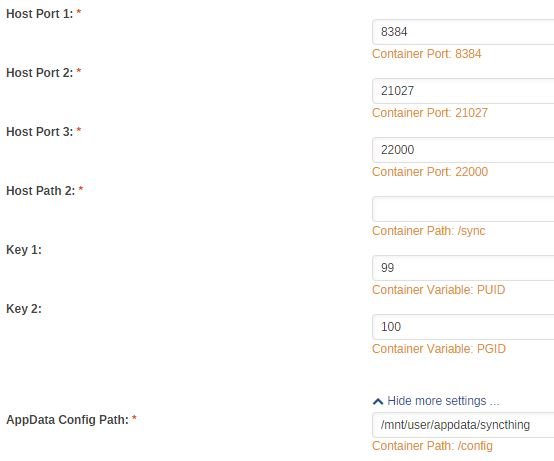
Here's a screen grab of a new install. No Host Path 1. Is this normal?
-
The user description field seems to accept special characters (slash, back-slash etc.) but will not accept a colon. If a colon is included for a new user, the new user is not created. While trying to add a colon, the change is not accepted. 6.5.1 RIchard
-
I see Host Path 2 in the edit screen, but not Host Path 1. What happened to Host Path 1? What should Host Path 2 be set to?


