





RichardU
Members
-
Joined
-
Last visited
Everything posted by RichardU
-
That's exactly what I want to do. Did you figure this out? Richard
-
This WordPress docker is fantastic - much better than the VM I ran on the same hardware. My only question is, how to I set up FTP so I can connect with Filezilla? Cheers, Richard
-
I have n8n installed on my unRaid server A and just tried installing it on my unRaid server B. When trying to copy over the settings, I noticed that the new installation wasn't asking for: Basic Auth, Basic Auth Username, and Basic Auth Password. Am I supposed to add those manually? When I install without those, I get the same error as frankie666. For fun, I added those variables manually and got the same error. You can see the error clearly if you check the logs quickly after starting. If you wait long enough the errors time out and the logs only flash what frankie666 showed.
-
Thanks so much for this awesome plugin. My only quibble is the section label: "Notifications, scheduling and retention". Seems like Retention options are actually in the Main settings area, or else I am completely missing something.
-
Perfect. This is the kind of thing I deal with about every 4-5 years so I appreciate the help. Thanks.
-
I currently have two SAS controllers, each with two outputs. I want to free up one of my PCIe slots so I'm looking for a single cart that can handle all four of my cables (each cable goes to four drives). Any suggestions will be appreciated. Richard
-
Are you using something that's similar but better?
-
I recently installed this plugin and completed my first parity check in 8 hour segments. The check took 25 hours and now the History section on my Main page says: Duration: 1 hour, 1 minute, 32 seconds which was the amount done during the last day only. Is this normal or am I doing something wrong.
-
Worked for me too. Thanks.
-
Tried to install Socat with default parameters and I get this: root@localhost:# /usr/local/emhttp/plugins/dynamix.docker.manager/scripts/docker run -d --name='socat' --net='bridge' -e TZ="America/New_York" -e HOST_OS="Unraid" -p '443:443/tcp' -p '100:PGID/tcp' --expose 443 'tynor88/socat' docker: Invalid containerPort: PGID. See 'docker run --help'. The command failed. I'm wanting socat so my HomeAssistant VM can talk to an iTach. Should I be using some parameters other than default? Cheers, Richard
-
That worked. Thanks.
-
@Taddeusz I'm running MariaDB for another purpose, but would prefer not to use it here. Since I don't plan on using a separate database it seems like I SHOULD use plain ApacheGuacamole and NOT use ApacheGuacamoleNoMariaDB which is what I have been doing, or do I have that wrong? Cheers,
-
I' I'm using the one that doesn't say NoMariaDB. usermod: no changes ---------------------- User UID: 99 User GID: 100 ---------------------- Using existing properties file. Using existing MySQL extension. No permissions changes needed. Database exists. Database upgrade not needed. 2021-07-30 08:14:31,546 INFO Included extra file "/etc/supervisor/conf.d/supervisord.conf" during parsing 2021-07-30 08:14:31,547 INFO Set uid to user 0 succeeded 2021-07-30 08:14:31,548 INFO supervisord started with pid 27 2021-07-30 08:14:32,550 INFO spawned: 'guacd' with pid 30 2021-07-30 08:14:32,552 INFO spawned: 'mariadb' with pid 31 2021-07-30 08:14:32,553 INFO spawned: 'tomcat9' with pid 32 guacd[30]: INFO: Guacamole proxy daemon (guacd) version 1.3.0 started guacd[30]: INFO: Listening on host 0.0.0.0, port 4822 2021-07-30 08:14:33,680 INFO success: guacd entered RUNNING state, process has stayed up for > than 1 seconds (startsecs) 2021-07-30 08:14:33,681 INFO success: mariadb entered RUNNING state, process has stayed up for > than 1 seconds (startsecs) 2021-07-30 08:14:33,681 INFO success: tomcat9 entered RUNNING state, process has stayed up for > than 1 seconds (startsecs)
-
Just tried to load this following the Spaceinvader One video, got to the login and guacadmin for u/p doesn't work.
-
Thanks. I was having difficulty setting up mariadb. Turns out it's not enough to delete a docker and its container. You also need to delete its folder in appdata. All is good now.
-
If I'm using SQLite, what would I enter into: PHOTOVIEW_MYSQL_URL I removed PHOTOVIEW_MYSQL_URL and added PHOTOVIEW_SQLITE_PATH, but that doesn't work.
-
I'm also having no luck with this docker right from the start. I created the docker and added a password: mypassword Open the console, type: mysql -u root -p Enter the password and I get: ERROR 1045 (28000): Access denied for user ‘root’@’localhost’ (using password: YES) Same result on another unraid machine.
-
The FreshRSS docs say use this to run the command line interface: cd /usr/share/FreshRSS sudo -u www-data sh -c './cli/list-users.php' How do I do that in docker?
-
Identity crisis. I was looking for My Servers on the plugin page but there it's called Unraid.net. It would be nice to settle on one name. Also, the App store has a link to the Support thread which goes to a general category.
-
If your log file ends with: /config/nginx/security/rpc2_pass: No such file or directory The fix is to create a Variable using + Add another Path, Port, Variable, Label or Device Key: RPC2_PASS Value: (your password) And make sure you fill in a password for K 16: Container Variable: WEBUI_PASS
-
You're right! Thanks. My mistake was thinking "Changes here will not take effect" applied to the whole page
-
What can I change here: To avoid getting this:

-
Maybe try deleting that and add it again.
-
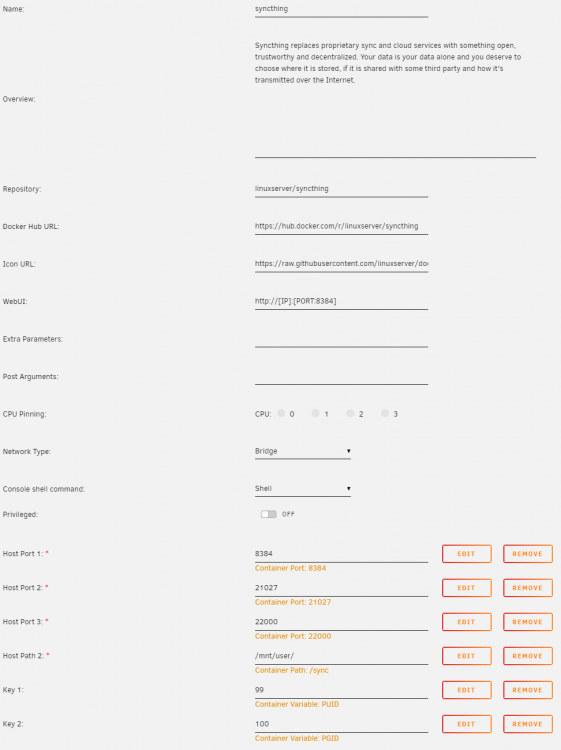
Syncthing offers a default folder path that starts with config, which you need to remove In the container configuration for my backup location, My Host Path 2 is: /mnt/user/ In the Syncthing app, my folder path is: /sync/Backup/Richard That puts the files into a share called Backup with a subfolder called Richard
-
I'm getting a big danger notice saying I need to specify user/pw in settings. But settings says I can't modify those fields. How would I specify user/pw in the docker config? Or is there some other way to get rid of the danger notice? Cheers, Richard


