mgworek
Members
-
Joined
-
Last visited
Everything posted by mgworek
-
I am running into this now as well. I do not have the GPU statistics installed but I am also in the middle of replacing a 10TB drive with a 26TB drive. The rebuild was running fine until this morning, i got that error and noticed my rebuilt was now 17days. I ended up stopping Docker and i am back to 1day 15hours. I don't know if that error had anything to do with Docker or not but I am leaving it off until the rebuild is finished and I can investigate more.
-
Never mind. I am a dork. I was trying to trouble shoot why my nvidia card wasn't working and i followed some post that had me put acpi=off in the syslinux.cfg but I never rebooted it and it was a over a month ago. That was a fun afternoon. Someone pointed me in the right direction with a different suggestion on Discord and then it hit me! You can delete.
-
Did you get this resolved? It is happening all of a sudden to me. it was working fine until I think the latest beta.
-
Never mind. I am a dork. I looked at the logs and it looked like it was downloading the same files again this morning but it was yesterday and I saw it connected this morning and didn't have anything to download. I thought yesterdays downloads were todays date but they weren't....... DOH!
-
Thanks for this. I just installed it this week and is working great. Quick question, does it download the whole library each time or does it only download the latest after the first download? I did see a recent settings. I am wondering if I need to use that if it downloads the whole library each time. Thanks!
-
This is a question for radarr in general. My docker updated to 3.x this weekend. Has anyone on 3.x noticed the search takes forever and is pulling way to many results and seems like just random movies are getting found. 2.x was not doing that. Is there a new setting I need to fix?
-
Has anyone found a good Prometheus docker to run with this? I have a dashboard I want to install but it requires Prometheus. Thanks
-
When viewing the dashboard on safari on my phone, the motherboard information is properly wrapping. I circled the problem.
-
Thank you for this. This has been bugging me for months.
-
Thanks for the info! I was looking at the GitHub site yesterday to find info but was also doing a million other things and missed it. Sorry about that and thanks!
-
Seeing the same thing. Did you get anything to load when you manually went to 8082? I just get a white screen in Safari. Chrome give me a page not working 500 error.
-
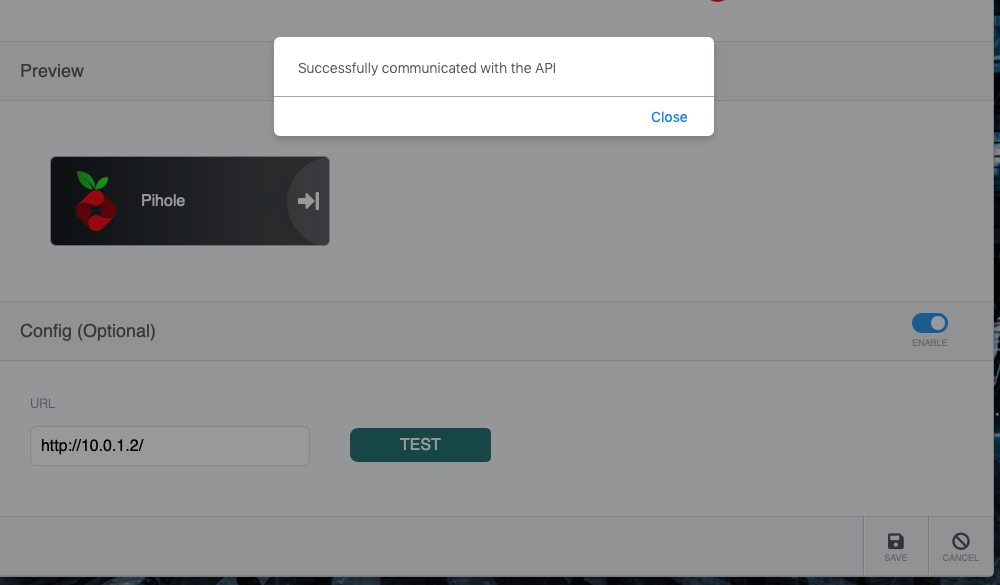
Yea. here is a screen shot showing its enabled and the test worked ok. Thanks
-
Just a quick question. What is the enchanted Pihole supposed to do? I have it set for an app, the test said it talked to the api but I don't see anything but the logo and name on the dashboard. Thanks
-
Thanks! I removed the docker and reinstalled it to make sure it was the latest one and that fixed nzbget!
-
Yea, I removed everything (docker and directory) and just started fresh. I am also worried about happening again as well but so far its been running smoothly. I have backups for the last 5 weeks, if it crashes again and I have to restart from scratch, I might see if I can copy a config file or something from last week.
-
My app took a complete dump yesterday after I posted the above problem. It went to some error page I've never seen before that looked like a javascript console window. Listed a ton of files it was missing. I had to remove everything and start from scratch to get it working again. Luckily, its not that hard to rebuild. It didn't fix the nzbget problem though but so far, everything else is working today.
-
I like the new functionality with Sonarr and Radarr but I can't get nzbget to work now with the changes. Application Type is set to Nzbget. I enable the config, enter in the user name and password. Hit test and nothing happens. Sonarr and Radarr popped up a message saying it worked with the API when hitting test. Nzbget was working correctly before the last update. Thanks.
-
Just thought I would update this in case anyone else has this problem. It is a known bug when using the nzb.su indexer. I have disabled it the indexer and will be keeping my eye on it for the next few days.
-
It is set to Yes. I never manually clean the history. I just looked at another one that failed this morning. "47 of 3106 article downloads failed" Its marked as failed in the history but the log shows Nothing to unpack for..., Moving completed files...., Parking file..... then sonarr grabs it.
-
Hey, I have a quick question. This isn't about the docker but the app. I've been using this docker for a long time and its been great. I've been having a problem for the past 2 months and I don't know how to fix it. I have downloads that are failing and Sonarr keeps grabbing them as being a successful downloading. Before when something failed, it would notify Sonarr and Sonarr would try to download a different version. Any idea what setting I might have messed up? Thanks!
-
So far it is working. It it finally able to scan all my folders and I was able to hit import the matched artists and it completed!!
-
Guess I maybe should of said Tags, not folders. I didn't have my coffee yet. In case you still need to know, on the right side there is now a tag icon. You can assign tags to apps now and on the home page, the tags will be listed which will refresh the page with those tagged apps.
-
Awesome updates to the app. Love the folders, takes care of the tabs I asked for. You should have links to the web, support, and issues pages in the settings section of the app to make it easier to find info. Any maybe a link to release notes. I didn't even know about the folders feature till yesterday.
-
weird, Sabnzbd work fine when adding it. The config box appears for the API.
-
Tried in both chrome and safari. I start typing and selecting it. It auto populates the color and the icon but thats it.