





crowdx42
Members
-
Joined
-
Last visited
Everything posted by crowdx42
-
So that is what is causing the error above? Is there a solution? Just don't use sleep? The server seems to be working fine otherwise.
-
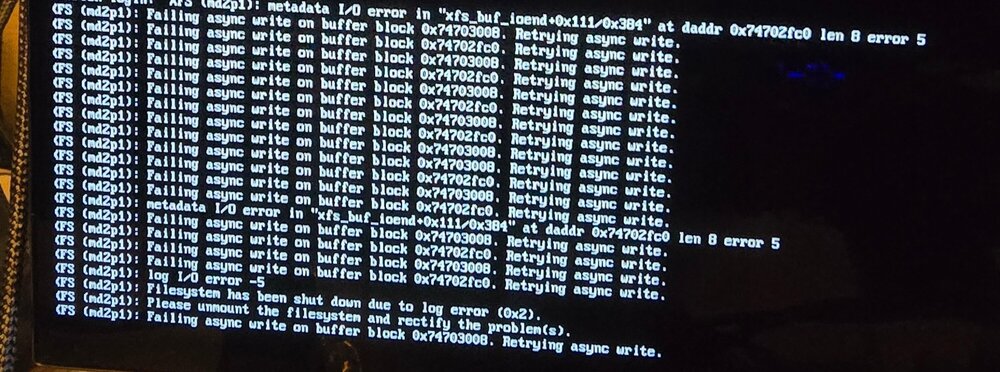
Hi all, does anyone have a SAS3 expander backplane and use sleep on their server? I am wondering if some drive issues when coming out of sleep are related to compatibility with a SAS3 expander. It seems when I hit the sleep button in the GUI, the systems goes straight to sleep immediately, when I resume from sleep I then see the errors below. I don't have diagnostics for the current setup as I have been swapping hardware in and out, trying to locate the issue. Thoughts
-
Does this plugin help with SAS3 expander backplane and not handling sleep correctly? i.e. I have had an issue when I put my server to sleep, when it comes out of sleep if throws up errors that it can't write to the file system correctly, this has resulted in drives getting the Red X beside the drive. Thoughts?
-
Just to update, I pulled all the current drives, added 4 drives that I don't use and then also replaced the HBA with a 9500 and also changed the cables. Plugged in a different USB drive with a test license I have and then booted, did a new config. I then did a restart and a sleep and restart and got the same issue. I contacted the eBay seller and they are sending out a replacement backplane expander.
-
Hi all, so I just got a CSE 846 chassis with a SAS3 expander backplane. The backplane had 4 𝐒𝐅𝐅-𝟖𝟔𝟒𝟑 cables connected to it and so I connected those 4 cables to my 9300 16i HBA which also has 4 ports on it. After a couple of weeks I have had an issue after doing server shutdown, on restart, I am getting the red x on one of the drives, I swapped the drive for a new one, but had the same issue again over the weekend. I have attached the diagnostics file and have had this question also on the general support in the forums. I am being led to believe that I should only connect 2 cables from the expander to the HBA? Is this correct? My initial thought was that the expander had a bad port on it and the seller on eBay has already indicated they can send a replacement backplane. Thoughts? unraid-diagnostics-20250110-1737.zip
-
Would connecting all 4 cables from the expander cause the issue I am seeing? When I swap out the current 9300 for a 9500, it will have a single 𝐒𝐅𝐅-𝟖𝟔𝟓𝟒 connector to two 𝐒𝐅𝐅-𝟖𝟔𝟒𝟑 on the expander backplane. Is the 4 𝐒𝐅𝐅-𝟖𝟔𝟒𝟑 on the backplane designed for the connection of two HBAs? The chassis came with all 4 cables connected to the expander and so I connected all 4 cables to the HBA.
-
Nope, this has been the setup that I have had the issue with, no changes have been made. The backplane has a SAS3 expander which has 4 ports on it, those 4 ports are connected back to the 9300 16i HBA.
-
Ok, so there is a single SAS3 expander backplane on the chassis. I have a single 9300 16i HBA connected using 4 cables from the HBA to 4 connections on the backplane.
-
Here are the diagnostics from the server: unraid-diagnostics-20250110-1737.zip
-
I have had an issue twice now, where when I just select shutdown in Unraid 7, the server gives the error below and sits retrying and when i eventually restart the server, I have a drive with the red x error. First time I replaced the drive, second time it had happened to the exact same slot. The drives are attached via a LSI 9300 16i HBA to a SAS 3 expander backplane on a CSE 846 chassis (chassis is new to me, got it a couple of weeks ago). So with the error below, could I possibly have a bad backplane on the new chasis or is it simply a cable issue? (The chassis came with the cables already attached to the backplane) I contacted the eBay seller but I really don't want to have ship the chassis back with all that entails. This is the error I see: XFS (md5p1): Failing async write on buffer block 0x1. Retrying async write Thoughts?
-
Will it make a difference if the spinning drives are already a bottleneck? I get around 185mbs on a parity check with my current 9300 with 4 cables attached to the expander backplane.
-
So I am expecting to receive a 9500 8i tomorrow, I have a single cable which I intend to connect the HBA to the SAS3 backplane expander. Will this work or should I get a cable which has 𝐒𝐅𝐅-𝟖𝟔𝟓𝟒 to two 𝐒𝐅𝐅-𝟖𝟔𝟒𝟑? 24 spinning disks, now SSDs.
-
I have a SAS 3 expander backplane (Supermicro CSE 846 with SAS3-846EL1), will a single cable from a 9500 8i to the backplane work with 24 spinning disks attached to the backplane? OR do I need a cable with 𝐒𝐅𝐅-𝟖𝟔𝟓𝟒 to two 𝐒𝐅𝐅-𝟖𝟔𝟒𝟑 connectors on the backplane?
-
Question on controllers, I have a LSI IT Mode SAS9300-16i and it is attached to a SAS3 Epxander on a Supermicro 846 chassis. I am wondering, would I be better off running multiple 9300-8i cards to run 24 drives. My motherboard is an MSI PRO B760-P with an i5 14600k.
-
I am currently running Czkawka to find the duplicates, it looks like a lot of files have been duplicated in the Nextcloud folder on the Nas. The duplicates are all in the same user folder files folder. The only thing I did manually to the Nas folder was add in files I had saved on the NAS to that folder, so that I could sync those all back to the PCs connected. For the connected PCs I also copied the same files to the same Nextcloud on the PC. The intent was that the sync would be faster than having NextCloud slowly copy across the files ( I am using a 10g network and so it is much faster to copy files manually to/from the server than having NextCloud copy them with all it's process overhead). Thoughts?
-
Hi all, got a NextCloud question. I have been using NextCloud and my idea was that I use the same login across multiple machines and sync them all to the same NextCloud folder on my server. I thought this was working but it seems like the folder on the server is growing in size when syncing the multiple machines to it. What am I missing? I thought this would work similar to OneDrive.
-
I ended up and biting the bullet and bought an 846 chassis. Putting it together this weekend, hoping all goes well
-
I have looked at the 848 and it seems like it is built for server boards with no place for a regular motherboard to output from it's backplate. The 847 I have seen have been 36 bay and so only half height cards would work, and I assume it would not allow 12mm fans to replace the supplied, also due to the drive cages underneath the motherboard location.
-
Can anyone recommend a 24 bay hot swap case? I have been looking at used Supermicro 846 but they have become very pricey ($899 on eBay). Does anyone havee advice of a decent 24 bay? I am not sure I need a SAS 3 expander, as I have HBAs and so I can connect directly to a backplane, SAS 2 I am sure would be fine, as I am not using SSDs and the system is storing movies and tv shows for Emby. Thoughts?
-
Hi all, I am wondering has anyone modded a Supermicro SC846 case to replace the dual PSUs with a single ATX PSU? I am considering upgrading from my current 20 bay Norco case to a Supermicro 24 bay case and wanted to use the existing PSU from my current case, rather than buying one of the SQ PSUs for the Supermicro case. Thoughts?
-
Nvm, I found the solution is via Plugins.
-
Quick question (possibly answered in this long thread), is there a way for Unmaic to keep the original file and move the transcoded file to a different folder? Basically I am only using Unmanic for reducing file sizes for tablet viewing and so I copy the files to a folder that Unmanic watches to encode. My preference is that the original file does not get deleted, as I may want to encode that same file with different settings and do not want to have to copy it back to the folder again. Thoughts?
-
As an update, I dug around parts I have on hand and ended up putting together a 7700k with 32gig of memory and two Supermicro Hot Swap bays which allows me to run 8 drives. Overall it is not bad, at idle with no drives installed it idles at 40watts and maxed out with all drives it is running at 140watts. Being that I wanted this setup mainly for clearing old drives and preclearing new ones, I think this setup will work for me in my limited use case. Patrick
-
Hi all, can anyone give advice on a system that can hold around 8 drives and takes really low power draw. My use case is for doing pre-clears and other testing. Cpu does not have to be powerful. Are there any small factor cases that have 8 hot swap bays that would allow adding and removing drives without having to take off case cover/side. Thoughts?
-
As an update, the new Sandisk USB arrived and works fine for the trial.

