





JonathanM
Moderators
-
Joined
-
Last visited
Everything posted by JonathanM
-
Did you mean parity instead of cache?
-
The support link for the container seems to point here https://github.com/cross-seed/cross-seed/issues?q=is%3Aissue I suggest asking there, that is the designated place to get support for that container.
-
I didn't see any indication that you added the port to the container config. Normally with binhex's VPN enabled containers there is no port defined in the container template, because it is assumed you will be using a VPN with port forwarding inside the VPN tunnel. I suggest trying to get PIA working again, being sure that you select an endpoint that supports port forwarding. If you can't get it working, look through the supervisord.log file after the attempt, redact all your PIA credentials (probably multiple places) then attach it to your next post.
-
I believe so. Probably caused by clients advertising sources that are no longer online.
-
Do you intend to use a paid VPN to hide behind? If not, you need to open and forward a port through your router and into the container.
-
If you go to settings, apps in prowlarr, do all your apps show up and test good?
-
You can select the memtest option in the Unraid boot menu.
-
That would probably do it. I thought there is logic in place to eventually force the shutdown, but maybe that only applies to UPS power failure shutdowns.
-
You can try using the umount command on all the /mnt/diskX, check if they are gone with the mount command, finally umount /mnt/user. This is obviously not the "correct" way of doing things, but it's the least harm I can think of, since if all the disks are unmounted parity should stay valid.
-
What does mount show?
-
Try umount -f -l /mnt/cache That's a lowercase L for lazy in the command switches.
-
Any running VM's?
-
As long as no parity slots are occupied you can add the drive back without issue.
-
Disk to disk is safe, or you could add the array as a secondary storage, and tell the mover to go from array to cache.
-
That's how mine is set up.
-
What exactly do you mean by that? If you put that drive back in Unraid while parity is valid Unraid will overwrite it with the emulated unmountable data currently there.
-
Yes, at least that's how I have mine configured.
-
https://github.com/binhex/documentation/blob/master/docker/faq/vpn.md See Q24
-
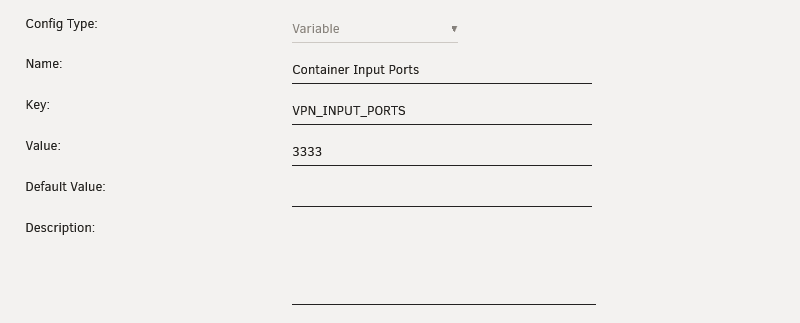
Did you also add it to your VPN_INPUT_PORTS list?
-
Unassigned Devices can mount and read NTFS. Only issue I can think of is if the volume wasn't completely closed properly the last time it was mounted in the Windows system.
-
See if the mover tuning plugin will do what you want.
-
Where was the nvme used before? What format is it? Probably could use the Unassigned Devices plugin to read it. diagnostics might be useful
-
This is the multi language support area, start a post in the main general support, add your diagnostics file and a description of your network equipment.
-
Nice catch, I assumed when I asked, the response would reflect what was asked. Didn't even think to cross check. The _. files are still there, don't know if that will be an issue or not.
-
Why not just run it natively in Unraid? Works great there.


