




.jpg.adf8def3431e0aa8e590900f82752d7a.jpg)

wgstarks
Members
-
Joined
-
Last visited
Everything posted by wgstarks
-
I get an execution error when trying to stop this docker. Unraid 7.3.1. docker run -d --name='HDHomeRun-Signal-Web' --net='bridge' --pids-limit 2048 -e TZ="America/New_York" -e HOST_OS="Unraid" -e HOST_HOSTNAME="BrunnhildeTwo" -e HOST_CONTAINERNAME="HDHomeRun-Signal-Web" -e 'PORT'='3000' -e 'HDHOMERUN_DEVICES'='' -e 'HDHOMERUN_DISABLE_DISCOVERY'='false' -l net.unraid.docker.managed=dockerman -l net.unraid.docker.webui='http://[IP]:[PORT:3000]' -l net.unraid.docker.icon='https://raw.githubusercontent.com/petelombardo/unraid-templates/main/icons/hdhomerun-signal-web.png' -p '3000:3000/tcp' 'petelombardo/hdhomerun-signal-web' 41044ee444d0009dc0f77d981e69c78c68cb6c5f38f51b53b2762236351a2370 The command finished successfully brunnhildetwo-diagnostics-20260622-0950.zip
-
Attach your supervisord log and docker run command to your next post. Be sure to redact any users/passwords.
-
Done https://product.unraid.net/p/7-3-1-management-access-help-shows-invalid-pfsense-rebind-config?b=unraid-os-bugs
-
That’s not supposed to be an issue anymore according to LT but I recently had a bunch of unexplained (nothing in the logs) system freezes that totally disappeared after changing MACVLAN to IPVLAN so I would have to agree with you. It’s possible that whatever is causing this issue may be hardware dependent I suppose.
-
Not sure if that matters. Saw a bunch of examples that had either one. I used singles though.
-
Actually the instructions may have said separate lines. Not sure about the exact wording but my assumption was that if each setting should be on a separate line then settings that took up two lines wouldn’t work. Changing the setting so that it was all on one line fixed the failed dns query. The full discussion on the pfsense forum is here if anyone is interested. It really illustrates my lack of knowledge when dns is involved.😁
-
A little more info from the pfsense forums. The settings page in pfsense states that settings should be separated by a line break. The unbound docs state that only a whitespace is needed but recommend using line breaks and indentation for visual clarity so the currently suggestion in the help menu should work but doesn’t.
-
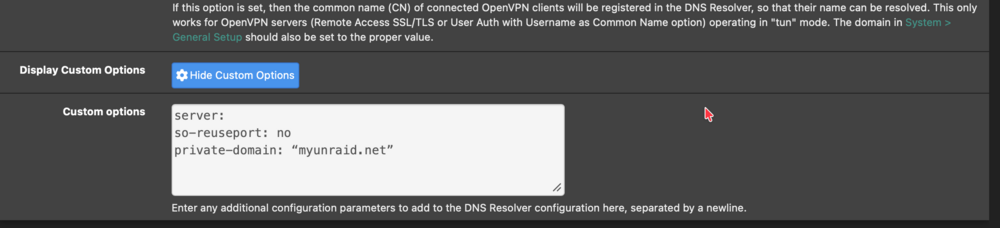
Actually got this fixed too. It seems that the pfsense setting recommended in the Unraid help menu in management access settings isn’t formatted properly. The help menu shows adding this setting in pfsense- server: private-domain: “myunraid.net” What actually worked was this- server: private-domain: ‘myunraid.net’ No line breaks.
-
Actually got it fixed with help from Google. Looks like it was a corrupted certificate bundle. Deleted /boot/config/ssl/certs/certificate_bundle.pem and then re-provisioned in settings>management access. Everything is working now.
-
I have avoided making any changes to this server other than the docker network type for more than a week and haven't had anymore recurrances of the freezes. Changing macvlan to ipvlan seems to have fixed the problem.
-
Only worked for about an hour. I’m going to do a little more research but looks like I can either turn off rebind attack detection on my firewall or just turn off ssl on Unraid.
-
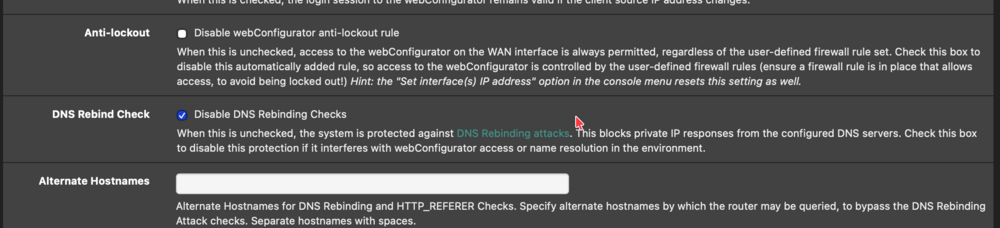
I think maybe I've got it (at least it's working right now 🤞). I set the code from the help menu in pfsese>services>dns resolver>custom options (so-reuseport: no was already existing)- Also in System>Advanced>Admin Access>DNS Rebind Check I checked Disable DNS Rebinding Checks. I feel like there should be some way to make this work without disabling the rebind check? Not sure if this is a real threat to my firewall now?
-
My problem is that I don’t know where to add that custom configuration in pfsense.
-
I think this is possibly related to my pfsense firewall which handles dns for my local network. I notice that when I connect via IP once I’m logged in the browser shows that I am connected to the myunraid.net address. ❓❓❓
-
And now a few hours later and the problem is back. I’m only able to reach the webUI using the local IP address. Clearly I don’t know how to fix this issue and could use some help. New diagnostics attached. brunnhildetwo-diagnostics-20260619-0720.zip
-
I think I’ve resolved the problem. It appears that settings>management access>use SSL/TLS was set to “no”. No idea how this would happen? I know I didn’t make the change and no one else has root access. I have set it back to “strict” and access is working now.
-
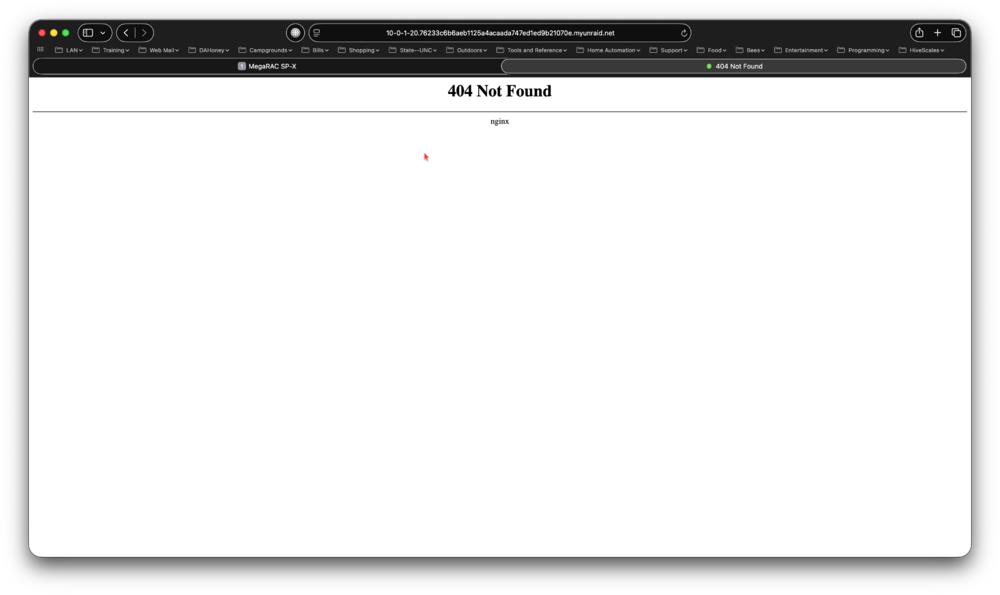
I seem to have lost ability too connect using myunraid.net address. Just get a 404 error- After reboot I was able to connect using the local IP but still a 404 using myunraid.net. Attached diagnostics taken automatically during the shutdown process to boot/logs in case it helps. I can also supply syslog if needed. brunnhildetwo-diagnostics-20260618-2021.zip
-
No keyboard (it’s a iPhone) but a pinch doesn’t work.
-
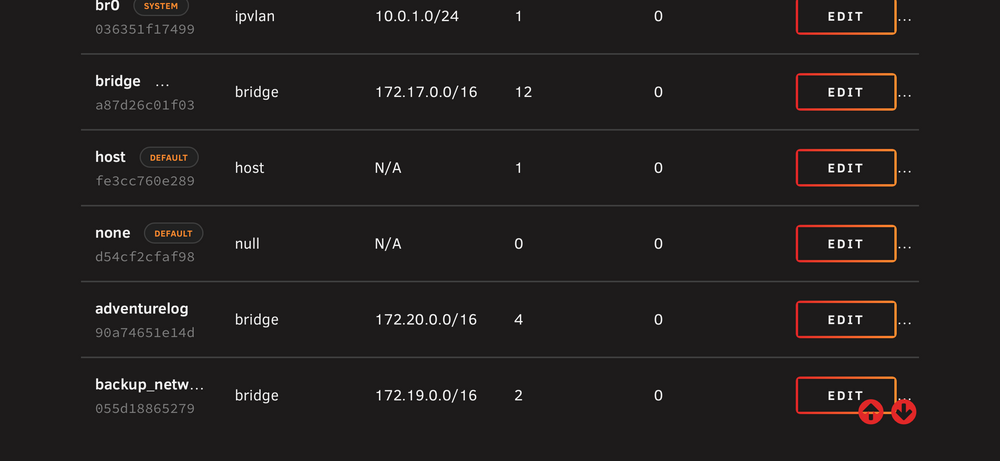
What are the 3 dots for in the Actions column? They don’t seem to have any function.
-
You didn’t need to use the non vpn version. Just need to correct the name of the server you were connecting to. If your current setup works no point in changing it though.
-
Thanks 👍
-
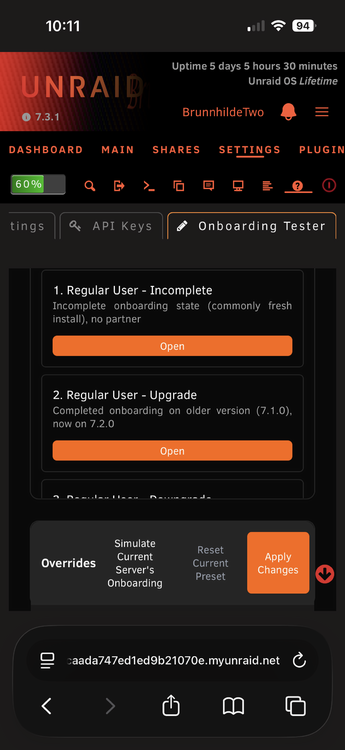
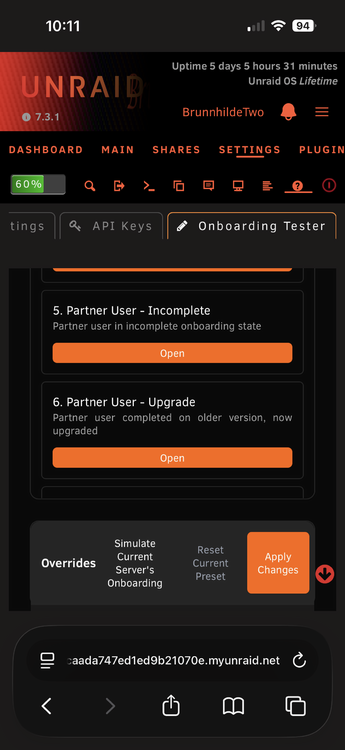
I’m seeing this in Settings>Management Access>Onboarding Tester- There isn’t any content for these settings in the help menu but the “incomplete” wording suggests an issue. Not sure what to do here? I clicked the “open” button and the text suggested that my current plugins would be removed and a predefined set of “necessary” plugins would be installed. I don’t want to do that. Any guidance? brunnhildetwo-diagnostics-20260614-2220.zip
-
I had this same problem when I first updated to 7.3. It was caused by me using --net=container:<vpn container name> in extra parameters to route containers through another container. This no longer appears to work in 7.3+ (at least not for me). I had to remove this extra parameter and instead set Network Type to Container and below that set Container Network to the VPN docker that I want it to route through.
-
Looking at your docker run command I see lots of ports listed in VPN_INPUT_PORTS that I'm not seeing a corresponding port mapping for. See https://github.com/binhex/documentation/blob/master/docker/faq/vpn.md. Scroll down to Q24.
-
What version of Unraid are you using?






