




.jpg.adf8def3431e0aa8e590900f82752d7a.jpg)

wgstarks
Members
-
Joined
-
Last visited
Everything posted by wgstarks
-
Post your supervisord log. Be sure to redact users and passwords.
-
@betaman As I posted earlier, your old parameters may be different or not exist at all. I don’t have anything in that field on my docker.
-
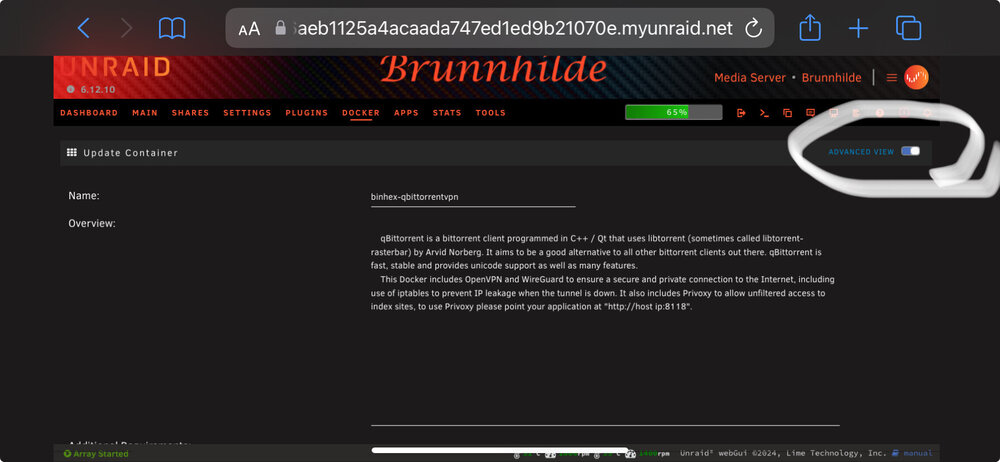
From the documentation linked earlier- It’s shown as Extra Parameters in your screenshot.
-
You’ll need to be in Advanced View. Top right corner. And there may not be any parameters currently shown.
-
See this post. It has links to binhex’s great documentation.
-
PIA claims to have a NO LOGS policy that has been audited here. It all looks like marketing and you can choose to trust it or not. I’ve been using them for about 4 years without any complaints.
-
https://github.com/binhex/documentation/blob/master/docker/faq/vpn.md Scroll down to Q21 and Q28.
-
The current setting would be what you configured as your local network. You can add other networks as well if you want to be able to access the gui from those networks. I don’t believe there is any default setting for this. Too many possibilities.
-
Yes. Just add a comma and any other networks you want to be able to access the webUI from. Then click apply.
-
This is likely your problem. If you add the lan network used by your wireguard server to the LAN_NETWORK setting on the container (comma separated) you’ll probably have access.
-
PIA is widely used with many servers that support port forwarding. Easy to setup since the docker is pre-configured for it. Wireguard and OpenVPN are two different protocols used to connect to VPN servers. I know that PIA (and probably most other providers) supports both methods. I’ve never used wireguard though so not really qualified to answer questions about it. Attach your logs to your next post if you like. There is probably something in there to indicate the cause of the failure. If Mullvad is no longer supporting port forwarding they may have taken the server you have been using off-line and you’ll need to pick another one. Be sure to redact users/passwords in the logs.
-
You might get it working but it will be VERY slow speeds. I would recommend switching to another provider that supports port forwarding. If you want to give it a try set STRICT_PORT_FORWARDING to “NO” in the container settings.
-
The host and container paths for qbittorrent and sonarr must be exactly the same. For example mine is /data:/mnt/user/qbitvpn/ IN BOTH DOCKER CONTAINERS. You can then configure qbittorrent to download to /data within the app using sub folders as you desire.
-
Add any networks you want to be able to access qbit from to the lan_network setting. Comma separated. https://github.com/binhex/documentation/blob/master/docker/faq/vpn.md Scroll down to Q33.
-
Just to be sure, you are attempting to access from the lan network you have configured (192.168.1.0/24)?
-
Did you use the temp password supplied in the supervisord log to access the webUI and reset the password? Looks like the app is running properly but you have to use the temp password from the log for initial access.
-
See the link in my previous post. If that doesn’t work post your supervisord log. Be sure to redact users/passwords.
-
Recent versions of qbittorrent will no longer allow access using the default password. Have you changed the password? https://forums.unraid.net/topic/75539-support-binhex-qbittorrentvpn/?do=findComment&comment=1332654
-
https://github.com/binhex/documentation/blob/master/docker/faq/vpn.md Scroll down to Q29.
-
This is definitely NOT my experience. I imagine you have something misconfigured (very easy to do). If you want to provide specifics of your configuration I’d be glad to help with this if I can.
-
You didn’t post the entire supervisord log so this is a bit of a guess. https://github.com/binhex/documentation/blob/master/docker/faq/qbittorrentvpn.md Scroll down to Q4.
-
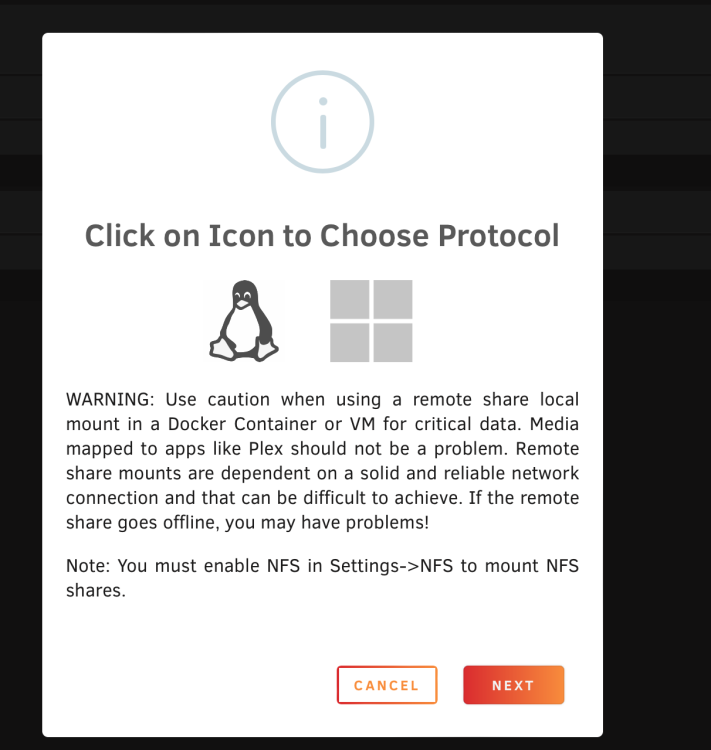
Please disregard. I'm an idiot. 😀 Didn't actually read the popup and never selected a protocol.
-
After updating to 6.12.10 I can no longer add remote SMB shares. When I click the button to add a share I get a warning popup window but clicking "Next" doesn't do anything. UD version- 2024.3.31 brunnhilde-diagnostics-20240405-0625.zip
-
From the first post in this thread- There is also the option available to use the notification options configured in unRAID to send you notifications at intervals which you configure if you enable the notifications option in the preclear popup window. I usually prefer to receive an email at the end of every step and cycle.
-
When you start the preclear you’ll get a popup that lets you set what process you want to run. Verify signature is one of them. https://forums.unraid.net/topic/120567-unassigned-devices-preclear-a-utility-to-preclear-disks-before-adding-them-to-the-array/




