




.jpg.adf8def3431e0aa8e590900f82752d7a.jpg)

wgstarks
Members
-
Joined
-
Last visited
Everything posted by wgstarks
-
How are you entering the password? If you're using copy/paste maybe try typing it into the password field. Also, are you sure you're using the correct credentials? I know PIA has separate credentials for VPN login and website login.
-
You could test this by disabling 2FA. There could also be other reasons- https://github.com/binhex/documentation/blob/master/docker/faq/vpn.md Scroll down to Q16.
-
https://github.com/binhex/documentation/blob/master/docker/faq/vpn.md scroll down to Q21 Yes you can route other dockers through the vpn. Search YouTube and you should find several videos for this. I believe SpaceInvaderOne made one specifically for this docker.
-
You can set a canary delay. I think mine is 72 hours.
-
Do you have Inform Host set to the IP of your controller? I’ve never had to adopt my AP’s more than once.
-
Mine seems to work just fine after the latest update. Everyone does need to delete empty paths with the current version of unRAID though.
-
It works great for me. Seems to show me every post containing the search terms.
-
Honestly, I got this docker running just to see if I could but I have deleted it a switched to peteasking version.
-
Intel Xeon E3-1241 Haswell. Rather underpowered for this. I would recommend you setup a test library with maybe a dozen or so videos and see how yours does before starting your main library.
-
On my machine it takes about 20 minutes. ~40% You won’t see as much file size reduction from low quality files but if they’re all in the same directory it might be easier just to convert everything. It’s possible but you should test this first. You may decide that you don’t want to overwhelm your CPU for weeks or months. Sorry, can’t give you any advise on the nvidia cards.
-
My experience has been that the transcodes take longer than file moves so a fast drive may not speed things up. I just use a directory on my array. Completed files are moved while others are processing and not seeing any bottle necks there. As far as your main question, I've got a new library processing right now. Looks like the process is that a new file is created at your transcode location. All changes are made to that new file. Then the new file is moved to the original location overwriting the original. I can see from the file creation times that only one file is being created in my transcode folder.
-
This isn’t necessarily true. The location used is wherever you have it mapped to in the container configuration.
-
I’m not seeing anything obvious other than the app shutdown immediately after starting. Maybe someone else will spot something. Also, your VPN user name and password are contained in the log. You should contact your VPN provider and change them. Sorry, I should have mentioned that you would need to redact them.
-
👍
-
Great idea. I probably wouldn’t overwrite this drive since it’s named UNRAID but why take a chance.
-
Since I don’t really have a use for it yet I’m reluctant to actually add any configurations, plugins etc. I guess the best course would be to leave it empty other than the key file and just download the current version of unRAID when I get set to actually use the flash. I may store the key file in a seperate directory that won’t get overwritten when I unpack the unRAID OS zip file though.
-
The file is in your appdata folder.
-
I have a spare (licensed) unraid flash drive that I bought in a two for one deal when I first setup my unraid server. LT's recently announced pricing changes for their licenses started me thinking about possibly putting this license to some use but not really sure how yet. For now I'm just trying to work out a method for keeping it up-to-date. It has some very old config that I would like to remove. I know bzroot, bzimage and the pro.key files need to remain. Is there anything else? Once I have the vanilla file system what would be the best way to keep it updated? It's not installed in any hardware currently but could I mount it in my current unraid server and run some sort of automated sync with each unraid update? Maybe just a manual sync is less headache? Any ideas?
-
Attaching the supervisord.log to your next post would be a good starting point for troubleshooting.
-
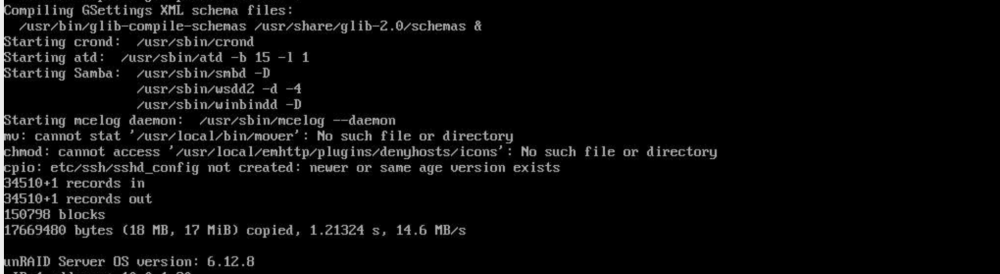
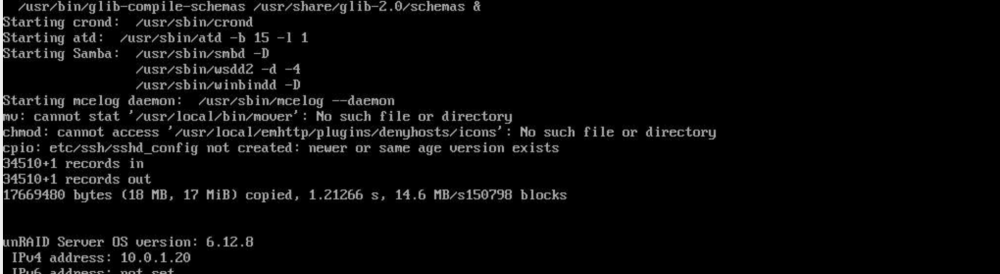
For me the error has only showed up on reboot in the console. Not in the system log. Started mover manually (didn't want to wait an hour) and see this in the system log- Feb 24 20:42:21 Brunnhilde emhttpd: shcmd (129): /usr/local/sbin/mover &> /dev/null & Feb 24 20:42:21 Brunnhilde root: Starting Mover Feb 24 20:42:21 Brunnhilde root: ionice -c 2 -n 0 nice -n 0 /usr/local/sbin/mover.old Seems to work properly. root@Brunnhilde:~# ls -l /usr/local/bin/mover -rwxr-xr-x 1 root root 161 Feb 24 20:28 /usr/local/bin/mover* root@Brunnhilde:~# # Generated mover schedule: 0 */1 * * * /usr/local/sbin/mover &> /dev/null Tried uninstall-reboot-reinstall. Didn't work. performed another reboot after the reinstall and still seeing the error.
-
I’m also getting the same error.
-
I've never had this issue with this docker but often with unraid I have to do a recovery reinstall of macOS after updates. Might be worth a try for you.
-
Yes. It will correct empty paths for anyone who hasn’t updated to 6.12.8 and FCP will recommend it’s installation.
-
It’s the same thing. Whatever you enter in settings will be stored in the config file.
-
Thanks for this. Exactly the same thing happened to me but I knew how to fix it because of this post.



