hernandito
Community Developer
-
Joined
-
Last visited
Everything posted by hernandito
-
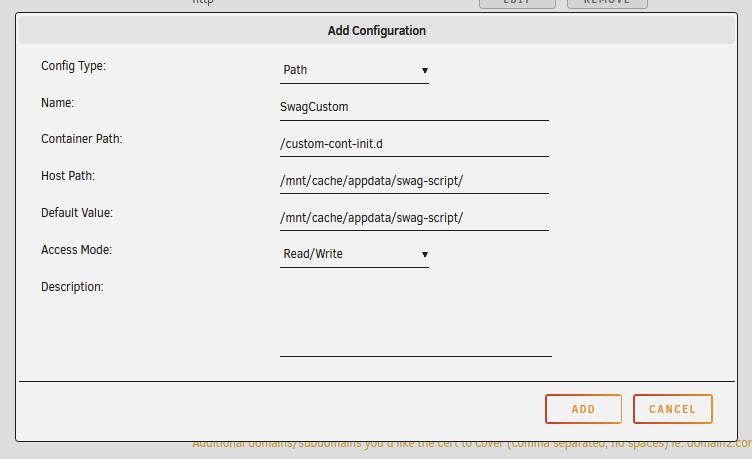
Boy....With so much unRAID experience, I hate to ask this question. For ages, I used to have a folder inside my /appdata/swag/ folder called custom-cont-init.d. In here I had a bash script that installed a few things to my container. I see now that this is a legacy way; and that the new way is place/locate this folder outside the docker's /config folder. Thinking that a more updated docker template would have this volume mapping; I compared my template to the latest Swag template and they are different! Like SCARY different. Plus it did not have anything pre-set for the custom script. What should I do? In reading Cutomizing LSIO Dockers, do I need to go my original template and ... +Add Another Path...? Will this work? I am afraid of ruining my Swag setup. I am also scared of updating my template to the latest. Things were nicely working w/ LetsEncrypt... I'm not a master at DNS and certificates. Thank you, H.
-
in your screen cap above, you have the folder /mnt/user/SHARE... is the "share" share in all capital letters?
-
I would like it for the unRAID server. I'm sure at some point I will forget about it and then it may expire. Thank you! H.
-
I just ordered a set of the below CPU/mobo combos…. https://www.ebay.com/itm/334496236583 64GB DDR4 ECC Ram. sata controller 9211-8i 6Gbps HBA LSI FW:P20 IT Mode https://www.ebay.com/itm/ I’m toying w the idea of a Fractal Desigb Define 7 XL. And a $200 1800W mining power supply. I will migrate all my drives to the new hardware. I am very nervous. Thoughts?
-
Has anyone created a script that renews the LetsEncrypt certificate? Would love to implement. thank you.
-
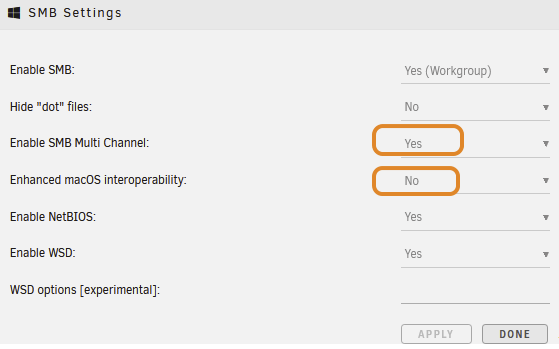
I think I have finally resolved this. I went back to 6.10.3. In my Samba settings, I enabled SMB Multi Channel; and I disabled Enhance macOS Interoperability. We do not use Macs. I tested with a 4K movie and it played fine for the first 5 minutes... I didnt have the time to watch the whole thing. I hope this helps someone. Thanks to @Squid for pointing me in the right direction.
-
Thank you ChatNoir!
-
Hi Lilarcor… how exactly did you disable this? I am getting caching movies stored in my server directly from Kodi. I tried 6.10 and 6.11RC. thanks.
-
Well, I spoke too soon. I got the same problems with 6.11 RC. Constant stopping/caching from my local network. i went back to 6.9.x and is normal. ‘’I would love to resolve this if someone has an idea. thanks.
-
Thanks again Squid. Did the 6.11rc update and much better. Rain into one brief buffering part, but ver randowm thanks again. H.
-
Thank you Squid. Is this a known issue that 6.11 resolved…? I don’t want to jump to 6.11 and not be able to get back to 6.9.x. I could backup the flash… but scary.
-
Hi guys, So I upgraded to 6.10, did the new password, installed My Servers, backed up flash drive. Then I proceeded to have a nice Saturday with family. That night, I wanted to watch a movie. unRAID stores all my media, which I consume in Kodi on an Intel NUC running Libreelec. All Ethernet cable connected. I put on the movie and immediately Kodi starts caching and buffering. Kodi shows me an error message about not having the reading speed…. Oh oh… maybe it’s the one movie, so I tried a second movie that I have watched before to test…. Same problem!! Rebooted both the Nuc and unRAID…. Same!! So I ran to my PC and I downgrade to 6.9.x. Tested with the same two movies…. Flawless playback…. Phew…. What did I do wrong? Is there a new setting or step i missed? This cannot be….! I have a dual CPU Xeon E5-2670, 64GB RAM. I checked if anyone was streaming from Plex… no streams. No VMs, no downloads… I have been using this server for ages Please, any advice?? Thank you. H.
-
Quick question. Is there a way to setup this client so that files will never get removed? IOW, if I have folders or files in my Windows Dropbox and I erase files or loose rights (work account) to certain folders, the files from the unRAID docker are NOT erased from my server. thank you.
-
I am a Kodi guy as well. When you add the new library, what category do you use? I see that NFO’s are created. I am really liking this whole thing. Thanks.
-
I can definitely see point no. 3…. Too much censoring. How do you watch the videos? I tried Tubesync, and it does put them in a subfolder of the channel name. I added the overall folder to Plex library, and configured. Sadly it lumps all channels into the one library.
-
looks interesting…. Not sure if I have a need for this. I usually watch YouTube videos in a random way on my tablet. I once downloaded a full concert to use on my htpc box. I would love to hear use case scenarios….
-
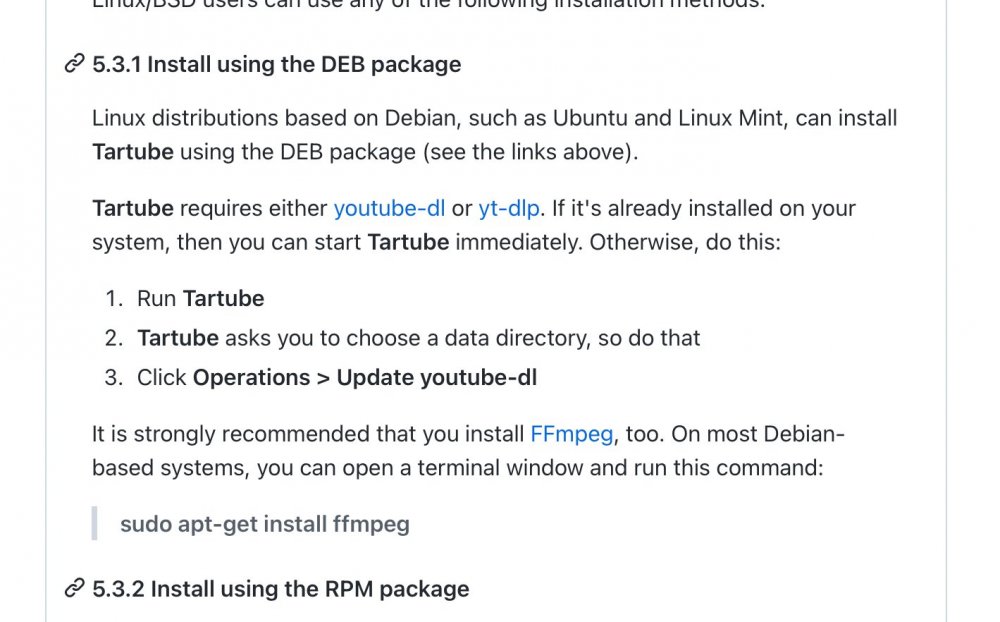
In reading about Tartube, it says it’s a front end for YouTube-dl. There already dockers for this. Wondering if it could be added to one of the existing Dockers……
-
Script sounds quite risky if you don’t know what you are doing. Have you looked at:
-
Thank you guys... it worked! Here is what I ended up adding... COPY docker-entrypoint.sh /usr/local/bin/ RUN chmod +u /usr/local/bin/docker-entrypoint.sh ENTRYPOINT ["sh","/usr/local/bin/docker-entrypoint.sh"] I have added the template for this docker in my repo. It should show up soon on CA. Thanks again! H.
-
I strongly suspect this is the issue. I did add all the copy commands after the ENTRYPOINT line... but I cannot figure out why it does not work. I also tried COPY but again without luck.
-
Anyone... 🤒
-
No problem. Thanks!
-
I have narrowed the non-working part to my Firefox browser. I cleared the cache and it is still sporadic -it's working now. I am not sure if others have the same issue. I have it also set up to work through a VNC connection inside the Guacamole docker. This way it always works in my browser. The issue others are having is not related to this. I think they have upgraded to the paid v. 4 option. I guess I can update the template with more detailed instructions... Your thoughts?
-
Hi Guys, I completely missed that this TinyMM template was pushed to CA... it has been experimental. It is not quite working. The No-VNC port works once i a while... but not consistently/reliably. I only created the unRAID template; I did not create the container. EDIT: A quick Google suggests to clear my browser's cache. It still did not work on Firefox... but it does load in Chrome. What does work consistently is through an external VNC client (like VNC Viewer) on the 5900 port. When trying on port 5800 on my browser the error I get is: 24/01/2022 18:11:16 - webSocketsHandshake: using binary/raw encoding 24/01/2022 18:11:16 - WebSockets client version hybi-13 24/01/2022 18:11:16 incr accepted_client=3 for 127.0.0.1:52712 sock=11 24/01/2022 18:11:17 webSocketsDecodeHybi: got frame without mask 24/01/2022 18:11:17 rfbProcessClientProtocolVersion: read: I/O error 24/01/2022 18:11:17 client_count: 1 24/01/2022 18:11:17 Client 127.0.0.1 gone 24/01/2022 18:11:17 Statistics events Transmit/ RawEquiv ( saved) 24/01/2022 18:11:17 TOTALS : 0 | 0/ 0 ( 0.0%) 24/01/2022 18:11:17 Statistics events Received/ RawEquiv ( saved) 24/01/2022 18:11:17 TOTALS : 0 | 0/ 0 ( 0.0%) 24/01/2022 18:11:18 active keyboard: turning X autorepeat off. 24/01/2022 18:11:18 active keyboard: turning X autorepeat off. with the Read: I/O Error highlighted in red. I have not been able to resolve. DO NOT UPGRADE TO V. 4.... This is a paid version only.
-
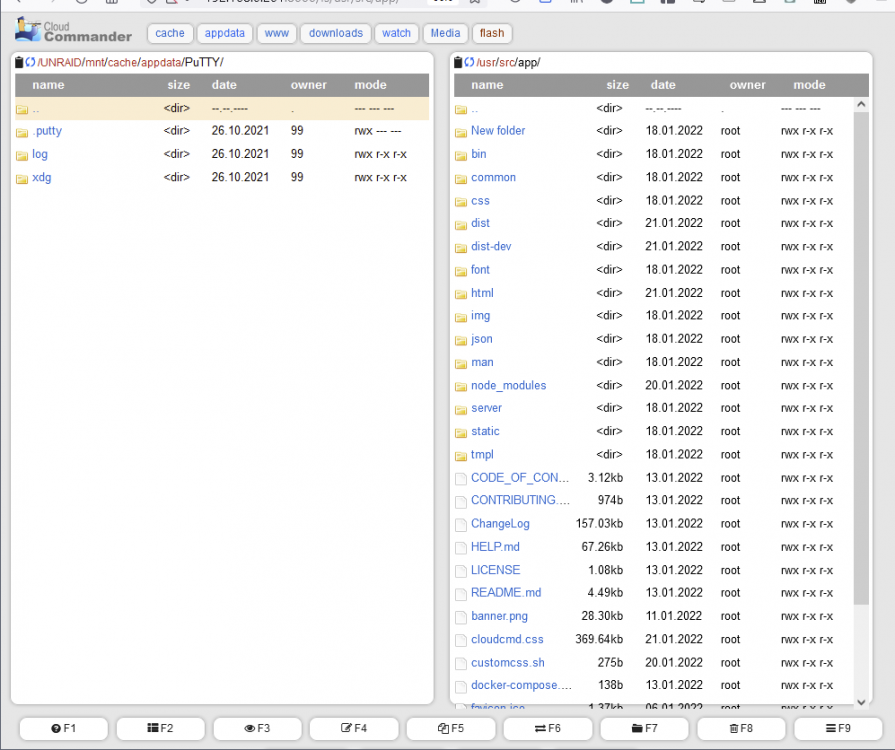
Hi Guys, I am perhaps a little rusty, or things have changed in the Docker landscape. I am creating a container for CloudCommander. I have taken the original CC repo and made some slight improvements. I revamped the UI and added folder shortcut buttons that are somewhat user editable. NOT a great solution, but it somewhat does the job. I have been able to successfully build and push the new container into Docker Hub. I have also create the unRAID temple .xml. But I have one thing I cannot resolve. In my Docker file, I create a folder called /config. I copy certain things to this folder - files that can be user configured. This is the folder that I want to map to /mnt/cache/appdata/cloudcmd. But it's not working. When I build the docker, and I run the container in Docker Desktop, I am able to go into the /config folder, I see all the copied files. So I push the docker. When I run the template in unRAID, I pick a new folder in /appdata, the container installs and all looks good. HOWEVER, the /appdata folder and the /config folder do NOT have the copied files. What am I missing? I am pasting my Dockerfile and the unRAID template... any help is greatly appreciated. Dockerfile: FROM node:lts-buster-slim LABEL maintainer="Coderaiser" RUN mkdir -p /usr/src/app WORKDIR /usr/src/app COPY package.json /usr/src/app/ RUN npm root set package-lock false && \ npm install --production && \ apt update && \ apt install -y make bash nano mc g++ python3 && \ npm i gritty && \ npm cache clean --force && \ apt remove -y make g++ python3 && \ rm -rf /usr/include /tmp/* /var/cache/apt/* COPY . /usr/src/app VOLUME ["/config"] RUN mkdir -p /config COPY cloudcmd.css /usr/src/app/dist/ WORKDIR / ENV cloudcmd_terminal true ENV cloudcmd_terminal_path gritty ENV cloudcmd_open false EXPOSE 8000 ENTRYPOINT ["/usr/src/app/bin/cloudcmd.mjs"] RUN cp -n /usr/src/app/cloudcmd.css /config/cloudcmd.css RUN cp -n /usr/src/app/dist/index.html /config/index.html RUN cp /usr/src/app/banner.png /config/banner.png RUN cp /usr/src/app/favicon.ico /config/favicon.ico RUN cp /config/cloudcmd.css /usr/src/app/dist/cloudcmd.css RUN cp /config/index.html /usr/src/app/dist/index.html and here is the Template.xml: <?xml version="1.0"?> <Container version="2"> <Name>CloudCommander</Name> <Repository>hernandito/cloudcommander</Repository> <Registry>https://hub.docker.com/r/coderaiser/cloudcmd/</Registry> <Network>bridge</Network> <MyIP/> <Shell>sh</Shell> <Privileged>false</Privileged> <Support></Support> <Project/> <Overview> CloudCommander Hernandito is a simple web file browser with .... </Overview> <Category>Tools:</Category> <WebUI>http://[IP]:[PORT:8000]</WebUI> <TemplateURL>https://raw.githubusercontent.com/hernandito/Hernandito-Templates/main/unRAID-Templates/CloudCommander-HR.xml</TemplateURL> <Icon>https://i.imgur.com/Ng2rkTL.png</Icon> <ExtraParams/> <PostArgs/> <CPUset/> <DateInstalled>1641245969</DateInstalled> <DonateText/> <DonateLink/> <Description>
 CloudCommander is a simple web file browser with a built in text editor and archive compress/extract </Description> <Networking> <Mode>br0</Mode> <Publish/> </Networking> <Data> <Volume> <HostDir>/</HostDir> <ContainerDir>/UNRAID</ContainerDir> <Mode>rw</Mode> </Volume> <Volume> <HostDir>/mnt/cache/appdata/cloudcmd2</HostDir> <ContainerDir>/config</ContainerDir> <Mode>rw</Mode> </Volume> </Data> <Labels/> <Config Name="PUID" Target="PUID" Default="99" Mode="" Description="Container Variable: PUID" Type="Variable" Display="always" Required="false" Mask="false">99</Config> <Config Name="PGID" Target="PGID" Default="100" Mode="" Description="Container Variable: PGID" Type="Variable" Display="always" Required="false" Mask="false">100</Config> <Config Name="Config" Target="/config" Default="/mnt/cache/appdata/cloudcmd" Mode="rw" Description="Container Path: /config" Type="Path" Display="always" Required="true" Mask="false">/mnt/cache/appdata/cloudcmd</Config> <Config Name="Mount Path" Target="/UNRAID" Default="/" Mode="rw" Description="Container Path: /UNRAID" Type="Path" Display="always" Required="true" Mask="false">/</Config> <Config Name="HOME - Dont Change!" Target="HOME" Default="" Mode="" Description="Container Variable: HOME" Type="Variable" Display="always" Required="true" Mask="false">/root</Config> <Config Name="Port" Target="8000" Default="8000" Mode="tcp" Description="Container Port: 8000" Type="Port" Display="always" Required="true" Mask="false">8000</Config> </Container> Here is some eye candy.... Thank you!! H.