





bungee91
Members
-
Joined
-
Last visited
Everything posted by bungee91
-
Is there any chance of adding VM backup natively into CA's backup function? I think this would be the most streamlined way while we await (at some point) getting snapshot's added into the VM manager.
-
Thanks for the reply, I get it.. I've switched these duties to the Pi for now, should suffice in the mean time. Keep up the great work, "go team" etc..
-
Decided to load alpha 3 (which is stated as the last alpha), normally OE was so far distant I wouldn't dare (2 Pi's in house, thanks LE!). Now realizing this is still stuck at 16, any chance an update is happening prior to beta releases?
-
Quit talking funny... Glad it helped! Is there a way to program this to dynamically resize based on DPI/resolution? If so while I'd assume it would be a pain, it would likely resolve any further issues that may crop up from variations within Android phones (which as we know has quite the variety).
-
Odd, as my nexus 6 has the same resolution (2560x1440) and I don't have this issue either. Maybe it is related to the DPI setting by default on your phone?
-
lionelhutz has tried changing machine type and reports activation is okay when changed I think this is still questionable, as I recently performed some testing on this very thing (it was not specifically for this, but related). This is what I know on my main W10 VM activated using i440FX. Activated status, disable network (thought it'd be a good idea) and shutdown. Changed to Q35 (was testing for a USB related issue), checked activation "Windows is not activated" can't connect to Microsoft, blah blah (meaning the switch to Q35 flagged it to break the initial activation). Shutdown, change back to i440FX, re-enable network, "Windows is not activated" still a can't connect displaying. Try to hit the manual check option, not working. Reboot, same not activated message. Stop thinking about it, use computer as normal, check back a day or so later "Windows is activated". So the change to Q35 certainly made Windows take notice and kill my initial activation status (this machine has been activated for the last 6 months). However, would keeping it at Q35 from i440FX eventually lead to an activated status? IDK, however I have my doubts as this is basically a new motherboard to M$ and that almost always flags re-activation.
-
Thanks for the continued improvements! I've added some requests, feel free to comment or ignore them entirely..
-
Thanks, looking forward to the addition. Took a quick test drive yesterday, and it worked well for my limited testing (I looked mainly, didn't start/stop array, etc...) Two suggestions: Running 6.2B21, with only 1 parity drive. The 2nd parity is listed with Nan% or something like that for free space/size. Maybe you can check for single parity and remove the entry entirely if not present? 2nd, even on my Nexus 6 (which is a pretty big phone) the buttons seem a little small to click on. For instance the Gear icon in the top right took a couple of taps for me to click on it correctly so that it'd open. Maybe the area for it's click could be bigger, or the icon resized to be a bit larger? IDK.. Either way both are very minor things/suggestions.
-
Thank you for making this app, I have just purchased this from the store. I have not installed this yet, however did not see VM management (basics such as start/stop/force stop) as an option currently. This would be my no.1 request for inclusion as you develop this further. Edit: Thinking about this more, it would be nice to be able to control (if/as needed) the server from a remote location also. In order to do this currently would involve allowing access to UnRAID from the outside world (which we all know would be a bad idea!), or using a VPN to tunnel into to be "local". Would it be possible to control the server from the app through a plugin locally installed? Therefore exposing that plugins port, and securing the connection between the app and it for communication? This would then limit the risk, and only provide access to the apps functions just in case credentials were somehow stolen. Just thinking out loud, can hear the wife calling me saying "The kitchen Tv is frozen, can you fix it?" which this would be perfect for!
-
I'm wondering how ram usage is for others of this docker? I read some talk of this from this thread http://emby.media/community/index.php?/topic/32516-question-about-ram-usage/?hl=ram but nothing conclusive, or to be worried about either. I'm testing with the current version of the beta server (currently version 3.0.5977.0), and no tasks are currently running from what I see on the server dashboard. My library is scanned in, and LiveTv/recordings are setup. The resource monitor in CA shows anywhere from 2GB up to 4GB used by this Docker which seems a tad excessive, however is not causing any issues. Since I don't typically leave this running as it is not my primary Media consumption choice currently (still on Kodi/TvHeadend) I'm concerned if this Docker will require more Ram than I'd expect. I purchased the monthly Emby premiere to give this a good test prior to making a final decision, so any feedback on this is appreciated. Also, the new Emby Theater for Windows is pretty sweet BTW!
-
Only if its on the parity drive I had thought that an array drive changing size was also bad for the calculated parity. Well either way, just thought I'd mention it.
-
I'll check it out and fix it on tonights update Thanks!
-
One more thing, not sure if you want it to be included in your checks. I have this in my system log kernel: ata9.00: HPA detected: current 1465147055, native 1465149168 which I'm well aware of, it won't easily get disabled on the drive (tried), and the BIOS setting which likely caused this doesn't apply to my current board (plus this drive is on the short list of being replaced). However, for some users of old hardware (since this isn't "a thing" really anymore) it may be worth identifying and reporting, as the consequence(s) of HPA and a drive changing in size is a bad thing for UnRaid/parity protection.
-
I have a warning for a share which is array only that states there are files on the cache drive, however this is not the case. Screenshot attached of the warning, and SSH ls of the contents of my cache drive.
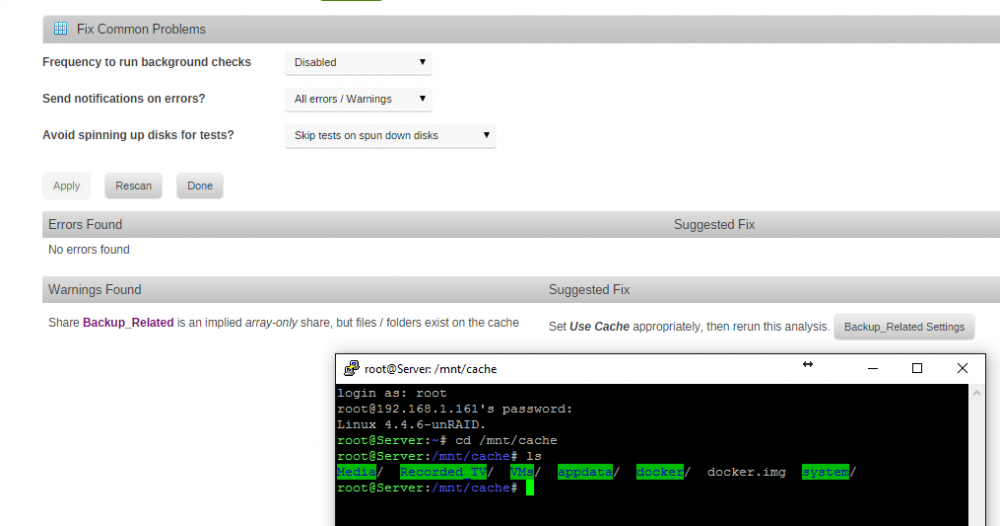
-
Why not use RDP as it will give proper resolution and typically performs much better than VNC? The only reason I know of not to is if you have a Home edition, or whatever version of Window's doesn't support RDP as the host.
-
I don't know your hardware, but you can try to add iommu=pt in your syslinux.cfg file, and also vfio_iommu_type1.allow_unsafe_interrupts=1 (I don't think the order matters). It would look like this: kernel /bzimage append iommu=pt vfio_iommu_type1.allow_unsafe_interrupts=1 initrd=/bzroot Try one, or both, and see if it helps.
-
I think the deal is this (speaking on your topic of Skylake): Most hardware is compatible with UnRAID, but there are caveats to each, and not everything is perfect. If we all want to have "servers" we should all have ECC memory, and Xeon's, or equivalent. However a lot of people don't, and are very happy with their setups. Skylake being the newest shiniest Intel architecture is definitely supported, however with all new hardware you're likely to be ahead of the curve at times with support in the kernel, drivers, etc.. If you're running multiple VM's, you're also likely to have an issue with IOMMU grouping. The ACS override patch is just that, a patch, and from what I understand will not go upstream in the Linux kernel, as it is not a recommended thing to enable (yes, you're likely fine, BUT that doesn't mean it may not cause issues), there is a reason you get that annoying warning in the log, and on the system devices page. Tell Intel to add ACS on root ports, and Skylake will likely be the new recommended "desktop" processor for KVM/QEMU. However unfortunately it doesn't, and for that reason the recommended (cover most bases) is i7 "E", or Xeon E5. I can't see that stance changing without the hardware changing, and the recommendation when a primary part of the recommendation is using vt-d and virtualization.
-
I'm going to take a guess that one of your components doesn't support directed I/O for hardware. Your BIOS states this for "IOMMU" (which doesn't mean amd-vi (or more common Intel's vt-d), and I see nowhere else to enable virtualization. IOMMU IOMMU is supported on LINUX based systems to convert 32bit PCI IO address to 64 bits. Enabled / Disabled You can try adding this to your syslinux.cfg file (on your unRAID flash drive): You may only need the iommu=1 part. iommu=pt iommu=1 It would then look something like this: label unRAID OS menu default kernel /bzimage append iommu=pt iommu=1 initrd=/bzroot The problem is your hardware is pretty old, and AMD is difficult to lookup for the needed "AMD-Vi" specification for your CPU. Hopefully it is supported (on both the CPU, the chipset, and in the BIOS), and you're all set, but I'm not too confident as of now.
-
Tools > Diagnostics > Download (then upload it) and you'll be a superstar in no time (and we'll be able to help in much greater detail) .
-
I use JSON and cURL to trigger updates, from this guide http://kodi.wiki/view/HOW-TO:Remotely_update_library I just have my sync program run a .bat file (the specific string for update library) after sync, and it works perfectly. Sync program monitors the folder (Allway Sync) and UTorrent does its thing.
-
But I think if you take that approach, you will have to move your script there with a command in go or it won't be there next boot. Kind of a hybrid here, such options! I like being able to see it without dropping to the command line, so I will do just that. Thanks!
-
Ok, so I did all of that however I suppose was expecting it to show up somewhere in the plugin/scheduler page. Which is not the case, as stated (which would be awesome to add, definitely a request!). So okay, it is working I just wouldn't know it is scheduled without running this So I was good all along, just didn't know it was working as I expected to see it and I cannot without the SSH command above. Right?.. (when I expect something to take 2 minutes I over complicate it to take 2 hours.. story of my life).
-
OK, then maybe I'm missing something super obvious.... Where do I view/edit jobs used with the Schedules plug-in? So if I want to add a cron job, do I then just add it to the Go file so that it's added to cron? I'm likely missing something here, sorry.. The schedules plugin handles the built-in cron entries for hourly, daily, weekly and monthly jobs. These are separate from the custom cron jobs which a plugin or user can define. OK I think I get it... Let me approach this another way since I have already mucked up this thread. I will stop acting like I think I know what I'm doing, as it just makes this worse and confusing (thank you for the responses so far!)... So... What is the best way to schedule a script to run to backup apps, or copy whatever, on a timed basis? I assumed this was now able to be handled by Schedules, which I was wrong. Add to go script?
-
OK, then maybe I'm missing something super obvious.... Where do I view/edit jobs used with the Schedules plug-in? So if I want to add a cron job, do I then just add it to the Go file so that it's added to cron? I'm likely missing something here, sorry..
-
I'm having issues getting a cron job/file working with the schedules plugin. I'm following the directions posted by bonienl in another thread, here for reference: I placed my cron file (made with N++/Unix mode) in the /boot/config/plugins/mycron folder, however it never shows up as a schedule in the plugin/scheduler settings page. I've ran the SSH command update_cron with no difference, and also rebooted. The only script listed in schedules is logrotate. My cron file is attached (with the wrong extension as it wouldn't upload, it is .txt here, I have it as ".cron"), I tried varying the spaces, editing the time, and still nothing. I'm likely doing something stupid.. If you don't feel like grabbing the attachment, it basically looks like this, my script is located in the directory specified: # Add cache backup script to cron: 30 4 * * * /boot/custom/cache_backup &> /dev/null I've tried cache_backup.sh, without the "&>", changing the time.. Out of ideas. cachebackup.txt

