





d3fc0n0wltraps
Members
-
Joined
-
Last visited
Everything posted by d3fc0n0wltraps
-
Option 1 was absolutely what I wanted. It's working great, thanks again.
-
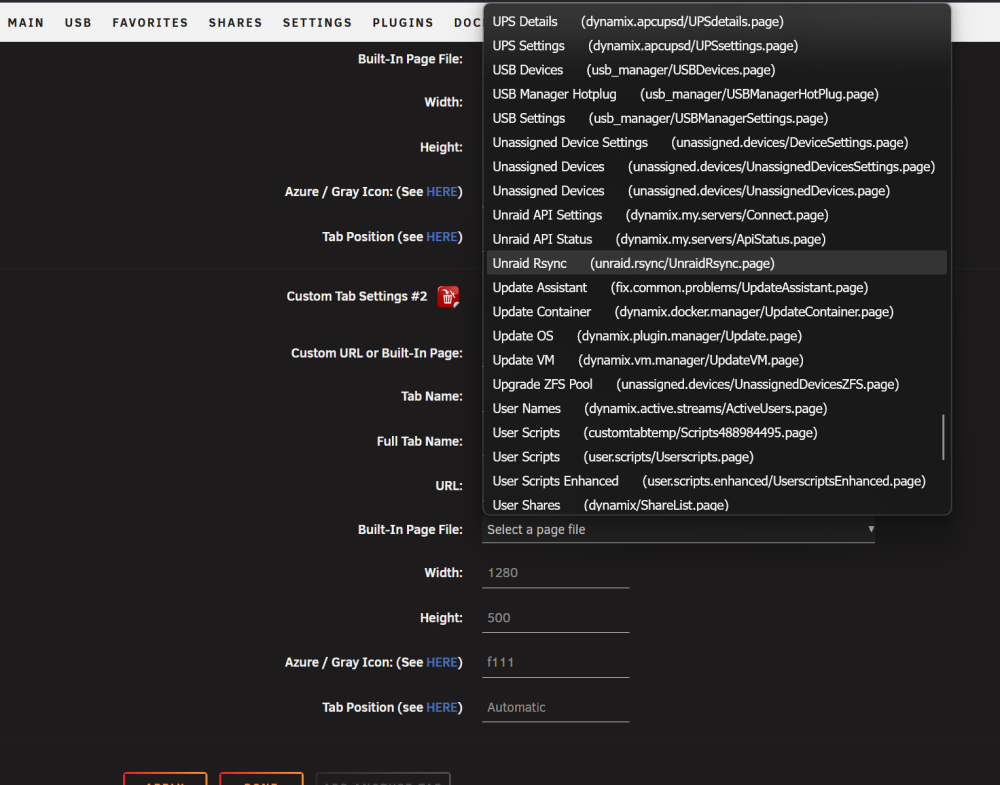
Thanks again for posting this. I've been using it very successfully since you added the omit times flags. This has now fully replaced my previous rclone/user script solution. I did have a quick question - and this may be a long shot / not in your wheelhouse. No worries either way. A popular plugin, custom tab, allows users to make a custom tab out of anything and add it to Unraid's nav bar. Usually this plays well with other installed plugins via the Built-In page dropdown. It looks like there's an entry there, but when I configure it I just get a blank Unraid page. I'm not sure if the custom tab plugin has robust documentation about what it's looking for as I've never run into this issue with an Unraid plugin. As a workaround I have it configured to use the plugin url (https://nas.effoff.dev/Settings/UnraidRsync) but that has several drawbacks. That URL is serviced by my reverse proxy so if that's down it won't work, or if I connect to my Unraid box using its IP or the actual machine name then I have to re-login to use the link. Again, thanks for your efforts so far and no worries if this isn't something that can be fixed/isn't something you want to take on.
-
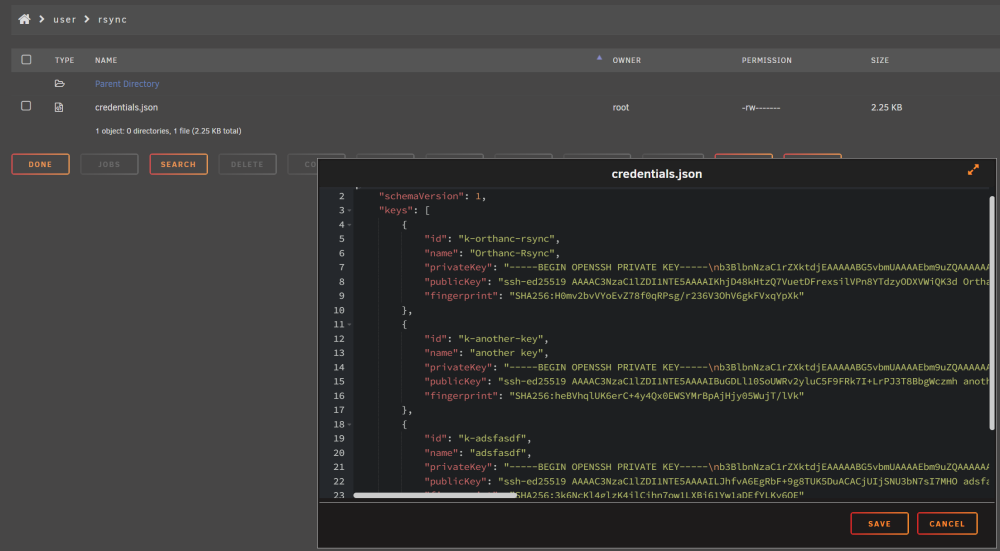
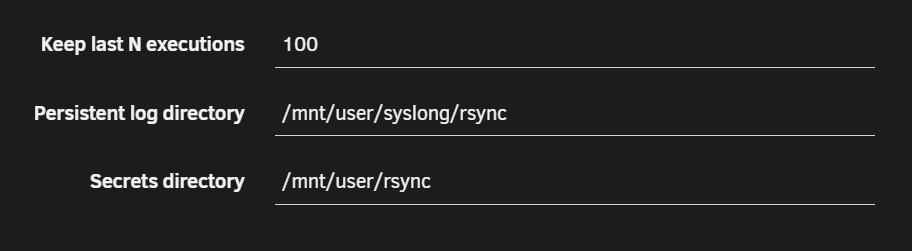
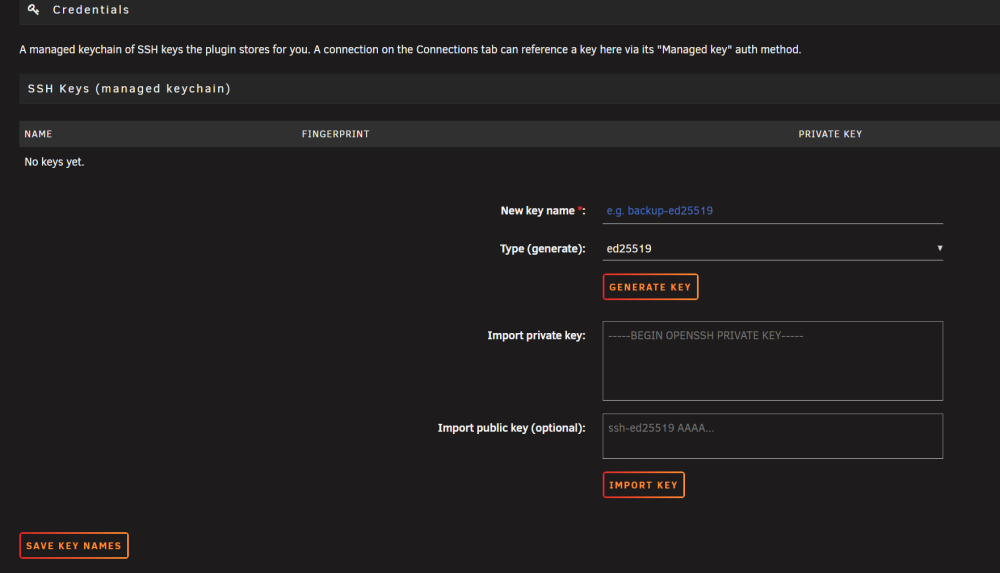
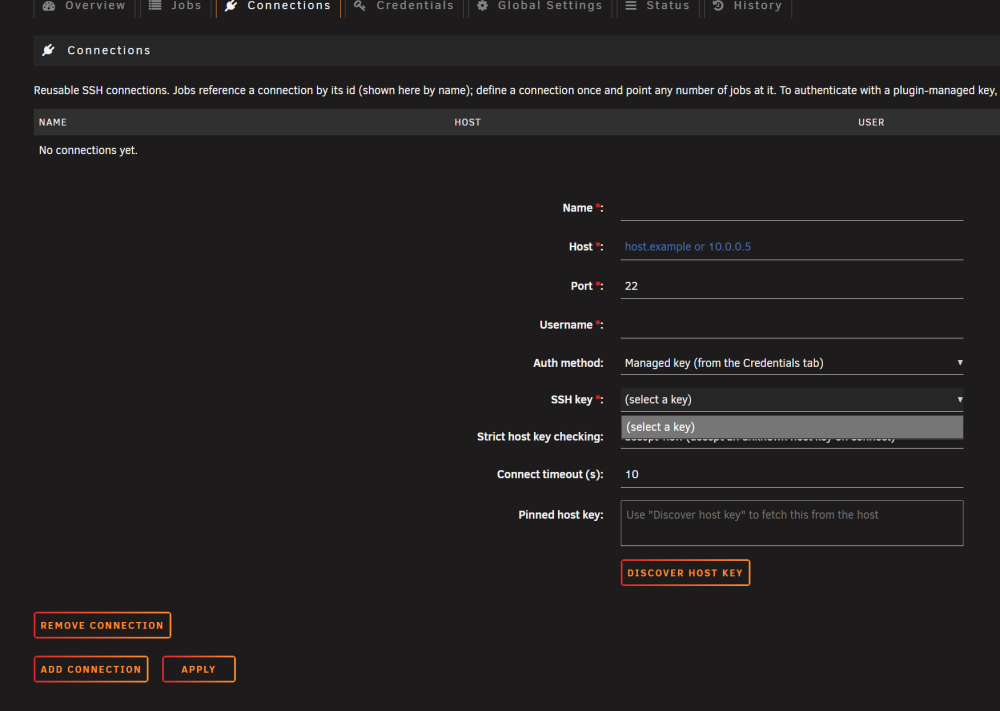
Thanks for putting this out there! I love the UI but I'm running into two issues: My distant filesystem doesn't support setting the time attribute on directories, but -O (--omit-dir-times) isn't surfaced in the webui as a global or job specific flag. Would it be possible to add it? When I set a custom secret directory the plugin creates a cred json file, creates and stores new creds there, but stops showing them in the credential manager / stops allowing me to select them on connections: Setting: New creds get created successfully: Unavailable in Cred manager tab or new connections:
-
Thank you for this container and supporting it. It was able to scan my Pictures and identify a ton of duplicates, but when I go to sort by folder it crashes: [app ] 15:18:28.861 [ERROR] log_panics: thread 'main' panicked at 'Failed to get TreeModel value: WrongValueType(ValueTypeMismatchError { actual: guint64, requested: gchararray })': /root/.cargo/registry/src/index.crates.io-1949cf8c6b5b557f/gtk4-0.11.0/src/tree_model.rs:44 [app ] 0: <unknown> [app ] 1: <unknown> [app ] 2: <unknown> [app ] 3: <unknown> [app ] 4: <unknown> [app ] 5: <unknown> [app ] 6: <unknown> [app ] 7: <unknown> [app ] 8: <unknown> [app ] 9: <unknown> [app ] 10: <unknown> [app ] 11: <unknown> [app ] 12: g_signal_emit_valist [app ] 13: g_signal_emit [app ] 14: <unknown> [app ] 15: <unknown> [app ] 16: <unknown> [app ] 17: g_signal_emit_valist [app ] 18: g_signal_emit [app ] 19: <unknown> [app ] 20: g_cclosure_marshal_VOID__BOXEDv [app ] 21: <unknown> [app ] 22: <unknown> [app ] 23: g_signal_emit_valist [app ] 24: g_signal_emit [app ] 25: <unknown> [app ] 26: <unknown> [app ] 27: <unknown> [app ] 28: <unknown> [app ] 29: <unknown> [app ] 30: <unknown> [app ] 31: <unknown> [app ] 32: <unknown> [app ] 33: <unknown> [app ] 34: <unknown> [app ] 35: <unknown> [app ] 36: g_closure_invoke [app ] 37: <unknown> [app ] 38: <unknown> [app ] 39: g_signal_emit_valist [app ] 40: g_signal_emit [app ] 41: <unknown> [app ] 42: <unknown> [app ] 43: <unknown> [app ] 44: <unknown> [app ] 45: g_main_context_iteration [app ] 46: g_application_run [app ] 47: <unknown> [app ] 48: <unknown> [app ] 49: <unknown> [app ] 50: <unknown> [app ] 51: <unknown> [app ] 52: <unknown> [app ] 15:18:28.864 [ERROR] log_panics: thread 'main' panicked at 'panic in a function that cannot unwind': /rustc/4a4ef493e3a1488c6e321570238084b38948f6db/library/core/src/panicking.rs:225 [app ] 0: <unknown> [app ] 1: <unknown> [app ] 2: <unknown> [app ] 3: <unknown> [app ] 4: <unknown> [app ] 5: <unknown> [app ] 6: <unknown> [app ] 7: <unknown> [app ] 8: <unknown> [app ] 9: <unknown> [app ] 10: <unknown> [app ] 11: g_signal_emit_valist [app ] 12: g_signal_emit [app ] 13: <unknown> [app ] 14: <unknown> [app ] 15: <unknown> [app ] 16: g_signal_emit_valist [app ] 17: g_signal_emit [app ] 18: <unknown> [app ] 19: g_cclosure_marshal_VOID__BOXEDv [app ] 20: <unknown> [app ] 21: <unknown> [app ] 22: g_signal_emit_valist [app ] 23: g_signal_emit [app ] 24: <unknown> [app ] 25: <unknown> [app ] 26: <unknown> [app ] 27: <unknown> [app ] 28: <unknown> [app ] 29: <unknown> [app ] 30: <unknown> [app ] 31: <unknown> [app ] 32: <unknown> [app ] 33: <unknown> [app ] 34: <unknown> [app ] 35: g_closure_invoke [app ] 36: <unknown> [app ] 37: <unknown> [app ] 38: g_signal_emit_valist [app ] 39: g_signal_emit [app ] 40: <unknown> [app ] 41: <unknown> [app ] 42: <unknown> [app ] 43: <unknown> [app ] 44: g_main_context_iteration [app ] 45: g_application_run [app ] 46: <unknown> [app ] 47: <unknown> [app ] 48: <unknown> [app ] 49: <unknown> [app ] 50: <unknown> [app ] 51: <unknown> [app ] thread caused non-unwinding panic. aborting. [supervisor ] service 'app' exited (got signal SIGABRT). [supervisor ] service 'app' exited, shutting down... [supervisor ] stopping service 'xcompmgr'... [supervisor ] service 'xcompmgr' exited (got signal SIGTERM). [supervisor ] stopping service 'openbox'... [supervisor ] service 'openbox' exited (with status 0). [supervisor ] stopping service 'nginx'... [xvnc ] Fri Jun 26 11:18:29 2026 [xvnc ] VNCSConnST: Closing /tmp/vnc.sock: Clean disconnection [xvnc ] EncodeManager: Framebuffer updates: 364 [xvnc ] EncodeManager: Tight: [xvnc ] EncodeManager: Solid: 271 rects, 8.21995 Mpixels [xvnc ] EncodeManager: 4.23438 KiB (1:7583.73 ratio) [xvnc ] EncodeManager: Bitmap RLE: 91 rects, 23.408 kpixels [xvnc ] EncodeManager: 2.66016 KiB (1:34.7739 ratio) [xvnc ] EncodeManager: Indexed RLE: 409 rects, 524.49 kpixels [xvnc ] EncodeManager: 56.5029 KiB (1:36.3447 ratio) [xvnc ] EncodeManager: JPEG: [xvnc ] EncodeManager: Full Colour: 349 rects, 2.13429 Mpixels [xvnc ] EncodeManager: 1.25927 MiB (1:6.46857 ratio) [xvnc ] EncodeManager: Total: 1.12 krects, 10.9021 Mpixels [xvnc ] EncodeManager: 1.32118 MiB (1:31.4879 ratio) [xvnc ] Connections: Closed: /tmp/vnc.sock [supervisor ] service 'nginx' exited (with status 0). [supervisor ] stopping service 'xvnc'... [supervisor ] service 'xvnc' exited (with status 0). [supervisor ] stopping service 'dbus'... [supervisor ] service 'dbus' exited (with status 0). [finish ] executing container finish scripts... [finish ] all container finish scripts executed. It would be convenient for me to sort by folder as a lot of my duplicates are in an ingest folder, but not every image in the folder is a duplicate. If I could group them by folder then I could easily select a large number of duplicate files for removal. Any suggestions would be appreciated!
-
Their reddit post was a little more informative: Which then devolved into arguing. Someone else used ChatGippity to find a non-trivial risk of API key leakage which went unremarked on, so who knows if that is real or has been fixed:
-
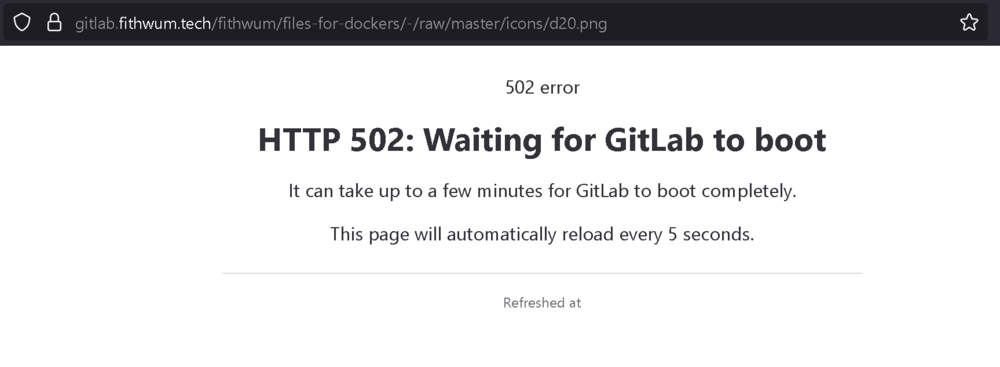
@fithwum It looks like your gitlab is having issues, I went to deploy another copy of your container and can't get an icon again. As always, thanks for your work on this!
-
That's the one! I am also running it with the default value of 99:100. Thanks to your suggestion I was able to get yt-dlp updated, which still didn't resolve my downloading issues. That prompted me to try creating a new source for a channel I had never used before, which worked, and recreating the troublesome source, which failed. Turns out the whole time my issue was that the source channel had been renamed at some point late February and YouTube is just really good at abstracting that name change from me. Problem solved, thanks again for your help!
-
Thanks for the reply. I did try re-pulling the image without any change in behavior, and I have not mapped that path. This same issue I am seeing is captured here without resolution (yet): https://github.com/kieraneglin/pinchflat/issues/625 The PR you linked has enabled me to successfully update the version of yt-dlp that is installed in the container. Thanks!
-
My container stopped pulling videos a week or two ago - I assume it's because yt-dlp needs an update. When it attempts to auto update it fails with a permission issue: ERROR: Unable to write to /usr/local/bin/yt-dlp; try running as administrator 2025-03-02 09:45:07.968 [error] | [command_wrapper]: /usr/local/bin/yt-dlp called with: --update exited: 100 with: Current version: [email protected] from yt-dlp/yt-dlp Latest version: [email protected] from yt-dlp/yt-dlp Current Build Hash: 227631e434d6f8418c4b821aeefc6302d3d1db1e7d805da2ad5b301c8d910107 Updating to [email protected] from yt-dlp/yt-dlp ... when I try to su/yt-dlp -U as suggested earlier I'm stuck needing to supply a password I'm unaware of: I have no name!@ef4dd1ea3b6a:/app$ yt-dlp -U Current version: [email protected] from yt-dlp/yt-dlp Latest version: [email protected] from yt-dlp/yt-dlp Current Build Hash: 227631e434d6f8418c4b821aeefc6302d3d1db1e7d805da2ad5b301c8d910107 Updating to [email protected] from yt-dlp/yt-dlp ... ERROR: Unable to write to /usr/local/bin/yt-dlp; try running as administrator I have no name!@ef4dd1ea3b6a:/app$ su Password: su: Authentication failure I have no name!@ef4dd1ea3b6a:/app$ Any assistance you can provide would be appreciated!
-
Thanks for responding again. Do I understand correctly from the release notes that v7 is one-way for ZFS pools and v7 itself is currently only in RC? If so, and i'm not missing something, I think I'll hold off on upgrading and try something like DMDE instead. Is there another file recovery app that you have heard good things about or had good experiences with in similar instances of file corruption?
-
Thanks for the response! I stopped the array, mounted the pool as readonly, and attempted to copy it off to a remote smb share using MC. Sadly it still stalls at 37% and dumps the following into syslog: Jan 3 12:10:14 BaradDur kernel: rcu: INFO: rcu_preempt detected stalls on CPUs/tasks: Jan 3 12:10:14 BaradDur kernel: (detected by 2, t=60002 jiffies, g=24323593, q=180027 ncpus=16) Jan 3 12:10:14 BaradDur kernel: rcu: All QSes seen, last rcu_preempt kthread activity 60002 (4378039330-4377979328), jiffies_till_next_fqs=3, root ->qsmask 0x0 Jan 3 12:10:14 BaradDur kernel: rcu: rcu_preempt kthread starved for 60002 jiffies! g24323593 f0x2 RCU_GP_WAIT_FQS(5) ->state=0x0 ->cpu=2 Jan 3 12:10:14 BaradDur kernel: rcu: Unless rcu_preempt kthread gets sufficient CPU time, OOM is now expected behavior. Jan 3 12:10:14 BaradDur kernel: rcu: RCU grace-period kthread stack dump: Jan 3 12:10:14 BaradDur kernel: task:rcu_preempt state:R running task stack:0 pid:15 ppid:2 flags:0x00004000 Jan 3 12:10:14 BaradDur kernel: Call Trace: Jan 3 12:10:14 BaradDur kernel: <TASK> Jan 3 12:10:14 BaradDur kernel: __schedule+0x5b2/0x612 Jan 3 12:10:14 BaradDur kernel: ? _raw_spin_unlock_irqrestore+0x24/0x3a Jan 3 12:10:14 BaradDur kernel: ? __mod_timer+0x207/0x232 Jan 3 12:10:14 BaradDur kernel: ? rcu_gp_init+0x494/0x494 Jan 3 12:10:14 BaradDur kernel: schedule+0x8e/0xcc Jan 3 12:10:14 BaradDur kernel: schedule_timeout+0x9d/0xd7 Jan 3 12:10:14 BaradDur kernel: ? __next_timer_interrupt+0xf6/0xf6 Jan 3 12:10:14 BaradDur kernel: rcu_gp_fqs_loop+0x12d/0x475 Jan 3 12:10:14 BaradDur kernel: rcu_gp_kthread+0x151/0x16d Jan 3 12:10:14 BaradDur kernel: kthread+0xe7/0xef Jan 3 12:10:14 BaradDur kernel: ? kthread_complete_and_exit+0x1b/0x1b Jan 3 12:10:14 BaradDur kernel: ret_from_fork+0x22/0x30 Jan 3 12:10:14 BaradDur kernel: </TASK> Jan 3 12:10:14 BaradDur kernel: rcu: Stack dump where RCU GP kthread last ran: Jan 3 12:10:14 BaradDur kernel: CPU: 2 PID: 125681 Comm: z_rd_int_1 Tainted: P O 6.1.74-Unraid #1 Jan 3 12:10:14 BaradDur kernel: Hardware name: To Be Filled By O.E.M. To Be Filled By O.E.M./X399 Taichi, BIOS P4.03 01/18/2024 Jan 3 12:10:14 BaradDur kernel: RIP: 0010:abd_fletcher_4_iter+0x0/0x95 [zcommon] Jan 3 12:10:14 BaradDur kernel: Code: 48 81 fe ff 01 00 00 48 89 d1 48 89 f2 48 89 fe 77 0a 48 89 cf e8 1a f9 ff ff eb 07 31 ff e8 93 fe ff ff 31 c0 e9 86 a9 7e e1 <0f> 1f 44 00 00 41 56 41 55 49 89 f5 49 83 e5 c0 41 54 49 89 d4 55 Jan 3 12:10:14 BaradDur kernel: RSP: 0018:ffffc900177af898 EFLAGS: 00000206 Jan 3 12:10:14 BaradDur kernel: RAX: 000000000001f000 RBX: 0000000000001000 RCX: 0000000000000000 Jan 3 12:10:14 BaradDur kernel: RDX: ffffc900177af960 RSI: 0000000000000000 RDI: 0000000000000000 Jan 3 12:10:14 BaradDur kernel: RBP: 0000000000000000 R08: ffffc900177af960 R09: 000002a5c22f0400 Jan 3 12:10:14 BaradDur kernel: R10: ffff88816d144e00 R11: 0000000000010000 R12: 0000000000000000 Jan 3 12:10:14 BaradDur kernel: R13: ffff8881c59ac068 R14: ffffffffa041773a R15: ffffc900177af960 Jan 3 12:10:14 BaradDur kernel: FS: 0000000000000000(0000) GS:ffff88903d080000(0000) knlGS:0000000000000000 Jan 3 12:10:14 BaradDur kernel: CS: 0010 DS: 0000 ES: 0000 CR0: 0000000080050033 Jan 3 12:10:14 BaradDur kernel: CR2: 0000561c68d45f70 CR3: 000000023e770000 CR4: 00000000003506e0 Jan 3 12:10:14 BaradDur kernel: Call Trace: Jan 3 12:10:14 BaradDur kernel: <IRQ> Jan 3 12:10:14 BaradDur kernel: ? rcu_check_gp_kthread_starvation+0xec/0xfd Jan 3 12:10:14 BaradDur kernel: ? rcu_sched_clock_irq+0x87e/0xa45 Jan 3 12:10:14 BaradDur kernel: ? do_set_msr+0x12/0x12 [kvm] Jan 3 12:10:14 BaradDur kernel: ? notifier_call_chain+0x38/0x5a Jan 3 12:10:14 BaradDur kernel: ? timekeeping_update+0xe8/0x117 Jan 3 12:10:14 BaradDur kernel: ? tick_init_jiffy_update+0x7c/0x7c Jan 3 12:10:14 BaradDur kernel: ? update_process_times+0x62/0x81 Jan 3 12:10:14 BaradDur kernel: ? tick_sched_timer+0x43/0x71 Jan 3 12:10:14 BaradDur kernel: ? __hrtimer_run_queues+0xeb/0x190 Jan 3 12:10:14 BaradDur kernel: ? hrtimer_interrupt+0x9c/0x16e Jan 3 12:10:14 BaradDur kernel: ? __sysvec_apic_timer_interrupt+0xc5/0x12f Jan 3 12:10:14 BaradDur kernel: ? sysvec_apic_timer_interrupt+0x80/0xa6 Jan 3 12:10:14 BaradDur kernel: </IRQ> Jan 3 12:10:14 BaradDur kernel: <TASK> Jan 3 12:10:14 BaradDur kernel: ? asm_sysvec_apic_timer_interrupt+0x16/0x20 Jan 3 12:10:14 BaradDur kernel: ? fletcher_4_incremental_byteswap+0x2f/0x2f [zcommon] Jan 3 12:10:14 BaradDur kernel: ? fletcher_4_incremental_byteswap+0x2f/0x2f [zcommon] Jan 3 12:10:14 BaradDur kernel: ? fletcher_4_incremental_byteswap+0x2f/0x2f [zcommon] Jan 3 12:10:14 BaradDur kernel: abd_iterate_func+0x8c/0xef [zfs] Jan 3 12:10:14 BaradDur kernel: abd_fletcher_4_impl+0x33/0x46 [zfs] Jan 3 12:10:14 BaradDur kernel: abd_fletcher_4_native+0x55/0x73 [zfs] Jan 3 12:10:14 BaradDur kernel: ? ___slab_alloc+0x256/0x6fe Jan 3 12:10:14 BaradDur kernel: ? mempool_alloc+0x5e/0x149 Jan 3 12:10:14 BaradDur kernel: ? mempool_alloc+0x5e/0x149 Jan 3 12:10:14 BaradDur kernel: ? __kmem_cache_alloc_node+0x118/0x147 Jan 3 12:10:14 BaradDur kernel: ? __blk_rq_map_sg+0x2a4/0x339 Jan 3 12:10:14 BaradDur kernel: ? dma_direct_map_sg+0x1a4/0x1d6 Jan 3 12:10:14 BaradDur kernel: ? preempt_latency_start+0x2b/0x46 Jan 3 12:10:14 BaradDur kernel: ? _raw_spin_lock_irqsave+0x2c/0x37 Jan 3 12:10:14 BaradDur kernel: ? wbt_issue+0x16/0x3a Jan 3 12:10:14 BaradDur kernel: zio_checksum_error_impl+0x30b/0x41e [zfs] Jan 3 12:10:14 BaradDur kernel: ? preempt_latency_start+0x2b/0x46 Jan 3 12:10:14 BaradDur kernel: ? _raw_spin_lock+0x13/0x1c Jan 3 12:10:14 BaradDur kernel: ? _raw_spin_unlock+0x14/0x29 Jan 3 12:10:14 BaradDur kernel: ? nvme_queue_rqs+0x13c/0x176 [nvme] Jan 3 12:10:14 BaradDur kernel: ? blk_mq_flush_plug_list+0xbd/0x217 Jan 3 12:10:14 BaradDur kernel: ? __blk_flush_plug+0xc9/0x11a Jan 3 12:10:14 BaradDur kernel: zio_checksum_error+0x82/0xb9 [zfs] Jan 3 12:10:14 BaradDur kernel: raidz_checksum_verify+0x39/0x69 [zfs] Jan 3 12:10:14 BaradDur kernel: vdev_raidz_io_done+0x1f3/0x7eb [zfs] Jan 3 12:10:14 BaradDur kernel: ? kmem_cache_free+0x10f/0x154 Jan 3 12:10:14 BaradDur kernel: ? spl_kmem_cache_free+0x3a/0x1a5 [spl] Jan 3 12:10:14 BaradDur kernel: ? percpu_counter_add_batch+0x85/0xa2 Jan 3 12:10:14 BaradDur kernel: ? preempt_latency_start+0x2b/0x46 Jan 3 12:10:14 BaradDur kernel: zio_vdev_io_done+0x13b/0x199 [zfs] Jan 3 12:10:14 BaradDur kernel: zio_execute+0xb4/0xdf [zfs] Jan 3 12:10:14 BaradDur kernel: taskq_thread+0x269/0x38a [spl] Jan 3 12:10:14 BaradDur kernel: ? wake_up_q+0x44/0x44 Jan 3 12:10:14 BaradDur kernel: ? zio_subblock+0x22/0x22 [zfs] Jan 3 12:10:14 BaradDur kernel: ? taskq_dispatch_delay+0x106/0x106 [spl] Jan 3 12:10:14 BaradDur kernel: kthread+0xe7/0xef Jan 3 12:10:14 BaradDur kernel: ? kthread_complete_and_exit+0x1b/0x1b Jan 3 12:10:14 BaradDur kernel: ret_from_fork+0x22/0x30 Jan 3 12:10:14 BaradDur kernel: </TASK>
-
Hello, I was troubleshooting sporadic lockup issues in my setup, which I believe I have finally tracked down to corruption of a vdisk file that resides in my cache pool of 3x1tb NVMe drives in raidz1. After a scrub/clear I always get the following, two checksum issues on every disk: root@BaradDur:~# zpool status pool: cache state: ONLINE status: One or more devices has experienced an unrecoverable error. An attempt was made to correct the error. Applications are unaffected. action: Determine if the device needs to be replaced, and clear the errors using 'zpool clear' or replace the device with 'zpool replace'. see: https://openzfs.github.io/openzfs-docs/msg/ZFS-8000-9P scan: scrub repaired 192K in 00:01:20 with 0 errors on Thu Jan 2 13:53:21 2025 config: NAME STATE READ WRITE CKSUM cache ONLINE 0 0 0 raidz1-0 ONLINE 0 0 0 nvme1n1p1 ONLINE 0 0 2 nvme2n1p1 ONLINE 0 0 2 nvme0n1p1 ONLINE 0 0 2 errors: No known data errors I found the messed up file by process of elimination - I have moved everything else off of that pool successfully. Any attempt to start that vm, copy the img file locally via mover/mc/etc. or remotely via smb causes the server to lock up / all shares become inaccessible / etc. Dec 31 15:55:00 BaradDur kernel: VERIFY3(size <= rt->rt_space) failed (196608 <= 193536) Dec 31 15:55:00 BaradDur kernel: PANIC at range_tree.c:436:range_tree_remove_impl() Dec 31 15:55:00 BaradDur kernel: Showing stack for process 21163 Dec 31 15:55:00 BaradDur kernel: CPU: 2 PID: 21163 Comm: dsl_scan_iss Tainted: P O 6.1.74-Unraid #1 Dec 31 15:55:00 BaradDur kernel: Hardware name: To Be Filled By O.E.M. To Be Filled By O.E.M./X399 Taichi, BIOS P4.03 01/18/2024 Dec 31 15:55:00 BaradDur kernel: Call Trace: Dec 31 15:55:00 BaradDur kernel: <TASK> Dec 31 15:55:00 BaradDur kernel: dump_stack_lvl+0x44/0x5c Dec 31 15:55:00 BaradDur kernel: spl_panic+0xd0/0xe8 [spl] Dec 31 15:55:00 BaradDur kernel: ? preempt_latency_start+0x2b/0x46 Dec 31 15:55:00 BaradDur kernel: ? _raw_spin_lock+0x13/0x1c Dec 31 15:55:00 BaradDur kernel: ? _raw_spin_unlock+0x14/0x29 Dec 31 15:55:00 BaradDur kernel: ? slab_free_freelist_hook.constprop.0+0x3b/0xaf Dec 31 15:55:00 BaradDur kernel: ? _raw_spin_unlock_irqrestore+0x24/0x3a Dec 31 15:55:00 BaradDur kernel: ? kmem_cache_free+0x10f/0x154 Dec 31 15:55:00 BaradDur kernel: ? spl_kmem_cache_free+0x3a/0x1a5 [spl] Dec 31 15:55:00 BaradDur kernel: ? slab_post_alloc_hook+0x4d/0x15e Dec 31 15:55:00 BaradDur kernel: range_tree_remove_impl+0x77/0x406 [zfs] Dec 31 15:55:00 BaradDur kernel: ? kmem_cache_free+0xc9/0x154 Dec 31 15:55:00 BaradDur kernel: ? spl_kmem_cache_free+0x3a/0x1a5 [spl] Dec 31 15:55:00 BaradDur kernel: scan_io_queues_run_one+0x3c5/0x586 [zfs] Dec 31 15:55:00 BaradDur kernel: taskq_thread+0x269/0x38a [spl] Dec 31 15:55:00 BaradDur kernel: ? wake_up_q+0x44/0x44 Dec 31 15:55:00 BaradDur kernel: ? taskq_dispatch_delay+0x106/0x106 [spl] Dec 31 15:55:00 BaradDur kernel: kthread+0xe7/0xef Dec 31 15:55:00 BaradDur kernel: ? kthread_complete_and_exit+0x1b/0x1b Dec 31 15:55:00 BaradDur kernel: ret_from_fork+0x22/0x30 Dec 31 15:55:00 BaradDur kernel: </TASK> The behavior is very repeatable - past a certain point copying that file the WebUI reports CPU2 at 100%, then services start to become unresponsive and more cores will go to 100%. If I'm already ssh'd into the server I can interact with it minimally, for example I can issue a reboot command and it will tell me it's going down NOW - but it doesn't actually do anything past that. The only solution I have found is hard reboot the server. In the mean time, I have added a regular SSD for cache in a new pool and am moving all of my AppData over there to get my hosted services running again. I have run memtest86+ overnight and all tests were successful. All NVMe disks recently reported no errors on extended SMART test. I was NOT running scrubs on an automated schedule prior to this, but that is now scheduled. Does anyone have any recommendations on how to proceed from here? Is there any way to look at recovering that VM Disk? I fully embrace that it's my fault for not backing it up before this, and It's not the end of the world if it is totally lost, but I would like to explore any options How do I prevent this from occurring in the future? Anything that could indicate what caused corruption across the entire pool? If it is totally hooped - how do I proceed safely destroying that pool and re-adding it? Thank you! baraddur-diagnostics-20250102-1339.zip
-
Found my issue - I had been previously playing with disk mappings and mover. This broke my maria container in such a way that it would start without error and "accept" connections, but those connections would just hang forever instead of actually succeeding or failing. I wouldn't expect Romm to handle this any more gracefully than it already did - even MySQLWorkbench would lock up waiting trying to access my maria container So, false alarm, please disregard. Fixed my maria container
-
I haven't messed with Romm in a little while - it was working fine on 3.x previously - and today trying to use it the WebUI doesn't work. Looking in my logs I see the following; INFO: [init][2024-06-22 12:58:07] Starting up, please wait... INFO: [init][2024-06-22 12:58:12] starting redis-server 11:C 22 Jun 2024 12:58:12.814 # WARNING Memory overcommit must be enabled! Without it, a background save or replication may fail under low memory condition. Being disabled, it can also cause failures without low memory condition, see https://github.com/jemalloc/jemalloc/issues/1328. To fix this issue add 'vm.overcommit_memory = 1' to /etc/sysctl.conf and then reboot or run the command 'sysctl vm.overcommit_memory=1' for this to take effect. 11:C 22 Jun 2024 12:58:12.814 * oO0OoO0OoO0Oo Redis is starting oO0OoO0OoO0Oo 11:C 22 Jun 2024 12:58:12.814 * Redis version=7.2.4, bits=64, commit=00000000, modified=0, pid=11, just started 11:C 22 Jun 2024 12:58:12.814 * Configuration loaded 11:M 22 Jun 2024 12:58:12.815 * monotonic clock: POSIX clock_gettime 11:M 22 Jun 2024 12:58:12.815 * Running mode=standalone, port=6379. 11:M 22 Jun 2024 12:58:12.815 * Server initialized 11:M 22 Jun 2024 12:58:12.816 * Loading RDB produced by version 7.2.4 11:M 22 Jun 2024 12:58:12.816 * RDB age 122447 seconds 11:M 22 Jun 2024 12:58:12.816 * RDB memory usage when created 11.05 Mb 11:M 22 Jun 2024 12:58:12.856 * Done loading RDB, keys loaded: 16, keys expired: 2. 11:M 22 Jun 2024 12:58:12.857 * DB loaded from disk: 0.042 seconds 11:M 22 Jun 2024 12:58:12.857 * Ready to accept connections tcp INFO: [RomM][2024-06-22 12:58:14] Connecting to redis in /backend/bin/alembic... INFO: [RomM][2024-06-22 12:58:14] Redis connection established in /backend/bin/alembic! And it just waits forever after that. No failure to connect to maria, etc., I did try the changes listed by ktfcaptain and those unfortunately did not make a difference.
-
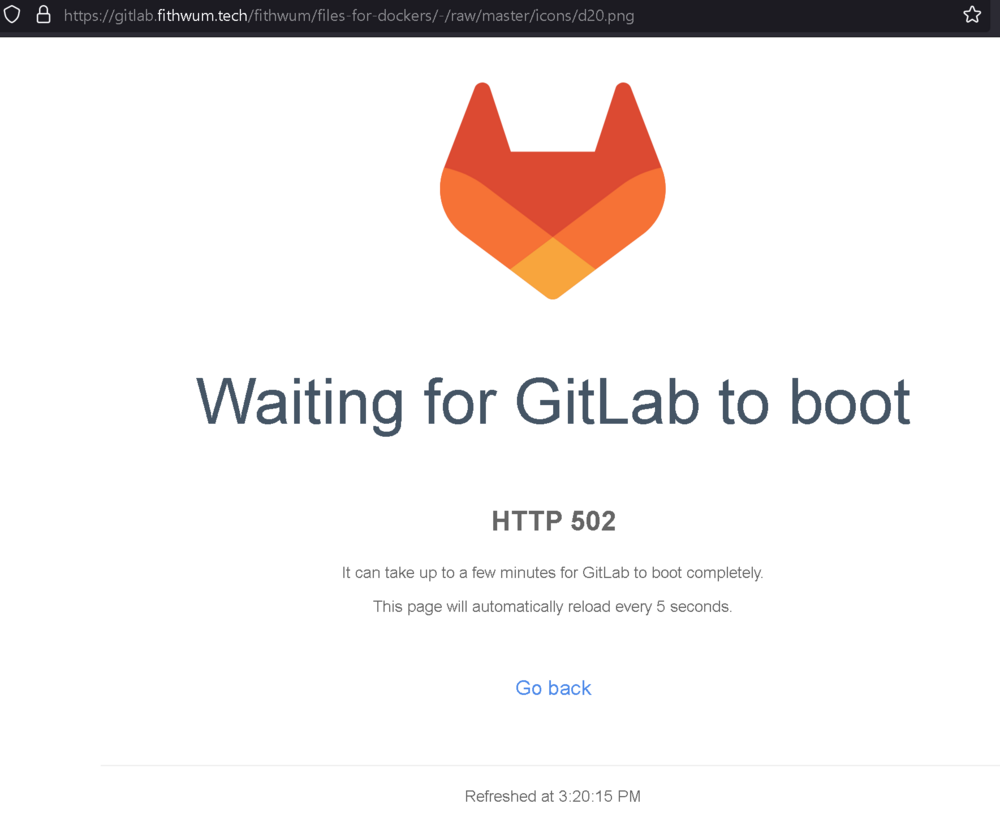
Hey @fithwum, love the container. I was deploying another instance today and noticed that the logo is requested from a gitlab that is currently unreachable. It looks like you maintain your icon repo over on github as well so I just updated the container config to reference that. Not sure if this is the result of an intentional migration or what-have-you, just though I'd bring it to your attention.

-
Sure - to be more clear - the current template targets :latest, which means 3.X, so it is completely broken by default and will break if anyone deployed it previously and then updates it now that 3.0 is released (what happened to me). The template doesn't take into account any of the requirements. Your instructions are great for anyone that wants to use 3.X, my recommendation is only for people that are comfortable on the last 2.X release and want the CA template to work again.
-
Alternatively, just use the current CA template and set it to target zurdi15/romm:2.3.1 At least for me that most recent legacy version scratches all my itches.
-
That container doesn't share mappings with anything else, and it doesn't matter if the container is mapped via FUSE or not (I haven't gotten around to setting up exclusive share yet). It's a non-issue at this point, anyway. I just had to let it stop for longer by changing the stop->backup->start behavior
-
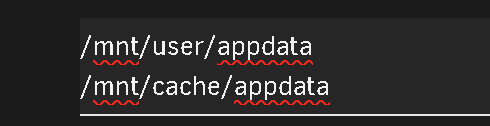
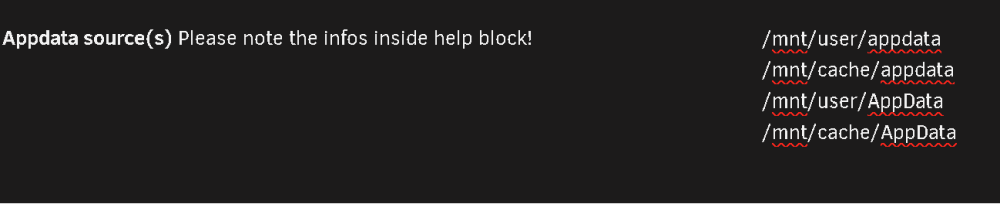
I seem to be having an issue with this vs. the original appdata backup: 'file has changed' as experience by several other people in the thread: [13.01.2024 09:25:55][❌][FoundryVTT10] tar creation failed! Tar said: tar: /mnt/user/AppData/FoundryVTT10/data/Data/modules/JB2A_DnD5e/Library/Generic/Impact/GroundCrackFrostImpact_01_Regular_White_600x600.webm: file changed as we read it; tar: /mnt/user/AppData/FoundryVTT10/data/Data/modules/JB2A_DnD5e/Library/Generic/Impact: file changed as we read it; tar: /mnt/user/AppData/FoundryVTT10/data/Data/modules/JB2A_DnD5e/Library/Generic: file changed as we read it; tar: /mnt/user/AppData/FoundryVTT10/data/Data/modules/JB2A_DnD5e/Library: file changed as we read it; tar: /mnt/user/AppData/FoundryVTT10/data/Data/modules/JB2A_DnD5e: file changed as we read it; tar: /mnt/user/AppData/FoundryVTT10/data/Data/modules: file changed as we read it; tar: /mnt/user/AppData/FoundryVTT10/data/Data: file changed as we read it; tar: /mnt/user/AppData/FoundryVTT10/data: file changed as we read it id: 89a9402e-820c-47c8-b066-a6a8baae4ee8 While it isn't reliably that file, it is reliably that folder that has a "changed as we read it". Any recommendations for finding what is touching that file with the docker stopped? That container doesn't share mappings with anything else, and it doesn't matter if the container is mapped via FUSE or not (I haven't gotten around to setting up exclusive share yet). Editing to add: I changed the backup type from "stop, backup, start container" to "stop all containers, backup, start all containers" and that seems to have given whatever process enough time to let go of those files before the plugin tries to touch it. I have noticed in the past that that particular container isn't receptive to being restarted from the gui. It need to be stopped - wait - restarted. I don't know how to explain that behavior from a docker POV but it certainly seems to track with this. Either way issue seems to be resolved for me. When this happened to me, it was because the appdata source paths are case sensitive. By default the plugin looks for paths of So it didn't automatically believe my paths (/mnt/user/AppData and /mnt/cache/AppData) were internal volumes. I just added my paths to appdata source(s):
-
Excellent! Thank you very much!
-
Hi Fithwum, Thanks for you work on this! I am running into an issue where I would like to run multiple instances and they all try to grab port 30000. Would it be possible to update it to use a specified port? Thank you!
-
You're too fast! I was just coming back to the thread to say, testing it up to 9.255 that it is case sensitive on the zip. Thanks again for your work on this and the support!
-
Thanks for the suggestion. I'll try that and update as I can. Edited to add - looks resolved. I noticed in your entrypoint.sh that it creates the container_cache folder if none exists. Previously I had created it and loaded the files into it. When your script creates it, it sets: root@Tower:/mnt/user/AppData/Foundry# ls -ld container_cache/ drwxr-xr-x 1 421 421 40 Mar 14 19:17 container_cache// So, I removed my container_cache folder, started it (let it fail), then moved the zip into it and started it again. And it starts up fine now. So, lesson learned.
-
Happy to! Thanks for the assist and rapid reply. Log traffic doesn't seem too dissimilar, save for no longer notifying about the version mismatch (for obvious reason) Entrypoint | 2022-03-14 17:26:28 | [[34mdebug[0m] Timezone set to: America/New_York Entrypoint | 2022-03-14 17:26:28 | [[32minfo[0m] Starting felddy/foundryvtt container v9.238.0 Entrypoint | 2022-03-14 17:26:28 | [[34mdebug[0m] CONTAINER_VERBOSE set. Debug logging enabled. Entrypoint | 2022-03-14 17:26:28 | [[32minfo[0m] No Foundry Virtual Tabletop installation detected. Entrypoint | 2022-03-14 17:26:28 | [[32minfo[0m] Using CONTAINER_CACHE: /data/container_cache Entrypoint | 2022-03-14 17:26:28 | [[31merror[0m] Unable to install Foundry Virtual Tabletop! Entrypoint | 2022-03-14 17:26:28 | [[31merror[0m] Either set set FOUNDRY_RELEASE_URL. Entrypoint | 2022-03-14 17:26:28 | [[31merror[0m] Or set FOUNDRY_USERNAME and FOUNDRY_PASSWORD. Entrypoint | 2022-03-14 17:26:28 | [[31merror[0m] Or set CONTAINER_CACHE to a directory containing foundryvtt-9.238.zip I have also tried this with a 9.255 zip (the person I host the server for was able to get it to me) and I see identical behavior (after setting the appropriate variables and tags back to 9.255.) I'm going to admit ignorance here and just paste the result of ls -l, as file permissions in Linux are.... not my strong suit. Is there a way I can be more helpful/informative? root@Tower:/mnt/user/AppData# ls -l Foundry total 0 drwxrwxrwx 1 root root 80 Mar 14 17:13 container_cache/ root@Tower:/mnt/user/AppData/Foundry# ls -l container_cache/ total 379264 -rw-rw-rw- 1 d3fc0 users 193850047 Mar 14 17:02 FoundryVTT-9.255.zip -rw-rw-rw- 1 d3fc0 users 194511363 Dec 27 11:59 foundryvtt-9.238.zip
-
Hello! I would love to tryout a new Foundry container but I'm running into an issue trying to get it running for the first time. At the moment I have a copy of the Linux/NodeJS installer of 9.238 so for simplicity sake I have set the version to that and added it into the container-cache which is mapped using your default recommended value, but it can't seem to locate that installer. Game Data Path is mapped to /mnt/user/AppData/Foundry/ FOUNDRY_VERSION is set for 9.238 CONTAINER_CACHE is set for /data/container_cache It definitely knows where it should look, and what version .zip it should be looking for, and that file definitely exists: Here is the log traffic on start: today at 4:58:35 PMEntrypoint | 2022-03-14 16:58:35 | [debug] Timezone set to: America/New_York today at 4:58:35 PMEntrypoint | 2022-03-14 16:58:35 | [info] Starting felddy/foundryvtt container v9.255.0 today at 4:58:35 PMEntrypoint | 2022-03-14 16:58:35 | [debug] CONTAINER_VERBOSE set. Debug logging enabled. today at 4:58:35 PMEntrypoint | 2022-03-14 16:58:35 | [warn] FOUNDRY_VERSION has been manually set and does not match the container's version. today at 4:58:35 PMEntrypoint | 2022-03-14 16:58:35 | [warn] Expected 9.255 but found 9.238 today at 4:58:35 PMEntrypoint | 2022-03-14 16:58:35 | [warn] The container may not function properly with this version mismatch. today at 4:58:35 PMEntrypoint | 2022-03-14 16:58:35 | [info] No Foundry Virtual Tabletop installation detected. today at 4:58:35 PMEntrypoint | 2022-03-14 16:58:35 | [info] Using CONTAINER_CACHE: /data/container_cache today at 4:58:35 PMEntrypoint | 2022-03-14 16:58:35 | [error] Unable to install Foundry Virtual Tabletop! today at 4:58:35 PMEntrypoint | 2022-03-14 16:58:35 | [error] Either set FOUNDRY_RELEASE_URL. today at 4:58:35 PMEntrypoint | 2022-03-14 16:58:35 | [error] Or set FOUNDRY_USERNAME and FOUNDRY_PASSWORD. today at 4:58:35 PMEntrypoint | 2022-03-14 16:58:35 | [error] Or set CONTAINER_CACHE to a directory containing foundryvtt-9.238.zip today at 5:02:54 PMContainer stopped Am I doing something wrong or do you have any suggestions for starting a server from a pre-existing, older zip? Honestly I can't think of much reason to use an older installer (save for version-locking for module compatibility) but it would be convenient.








