Jorgen
Members
-
Joined
-
Last visited
Everything posted by Jorgen
-
It does, but time machine over SMB is only supported from Sierra and up. For what it’s worth, I’m having no problems with time machine to smb unRAID shares from multiple macs running either High Sierra or Catalina. But the original time machine jobs was actually created on High Sierra and the Mac later upgraded to Catalina. Don’t know if that makes a difference. Sent from my iPhone using Tapatalk
-
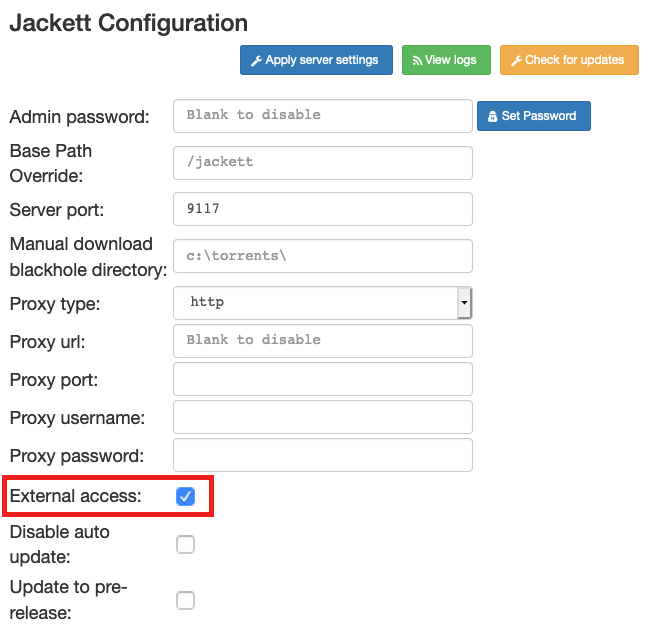
@mbc0 Jackett has a setting for allowing "External access". Not sure exactly what it does, but if I turn it off I can't get to the Web UI either when using the delugevpn network. If I turn it on the Web UI is accessible again. If you can't get to the UI to change it, you can edit the config file directly in config/ServerConfig.json and restart the container.
-
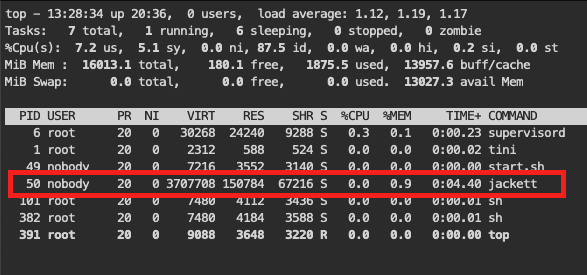
And what does the Jackett logs say, like IceNine451 suggested? It's possible for the container to start and use the delugevpn network, but the Jackett application itself might be having problems. This is what my logs look like on a successful start: 2020-04-13 13:19:55,749 DEBG 'jackett' stdout output: 04-13 13:19:55 Info Jackett startup finished in 2.927 s 2020-04-13 13:19:55,749 DEBG 'jackett' stdout output: Hosting environment: Production Content root path: /usr/lib/jackett/Content Now listening on: http://[::]:9117 Application started. Press Ctrl+C to shut down. And if you run top from the docker console, you should see jackett listed as a process
-
And just to confirm, your unRAID IP is 192.168.0.33 and you are using v6.8.3? No ad blockers or similar used in your browser? Sent from my iPhone using Tapatalk
-
For what it’s worth, I just set up binhex jackett using the network of binhex delugevpn following spaceinvader’s video. Can access jacket UI without problems and have confirmed it is using the VPN tunnel. And I left the port mappings in place for jackett.
-
The underlying OS of the dockers aren’t routing through privoxy, but the application itself is. So sonarr will go through the VPN, but the curl command from the OS level won’t. Same in your VM. The browser is using privoxy as a proxy, but not windows itself. You CAN configure both the VM and the dockers to use privoxy for all network traffic, but it’s not needed for the docker apps you mention as they have built-in proxy support. Edit: Binhex explained it better
-
Just reporting a successful (but long) 3-cycle preclear of a Seagate 8TB archive drive. Triggered with: /usr/local/bin/preclear_binhex.sh -f -c 3 /dev/sdd It's been a few years since I last precleared a drive, and this docker was very easy to use, thanks for making it available! I remember using the script directly before and I was never really sure I had managed to get the right version of it from the forum threads.
-
You can't set those docker containers to use a proxy, so I guess what you have done is setting the application within the container to use the proxy. The curl commands show you the containers networking not using the proxy, which is expected. Except for the deluge container itself, where the whole container is using the VPN tunnel (not via a proxy). I don't know how you can test if Sonarr etc. is actually using the proxy correctly, your best bet might be to look at the application logs to see if something useful is logged? For what it's worth, I am using the deluge proxy for both Sonarr and Radarr, but I haven't actually checked if the traffic goes via the VPN tunnel or not. But I can't see any reason why they wouldn't.
-
Yes there is, on page 175 😉
-
This is probably not the cause of your problem, but umask is not the same as normal chmod permission. For umask, you want 0000 for most open permissions, 0777 is actually the most restrictive. Also, the “downloads” directory (output) doesn’t exist under /storage/Handbrake according to you screenshots. Not sure if Handbrake can create it for you on the fly, or if you need to create yourself first Sent from my iPhone using Tapatalk
-
Script is case sensitive, you have the second letter “t” capitalized the wrong way round between the script and your utorrent VM names. Sent from my iPhone using Tapatalk
-
Enter this command in the unraid terminal and it will give you the last file Handbrake opened for processing: grep Opening /mnt/cache/appdata/HandBrake/log/hb/conversion.log | tail -1 Adjust the path to wherever you have your Handbrake appdata
-
What’s your run command Sauso? If you run in bridge mode with privileged=off, you also need --cap-add=NET_ADMIN This was missing for me, probably because I’ve just been updating without problems for a long time and am using a very old template. It was causing all sorts of problems until I fixed it. Just a thought, might not be your problem. Sent from my iPhone using Tapatalk
-
Here you go, just edit with your own watch folder path and set it up on a schedule with User Scripts. The script will first check that the folder exists, then start Handbrake if the folder is not empty. #!/bin/bash # Set the path to the Handbrake watch folder as seen from the Unraid command line WATCH="/mnt/user/Media/Handbrake_hotfolder/watch" if [ -d "$WATCH" ] && [ -n "$(ls -A "/$WATCH")" ]; then docker start HandBrake logger "HandBrake started by User Scripts" fi And here's what I do to stop it once the watch folder is emptied again. I only use the watch folder to process files. Not sure if this is safe to run if you are also processing files via the GUI at the same time. I think it will shut down the container mid-processing in that case.
-
Yep, I do. I have a script on a cron schedule in User Scripts that checks if the watch folder contains any files once every night. If it does, the script starts the container. Then I use a hook script to shut down the container when the watch folder is empty. See a few posts up for that script. End result is that Handbrake only runs at night, and only when there is work to be done. I can post the start script when I get home tonight if you’re interested? Sent from my iPhone using Tapatalk
-
Hi @Djoss, saw the notification from github that you added the post_watch_folder_processing hook, thank you so much for that! To test, I pulled down the latest image and added the following post-watch script: #!/bin/sh # # This is an example of a post watch folder processing hook. This script is # always invoked with /bin/sh (shebang ignored). # # The argument of the script is the path to the watch folder. # WATCH_FOLDER=$1 echo "post-watch folder processing: Watch folder = $WATCH_FOLDER" if [ -d "/$WATCH_FOLDER" ] && [ -z "$(ls -A "$WATCH_FOLDER")" ]; then echo "watch folder empty, shutting down" killall -sigterm ghb fi And it worked beautifully: [autovideoconverter] Conversion ended successfully. [autovideoconverter] Removed /watch/movie.mp4'. [autovideoconverter] Watch folder '/watch' processing terminated. [autovideoconverter] Executing post watch folder processing hook... post-watch folder processing: Watch folder = /watch watch folder empty, shutting down [autovideoconverter] Post watch folder processing hook exited with 0 [autovideoconverter] Conversion ended successfully. [autovideoconverter] Removed /watch/movie.mp4'. [autovideoconverter] Watch folder '/watch' processing terminated. [autovideoconverter] Executing post watch folder processing hook... post-watch folder processing: Watch folder = /watch watch folder empty, shutting down [autovideoconverter] Post watch folder processing hook exited with 0 [services.d] stopping services [services.d] stopping app... [services.d] stopping x11vnc... caught signal: 15 26/03/2019 23:50:01 deleted 40 tile_row polling images. [services.d] stopping statusmonitor... [services.d] stopping openbox... [services.d] stopping logmonitor... [services.d] stopping xvfb... [services.d] stopping autovideoconverter... [services.d] stopping nginx... [services.d] stopping certsmonitor... [services.d] stopping s6-fdholderd... [cont-finish.d] executing container finish scripts... [cont-finish.d] done. [s6-finish] syncing disks. [s6-finish] sending all processes the TERM signal. [s6-finish] sending all processes the KILL signal and exiting. So again, thank you!
-
From the handbrake UI you need to set the destination folder to: /output/finished Sent from my iPhone using Tapatalk
-
Done. Let me know if/when you need help with testing. Thanks for all your work on this container, it's very very useful.
-
Ok, "killall -sigterm ghb" works well, at least when running manually in the container shell. But I've run into another problem. The post-conversion hook runs before the watch folder is cleaned up, so I can't look for an empty folder. [autovideoconverter] Executing post-conversion hook... post-conversion: Status = 0 post-conversion: Output File = /output/movie.mkv post-conversion: Source File = /watch/movie.mp4 post-conversion: Preset = Mathias_MKV_720p30_v2 [autovideoconverter] Post-conversion hook exited with 0 [autovideoconverter] Conversion ended successfully. [autovideoconverter] Removed /watch/movie.mp4 I could use the source file parameter to test if the watch folder only contains that file, but that has two problems: 1. Source files in sub folders will trip it up 2. Not sure if the watch folder purge have time to run before the container is shut down by the script Hmm, might have to resort to a scheduled external script polling the watch folder.
-
Great, thanks to both of you! Sent from my iPhone using Tapatalk
-
Since hooks are all the rage at the moment, I’ll throw my question into the ring as well! At the end of each conversion I want to check if the watch folder is empty and if it is, shut down the container. I know I can do the first bit with a post processing hook, but is it possible to stop the container from the container shell? If it is, what’s the command? Sent from my iPhone using Tapatalk
-
Try the steps in the post above to restart the daemon from within deluge UI after enabling the plugin
-
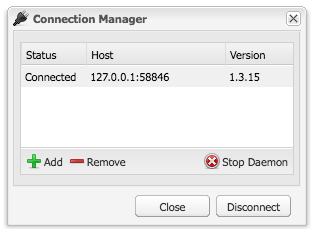
Yeah sorry about that, I wrote it from memory and deluge doesn't have a file menu... To get the plugins to stick: 1. Enable the plugin in deluge preferences 2. Open connection manager 3. Select the host you're connected to 4. Stop the daemon (at this point you can check that the plugin has been added to core.conf) 5. Start the daemon 6. Connect to the now running daemon 7. Stop and start the container 8. Open deluge preferences and confirm plugin is now enabled Please report back if this solves the problem for you
-
Looks like your VM is named HassOI in unraid template, not HassIO. Sent from my iPhone using Tapatalk
-
I had this problem and fixed it by installing the plugin, re-starting deluge from within the container, i.e. from the deluge file menu, and then restarting the container itself. Plugin has persisted all restarts since. There is a label plugin you can just turn on that will give the sorting options. Sent from my iPhone using Tapatalk