Jorgen
Members
-
Joined
-
Last visited
-
Hi @JPDVM2014 the CWA docker is throwing up critical vulnerabilities in a Trivy scan, are you able to update the container to fix this? Or does this need to be fixed upstream? Looks like it's already raised as an issue here so we just have to wait for a fix and a new image build? https://github.com/crocodilestick/Calibre-Web-Automated/issues/1656

-
@Djoss looks like this container is affected by the Brotli CVE https://avd.aquasec.com/nvd/2026/cve-2026-111497/ aka Node2Shell/Broccoli2Shell/HTTP2Shell. Please consider fixing this, even though I understand the risk of an attack/exploit is very low for this use case. The container is already on Alpine 3.24, and that branch has the fix: brotli-libs 1.2.1-r0 (CVE-2026-111497). The published image still has 1.2.0-r1. AI suggests (and could be wrong!): "add-pkg firefox=151.0.3-r0 will not upgrade it, because the base image already installed 1.2.0-r1. Rebuild baseimage-gui on current Alpine 3.24 and then rebuild Firefox on that base, or upgrade brotli-libs in the Firefox build. The new image should show apk info -v brotli-libs as 1.2.1-r0."
-
Thanks for all your work on this @chodeus ! I've been running the beta successfully for a while, but I want to swap back to the original plugin now that the updates have been merged. Is there a way to import the beta-config into the original plugin? Or is that a manual compare-and-update job for me? Also, is there nay point in keeping the beta installed now, or will all future updates go straight to the original plugin from this point?
-
For Linux VMs you also need to load the dkms in the guest. I’ve never tried this so can’t help much, but the upstream repo has install guides that should work: GitHubGitHub - strongtz/i915-sriov-dkms: dkms module of Linux i...dkms module of Linux i915 driver with SR-IOV support - strongtz/i915-sriov-dkms
-
Technically nothing else is needed for sr-iov to work. But intel_iommu=on iommu=pt are both a good anyway for VM passthrough so add those two
-
Ok, so the 6.18.60 package installed fine and there is no issue with the sr-iov plugin. Your Diagnostics show 00:02.0 (UHD 770) is bound to vfio-pci at boot, so VFs cannot be created (sriov_numvfs: No such file or directory). To fix: uncheck 00:02.0 in System Devices (i.e. unbind the iGPU from vfio), keep the plugin, reboot. lspci -k -s 00:02 should then show the PF on i915 (Kernel driver in use: i915) plus 00:02.1–.7 Also add these to Setting/BootParameters if they are not already present: i915.enable_guc=3 i915.xelp_enable_ccs=1 module_blacklist=xe
-
Try removing all files from /boot/config/plugins/i915-sriov/packages/ Then reboot. Re-install this plugin, reboot. If that doesn’t work, post diagnostics from after the last reboot
-
7.3.5 and 7.4.0 is the same kernel so will use the same compiled package. If it works for 7.4.0 it should work for 7.3.5. Yes I’m just using the standard playing from CA App Store
-
Ditto here but from 7.3.4, so slick. 😁 Including the automated sr-iov plugin/package update that caused some drama on 7.3.4
-
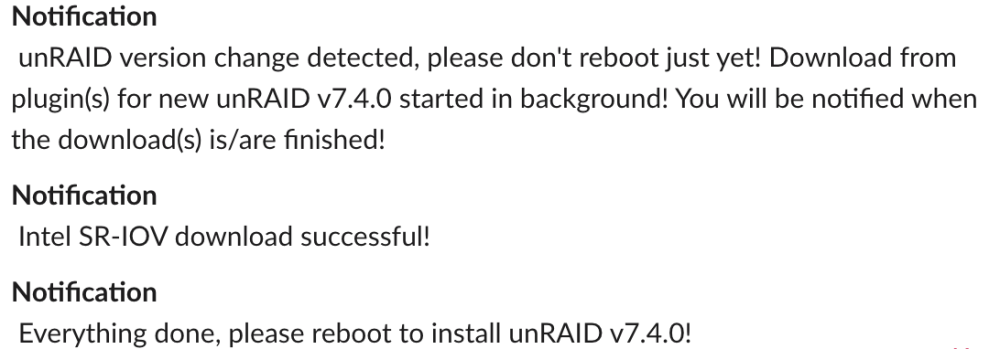
Upgrade to 7.4.0 completed successfully, including the "normal" download of the correct sriov package
-
From what I can tell the 6.18.60 release was already automatically generated in the standard plugin repo, so I don’t think it requires a separate download from your repo. But I haven’t tried to upgrade yet, so can’t confirm it will actually work.
-
I know not all of this is actually a problem for a LAN only server, but the results are still a bit unnerving...

-
Thanks @Samsonight plugin works great!
-
Thanks for sharing this! I like this a lot and would love to see it extended to the os and available via CA.
-
Yep, plugins are fixed for me too, thanks Binhex! I had to do a force update from the docker page to get the version with the fix when using the :latest tag. docker exec binhex-delugevpn cat /etc/image-build-info # expect IMAGE_RELEASE_TAG=2.2.0-7-09 or later While troubleshooting the broken plugins I also discovered I was using two out-of-date plugins that have newer versions by new maintainers in new repos. If anyone else are using these it's probably a good idea to install the newer versions ltConfig https://github.com/zakkarry/deluge-ltconfig/releases/tag/v2.1.1 Also see tuning tips here: https://forum.deluge-torrent.org/viewtopic.php?t=56921 AutoRemovePlus http://github.com/tote94