





spazmc
Members
-
Joined
-
Last visited
-
I did not realize "x Cache" was a button. That solved my problem thanks.
-
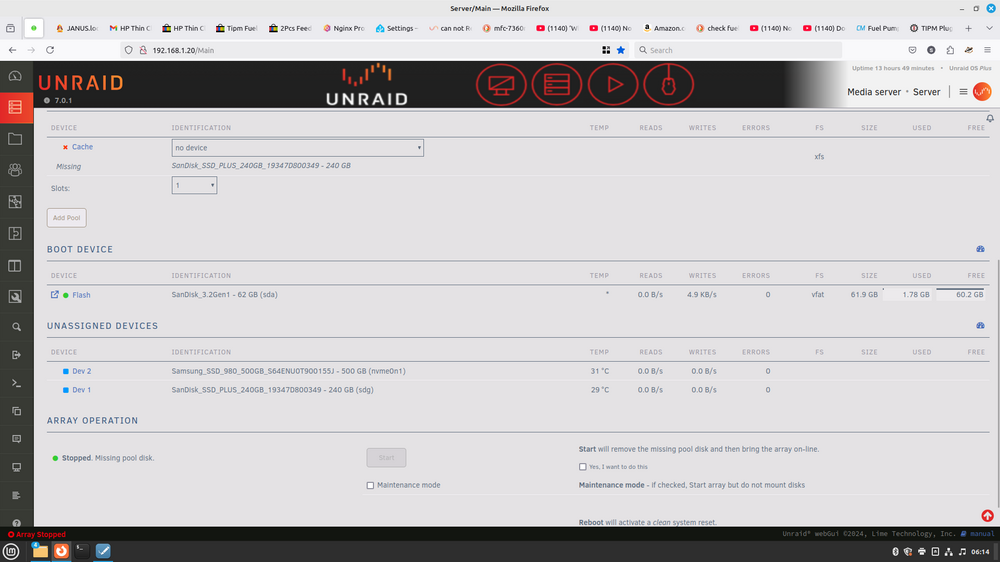
Stop array. Un assign drive no remove pool button. I only have 1 cache with a xfs file system.
-
yes stopped and removed from Cache slot. Will not allow me to restart with no cache disk. Can I remove it from a config file on the USB?
-
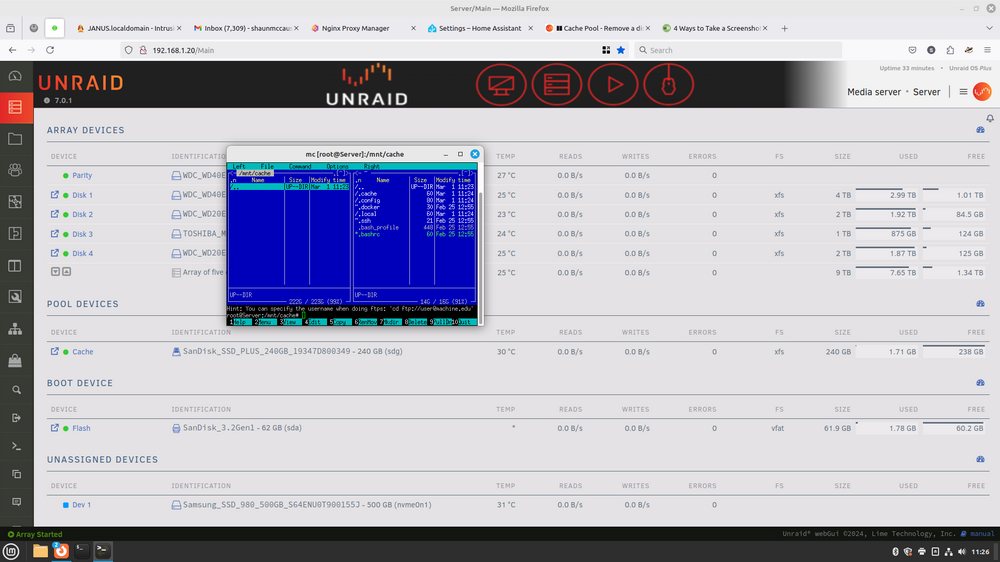
Update failed. USB drive died. So updated new USB stick. Key replacement was easy. With all of this going sideways updated hardware. Have moved everything from cache drive. but it will not allow me to remove it. Help.
-
I don't look at this very often and surprise it's not working. so to help others the template has changed. Start here https://foldingathome.org/v8-3-client-guide/ you need a token. modify your template as needed see this.https://hub.docker.com/r/linuxserver/foldingathome/ Add the 2 missing Variables. they are. ACCOUNT_TOKEN MACHINE_NAME hope this helps. Easy fix.
-
I had to change the template settings to match the Documentation. config = /etc/scanservjs output = /var/lib/scanservjs/output Anyone now what to do with this. --device-cgroup-rule="c $MAJOR_NUMBER:* rmw" \ https://github.com/sbs20/scanservjs/blob/master/docs/02-docker.md#environment-variables Found out no cgroups in unRAID
-
Found this in unRAID tools,system devices Bus 001 Device 005 Port 1-1.1ID 04a9:190a Canon, Inc. CanoScan LiDE 210 From docker termial " sane-find-scanner -q " got back found USB scanner (vendor=0x04a9 [Canon], product=0x190a [CanoScan], chip=GL124) at libusb:001:005 " scanimage -L " Created directory: /var/lib/snmp/cert_indexes device `genesys:libusb:001:005' is a Canon LiDE 210 flatbed scanner Change docker Config. add device /dev/bus/usb/001/005;genesys:libusb:001:005 this works in privileged mode. Now udev and usb permmisions. Oh my.
-
I have A old APC SmartUPS. 1500 have it connected to my Router. and My server. over the network. network switch is Plugged in too. At 11% load.
-
So what is wrong with Unraid charging for cloud based backup. If you want it? Some of you are already paying someone else to to do it.
-
If your not using Docker.(Great.loveit) Then no cache. If your intent on a Media server I would use a small SSD as cache for Jellyfin, MiniDLNA or Plex
-
That may have bin true in version 5? Version 6 has disk limits. Basic is 6 disks allocate how you wish. options are yours. maybe 2 parity and 4 data disks as basic file server? or 1 parity 1 cache for Docker 3 data disk and 1 unassigned disk for VM. You chose it's your server.
-
Yes Other dockers it will change. Icon URL: is where I change it This maybe it.
-
Trying to change Docker icon for this docker and it will not change? Other dockers icons will. Tried other browser and cleared browser cache. Server reboot no luck? Any suggestions? Thanks
-
The only guy here with a smaller budget than me.lol. I have newer hardware I would give away. We have to pay to dispose E waste.
-
If this docker was setup as 50%cpu usage out of the box. I feel that some of the performance problems and GUI being no responsive would be solved. I will say the cpu usage settings seem to work. Have memory limited in settings also seems to work. Have no tried to change password. Not sure it matters. Thanks for the container.




