





strike
Members
-
Joined
-
Last visited
Everything posted by strike
-
All plugins for v2 needs to be updated and most are not yet, so you need to roll back to v1 to be able to use most plugins.Not in the container, but you can use the user script plugin to do that.You can have this now with the Parity Check Tuning pluginI don't know what system this is, but from your volume mapping screenshot I can see that /share/Download/Torrents is marked as read-only. I would bet that's your issue.Try #!/bin/bash etherwake -b MAC:ADDRESS Should get you goingIt's actually real easy to do this and yes you're right, the answer lies within the logs. Just stop the delugevpn container then do a search for a movie/show in sonarr/radarr or whatever then look at their logs. You should see they are unable to search for anything and if you start delugevpn again everything should be working.Have you checked Q6 here: https://github.com/binhex/documentation/blob/master/docker/faq/vpn.mdlol, well glad you got it sortedPlease check your login credentials and make sure they only contain a-z, A-Z, 0-9 characters. Also make sure your subscription is active and have not expired.What about if you click the container and select "logs", can you paste the output here?Please take a look at link in the second post above yours.Just map a directory in RAM to a directory inside he container, then choose that directory in the emby transcode settings. I have mine mapped like this:
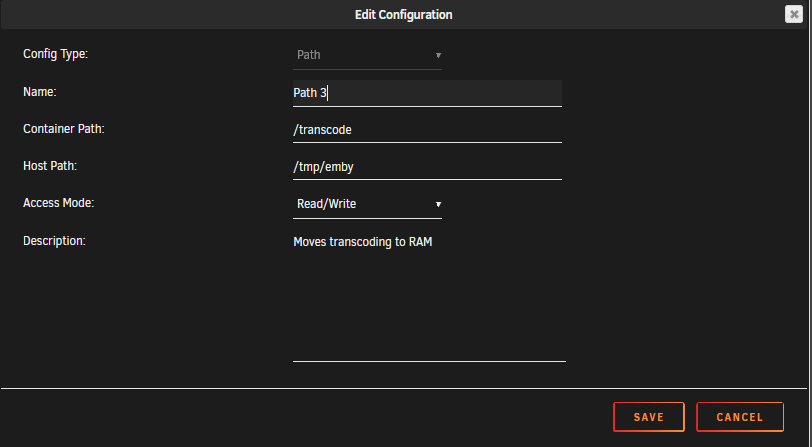
 Afaik the LabelPlus plugin is a more enhanced 3rd party version of the label plugin included with deluge. I only need the label plugin which is included in v1. Are you saying this plugin doesn't work either?I haven't really been following this thread after the v2 release, but can anyone using v2 confirm if the label plugin is working? That's really the only plugin I need.https://forums.unraid.net/topic/53520-support-linuxserverio-ombi/?do=findComment&comment=771317Known issue, fixed in next unraid release: https://forums.unraid.net/bug-reports/stable-releases/dockers-wanting-to-update-but-dont-in-the-end-r618/The password for the webui is "deluge". The auth file is for configuring the user/pass for connecting to the deluge daemon (thin client).Any news on adding the geoip2 module? I see from this link that @aptalca submitted a PR https://gitlab.alpinelinux.org/alpine/aports/issues/10068 Edit: Maybe I should try and update the container, clicking the PR link I see it was added to 3.10. Yup, update was all that was needed. I love you guys! 😍You need this: https://forums.unraid.net/topic/77813-plugin-linuxserverio-unraid-nvidia/Sorry for the late reply, but in case you haven't been using your google-fu the exact command is tar -xvf example.tar FolderName/ This will extract the folder named "FolderName" and all it's content to the directory you're currently in.So you're saying there actually was a leak? LOL, then I actually have to apologize The whole story didn't add up to me, but ok..I'm sorry, I'm not trying to be an ass, but sounds like BS to me. How do you know it's not working? Since you asked how you could check for IP leakage I'm guessing you don't have the knowledge to do so yourself? So what changed between your first and second post? Did you read up on how to use wireshark or something and actually test it? And I find it very unlikely that between your docker backup this morning and the supposed leakage you got some letter from your ISP delivered to you by express mail (or a drone maybe). Because how else would you know it was an IP leak when you don't know how to test it? If my assumption is wrong I apologize, but your story sounds like total BS to me. If not, you surely have some proof of your theory?You could do it from the command line I don't remember the exact command, but google should know. You could also extract it using winrar or something, but then you might screw up some permissions and/or symlinks so to be on the safe side I would do it from the command line.Thanks, love this community I'm learning something new almost every day! I will try to lower it even further to test. Can't really say I remember changing the value so current value most be default (on my system anyway). Any other thoughts if my tests fail? Why does the performance hit (for the most part) the 4 last cores? Or does it just have to do with the fact that there is a VM running on them and somehow VM's get a massive performance hit during dual parity -check? I mean if I take the workload on the 4 first cores into consideration and "add it" to the last 4 cores it should not have impacted the VM that heavily.


