





adoucette
Members
-
Joined
-
Last visited
Everything posted by adoucette
-
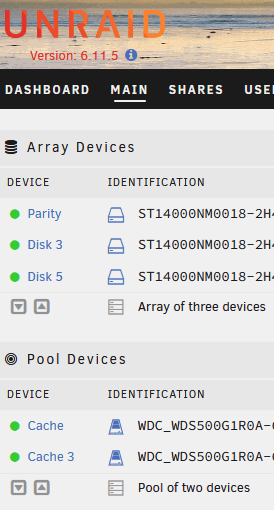
Hello, Does it matter that my array lists just parity and disks 3 and 5 (instead of 1 and 2), and my cache lists cache and cache 3? This came about after I replaced array 5x4TB drives with 3x14TB drives and upgraded the old cache drives. If it does matter, now or in future, how should I go about reconciling / re-enumerating (?) them? Thanks, Ari
-
Agree. I wish this plug in still was maintained and worked.
-
How do I go about standing up a new version as a docker in Unraid if new versions won't start because of this file system error? Is this just some config changes when I install the new docker instance?
-
I have a similar thought - as well as considering "/mnt/user" to be an important folder to be able to cache
-
+1 for that. I really hope that it can work again with mnt/user sometime soon.
-
https://www.mrg-effitas.com/test-library/ https://www.av-comparatives.org/test-results/ https://www.av-test.org/en/antivirus/home-windows/ Your (informed) choice.
-
Personally I really liked the plugin. Even though it is clear that it does not provide 100% protection, and preventing ransomware in the first place is more important, I still felt that it provided an additional layer. (seriously, we hear about a good number of malware designed to wait for a while and gather info about how to traverse any network locations available before launching an attack - so Unraid shares would be a target) Wish it still worked, but had to disable it and uninstall as it stopped working for me a few Unraid versions ago.
-
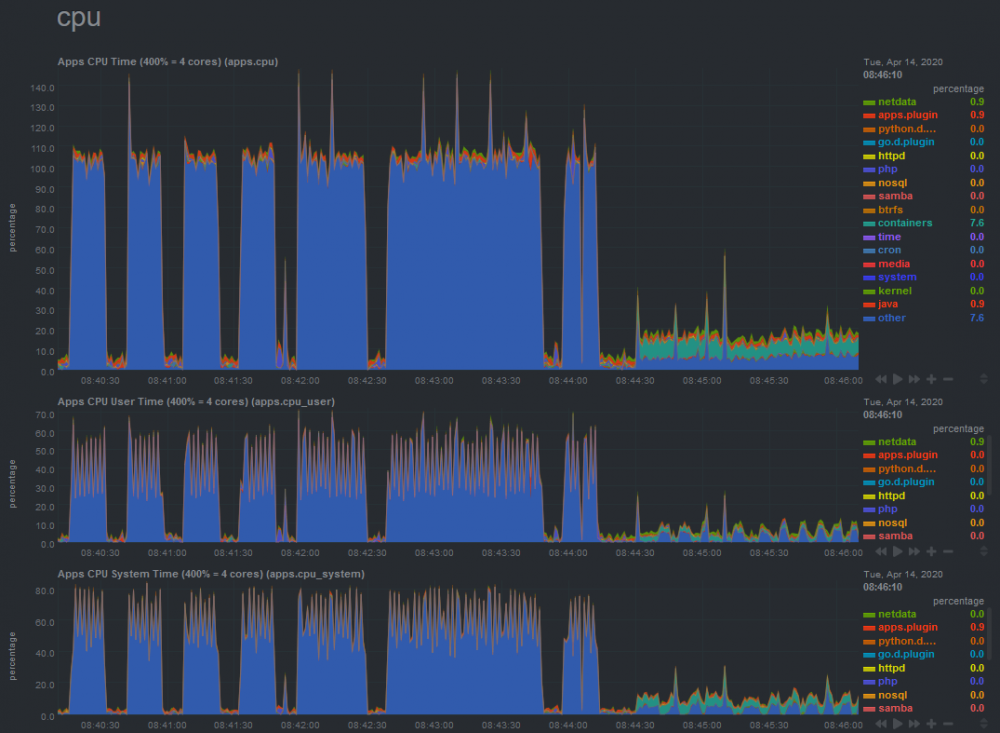
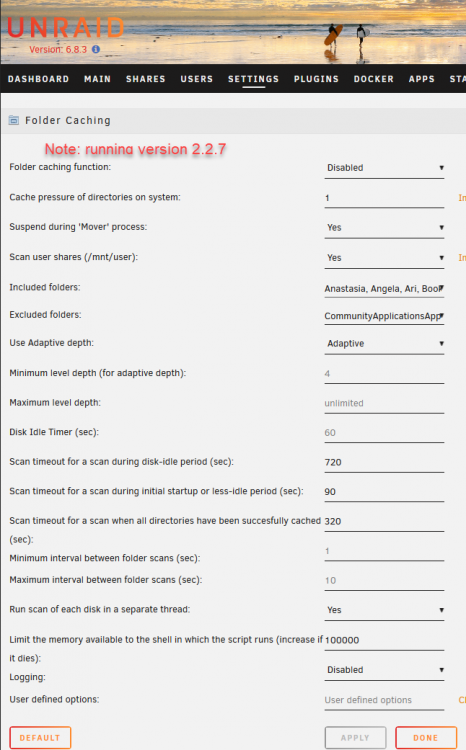
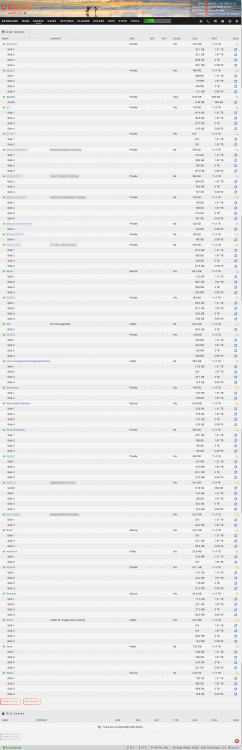
What have I set wrong with this plugin? I see two issues with my setup currently: 1) I still have to wait for disks to spin up when I'm browsing network shares that should be cached, and 2) the FolderCaching plugin keeps cycling my CPU seems to run for 30 seconds, takes a break, then runs another 30 seconds. I had thought that the plugin allow me to browse the network shares to see folder and files names without spinning up disks unless I actually transfer files and also would use some CPU initially to make a list of the folders and files to cache, and then stop using a lot of system resources until those folders/files are updated. I'm running unraid 6.8.3 and foldercaching 2.2.7. Here is my CPU output from NetData. You can see that I disabled the Folder Caching plugin after 08:44:00 in the graph. As soon as I turn off the plugin, the CPU goes back to normal. Here are my settings for the plugin: I've attached the size of the shares below in case needed. However, I do not have the total number of files in each share. How should I configure Folder Caching to 1) allow me to browse folders and filenames in the included shares without spinning up disks until I need a file and 2) stop using so many CPU resources? Thanks for any assistance. Ari
-
Alas - I thought this was such a nice idea and a really nice implementation of it. Of course, doesn't stop all ransomware attacks, but certainly better than nothing! Really too bad this is now depreciated and there isn't an alternative. (or is there an alternative?)
-
Thank you. To make it easier for others, here is the post testdasi was referring to: To run a web gui of rclone on unraid, here is the command to run (after the rclone plugin is installed, of course): rclone rcd --rc-web-gui --rc-user=test --rc-pass=test --rc-addr 192.168.1.10:12345 Replace "192.168.1.10" with your Unraid server's local IP. Replace "12345" with the [unused] port you would like the rclone server to use, replace the rc-user and rc-pass variables with the usernames and passwords you want to use. Then point your web browser to the address you specified and log in with the credentials you specified. Nice.
-
I See that rclone now offers a web GUI https://rclone.org/gui/ Is it possible to use this with the Unraid rclone plugin? I have tried installing the rclone plugin on Unraid, opening the command prompt from the Unraid web UI, running the command at the rclone page above. Here's the output: Linux 4.19.56-Unraid. Last login: Wed Oct 23 18:41:04 -0400 2019 on /dev/pts/0. root@SERVER:~# rclone rcd --rc-web-gui --rc-web-gui-update 2019/10/23 18:45:58 NOTICE: A new release for gui is present at https://github.com/rclone/rclone-webui-react/releases/download/v0.0.8/currentbuild.zip 2019/10/23 18:45:58 NOTICE: Downloading webgui binary. Please wait. [Size: 4646512, Path : /root/.cache/rclone/webgui/v0.0.8.zip] 2019/10/23 18:45:59 NOTICE: Unzipping 2019/10/23 18:45:59 NOTICE: Serving remote control on http://127.0.0.1:5572/ Then, if I point a browser to that port at my Unraid server's IP, I get a page not found error.
-
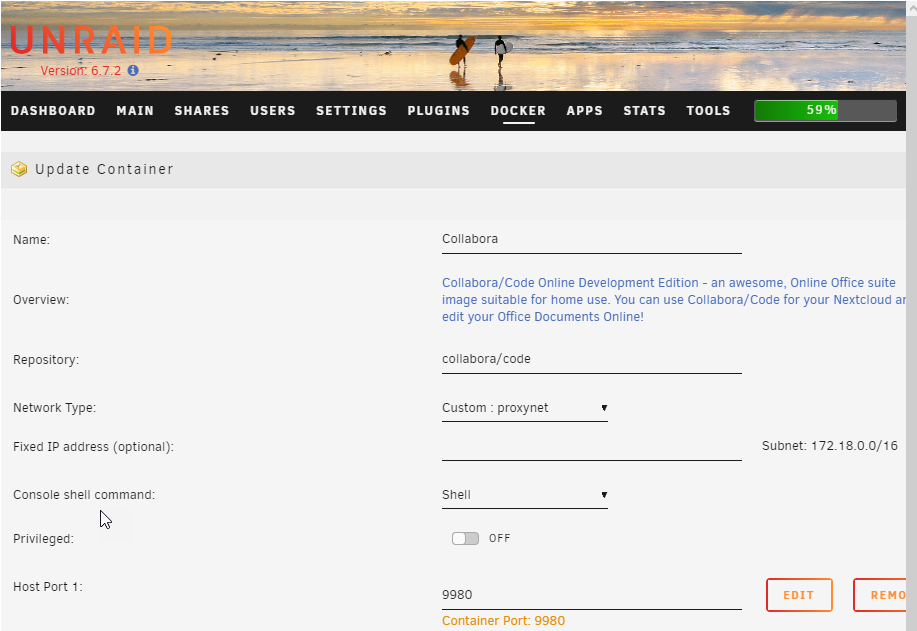
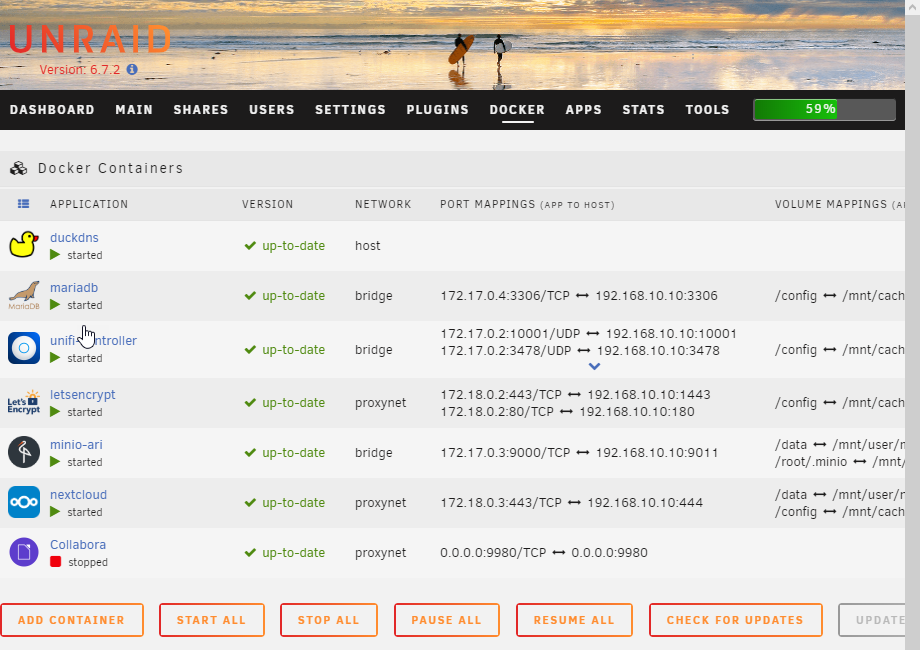
Hello, I have difficulty setting up the Collabora docker because it doesn't seem to get an IP? Container setup: Docker screen: So Collabora will not start. I see it gets a 0.0.0.0 IP. I tried putting "172.18.0.30" in the custom IP for the docker settings, but that resulted in a failed container install. What would be the correct settings here for the docker container? Thanks, Ari
-
Thanks Brit I just had this problem as well -- mis-placed root user password after I had changed it. The method Brit described above does work, but I did need to leave two semicolons after root (vice one), and the value between the 2nd and 3rd semicolons was different (so I left it as it was). root::17810:0:99999:7::: Hope this helps
-
Has anyone found a way (and a how-to guide!) for modsecurity, or another WAF, for hardening a Nextcloud docker install on unRAID?
-
I'm on COX residential as well. Please refer to these posts as to how I was able to get it set up (per aptalca's excellent dockers and documentation!) and Hope it helps!
-
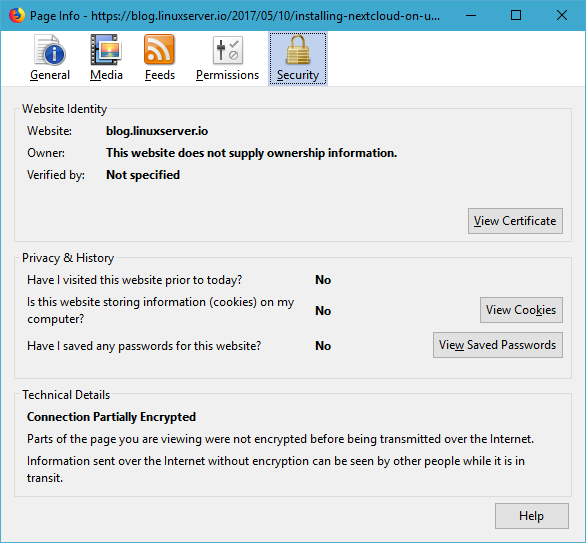
The instructions for setting this up at https://blog.linuxserver.io/2017/05/10/installing-nextcloud-on-unraid-with-letsencrypt-reverse-proxy/ have the following: ###SSL Certificates ssl_certificate /config/keys/letsencrypt/fullchain.pem; ssl_certificate_key /config/keys/letsencrypt/privkey.pem; But the file in the letsencrypt docker distro at /ngnix/site-confs/default has this in it: # all ssl related config moved to ssl.conf include /config/nginx/ssl.conf; So I went ahead and used that include statement in each of the ngnix reverse proxy server blocks. Then in the above-named ssl.conf file I have: # session settings ssl_session_timeout 1d; ssl_session_cache shared:SSL:50m; ssl_session_tickets off; # Diffie-Hellman parameter for DHE cipher suites ssl_dhparam /config/nginx/dhparams.pem; # ssl certs #ssl_certificate /config/keys/letsencrypt/fullchain.pem; #ssl_certificate_key /config/keys/letsencrypt/privkey.pem; # the letsencrypt docker has pointers that go to the above files, which should work, but the hardcoded path is below ssl_certificate /config/etc/letsencrypt/live/mydomain.com/fullchain.pem; ssl_certificate_key /config/etc/letsencrypt/live/mydomain.com/privkey.pem; # protocols ssl_protocols TLSv1 TLSv1.1 TLSv1.2; ssl_prefer_server_ciphers on; ssl_ciphers 'ECDHE-RSA-AES128-GCM-SHA256:ECDHE-ECDSA-AES128-GCM-SHA256:ECDHE-RSA-AES256-GCM-SHA384:ECDHE-ECDSA-AES256-GCM-SHA384:DHE-RSA-AES128-GCM-SHA256:ECDHE-RSA-AES128-SHA256:ECDHE-ECDSA-AES128-SHA256:ECDHE-RSA-AES128-SHA:ECDHE-ECDSA-AES128-SHA:ECDHE-RSA-AES256-SHA384:ECDHE-ECDSA-AES256-SHA384:ECDHE-RSA-AES256-SHA:ECDHE-ECDSA-AES256-SHA:DHE-RSA-AES128-SHA256:DHE-RSA-AES128-SHA:DHE-RSA-AES256-SHA256:DHE-RSA-AES256-SHA:!aNULL:!eNULL:!EXPORT:!DES:!RC4:!MD5:!PSK:!aECDH:!EDH-DSS-DES-CBC3-SHA:!EDH-RSA-DES-CBC3-SHA:!KRB5-DES-CBC3-SHA'; # HSTS, remove # from the line below to enable HSTS add_header Strict-Transport-Security "max-age=63072000; includeSubDomains; preload" always; # OCSP Stapling ssl_stapling on; ssl_stapling_verify on; Is this pointing to the correct cert? Or to the wrong cert (such as in the ngnix base image)? Or is there some other problem I'm not seeing? Thank you for the great help @aptalca FWIW, I actually also get that same error at blog.linuxserver.io (but not at the base linuxserver.io page).
-
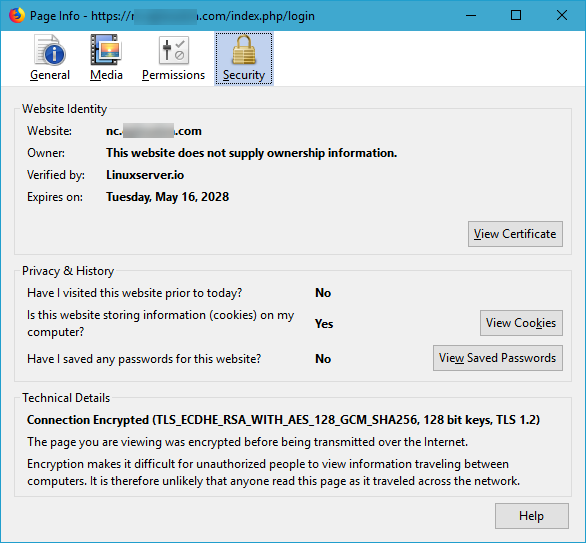
I have been getting a certificate error from the letsencrypt docker. The cert appears to be self-signed, but shows as verified by linuxserver.io. I have purchased my own domain name, and it is running through cloudflare (caching off) so that I can use DNS domain validation with letsencrypt because my ISP (COX) blocks port 80 so I can't do http validation. Here's my letsencrypt output: ------------------------------------- _ () | | ___ _ __ | | / __| | | / \ | | \__ \ | | | () | |_| |___/ |_| \__/ Brought to you by linuxserver.io We gratefully accept donations at: https://www.linuxserver.io/donations/ ------------------------------------- GID/UID ------------------------------------- User uid: 99 User gid: 100 ------------------------------------- [cont-init.d] 10-adduser: exited 0. [cont-init.d] 20-config: executing... [cont-init.d] 20-config: exited 0. [cont-init.d] 30-keygen: executing... using keys found in /config/keys [cont-init.d] 30-keygen: exited 0. [cont-init.d] 50-config: executing... Variables set: PUID=99 PGID=100 TZ=America/New_York URL=mydomain.com SUBDOMAINS=www,ftp,nc,ari43dou,minio-ari,minio-marty,testing EXTRA_DOMAINS= ONLY_SUBDOMAINS=false DHLEVEL=2048 VALIDATION=dns DNSPLUGIN=cloudflare [email protected] STAGING= Backwards compatibility check. . . No compatibility action needed 2048 bit DH parameters present SUBDOMAINS entered, processing SUBDOMAINS entered, processing Sub-domains processed are: -d www.mydomain.com -d ftp.mydomain.com -d nc.mydomain.com -d ari43dou.mydomain.com -d minio-ari.mydomain.com -d minio-marty.mydomain.com -d testing.mydomain.com E-mail address entered: [email protected] dns validation via cloudflare plugin is selected Certificate exists; parameters unchanged; attempting renewal <-------------------------------------------------> <-------------------------------------------------> cronjob running on Sat May 19 14:04:49 EDT 2018 Running certbot renew Saving debug log to /var/log/letsencrypt/letsencrypt.log ------------------------------------------------------------------------------- Processing /etc/letsencrypt/renewal/mydomain.com.conf ------------------------------------------------------------------------------- Cert not yet due for renewal ------------------------------------------------------------------------------- The following certs are not due for renewal yet: /etc/letsencrypt/live/mydomain.com/fullchain.pem expires on 2018-08-17 (skipped) No renewals were attempted. No hooks were run. ------------------------------------------------------------------------------- [cont-init.d] 50-config: exited 0. [cont-init.d] done. [services.d] starting services [services.d] done. Server ready How can I resolve this so the certs are good? Thanks, Ari
-
Right, but even if forwarded through the router (pfsense) the ports show as closed ("stealth") with an online port scanning tool like GRC shields up.
-
COX
-
My ISP blocks port 443 and I am struggling to get letsencrypt to work with non-standard ports. I've managed to obtain certificates by using the dns verification (vice 443) and cloudflare (set authentication type to "dns" in docker settings then use mc to change username and api key in letsencrypt/dns-conf/cloudflare.ini) I can forward the docker's port on my edge router from WAN port to the right port on the LAN unRAID server and get to the dockers in http, just not in https. What I'm struggling with is how to access dockers from the WAN if 443 is blocked. For example, if as explained here I set up subdomain.mydomain.com and use the ngnix reverse proxy to point it to my unraid server's IP and docker port, this doesn't work because the traffic is still coming in on 443. Forwarding ports 443 (and 80) on the edge router doesn't seem to help. The guide seems to assume that 443 is not blocked by the ISP (as some of us have to deal with). So, I assume I should be using a non-standard port to come in from the WAN, say port 2345. I should then be able to point my browser from the WAN to https://mydomain.com:2345 How do I set that up in letsencrypt? Thank you for any help, I've spent many hours trying to make this work without success.
-
ISvein, Would you be willing to post a screenshot of your LetsEncrypt settings that makes it work with Minio? Thanks, Ari
-
Goodsync looks like an excellent option for file sync / backups within and between networks. Has there been any movement on getting it to work within unRAID?
-
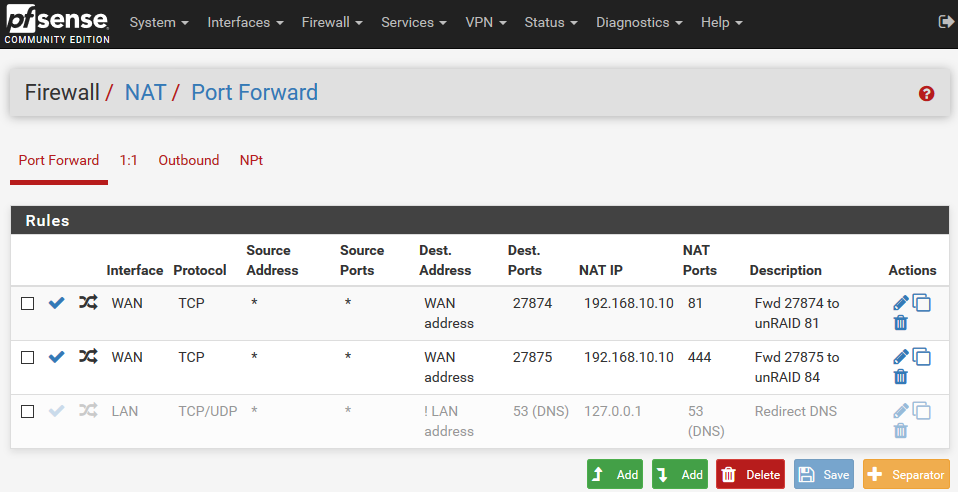
Thank you for suggesting that. I believe I have already set that up: I think there must be something going wrong in the path to get from WAN to my NextCloud instance. As I understand it, this should go from WAN --> DNS --> CloudFlare --> subdomain --> My IP --> pfSense --> unRAID --> LetsEncrypt --> NextCloud I'm not sure how to make sure traffic is flowing 1) to the subdomain, 2) to the port I've specified for pfSense to forward to the unRAID box (WAN 27875 to LAN unRAID 444), 3) from port 444 on the unRAID box through LetsEncrypt to the NextCloud instance. My thinking on this may be wrong though. I am admittedly a layman and this seems a little complex...
-
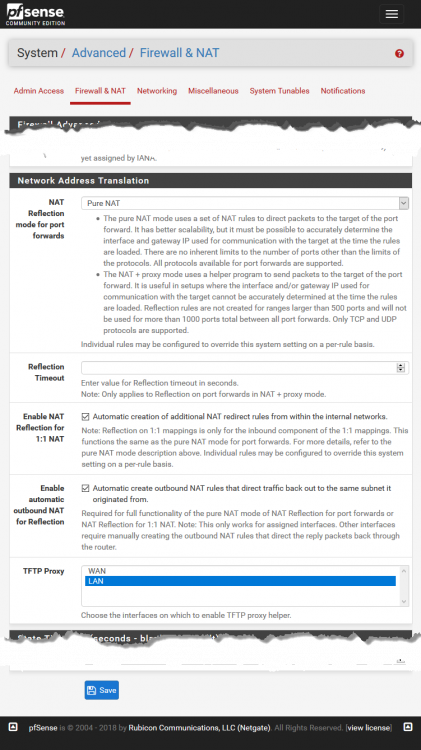
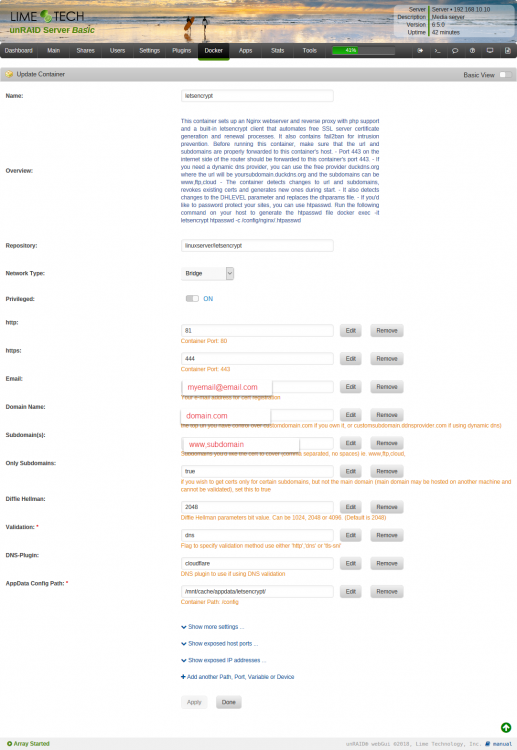
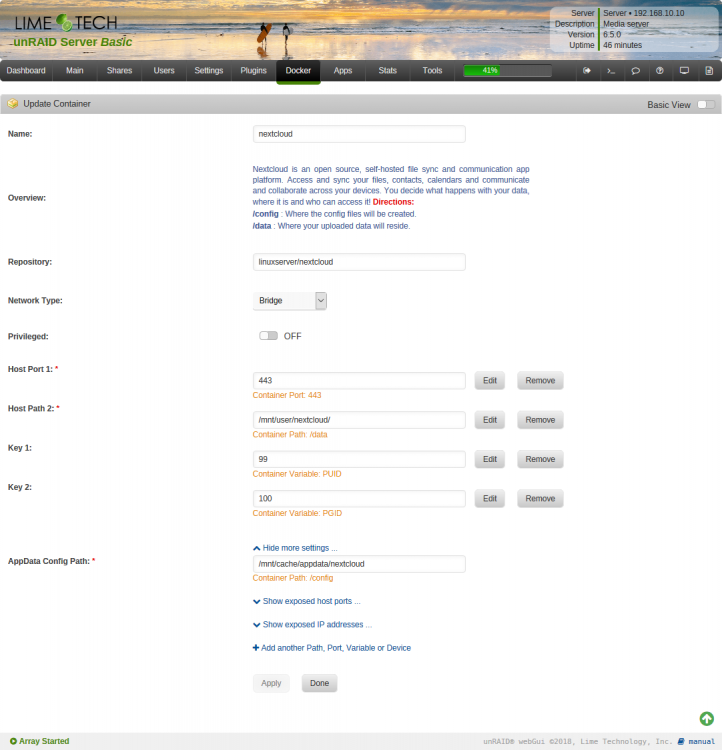
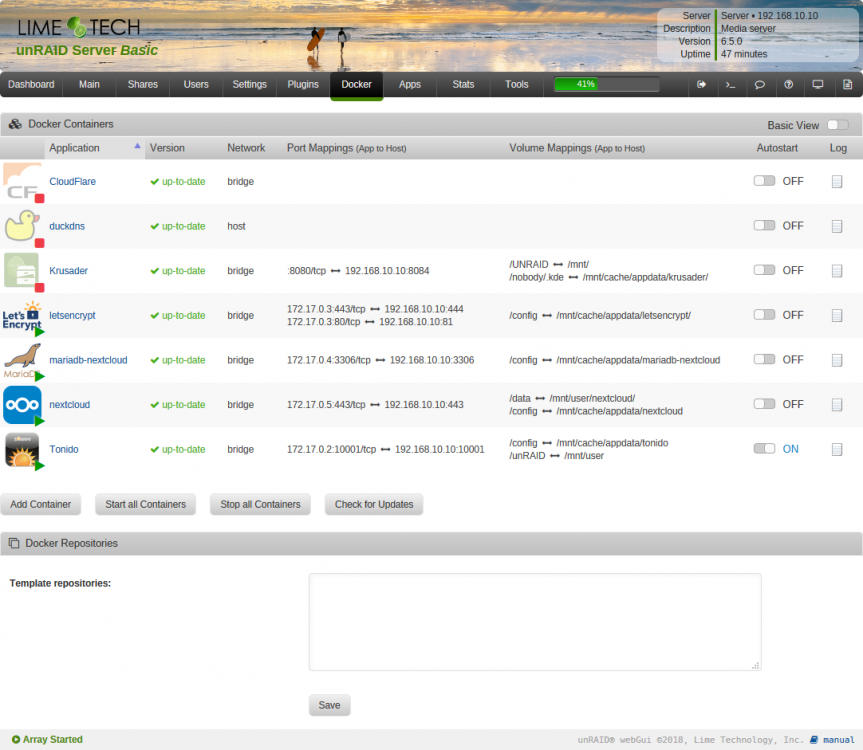
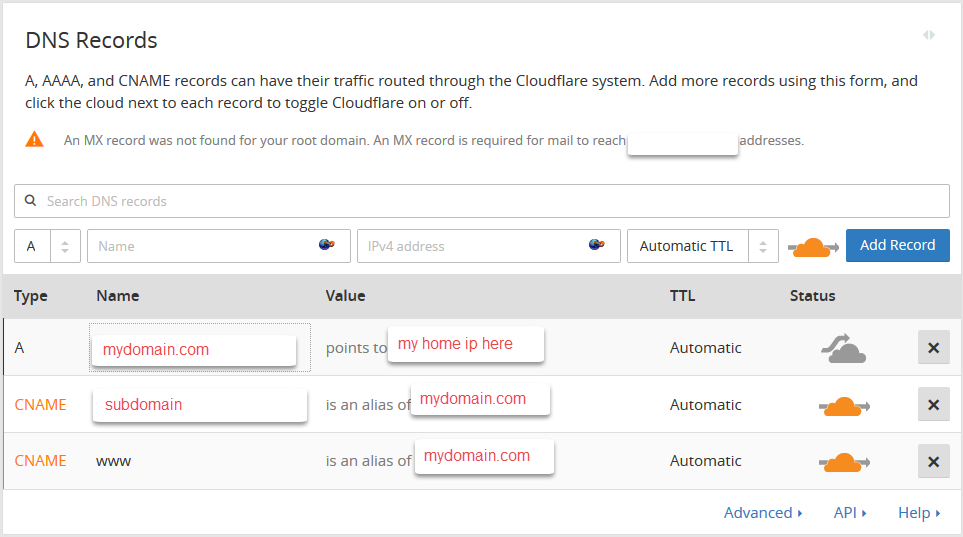
Thank you for the above posts -- there's a lot to read and sort through. I have not been able to get Nextcloud to work by accessing it from the WAN on a subdomain. I've been trying to get this to work today with limited success because my home unRAID server is on a COX residential internet connection that blocks incoming connections to ports 80 and 443. So I scanned 76 pages of posts here https://lime-technology.com/forums/topic/51808-support-linuxserverio-letsencrypt-nginx/?page=76 and found that, to remedy the ports being blocked by my ISP, I had to purchase a domain name, make a cloudflare account, and point the DNS servers in the domain name registrar to cloudflare. Then I worked on LetsEncrypt. Some notes that were helpful to me in this process: Then some port forwarding at home: I set up my pfSense router update cloudflare with my dynamic IP. Then in pfSense forwarded ports from the WAN to the LAN unRAID box. As COX blocks 80 and 443, I chose to replace 80 with 27874 and forwarded to unRAID box on 81 and replace 443 with 27875 and forward to unRAID box on 444. Then I followed the guide at https://cyanlabs.net/tutorials/the-complete-unraid-reverse-proxy-duck-dns-dynamic-dns-and-letsencrypt-guide/ to set up letsencrypt and ngnix (ignoring duckdns as I can't use that due to COX and use cloudflare instead) After this, I am able to view the ngnix default page if I point a browser (from outside my network) to https://mydomain.com:27875 Then the guide at https://blog.linuxserver.io/2017/05/10/installing-nextcloud-on-unraid-with-letsencrypt-reverse-proxy/ to set up nextcloud. At this point, if I don't follow the steps for "Setting Up A Letsencrypt Reverse Proxy" then I can access nextcloud from its UI from the unRAID Docker page. However, after following the "Setting Up A Letsencrypt Reverse Proxy" instructions then I lose that ability and the ability to access nextcloud from the WAN. So, at this point I am not sure how to get subdomain.mydomain.com to resolve to NextCloud on my unRAID box. I've posted screen grabs of the pfSense router NAT forwarding, the cloudflare setup, the LetsEncrypt docker setup, the NextCloud docker setup, and the dockers page. I've also posted the logs from LetsEncrypt and NextCloud. nextcloud-log.txt letsencrypt-log.txt
-
Thanks Capt -- seems to have updated correctly. Appreciate the work you put into it.





