





linuxserver.io
Community Developer
-
Joined
Everything posted by linuxserver.io
-
Application Name: HAbridge Application Site: https://github.com/bwssytems/ha-bridge Docker Hub: https://hub.docker.com/r/linuxserver/habridge/ Github: https://github.com/linuxserver/docker-habridge Please post any questions/issues relating to this docker you have in this thread. If you are not using Unraid (and you should be!) then please do not post here, instead head to linuxserver.io to see how to get support.

-
Application Name: Sickgear Application Site: https://github.com/SickGear/SickGear Docker Hub: https://hub.docker.com/r/linuxserver/sickgear/ Github: https://github.com/linuxserver/docker-sickgear Please post any questions/issues relating to this docker you have in this thread. If you are not using Unraid (and you should be!) then please do not post here, instead head to linuxserver.io to see how to get support.

-
Application Name: LDAP-auth Application Site: https://github.com/nginxinc/nginx-ldap-auth Docker Hub: https://hub.docker.com/r/linuxserver/ldap-auth/ Github: https://github.com/linuxserver/docker-ldap-auth Please post any questions/issues relating to this docker you have in this thread. If you are not using Unraid (and you should be!) then please do not post here, instead head to linuxserver.io to see how to get support.

-
We've made it easier to get Nvidia & iGPU hardware trancoding working with this container. This post will detail what you need to do to use either of these in your container. Nvidia 1. Install the Unraid Nvidia Plugin, download the version of Unraid required containing the Nvidia drivers and reboot 2. Add the Jellyfin container and add --runtime=nvidia to extra parameters (switch on advanced template view) and copy your GPU UUID to the pre-existing NVIDIA_VISIBLE_DEVICES parameter. There is no need to utilise the NVIDIA_DRIVER_CAPABILITIES parameter any more. This is handled by our container. Intel GPU 1. Edit your go file and add modprobe i915 to it, save and reboot. 2. Add the Jellyfin container and add --device=/dev/dri to extra parameters (switch on advanced template view) There is no need to chmod/chown the /dev/dri, this is handled by the container.
-
We've made it easier to get Nvidia & iGPU hardware trancoding working with this container. This post will detail what you need to do to use either of these in your container. (Emby Premiere Required) Nvidia 1. Install the Unraid Nvidia Plugin, download the version of Unraid required containing the Nvidia drivers and reboot 2. Add the Emby container and add --runtime=nvidia to extra parameters (switch on advanced template view) and copy your GPU UUID to the pre-existing NVIDIA_VISIBLE_DEVICES parameter. There is no need to utilise the NVIDIA_DRIVER_CAPABILITIES parameter any more. This is handled by our container. Intel GPU 1. Edit your go file and add modprobe i915 to it, save and reboot. 2. Add the Emby container and add --device=/dev/dri to extra parameters (switch on advanced template view) There is no need to chmod/chown the /dev/dri, this is handled by the container.
-
Application Name: Emby Application Site: https://emby.media/ Docker Hub: https://hub.docker.com/r/linuxserver/emby/ Github: https://github.com/linuxserver/docker-emby Please post any questions/issues relating to this docker you have in this thread. If you are not using Unraid (and you should be!) then please do not post here, instead head to linuxserver.io to see how to get support.

-
Application Name: Jellyfin Application Site: https://github.com/jellyfin/jellyfin Docker Hub: https://hub.docker.com/r/linuxserver/jellyfin/ Github: https://github.com/linuxserver/docker-jellyfin Please post any questions/issues relating to this docker you have in this thread. If you are not using Unraid (and you should be!) then please do not post here, instead head to linuxserver.io to see how to get support.

-
Application Name: Dokuwiki Application Site: https://www.dokuwiki.org/dokuwiki Docker Hub: https://hub.docker.com/r/linuxserver/dokuwiki/ Github: https://github.com/linuxserver/docker-dokuwiki Please post any questions/issues relating to this docker you have in this thread. If you are not using Unraid (and you should be!) then please do not post here, rather use the linuxserver.io forum for support.

-
Application Name: CodiMD Application Site: https://demo.codimd.org/ Docker Hub: https://hub.docker.com/r/linuxserver/codimd/ Github: https://github.com/linuxserver/docker-codimd Please post any questions/issues relating to this docker you have in this thread. If you are not using Unraid (and you should be!) then please do not post here, rather use the linuxserver.io forum for support.

-
Application Name: ddclient Application Site: https://github.com/ddclient/ddclient Docker Hub: https://hub.docker.com/r/linuxserver/ddclient/ Github: https://github.com/linuxserver/docker-ddclient Please post any questions/issues relating to this docker you have in this thread. If you are not using Unraid (and you should be!) then please do not post here, rather use the linuxserver.io forum for support.

-
As off January 25, 2022 this image has been deprecated, read the notice here https://info.linuxserver.io/issues/2022-01-25-pyload/ Application Name: Pyload Application Site: https://pyload.net/ Docker Hub: https://hub.docker.com/r/linuxserver/pyload/ Github: https://github.com/linuxserver/docker-pyload Please post any questions/issues relating to this docker you have in this thread. If you are not using Unraid (and you should be!) then please do not post here, rather use the linuxserver.io forum for support.

-
Application Name: Calibre Application Site: https://calibre-ebook.com/ Docker Hub: https://hub.docker.com/r/linuxserver/calibre/ Github: https://github.com/linuxserver/docker-calibre Please post any questions/issues relating to this docker you have in this thread. If you are not using Unraid (and you should be!) then please do not post here, rather use the linuxserver.io forum for support.

-
Application Name: Quassel-Web Application Site: https://github.com/magne4000/quassel-webserver Docker Hub: https://hub.docker.com/r/linuxserver/quassel-web/ Github: https://github.com/linuxserver/docker-quassel-web Please post any questions/issues relating to this docker you have in this thread. If you are not using Unraid (and you should be!) then please do not post here, instead head to linuxserver.io to see how to get support.

-
Application Name: Sickchill Application Site: https://sickchill.github.io/ Docker Hub: https://hub.docker.com/r/linuxserver/sickchill/ Github: https://github.com/linuxserver/docker-sickchill Please post any questions/issues relating to this docker you have in this thread. If you are not using Unraid (and you should be!) then please do not post here, instead head to linuxserver.io to see how to get support.

-
Application Name: Grocy Application Site: https://grocy.info/ Docker Hub: https://hub.docker.com/r/linuxserver/grocy/ Github: https://github.com/linuxserver/docker-grocy Please post any questions/issues relating to this docker you have in this thread. If you are not using Unraid (and you should be!) then please do not post here, instead head to linuxserver.io to see how to get support.

-
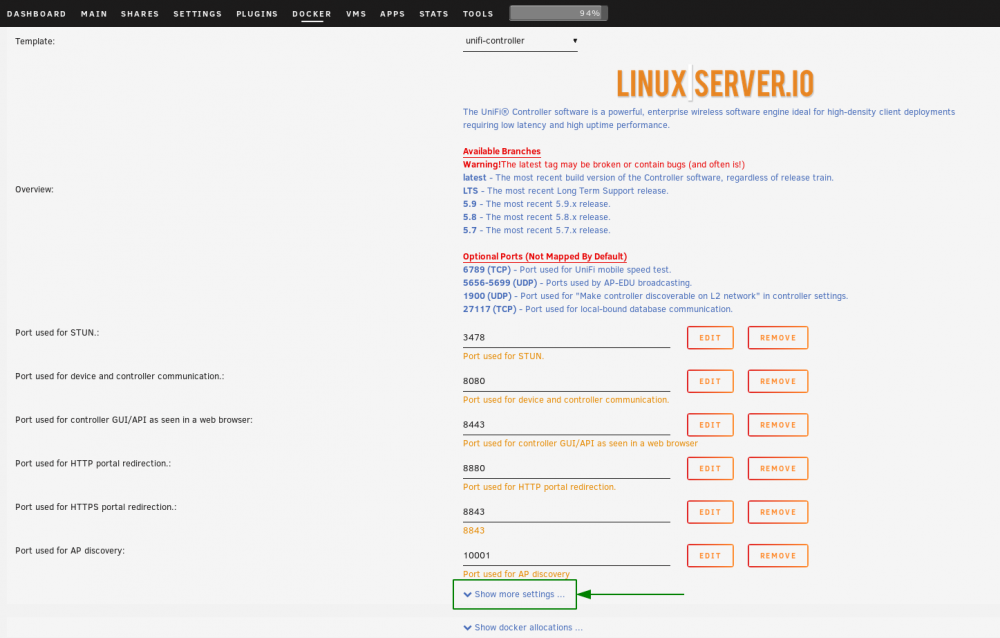
I mapped the ports according to the info here. https://help.ubnt.com/hc/en-us/articles/218506997-UniFi-Ports-Used I left out 6789, 27117 & 5656-5699 as they are require for mobile speed test, local bound database & EDU products respectively.
-
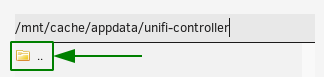
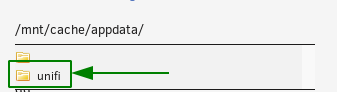
This container is a drop in replacement for our previous Unifi container. We have taken the decision to produce a new container rather than update our old container to mitigate the fact that there is a massive change in what version you will be pulling if you use the latest tag. Our new container allows the use of the following branches. Warning! The latest tag may be broken or buggy (and often is!) latest - The most recent build version of the Unifi controller software, regardless of release train. LTS - The most recent Long Term Support release. 5.9 - The most recent 5.9.x release. 5.8 - The most recent 5.8.x release. 5.7 - The most recent 5.7.x release. In our previous container, latest would pull the most recent LTS release, so if you wish to ensure continued stability, you should choose to use the LTS branch of this container. The appdata is fully compatible with your old appdata, however if migrating from our old container and you wish to use your existing appdata then please note you will need to manually select your old unifi appdata folder. As always you should ensure you have backups before migrating. (Regular backups of appdata being recommended general maintenance in any case) This is completely by design, to ensure no inadvertent overwriting and massive version hopping which would be the outcome if we had decided to modify our previous container. Before you attempt to migrate, ensure the old unifi container has been stopped/removed. To select your old appdata folder, first click Show more settings Click in the appdata box. Go up a folder level by clicking in the box shown below. Finally select your old appdata folder. (Reminder, make sure you've made a backup)

-
Application Name: Unifi-Controller Application Site: https://www.ui.com/software/ Docker Hub: https://hub.docker.com/r/linuxserver/unifi-controller/ Github: https://github.com/linuxserver/docker-unifi-controller/ Please post any questions/issues relating to this docker you have in this thread. If you are not using Unraid (and you should be!) then please do not post here, instead head to linuxserver.io to see how to get support.

-
**Attention -Latest Update - Image Rewrite** We have rewrite to our newest image, so much more lightweight, supports theme folders, fixes a known shutdown bug. Please make sure you backup your appdata before updating in case of any issues.
-
Application Name: Diskover Application Site: https://shirosaidev.github.io/diskover/ Docker Hub: https://hub.docker.com/r/linuxserver/diskover/ Github: https://github.com/linuxserver/docker-diskover Please post any questions/issues relating to this docker you have in this thread. If you are not using Unraid (and you should be!) then please do not post here, rather use the linuxserver.io forum for support.
-
Application Name: Bookstack Application Site: https://www.bookstackapp.com/ Docker Hub: https://hub.docker.com/r/linuxserver/bookstack/ Github: https://github.com/linuxserver/docker-bookstack Please post any questions/issues relating to this docker you have in this thread. If you are not using Unraid (and you should be!) then please do not post here, rather use the linuxserver.io forum for support.
-
Application Name: Bazarr Application Site: https://github.com/morpheus65535/bazarr Docker Hub: https://hub.docker.com/r/linuxserver/bazarr/ Github: https://github.com/linuxserver/docker-bazarr Please post any questions/issues relating to this docker you have in this thread. If you are not using Unraid (and you should be!) then please do not post here, instead head to linuxserver.io to see how to get support.
-
Application Name: Calibre-Web Application Site: https://github.com/janeczku/calibre-web Docker Hub: https://hub.docker.com/r/linuxserver/calibre-web/ Github: https://github.com/linuxserver/docker-calibre-web Please post any questions/issues relating to this docker you have in this thread. If you are not using Unraid (and you should be!) then please do not post here, instead head to linuxserver.io to see how to get support
-
Application Name: Lidarr Application Site: https://github.com/lidarr/Lidarr Docker Hub: https://hub.docker.com/r/linuxserver/lidarr/ Github: https://github.com/linuxserver/docker-lidarr Please post any questions/issues relating to this docker you have in this thread. If you are not using Unraid (and you should be!) then please do not post here, instead head to linuxserver.io to see how to get support.
-
Application Name: WebGrab+Plus Application Site: http://www.webgrabplus.com/ Docker Hub: https://hub.docker.com/r/linuxserver/webgrabplus/ Github: https://github.com/linuxserver/docker-webgrabplus/ Please post any questions/issues relating to this docker you have in this thread. If you are not using Unraid (and you should be!) then please do not post here, instead head to linuxserver.io to see how to get support.










