





truetype
Members
-
Joined
-
Last visited
Everything posted by truetype
-
Can't reach nextcloud from LAN on Google Chrome but new Microsoft Edge works? Both are built on Chrome? Anyone else has this problem or any ideas how to fix it?
-
Peeerfect! Very much appreciated!
-
Thanks Ich777, but is there really no way to run SteamCMD commands in your dockers as there is in the normal SteamCMD when u run it on a PC?
-
Hey, I want a script to have Valheim automatically to update if there's an update available. How can I get to simply run the "app_update 896660" command regurlarly? I cannot get the commands to respond. Trying "docker exec -it Valheim app_update 896660" does not work.
-
When I start a PaperMC server it says in the logs: * Please update the version of Java you use to run Paper * to at least Java 11. When Paper for Minecraft 1.17 is * released support for versions of Java before 11 will * be dropped. * * Current Java version: 1.8.0_265 Any idea if he's going to update the java version?
-
Hey Squid! Well, I don't download obfuscated ones and it still dont do it automatically.. Cant find a related setting either ;o
-
I wonder if it's able to set Radarr to automatically import a movie after download? Like couchpotato? Now I have to go in manually and import every downloaded movie...
-
Suddenly I cannot login anymore? Says it's the wrong username / password. But I can reach it from the UBNT cloud...
-
Thanks for reply, ok. I have nextcloud running on my main server working good, for the sake of it I will try to go with FTP this time on the backup machine.
-
This is strange, I did not have this problem before I updated to 6.7.0... My DNS settings looks right and adblocker have never been an issue before. But I guess it's duplicati that mess up everything, trying to get borg working now instead...
-
I decided to reinstall the docker and delete the backup completely, now it get stuck after about 30 minutes and my CPU 2 is working 100% and duplicati freezes...
-
Dynamix Stats seems to be pretty bugged on 6.7.0, for me it gives me error which makes duplicati hangs and I cannot shutdown my unraidserver but doing a power reset... May 12 12:59:54 Tower nginx: 2019/05/12 12:59:54 [error] 8100#8100: *121517 upstream timed out (110: Connection timed out) while reading response header from upstream, client: 192.168.1.5, server: , request: "POST /plugins/dynamix.system.stats/include/HardwareStats.php HTTP/1.1", upstream: "fastcgi://unix:/var/run/php5-fpm.sock", host: "tower:88", referrer: "http://tower:88/Stats""
-
Hey, I want to start using duplicati to backup my main unraid to my backup unraid to be placed off-site in the future. Right now I am trying to get it working locally first but I'm not successful. I followed spaceinvader's tutorial which means connecting the backupserver as a SMB share on my main server and copy there. But after I had made the first backup in duplicati it gave me like 220 warnings. So I tried to repair the database but it was unsuccessful and gave me even more warnings. I decided to delete and repair the database and now it's stuck on "recreating database" for over 24h, then I stopped the docker and tried again and now it gets stuck on the same place. I don't know if it's working on a file which is open or something like that, I can't tell from the logs. Anyone that can help me out?
-
It's this post you should be looking at I believe
-
Thanks for reply. Seems to be a failure with fullchain.pem, and also firewall problem but I haven't changed any firewall settings during the last 6 months... See log here please https://pastebin.com/UnEP0a4B EDIT: Maybe it has todo with cname configuration at my domain provider? I set my domain as cname to duckdns, that's the only change I made in the past 2 months.
-
When I try to connect to my site via subdomain.domain.com it says that the certificate has expired since 26th january. When I restart letsencrypt it does not automatically renew. Can I run a command to force it to renew?
-
I am already using subdomain "plex.mydomain.com" for ombi because it's easier for my users to remember. So I want to change the reverse proxy domain for plex to be say "plexw". How can I change the "plex.subdomain.conf" in proxy-confs to be "plexw.mydomain.com" instead? EDIT: Solved it by just changing the "plex.*" in the conf to "whatever.*" works like a charm.
-
Many thanks, got it working now !
-
Ok, many thanks. I should head over to reverse proxy myself then. Should I follow spaceinvaders youtube guide, or you know if there is any better guide?
-
I am having problems with the remote access, I have used it for a year without problem but for a week ago it started acting wierd. I am using pfSense and I'm sure port 32400 is correctly forwarded. I can access my nextcloud and other services on port 443 without issues, but Plex seems to refuse direct access outside my network... Have tried running the docker in bridge mode and mapping the ports manually and this doesn't work either except it shows accessible for like a second after I press the "allow remote access" button in plex, then goes back to not accessible. Any suggestions mostly appreciated. Running unraid 6.6.3.
-
In the default.conf below it works yes. server { listen 80; server_name _; return 301 https://$server_name$request_uri; }
-
Thanks, yeah I've followed that once but I cannot see anything that should do any difference, please see my config.php below (sensitive data censored) <?php $CONFIG = array ( 'memcache.local' => '\\OC\\Memcache\\APCu', 'datadirectory' => '/data', 'instanceid' => 'XXXXXXXXXXXXXX', 'passwordsalt' => 'XXXXXXXXXXXXXXXXXX', 'secret' => 'XXXXXXXXXXXXXXXXXX', 'trusted_domains' => array ( 0 => '192.168.1.8:444', 1 => 'nextcloud.mydomain.com', ), 'overwrite.cli.url' => 'https://nextcloud.mydomain.com', 'overwritehost' => 'nextcloud.mydomain.com', 'overwriteprotocol' => 'https', 'dbtype' => 'mysql', 'version' => '13.0.1.1', 'dbname' => 'nextcloud', 'dbhost' => '192.168.1.8:3305', 'dbport' => '', 'dbtableprefix' => 'oc_', 'dbuser' => 'XXXXXX', 'dbpassword' => 'XXXXXX', 'installed' => true, 'maintenance' => false, 'loglevel' => 2, 'theme' => '', ); I can send the domain to you in PM and you can see for yourself that it doesn't redirect properly if you like?
-
I am using pfsense and yes they are since I can reach my nextcloud from anywhere if I type https:// manually. and this docker is able to renew the certs using port 80, but now I have it enabled all the time. See attached files please. Where can I find the nextcloud config.php file? (Could really use a spoiler function to hide this wall of images )
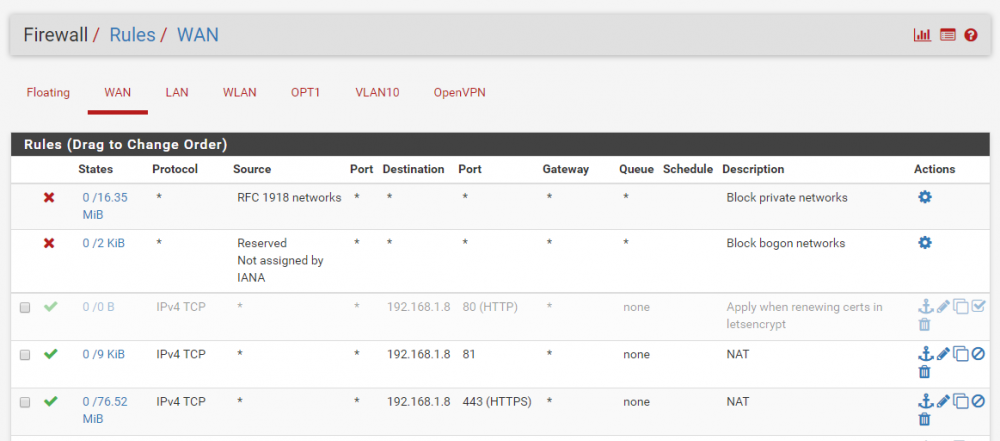

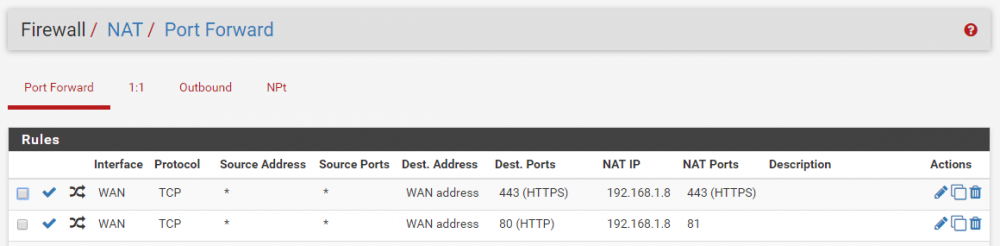
-
Thanks for reply, so the complete nextcloud.conf file should look like this? Because this does not redirect it automatically... server { listen 80; server_name nextcloud.mydomain.com; return 301 https://nextcloud.mydomain.com$request_uri; } server { listen 443 ssl http2; server_name nextcloud.mydomain.com; root /config/www; index index.html index.htm index.php; include /config/nginx/ssl.conf; client_max_body_size 25G; location / { proxy_pass https://192.168.1.8:444/; proxy_max_temp_file_size 2048m; include /config/nginx/proxy.conf; } }
-
I have real struggles to get nginx to redirect nextcloud.domain.com to https://nextcloud.domain.com. I have tried this here LINK to digitalocean And I have tried this here LINK to Serverfault.com Both with no success... Also tried alot of others without success... Please help me out, how should I configure a proper http to https redirect? I want to redirect all my subdomains.domain.com to https. It's much easier when I tell friends those pages in short instead of saying "ehm, you also need to type https:// before the domain". My config now is below in an own nextcloud file in site-conf: upstream php-handler { server 127.0.0.1:9000; #server unix:/var/run/php5-fpm.sock; } server { listen 80; listen [::]:80; server_name nextcloud.domain.com; # enforce https return 301 https://$server_name$request_uri; } server { listen 443 ssl http2; server_name nextcloud.domain.com; root /config/www; index index.html index.htm index.php; include /config/nginx/ssl.conf; client_max_body_size 25G; location / { proxy_pass https://192.168.1.8:444/; proxy_max_temp_file_size 2048m; include /config/nginx/proxy.conf; } }


