





djgizmo
Members
-
Joined
-
Last visited
Everything posted by djgizmo
-
Yea, tried it both ways (/tmp and /tmp/transcode) and both create a folder on my SSD (where my /config is located).
-
I'm having an odd problem. I noticed my transcoding to ram stopped working. I checked the docker log and I see this. However, I DO have the TRANS_DIR set via the volume mapping. name: tmp container path: /transcode host path: /tmp/transcode Am I doing something wrong?
-
figured it out... I used... /manage.py changepassword (user)
-
also, anyone have a chance to test this in a reverse proxy setup?
-
Anyone know how to reset the master password?
-
Remove everything in that field and only place the text "document_consumer" there (w/o quotes)
-
"Fine people" and "on facebook" do not compute :P
-
binhex, can you check out the support thread for Nzbhyda2. I'm not sure what to do and Without Hydra, I'm going to have to re-do everything.
-
Anyone?
-
hmmm... I'm unable to access the webgui and my other dockers are unable to communicate with my Hydra2 instance. It shows running in Unraid, however the log shows... �[2m2019-09-12 20:52:39.950�[0;39m �[31mERROR�[0;39m �[2m---�[0;39m �[2m[ main]�[0;39m �[36morg.nzbhydra.NzbHydra �[0;39m �[2m:�[0;39m�[35m �[0;39m�[34m�[0;39mAn unexpected error occurred during startup org.springframework.beans.factory.BeanCreationException: Error creating bean with name 'entityManagerFactory' defined in class path resource [org/springframework/boot/autoconfigure/orm/jpa/HibernateJpaConfiguration.class]: Invocation of init method failed; nested exception is org.hibernate.boot.archive.spi.ArchiveException: Unable to extract bytes from InputStream Caused by: java.io.IOException: Input/output error Suggestions?
-
I have the same error. Had to roll back. Sent from my iPhone using Tapatalk
-
Do you have an ssd? If so, check to see if the drive or the docker image is full with logs. By default, unraid doesn't limit the logs... I've had both plex and Home Assistant with multiple gigs of logs.
-
misery loves company. glad its not just me.
-
yep. It's odd. I have 3 dockers that do this. out of 25. No error in logs. Feels like a configuration issue... but no clue what.
-
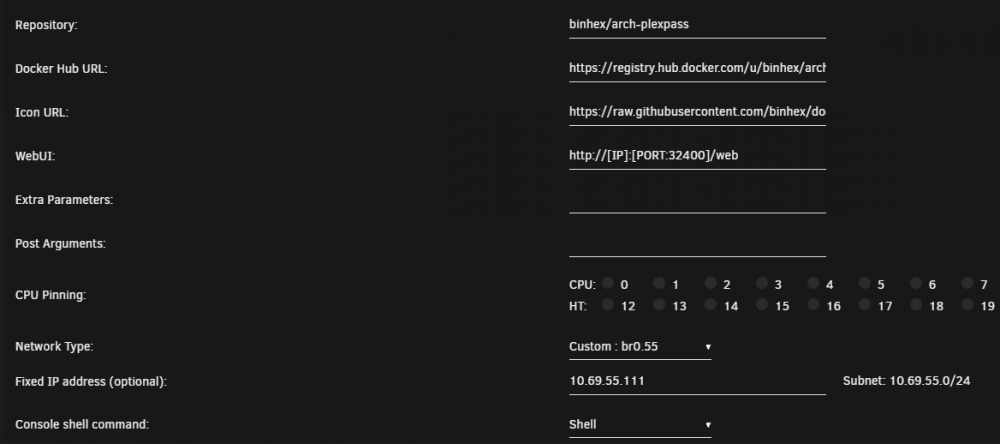
here you go...
-
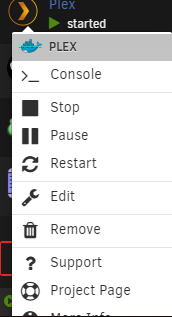
I'm unsure if I'm being clear.... attached is a screen shot what I mean. Plex works just fine and I can login to it just fine with the IP address... however the menu for this is missing in Unraid.
-
I'm having an odd issue wi th this specific docker where the WebUI menu option doesn't show un Unraid. All the other BinHex dockers show it just fine. Any suggestions?
-
I've spent the last 2 days trying to learn everything I can how to setup GNS3 on Unraid VM. Get a drink, this could take a while. Shutdown all of your VMs. Yes, this is needed. Install User Scripts if you don't have it already. Once installed, go to settings > User Scripts Add 2 new scripts - One "Enable Nested VMs" and another one, "Disable Nested VMs" Go here and grab the snippets for these. if you have AMD cpu, you'll need to adjust the scripts. Read the snippets, takes 2 seconds to adjust for AMD. Once done, run the Enable Nested VMs script via RUN IN BACKGROUND. It'll take about 5-10 seconds to run. click show log to verify that it was successful. Look for... Nested vms are enabled for intel cpus Script Finished blah blah blah Warning - if you have a Windows VM and AV on it, turning on these nesting settings can cause issues. My suggestion, turn off the AV for the vm. Download the GNS3 VMware workstation VM. (Yes, I know other posts have said download the virtual box one, but just humor me) Open the zip, extra the OVA file. Using Winrar or 7zip, open the OVA file, and extract the .vmdk files rename and remove any spaces out of the name of the vmdk files Login via ssh to your unraid box. I use mobaXterm to make this process easier as you'll need to get the domains folder and upload the .vmdk files we just extracted. path to the domains share Open your unraid gui and start creating an Ubuntu vm. Change your initial memory to whatever you think is best. I used 4096 for my box. Machine - Q35-2.12 Bios - SeaBIOS leave the rest the default. Make sure your Network Bridge is set (your VM needs an interface) Click Create, but do not start it. This will create the folder under the domains share. open the newly created folder in SSH (mine was GNS3), and then upload/scp files to this folder. Once these have been uploaded, we HAVE to convert them to raw. Yes, unraid does support vmdk, but in my experience over the past 48 hours has shown me, that not all things work the way they should. use these commands to convert them. Obviously, adjust your file names to what your files are named. qemu-img convert -f vmdk -O raw GNS3VM-disk1.vmdk GNS3VM-disk001.img qemu-img convert -f vmdk -O raw GNS3VM-disk2.vmdk GNS3VM-disk002.img This WILL expand the files... ALOT. Mine expanded to 117Gbits from 339MB. Thanks GNS3 for over killing the vmdk space :eyeroll: delete the other .img file that was created when you created the vm. Back in the Unraid gui, edit the newly created GNS3 vm. Primary vDisk Location - change to manual - path to your newly created disk001.img is (mine ended up being /mnt/user/domains/GNS3/GNS3VM-disk001.img) Add another vDisk location - change to manual - repeat - (/mnt/user/domains/GNS3/GNS3VM-disk002.img) Change BOTH of these to SATA. If you leave this as VirtIO, the vm will start to boot, but won't finish booting (the lizard will never get the bug) Once you change to SATA, save the changes and boot the vm, and connect to it via the VNC console. You might see an Ubuntu screen first, press enter and continue the boot. Voila! GNS3 vm has booted. However, it's might be complaining about KVM support (Nested Virtualization). Did you do Step 3? If GNS3 isn't complaining about KVM and it showing "KVM support available: True" then you're set to setup the network portion. Configure the network as you see fit. I personally statically assign all my vms, but if you have DHCP on your bridged network, it'll already have an IP. Finish that drink! P.S. Attached is my XML for this VM if you need to break it down for some reason. You'll need to reconfigure the GNS3 client app to use the VM. Open GNS3, edit, preferences, server, un-tick Enable local server, enter the IP of your GNS3 vm. I had to uncheck auth, but too tired to experiment anymore. Done. NOTE: If you've created any specific devices from templates... you'll probably have to recreate those as the devices you've saved were pointing a local VM (VMWare Workstation or Virtual Box). As a MIkrotik guy, this made me sad as I had 10 versions of RouterOS saved which had to be recreated. GNS3_XML.xml
-
Looks like I too had to role back to v19 due to the amount of errors I was getting with the binhex-radarr and binhex-sonarr containers. Those apps would continuously loose connectivity to binhex-nzbget(v20), but rolling back to v19, everything worked instantly.
-
Hello Binhex and other members, I've been having a terrible time getting the binhex-sonarr, binhex - radarr, and binhex-nzbget to play well with each other. I came from a windows environment where the 3 just worked. However, now, I keep getting "Download wasn’t grabbed by sonarr, skipping” and "Download wasn’t grabbed by Radarr , skipping” respectively. I'm unsure why this is as I've used the same data paths for each. /data/ = /mnt/user/downloads/ The webgui logs in NZBget don't show the episodes at all that are subject to these errors. Any suggestions?
-
Cool. Thank you. Tested and works great!
-
So, anyone willing to take pity on a guy who's strungling with NZBHydra2 in general?
-
For the transmission with VPN.... how can I verify that the vpn is connected?
-
nm, figured it out. Blew away the entire app and then the app data folder for guac. It seems if you only create 1 connection AS guacadmin, when you try to login as guac admin it tries to auto-initiate that connection immediately. Create an additional user for connections and give them permission to connect and only use guacadmin for admin purposes and issues go away.
-
I've been trying for hours to get this working. I was initially able to login with guacadmin/guacadmin and tried to create my first connection. However, after I clicked on it (the first connection that I setup) to test, I keep getting "The remote desktop server is currently unreachable. If the problem persists, please notify your system administrator, or check your system logs." I'm unsure how to find the logs... is that in the appdata folder?


