





superderpbro
Members
-
Joined
-
Last visited
Everything posted by superderpbro
-
My webgui came back after preclear finished the step it was on, I left it for a few hours then got the email on my phone that zeroing was done.. Now everything is fine and the cycle is complete. Weird but glad i didnt reboot heh Still be nice to know if you can check preclear status in ssh if it was started by the plugin.
-
Thanks, i will try it later when this disc is finished preclearing. Can't be sure but i think that is what caused it to fail somehow. Right after it failed to update my webgui locked up until preclear got to the next step. heh EDIT: Kinda strange.. Those orphans were gone when i went to remove them.. but sonnar seems to have reinstalled fine
-
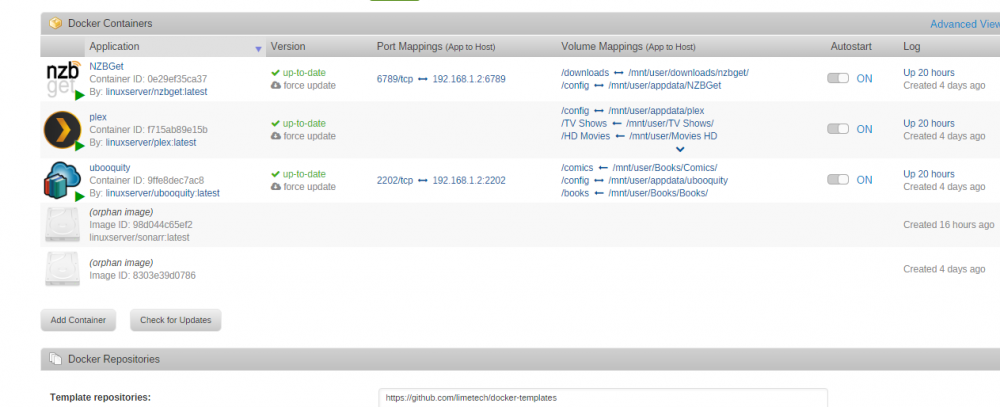
I tried to update my docker today and it failed... Now i have this.. HALP? EDIT: All the settings appear to be still there in appdata .. Can i just remove those orphans and use CA's Previous Apps section to put sonarr back? I really dont want to have to set it all back up again
-
My webgui has crashed. Is there a way to see the status of a preclear started by the plugin VIA SSH? I was about 85% into zeroing the disc and would rather wait to reboot if it is still running properly.
-
Figured it out i think. used putty. The result is the same other than the time/date hehe No idea why its not hashing new stuff then All i did was re-install. Set those settings above. Build and export.. What did i do wrong?
-
I did a build after install. As shown in the pics above. It does not hash anything automatically. I get notifications to build / export manually. I also have no idea how one would do # ls -l /var/log/packages/inotify-tools-3.14-x86_64-1 -rw-r--r-- 1 root root 1418 Feb 16 23:00 /var/log/packages/inotify-tools-3.14-x86_64-1
-
How can we tell if inotifytools is installed? Also.. with my settings two posts above it no longer hashes anything automatically. I get notifications to build export manually. Can anyone help me get this working for good?
-
Is that the Build command? So, should i select all my disks and run build, then enable Automatically protect new and modified files after it is done? Do you recommend i do anything else? Sorry, this is all a bit confusing to me and i'd like to do it right this time EDIT: No more time to fiddle today. Hope i did it right hehe
-
When you start the plugin does it not protect old files already on the array? I just noticed in settings were you enable it that is says "Automatically protect new and modified files". IF so that is probably why there was a difference in what it was scanning and what was actually on the disc. Is there a ways to hash old files? I uninstalled the plugin, deleted it's folder on flash, and re installed. Is there anything else i should do before i enable it again? Should i even bother now? heh
-
Thanks
-
Does using a usb drive count as an attached device?
-
Good point i didn't notice the weird cut off file names. As far as the files sizes I was just comparing to the main section where it says how much is used. For example the disc that says 1.77TB in my screen shot says 2.26TB used in main. I uninstalled the plugin for now.. can i delete \flash\config\plugins\dynamix.file.integrity? Anything else i need to do/remove to completely start fresh? EDIT: Well, i deleted that folder and re installed. Is there anything else i should do before i enable it again?
-
Another month and another few small files that are "corrupt" also it doesn't seem to be scanning the entirety of my data. Total file size is larger than that on all discs. Last month.. BLAKE2 hash key mismatch, 12Unl).zip */mnt/disk3/Games/ROMs/Console/No-Intro (2016-01-03)/Nintendo - Nintendo Entertainment System/Poke Block (Asia) (Unl).zip is corrupted This month.. BLAKE2 hash key mismatch, 12).zip */mnt/disk3/Games/ROMs/Console/No-Intro (2016-01-03)/GamePark - GP32/[bIOS] GamePark GP32 (Europe) (v1.6.6) (2004-10-10).zip is corrupted BLAKE2 hash key mismatch, 12).zip */mnt/disk3/Games/ROMs/Console/No-Intro (2016-01-03)/GamePark - GP32/[bIOS] GamePark GP32 (Europe) (v1.6.6) (Beta).zip is corrupted All files check out fine. When i rehash the old torrent file. I uninstalled the plugin for now.. can i delete \flash\config\plugins\dynamix.file.integrity? Anything else i need to remove to completely start fresh?
-
Just wondering what might cause false corruption reports? All of my disks are scanned on the 15th of every month and i always get one or two small files that are reported as corrupted. Thing is i usually have a sha1 or md5 checksum for my files (or groups of files) and they always check fine. This last time it was an NES ROMset that File Integrity said had one corrupt file. Ran the sha1 file and its fine. Found the torrent and forced recheck with uTorrent and its 100%. Any ideas?
-
Any idea why when i set it to original mode it crops off the top of every page of every comic i've tried? https://i.imgur.com/mbcwcKT.jpg Shows the full image on fit to width and height modes.
-
Hope danioj is hanging in there with all these notifications!
-
(Couldn't resist) ROFL! Am i off ignore? lol.. no sense in typing an actual reply if i am. @superderpbro While I appreciate your right to an opinion (however much I disagree with it - as well as your attitude to towards my friend who was just trying to help you) what I don't appreciate is you spamming the thread.. I (like many others) have this thread on "notify" so I can help those with issues (if it's in my ability to do so). Receiving that notification and taking the time to open up the thread to read / respond only to see 1 emoticon is ..... frustrating. My apologys danioj. Hope this message wasn't 'spam'
-
Am i off ignore? lol.. no sense in typing an actual reply if i am.
-
I have thanked you for your help multiple times. I didn't appreciate the elitism. Thanks for spending a LOT of free time making these containers and maintaining things. do as you wishThanks SquidThat is indeed advice .. but none that i asked for. Even if i had.. i am allowed to make my own decisions lol. I don't see what the problem is. This server will only ever be running sonarr and deluge (deluge will likely never get used and will not be tied into sonarr). They will have separate dl folders .. OH NOSSSSSSSSS!! Thanks again for your helpall i asked was if the folders need to be the same.. answer was yes.. advice taken and used. :I think i will stick with /mnt/user/downloads/nzbget/ for both sonarr and nzbget. I wont be doing anything other than TV shows. Maybe a random torrent or 2 not tied into sonarr (/mnt/user/downloads/torrents/). Thank you for your help

