





superderpbro
Members
-
Joined
-
Last visited
Everything posted by superderpbro
-
Hmm, I tried with just the folder. Now im at the serial number check part and it said it couldnt check (I forget why). It wont let me check again. Says "Try later"
-
Hello. Following a video on YouTube i get to the part with opencore config and when i mount the EFI partition there is no NvVars file.. Not sure what to do.
-
Heh, alright thanks. I seem to be getting the correct hash now anyways. Cheers
-
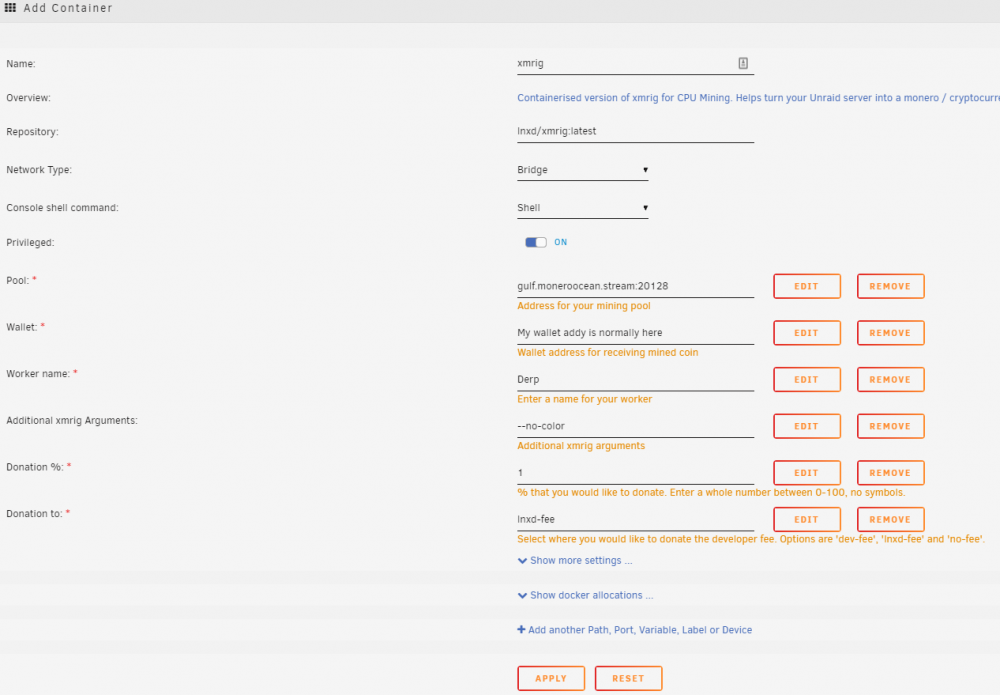
Pressing xmrig support takes me here. Trying it out and I cant seem to get it working.. Do I need to add a port or something? I think I got it going now.. but im getting [2021-03-31 17:23:56.731] msr FAILED TO APPLY MSR MOD, HASHRATE WILL BE LOW .. Any way to fix this?
-
Been using this for a while and curious. What happens when a file is renamed? Does it change the hash or make a new one? How does it know the difference between a file name change or say a text file edit and file corruption (since the hash would change if you edited a txt file)? Thanks :P
-
I only have 8GB but i don't run hardly anything on my box (sonarr/plex/nzbget/no VMs). If it is working it's been working fine hehe.
-
I already tried with the extra parameters and it seems to work. Not that i know a sure fire way to tell. The directory shows up in MC with plex temp files in it. NFI how to tell if that is in RAM or not heh.
-
Thanks. Like this?
-
This guide is kinda old. Does the OP's method still work? And if so is this correct?
-
I went into the share settings and made it public then secure again. From another user Thank you for your help guys
-
Did i do it right? lol
-
Thanks Gog. That worked. EDIT: will that affect the way my shares read/write is set up Squid? EDIT: Am i doing this right? REALLY dont want to mess something up
-
I dont know how to copy anything out of putty
-
Hmm.. i can't even cd into my TV Shows dir. bash: cd: too many arguments
-
Thanks. What is the 0 in the numbers (in my pic) used for? Also, I have my shares set up so only one user (Me) can write to any my shares. Everyone else can only read. Will doing what you said affect that?
-
So, all i do it flip that switch and touch nothing else below it? Will that solve the problem for the hundreds of directorys already made or only the new ones after i switch it? I have no idea what the numbers below it are
-
Hello, I've had this small problem for quite some time but never tried to figure it out. When Sonarr creates a directory in my TV share i am unable to delete or add anything to it. I can delete if i go into MC and use that to delete stuff. But say tonight i wanted to drag season 3 of The Walking Dead into the The Walking Dead.. i cannot because Sonarr originally created that folder. Any ideas?
-
Popups are already allowed EDIT: Hmm.. It works if i manually type in http://192.168.1.2:8080/ .. But not if i access the webui from unraid's webui.
-
https://crontab.guru Cronjobs can fail! Monitor your important cronjob by pasting the following snippet at the end of the crontab entry. Make sure to replace the <placeholders> with your email address and some name for your cronjob. && curl -sm 30 k.wdt.io/<email-address>/<cronjob-name>?c=5_4_*_*_* Should your cron job fail or not even start, you will receive an alert email. Yup that was the goal. Thanks guys i will check out user scripts. EDIT: Ran it for only 6 hours.
-
Also getting the blank screen in chrome but working in incognito. Clearing cache logged me out of every website i frequent but didn't help haha
-
Am i at least on the right track to get this to run every few days for a couple hours? Please be kind... i have almost no idea what i am doing hehehe EDIT: 0 0 * * 1,3,5 xfs_fsr -v && curl -sm 30 k.wdt.io/<[email protected]>/<xfs_fsr>?c=0_0_*_*_1,3,5 .. i mean't. Probably still very wrong haha. Not sure if the < > stay around the email and name or not..
-
Thanks. I have played with the idea of taking everything off, formatting the drive and putting everything back on.. but i KNOW i would mess something up lol I take files off and put files on my array all the time. It's not all just static data. I think the idea of running defrag a couple hours every 1 or 2 or 3 days is pretty cool. No idea why only one of my disks is so fragmented. Soooooooooooo.... If i just run xfs_fsr -v It will just run it for 2 hours on all my drives? Skipping my SSD which is btrfs? EDIT: guess so .. https://i.imgur.com/GidJsjN.jpg
-
Alright, thanks. Gonna have to wait will i get a monitor hooked up. I've no idea what screen is heh EDIT: If i just run xfs_fsr -v It will just run it for 2 hours on all my drives? Skipping my SSD which is btrfs? EDIT2: And is there a way to set unRAID to run that for 2 hours every day?
-
One of my disks is at %66 .. The others are around 10%. How do i run the default 2 hour defrag (on the one drive) to test? Not interested in a 3 day test hehe. EDIT: And has the file integrity plugin been modified to ignore those files since 2016?
-
Why is it skipping files? Also, i have a feeling it isn't hashing every newly added file. When it starts a scheduled scan (I only do one disc a month) it says the amount of data it is scanning and it is always a few hundred gigabytes less than is on the drive it is scanning.



