1812
Members
-
Joined
-
Last visited
Everything posted by 1812
-
Save yourself time and aggravation and just buy an hba card. H220 or Lsi variant will work great and you'll be done. Sent from my iPad using TapatalkNo worries. Part personal experience, part understanding of what plex does. When plex starts to use /tmp as a transcode directory, it either it doesn't seem aware of the size it can write into or uses the total size of ram as its "available space" regardless of system utilization. So, it fills until it can no longer fill anymore. If you fill /tmp with plex transcode data, which the system also uses but can't directly manage or flush because plex is in control of the transcode files, then the system no longer has the ability to use /tmp, causing system lockups. And it seems like when this happens, plex still tries to continuously use the /tmp even as the system is working to purge cached files to maintain operational status as it sees /tmp filling. Eventually the system is left with only its initially occupied ram space and no free space to operate in, causing hangs in operations. At the same time, the plex transcode crashes and in doing so, leaves the transcode files in place (vs removing when you exit a transcode stream), most likely due to plex not having enough ram itself to execute the procedure (because, it's full of transcoded files.) The last time I tested and experienced this was about 6 months ago. When you specify the a folder of fixed size, one of two things happens: 1. plex writes until it is full, stops the transcode, and then every stream thereafter has functional garbage collection of the oldest transcode streams utilizing the space up to the size of the folder or 2. plex is aware of the size of the folder before it reaches capacity and executes functional garbage collection of the oldest transcode streams up to the size of the folder. I once had a server with 64GB of ram and had no issues transcoding to /tmp. But when I moved my plex docker to a more power efficient server with only 8gb of ram, this was a continual issue transcoding to /tmp. I could watch df -h and see it happening in realtime. I then move to a 1tb ssd for about 4 months without issue. I then discovered the ability to make a specified plex "scratch disk". This reduced wear/usage on the ssd (which was also doing other jobs) and I was able to have steady, smooth streams with plex.Because plex can fill /temp, using all system memory, causing system hangs, stalls, and lock ups.It’s better to do it at the first array start before the docker starts, otherwise the path is invalid. If you’re just trying it out, shut down plex, make the directory with the script, edit plex settings mapping the transcode folder to the tmp directory you created, then start plex mine is in tmp/plexram...yesor, transcode to ram. I use the following in user scripts (which I found on here) #!/bin/bash mkdir /tmp/PlexRamScratch mount -t tmpfs -o size=4g tmpfs /tmp/PlexRamScratch Whenever I transcoded to just tmp or any already created subfolder it would fill and lock up the system. With a folder of a specified size like this, I'm my experience, It may fill up and halt the transcode the first time it fills the ram, but after (even after reboot) that I've never had any issue with plex doing it's own garbage service and deleting older transcode files (knock on wood). This costs me nothing and doesn't cause any appreciable wear and tear on physical hardware.have you tried making a new install? anytime I had lag issues, if I created a fresh install, it would typically eliminate it (or at least eliminate it as a source)sorry to spam you with quotes, but bad news/good news So evidently I didn't setup my remote syslog properly. Even though I told it to to keep 3 logs in rotation, it overwrote my latest error. But, I have new info that I believe is the problem. It may be that before when UD was doing the "refreshing/processing" moving graphic I was impatient even though it was throwing nginx errors. I just tested again and it eventually shows the remote share, still mounted but disconnected. I tired this with and without cloudberry running (the only docker that uses remote mounts) and that had no change. Then I realized that my router/firewall is in a vm. So I turned off that vm and retested, and sure enough, the timeout wouldn't happen and the error would return. UD was unusable as previously reported. But upon starting up my firewall vm again, UD would return to normal usage and show the expected disconnected remote smb share, which would resume operation normally when it rejoined the network. So I tested this theory by disconnecting the remote smb share, then refreshed UD which appears to get hung at loading. I then shut down the vm. this kept UD in a perpetual loading state (it appeared with errors about the remote share being offline) I then shut the server down. But oddly enough, it actually shut down this time. I'm not sure if it had to do with the readjustments to the timeouts you suggested, but it was gracefully powered off after only 2 minutes. So I believe this is what is happening: a remote share goes offline, UD appeared to hang and was unresponsive. I'd send the restart command to my server which would shutdown the vm, exacerbating the "hang" with UD not finding the share, then the shortened shutdown timer was trying to power down the server before UD could actually unmount the missing disk, which caused the shutdown hang. I don't know if any of this makes sense, or if I'm just rambling. But either way, I believe the issue is resolved. Thank you again for your time and suggestions which appear to have corrected the problem!There were on whatever the default is. But I will adjust them accordingly per your post. As I mentioned before the system hang exceeds the default shutdown timers. I don't understand how extending it will help since it isn't Unraid that has to force the unclean shutdown but me because the system is hung. But I'm no expert and have changed to your recommended settings in that post. I gave you exactly what you asked for, which was everything from when the remote syslog was activated (which is why I mentioned it was a continuation of the full diags I previously posted. I activated the remote syslog, triggered the error, attempted to shut down the server (which hung for over five minutes which had to then be forced off) then pulled the syslog of the remote storage and gave it to you. Regardless, I will replicate the error again and give you the full syslog since the remote logging has been active since reboot. yes, cloudberry. I'll try replicating the issue with this docker off to this time to eliminate that variable. thank you for your patience with me on this. I'm trying to provide accurate information so the cause can be discovered!done. this is on the same boot those the diags are from. as far as timeline and how it lines up with the log: shortly before 12:00:00 I stopped the array that was mounted via smb in unassigned devices without unmounting it. The loading/refreshing icon appeared and never went away in the UD section of the main tab. After a minute or two, the error at 12:00:21 appeared, which is similar to the nginx error previously reported. The loading/refreshing icon never went away, even after refreshing the page. This is an unrecoverable error and UD loses all functionality. Any services requiring mounting or un-mounting of disks to operate is also affected (backup services, etc) I then initiated a power down via webgui at 12:01:03. The server sat in a hung state for 5 minutes with the last entry at 12:02:21 showing active pids still, which I believe are via UD as the server powers down cleanly if all smb mounts are unmounted before turning off. After 5 minutes I had to shut the server off by holding the power button as it was clear it was not going to recover. syslog-192.168.1.253.logthank you brahms1-diagnostics-20190713-1145.zipAs I mentioned before, the system does not respond to diagnostic requests when this occurs via SMB. I had posted diagnostics from NFS mounts being unexpectedly removed, but the expected behavior occurred and the system responded normally without issue. But in this instance, an SMB share went offline, limiting system functions ( as shown on the previous page) To regain full functionality the server has to be rebooted. After initiating shutdown, and monitoring the syslog via web GUI, this is where it hangs : Jul 13 07:09:14 Brahms1 avahi-daemon[6409]: Withdrawing address record for fe80::10a6:baff:fea2:ea5d on zt0. Jul 13 07:09:14 Brahms1 avahi-daemon[6409]: Withdrawing address record for 192.168.2.253 on zt0. Jul 13 07:09:47 Brahms1 root: Status of all loop devices Jul 13 07:09:47 Brahms1 root: /dev/loop1: [2049]:4 (/boot/bzfirmware) Jul 13 07:09:47 Brahms1 root: /dev/loop2: [0032]:53108 (/mnt/cache/system/libvirt/libvirt.img) Jul 13 07:09:47 Brahms1 root: /dev/loop0: [2049]:3 (/boot/bzmodules) Jul 13 07:09:47 Brahms1 root: /dev/loop3: [0032]:1807716 (/mnt/cache/docker/docker.img) Jul 13 07:09:47 Brahms1 root: Active pids left on /mnt/* Jul 13 07:10:15 Brahms1 kernel: CIFS VFS: Server 192.168.2.254 has not responded in 120 seconds. Reconnecting... You had previously said that I should try to make sure remote shares are online or unmount before they go offline. While that is possible for those on my LAN, it is not possible to ensure when they are connected via vpn or other tunnel to offsite shares, which is the case with the above message.bump because this happens with remotely mounted smb shares off local network as well locking up my server.and as such a noob, you have posted in the wrong thread. per your syslog, your hardware is ASRock - B250M-HDV BIOS P2.20 05/11/2017 Thats not a proliaint or HP hardware. I would suggest starting a new thread and posting up the same diagnostics.had to help without knowing your setup. post your diagnostics zip file.the only difference in SMB config between the 2 Unraid servers is that "server B" has "max protocol = smb2" added to it.I'll see what happens using NFS later today for comparison. NFS publicly mounted share going offline resulted in both servers responding without throwing errors or locking up. when the NFS shares returned online, they also continued on like nothing had happened. let me know if there is any other info you need or methods to try. much appreciated! twins-diagnostics-20190629-1128.zipdone brand new disk but possibly an older cable, but thats why it's preclearing, to check it out since its new. it'll get a full smart self test next. and maybe another run through preclear. this disk is going in another server, but getting tested on this one first due to space issues. server went offline for an unRaid os update. those things tend to happen. my network otherwise is pretty rock solid and stable. It is not directly a problem with the remote server or network, but rather, how UD handles remote mounted shares that go offline. It occurs across all 3 of my installs, when a mounted smb share goes offline (not randomly, typically are offline when I'm doing an unRaid os update, or hardware swap). its a reproducible error/problem caused only by interaction with UD, as demonstrated below, carried on just now on a fresh boot: I have server A connected via smb to server B (both running unRaid) I stopped the array on server B, imitating an os update/reboot. Server A, still has the remote share mounted in UD from Server B on my local network Server A tries to find server B but can't After timing out, the gui section for mounting remote shares disappears (as indicated by the moving graphic which stops moving and shows only the disks inside the server. At the same time, the nginx upstream timeout occurs in the logs (watching live updates via tail) Jun 28 07:23:00 Twins nginx: 2019/06/28 07:23:00 [error] 5371#5371: *1961 upstream timed out (110: Connection timed out) while reading upstream, client: fe80::c48:f133:39ab:5f21, server: , request: "POST /plugins/unassigned.devices/UnassignedDevices.php HTTP/1.1", upstream: "fastcgi://unix:/var/run/php5-fpm.sock:", host: "twins.local", referrer: "http://twins.local/Main" There is no way to unmount missing share in the webgui now it returns "resource busy" in CLI, additionally, forcing it off does not work either Clicking on any tab other than main, the webgui is still functional for a short time and runs without error. Returning Server B back online (that hosts the remote share) still results in web gui loading icon. when it times out, UD displays disks in that server as before, no remote shares or section where that option is normally preset is visible. after multiple refreshes of main tab, web gui can crash (and often does for me) even when having the ability to shut down via web gui, UD hangs the shutdown (following not included in saved syslog, but taken from tail monitoring) Jun 28 07:45:27 Twins emhttpd: shcmd (151): /etc/rc.d/rc.docker stop Jun 28 07:45:28 Twins root: stopping dockerd ... Jun 28 07:45:29 Twins root: waiting for docker to die ... Jun 28 07:45:30 Twins avahi-daemon[5316]: Interface docker0.IPv4 no longer relev ant for mDNS. Jun 28 07:45:30 Twins avahi-daemon[5316]: Leaving mDNS multicast group on interf ace docker0.IPv4 with address 172.17.0.1. Jun 28 07:45:30 Twins avahi-daemon[5316]: Withdrawing address record for 172.17. 0.1 on docker0. Jun 28 07:45:30 Twins emhttpd: shcmd (152): umount /var/lib/docker Jun 28 07:45:30 Twins unassigned.devices: Unmounting All Devices... Jun 28 07:45:30 Twins unassigned.devices: Disk with serial 'ST10000NM0086-2AA101 _ZA20WW7C', mountpoint 'ST10000NM0086-2AA101' is not mounted and cannot be unmounted... Jun 28 07:45:32 Twins unassigned.devices: Unmounting disk 'Samsung_SSD_840_EVO_2 50GB'... Jun 28 07:45:32 Twins unassigned.devices: Unmounting '/dev/sdb1'... Jun 28 07:45:32 Twins unassigned.devices: Unmount cmd: /bin/umount '/dev/sdb1' 2 >&1 Jun 28 07:46:44 Twins root: Status of all loop devices Jun 28 07:46:44 Twins root: /dev/loop1: [2049]:4 (/boot/bzfirmware) Jun 28 07:46:44 Twins root: /dev/loop0: [2049]:3 (/boot/bzmodules) Jun 28 07:46:44 Twins root: Active pids left on /mnt/* I believe the active pid is UD related at this point, considering the server otherwise shuts down normally when the remote share is constant. Attempted retrieval of diagnostics from the web gui resulted in no zip download occurring. syslog is here minus the shutdown section shown above: syslognew.txt I really appreciate your time and assistance on this
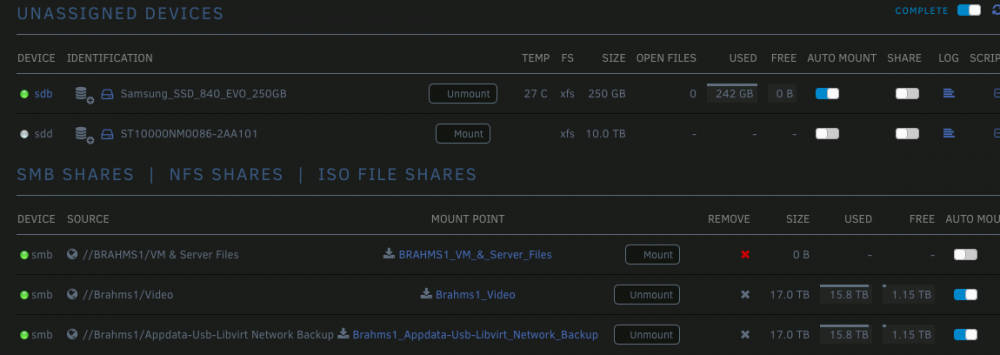

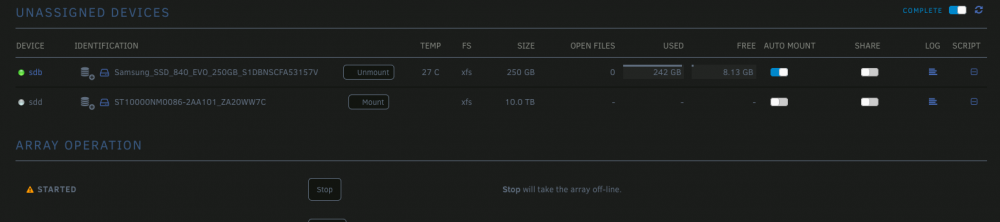 this server wouldn't respond in CLI to diagnostics command but I was able to get the syslog to copy to the flash.... it's something I guess. you'll see that a few minutes after the network connection times out, nginx tanks. I'll try to get something off the other, but it has ssh disabled and with no webGUI, not sure what I can do (thought I do have access to the flash drive via share) syslog.txtsee belowWhenever an smb mounted share goes offline, the server webgui refuses to load resulting in a 504 gateway timeout. Even when the server smb share returns to online status. This occurs on all 3 of my servers. Is this a timeout issue that can be fixed? It's quite annoying to have to reboot the server to regain access to the web gui.I had come across that. Anything I would want is either Deprecated and unreleasable or Deprecated but salvageable, sadly.Then I guess I'm going to have to pay either plex or emby some money then to use hw transcoding with clients around the house... bummer... especially because I'm a super cheap tightwad.