





DZMM
Members
-
Joined
-
Last visited
Everything posted by DZMM
-
Love the black theme. There are a few pages though that use the old theme if black is selected: - docker update progress - plugin update progress Not a problem, just pointing out
-
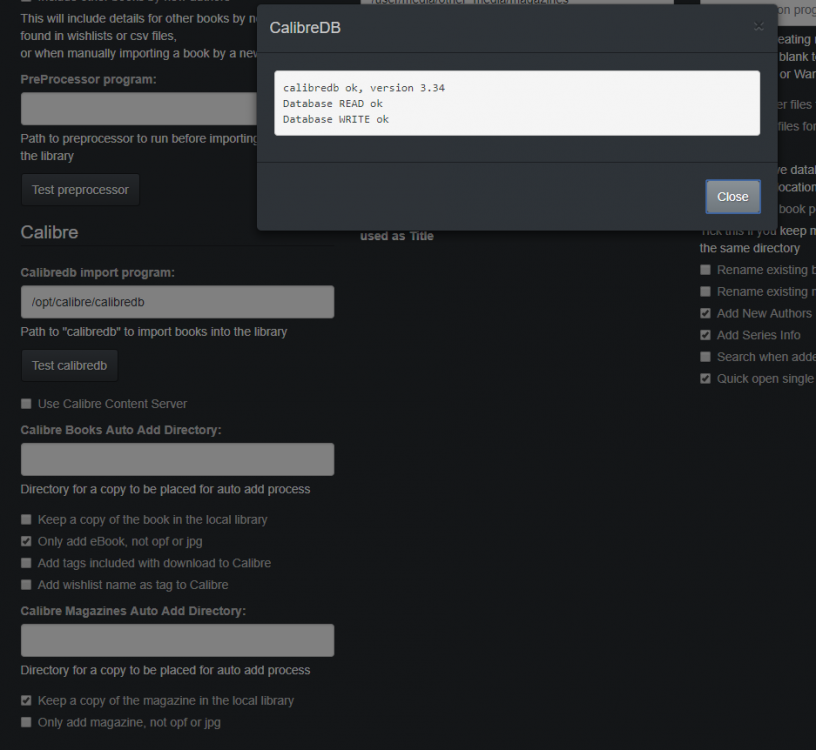
Hi I'm having another go at getting this working. I have LL adding books to my calibre library folder and each book gets a title (#) entry so it looks like all is correct. However, Calibre doesn't see the new books until I restart it - is Calibre supposed to be in sync with LL?
-
What I find is that if you move files in the mount by moving them in the unionfs mount, unionfs downloads the file and reuploads it. What I do if I'm doing a big move like that, is I move the files manually within the rclone mount as they don't get downloaded then
-
It's saying rclone isn't installed - check plugins
-
it doesn't matter as no real files exist on your array for those folders - just virtual files. Just add the current folders to your unionfs mount and then move them manually behind the scenes to your rclone_upload folder where they'll get uploaded over time e.g. unionfs -o cow,allow_other,direct_io,auto_cache,sync_read /mnt/user/rclone_upload/google_vfs=RW:/mnt/user/mount_rclone/google_vfs=RO:/mnt/user/OLD_MEDIA_LOCATION=RO /mnt/user/mount_unionfs/google_vfs Then add the unionfs folders to sonarr etc. You just have to make sure that the filepaths matchup e.g. - /mnt/user/mount_rclone/google_vfs/TV Show 1 - /mnt/user/Old/Media_location/TV Show 1
-
rc doesn't like it if you keep unmounting and mounting - it tends to only work the first mount. Don't worry about the errors that's fine. The purpose of the rc command is to pre-populate the directory cache at mount to ensure navigating the mount is as fast as possible from the outset. The dir cache stills gets populated without it, just not as fast.
-
Thanks - script picked up errors on my UD pool which I've corrected
-
What scrub arguments do you use for a UD pool? Thanks
-
I just followed @Symon earlier post blindly All good now, will set 19218 to Node 1 strict later: Per-node process memory usage (in MBs) PID Node 0 Node 1 Total ----------------------- --------------- --------------- --------------- 10236 (qemu-system-x86) 8269.48 0.00 8269.48 19218 (qemu-system-x86) 4146.88 181.60 4328.48 124935 (qemu-system-x86) 19.52 8257.12 8276.64 127416 (qemu-system-x86) 8264.96 0.00 8264.97 ----------------------- --------------- --------------- --------------- Total 20700.85 8438.73 29139.58
-
I've just done 3 of my 4 VMs and my memory usage looks the same for interleaved: Per-node process memory usage (in MBs) PID Node 0 Node 1 Total ----------------------- --------------- --------------- --------------- 18388 (qemu-system-x86) 4143.74 167.77 4311.51 29504 (qemu-system-x86) 4864.92 3407.02 8271.94 36634 (qemu-system-x86) 4881.64 3376.45 8258.08 115105 (qemu-system-x86) 8236.66 25.16 8261.83 ----------------------- --------------- --------------- --------------- Total 22126.96 6976.40 29103.36 18388 is the VM I haven't tweaked yet as it's my pfsense firewall, so I have to do that when the family aren't doing stuff. Unfortunately all the memory is on Node 0, when the cores are on 1. I'm wondering if memory mode isn't working because the memory is already in use e.g. by unRAID, dockers etc so if there's not enough when the VM is created unRAID uses memory from the other node? Otherwise to allocate say 8GB when there's only 6GB available it would have to move other blocks around????
-
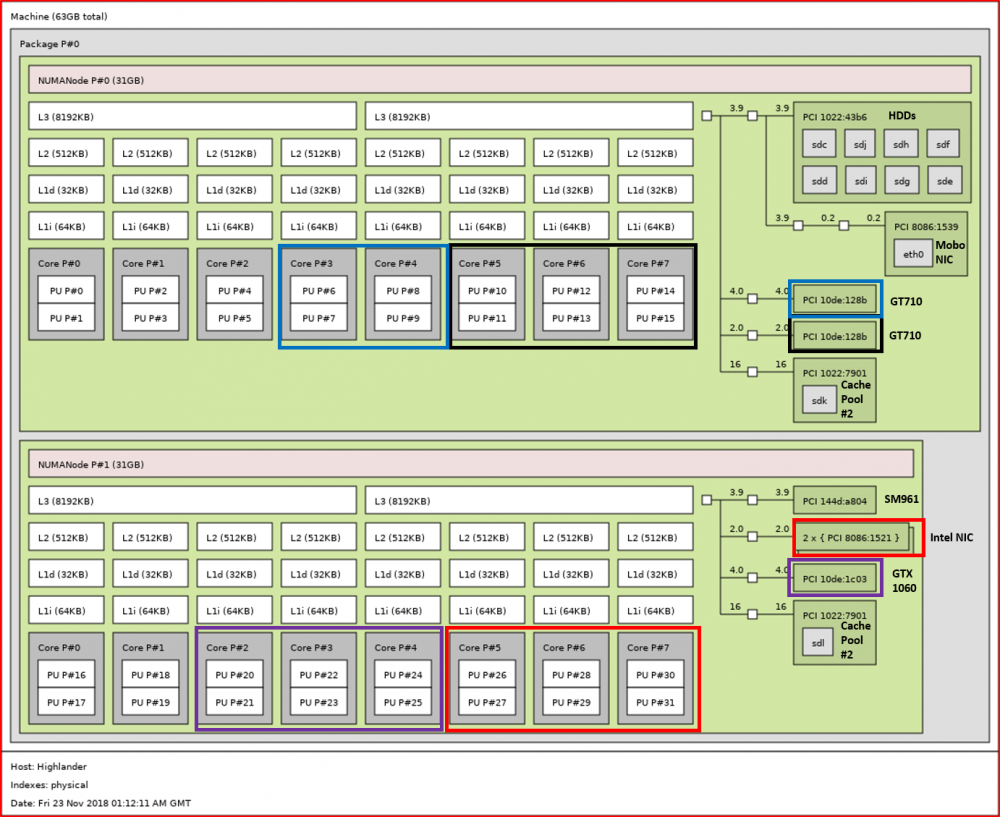
Brilliant - it worked. The results were interesting. Organising my 4 VMs the way I want looks easy, although the SM961 m.2 drive they share is on the wrong NUMA for two of them. Luckily, they are the two less important ones (kids): Does NUMA 'tuning' also apply to HDDs? My cache pool drives sdl and sdk are on different NUMAs - should I swap sdl's connector with one from sdc-sdj? Once someone confirms where numatune goes in the xml file, I'll start experimenting! Edit: found it <numatune> <memory mode='interleave' nodeset='1'/> </numatune>
-
Does it matter where in the VM xml this goes? Thanks
-
I'm going to try this out tomorrow - I didn't get a chance this week as I've been busy. Has anyone seen any benefit from emulatorpin to the same numa?
-
@BRiTThanks for pulling this together - brilliant!
-
There's already a variable to cover this Edit: actually 2 # default is 0. set this to the number of days backups should be kept. 0 means indefinitely. number_of_days_to_keep_backups="0" # default is 0. set this to the number of backups that should be kept. 0 means infinitely. # WARNING: If VM has multiple vdisks, then they must end in sequential numbers in order to be correctly backed up (i.e. vdisk1.img, vdisk2.img, etc.). number_of_backups_to_keep="2"
-
Thanks - I'll have a play to see if I can work out how to complete the script
-
I'm hoping someone can help me with a script please. I run the following command in a script to upload files via rclone to google: rclone move /mnt/user/rclone_upload/google_vfs/ gdrive_media_vfs: -vv --drive-chunk-size 512M --checkers 3 --fast-list --transfers 2 --exclude .unionfs/** --exclude *fuse_hidden* --exclude *_HIDDEN --exclude .recycle** --exclude *.backup~* --exclude *.partial~* --delete-empty-src-dirs --fast-list --bwlimit 15500k --tpslimit 3 --min-age 30m what I've been doing is rotating the /mnt/user/rclone_upload/google_vfs/ bit to rotate through my drives to stop them all spinning at the same time, e.g. /mnt/disk1/rclone_upload/google_vfs/ then /mnt/disk2/rclone_upload/google_vfs/ then /mnt/disk3/rclone_upload/google_vfs/ etc etc but what I'm finding is the script is never making it to disk7 so it never frees up space. Is there a way to dynamically determine the disk with the least GB (rather than % if possible) free and then upload that one e.g. the final command would be rclone move /mnt/VARIABLE SETTING CORRECT DISK/rclone_upload/google_vfs/ gdrive_media_vfs: -vv --drive-chunk-size 512M --checkers 3 --fast-list --transfers 2 --exclude .unionfs/** --exclude *fuse_hidden* --exclude *_HIDDEN --exclude .recycle** --exclude *.backup~* --exclude *.partial~* --delete-empty-src-dirs --fast-list --bwlimit 15500k --tpslimit 3 --min-age 30m Thanks in advance for any help
-
That's why I'd rather have 106GB free rather than 16GB free as that was cutting it too fine
-
Thanks! I've just completed this and I've gone from 16GB free to 106GB free on a 256GB drive - excellent. Does the command only work with Windows VMs or can I do the same to my pfsense vdisk? I won't gain a huge amount, but every GB helps
-
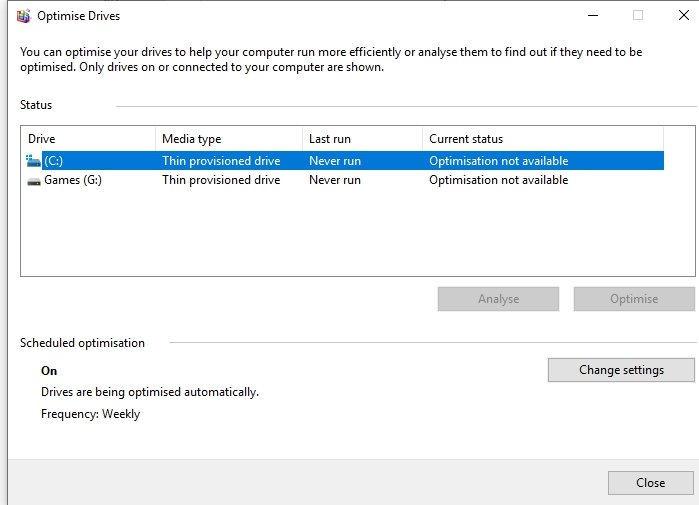
"empty trash automatically after every scan" in Plex library settingsI had to rebuild my W10 VMs today as I had a drive disaster and I decided to do a fresh build, rather than use a backup. I basically built one VM then re-used the vdisk images to create the 2nd two VMs. All went well, except for that thin provisioning is only working on one of the VMs so I'm wasting about 60GB of space on my small 256GB drive. Edit: Adding du - LEGO and Buzz should be the same as Disney root@Highlander:/mnt/disks/sm961/domains# du -h --max-depth=1 | sort -hr 196G . 75G ./LEGO 74G ./Buzz 36G ./Disney 10G ./Baymax 128K ./gpu I can't for the life of me see why as I've done this loads of times using @johnnie.black guide. What's strange about all 3 VMs is that in Windows it says 'Optimisation not available', even for the drive that seems to be ok, although I can't be confident that space will be recovered in the future. Any ideas how to fix? Thanks in advance. Here's the VM that seems to be working: <?xml version='1.0' encoding='UTF-8'?> <domain type='kvm'> <name>Disney</name> <uuid>d01e827e-d0fa-b27b-406f-bd84d84e0d23</uuid> <description>2 Cores</description> <metadata> <vmtemplate xmlns="unraid" name="Windows 10" icon="windows.png" os="windows10"/> </metadata> <memory unit='KiB'>8388608</memory> <currentMemory unit='KiB'>8388608</currentMemory> <memoryBacking> <nosharepages/> </memoryBacking> <vcpu placement='static'>4</vcpu> <cputune> <vcpupin vcpu='0' cpuset='16'/> <vcpupin vcpu='1' cpuset='17'/> <vcpupin vcpu='2' cpuset='18'/> <vcpupin vcpu='3' cpuset='19'/> <emulatorpin cpuset='2-3'/> </cputune> <os> <type arch='x86_64' machine='pc-i440fx-3.0'>hvm</type> <loader readonly='yes' type='pflash'>/usr/share/qemu/ovmf-x64/OVMF_CODE-pure-efi.fd</loader> <nvram>/etc/libvirt/qemu/nvram/d01e827e-d0fa-b27b-406f-bd84d84e0d23_VARS-pure-efi.fd</nvram> </os> <features> <acpi/> <apic/> <hyperv> <relaxed state='on'/> <vapic state='on'/> <spinlocks state='on' retries='8191'/> <vendor_id state='on' value='none'/> </hyperv> </features> <cpu mode='host-passthrough' check='none'> <topology sockets='1' cores='4' threads='1'/> </cpu> <clock offset='localtime'> <timer name='hypervclock' present='yes'/> <timer name='hpet' present='no'/> </clock> <on_poweroff>destroy</on_poweroff> <on_reboot>restart</on_reboot> <on_crash>restart</on_crash> <devices> <emulator>/usr/local/sbin/qemu</emulator> <disk type='file' device='disk'> <driver name='qemu' type='raw' cache='writeback' discard='unmap'/> <source file='/mnt/disks/sm961/domains/Disney/vdisk1.img'/> <target dev='hdc' bus='scsi'/> <boot order='1'/> <address type='drive' controller='0' bus='0' target='0' unit='2'/> </disk> <disk type='file' device='disk'> <driver name='qemu' type='raw' cache='writeback' discard='unmap'/> <source file='/mnt/disks/ud_pool/domains/Disney/vdisk2.img'/> <target dev='hdd' bus='scsi'/> <address type='drive' controller='0' bus='0' target='0' unit='3'/> </disk> <disk type='file' device='cdrom'> <driver name='qemu' type='raw'/> <source file='/mnt/disks/sm961/iso/Windows.iso'/> <target dev='hda' bus='ide'/> <readonly/> <boot order='2'/> <address type='drive' controller='0' bus='0' target='0' unit='0'/> </disk> <disk type='file' device='cdrom'> <driver name='qemu' type='raw'/> <source file='/mnt/disks/sm961/iso/virtio-win-0.1.160-1.iso'/> <target dev='hdb' bus='ide'/> <readonly/> <address type='drive' controller='0' bus='0' target='0' unit='1'/> </disk> <controller type='usb' index='0' model='qemu-xhci' ports='15'> <address type='pci' domain='0x0000' bus='0x00' slot='0x07' function='0x0'/> </controller> <controller type='scsi' index='0' model='virtio-scsi'> <address type='pci' domain='0x0000' bus='0x00' slot='0x03' function='0x0'/> </controller> <controller type='pci' index='0' model='pci-root'/> <controller type='ide' index='0'> <address type='pci' domain='0x0000' bus='0x00' slot='0x01' function='0x1'/> </controller> <controller type='virtio-serial' index='0'> <address type='pci' domain='0x0000' bus='0x00' slot='0x04' function='0x0'/> </controller> <interface type='bridge'> <mac address='52:54:00:21:c9:a5'/> <source bridge='br0.33'/> <model type='virtio'/> <address type='pci' domain='0x0000' bus='0x00' slot='0x02' function='0x0'/> </interface> <serial type='pty'> <target type='isa-serial' port='0'> <model name='isa-serial'/> </target> </serial> <console type='pty'> <target type='serial' port='0'/> </console> <channel type='unix'> <target type='virtio' name='org.qemu.guest_agent.0'/> <address type='virtio-serial' controller='0' bus='0' port='1'/> </channel> <input type='mouse' bus='ps2'/> <input type='keyboard' bus='ps2'/> <hostdev mode='subsystem' type='pci' managed='yes'> <driver name='vfio'/> <source> <address domain='0x0000' bus='0x0a' slot='0x00' function='0x0'/> </source> <address type='pci' domain='0x0000' bus='0x00' slot='0x05' function='0x0'/> </hostdev> <hostdev mode='subsystem' type='pci' managed='yes'> <driver name='vfio'/> <source> <address domain='0x0000' bus='0x0a' slot='0x00' function='0x1'/> </source> <address type='pci' domain='0x0000' bus='0x00' slot='0x06' function='0x0'/> </hostdev> <hostdev mode='subsystem' type='usb' managed='no'> <source> <vendor id='0x046d'/> <product id='0xc534'/> </source> <address type='usb' bus='0' port='1'/> </hostdev> <memballoon model='virtio'> <address type='pci' domain='0x0000' bus='0x00' slot='0x08' function='0x0'/> </memballoon> </devices> </domain> and the two that aren't <?xml version='1.0' encoding='UTF-8'?> <domain type='kvm'> <name>LEGO</name> <uuid>a365eeb2-8784-fa80-bb90-b1458515e0f7</uuid> <description>3 Cores</description> <metadata> <vmtemplate xmlns="unraid" name="Windows 10" icon="windows.png" os="windows10"/> </metadata> <memory unit='KiB'>8388608</memory> <currentMemory unit='KiB'>8388608</currentMemory> <memoryBacking> <nosharepages/> </memoryBacking> <vcpu placement='static'>6</vcpu> <cputune> <vcpupin vcpu='0' cpuset='10'/> <vcpupin vcpu='1' cpuset='11'/> <vcpupin vcpu='2' cpuset='12'/> <vcpupin vcpu='3' cpuset='13'/> <vcpupin vcpu='4' cpuset='14'/> <vcpupin vcpu='5' cpuset='15'/> </cputune> <os> <type arch='x86_64' machine='pc-i440fx-3.0'>hvm</type> <loader readonly='yes' type='pflash'>/usr/share/qemu/ovmf-x64/OVMF_CODE-pure-efi.fd</loader> <nvram>/etc/libvirt/qemu/nvram/a365eeb2-8784-fa80-bb90-b1458515e0f7_VARS-pure-efi.fd</nvram> </os> <features> <acpi/> <apic/> <hyperv> <relaxed state='on'/> <vapic state='on'/> <spinlocks state='on' retries='8191'/> <vendor_id state='on' value='none'/> </hyperv> </features> <cpu mode='host-passthrough' check='none'> <topology sockets='1' cores='6' threads='1'/> </cpu> <clock offset='localtime'> <timer name='hypervclock' present='yes'/> <timer name='hpet' present='no'/> </clock> <on_poweroff>destroy</on_poweroff> <on_reboot>restart</on_reboot> <on_crash>restart</on_crash> <devices> <emulator>/usr/local/sbin/qemu</emulator> <disk type='file' device='disk'> <driver name='qemu' type='raw' cache='writeback' discard='unmap'/> <source file='/mnt/disks/sm961/domains/LEGO/vdisk1.img'/> <target dev='hdc' bus='scsi'/> <boot order='1'/> <address type='drive' controller='0' bus='0' target='0' unit='2'/> </disk> <disk type='file' device='disk'> <driver name='qemu' type='raw' cache='writeback' discard='unmap'/> <source file='/mnt/disks/ud_pool/domains/LEGO/vdisk2.img'/> <target dev='hdd' bus='scsi'/> <address type='drive' controller='0' bus='0' target='0' unit='3'/> </disk> <disk type='file' device='cdrom'> <driver name='qemu' type='raw'/> <source file='/mnt/disks/sm961/iso/Windows.iso'/> <target dev='hda' bus='ide'/> <readonly/> <boot order='2'/> <address type='drive' controller='0' bus='0' target='0' unit='0'/> </disk> <disk type='file' device='cdrom'> <driver name='qemu' type='raw'/> <source file='/mnt/disks/sm961/iso/virtio-win-0.1.160-1.iso'/> <target dev='hdb' bus='ide'/> <readonly/> <address type='drive' controller='0' bus='0' target='0' unit='1'/> </disk> <controller type='usb' index='0' model='qemu-xhci' ports='15'> <address type='pci' domain='0x0000' bus='0x00' slot='0x07' function='0x0'/> </controller> <controller type='scsi' index='0' model='virtio-scsi'> <address type='pci' domain='0x0000' bus='0x00' slot='0x03' function='0x0'/> </controller> <controller type='pci' index='0' model='pci-root'/> <controller type='ide' index='0'> <address type='pci' domain='0x0000' bus='0x00' slot='0x01' function='0x1'/> </controller> <controller type='virtio-serial' index='0'> <address type='pci' domain='0x0000' bus='0x00' slot='0x04' function='0x0'/> </controller> <interface type='bridge'> <mac address='ac:7c:12:31:96:56'/> <source bridge='br0.33'/> <model type='virtio'/> <address type='pci' domain='0x0000' bus='0x00' slot='0x02' function='0x0'/> </interface> <serial type='pty'> <target type='isa-serial' port='0'> <model name='isa-serial'/> </target> </serial> <console type='pty'> <target type='serial' port='0'/> </console> <channel type='unix'> <target type='virtio' name='org.qemu.guest_agent.0'/> <address type='virtio-serial' controller='0' bus='0' port='1'/> </channel> <input type='mouse' bus='ps2'/> <input type='keyboard' bus='ps2'/> <hostdev mode='subsystem' type='pci' managed='yes'> <driver name='vfio'/> <source> <address domain='0x0000' bus='0x0b' slot='0x00' function='0x0'/> </source> <address type='pci' domain='0x0000' bus='0x00' slot='0x05' function='0x0'/> </hostdev> <hostdev mode='subsystem' type='pci' managed='yes'> <driver name='vfio'/> <source> <address domain='0x0000' bus='0x0b' slot='0x00' function='0x1'/> </source> <address type='pci' domain='0x0000' bus='0x00' slot='0x06' function='0x0'/> </hostdev> <hostdev mode='subsystem' type='pci' managed='yes'> <driver name='vfio'/> <source> <address domain='0x0000' bus='0x44' slot='0x00' function='0x3'/> </source> <address type='pci' domain='0x0000' bus='0x00' slot='0x08' function='0x0'/> </hostdev> <memballoon model='virtio'> <address type='pci' domain='0x0000' bus='0x00' slot='0x09' function='0x0'/> </memballoon> </devices> </domain> <?xml version='1.0' encoding='UTF-8'?> <domain type='kvm' id='7'> <name>Buzz</name> <uuid>54263aab-81a4-ed75-aa59-e7701d3f14fd</uuid> <description>3 Cores</description> <metadata> <vmtemplate xmlns="unraid" name="Windows 10" icon="windows.png" os="windows10"/> </metadata> <memory unit='KiB'>8388608</memory> <currentMemory unit='KiB'>8388608</currentMemory> <memoryBacking> <nosharepages/> </memoryBacking> <vcpu placement='static'>6</vcpu> <cputune> <vcpupin vcpu='0' cpuset='26'/> <vcpupin vcpu='1' cpuset='27'/> <vcpupin vcpu='2' cpuset='28'/> <vcpupin vcpu='3' cpuset='29'/> <vcpupin vcpu='4' cpuset='30'/> <vcpupin vcpu='5' cpuset='31'/> <emulatorpin cpuset='2-3'/> </cputune> <resource> <partition>/machine</partition> </resource> <os> <type arch='x86_64' machine='pc-i440fx-3.0'>hvm</type> <loader readonly='yes' type='pflash'>/usr/share/qemu/ovmf-x64/OVMF_CODE-pure-efi.fd</loader> <nvram>/etc/libvirt/qemu/nvram/54263aab-81a4-ed75-aa59-e7701d3f14fd_VARS-pure-efi.fd</nvram> </os> <features> <acpi/> <apic/> <hyperv> <relaxed state='on'/> <vapic state='on'/> <spinlocks state='on' retries='8191'/> <vendor_id state='on' value='none'/> </hyperv> </features> <cpu mode='host-passthrough' check='none'> <topology sockets='1' cores='6' threads='1'/> </cpu> <clock offset='localtime'> <timer name='hypervclock' present='yes'/> <timer name='hpet' present='no'/> </clock> <on_poweroff>destroy</on_poweroff> <on_reboot>restart</on_reboot> <on_crash>restart</on_crash> <devices> <emulator>/usr/local/sbin/qemu</emulator> <disk type='file' device='disk'> <driver name='qemu' type='raw' cache='writeback' discard='unmap'/> <source file='/mnt/disks/sm961/domains/Buzz/vdisk1.img'/> <backingStore/> <target dev='hdc' bus='scsi'/> <boot order='1'/> <alias name='scsi0-0-0-2'/> <address type='drive' controller='0' bus='0' target='0' unit='2'/> </disk> <disk type='file' device='disk'> <driver name='qemu' type='raw' cache='writeback' discard='unmap'/> <source file='/mnt/disks/ud_pool/domains/Buzz/vdisk2.img'/> <backingStore/> <target dev='hdd' bus='scsi'/> <alias name='scsi0-0-0-3'/> <address type='drive' controller='0' bus='0' target='0' unit='3'/> </disk> <disk type='file' device='cdrom'> <driver name='qemu' type='raw'/> <source file='/mnt/disks/sm961/iso/Windows.iso'/> <backingStore/> <target dev='hda' bus='ide'/> <readonly/> <boot order='2'/> <alias name='ide0-0-0'/> <address type='drive' controller='0' bus='0' target='0' unit='0'/> </disk> <disk type='file' device='cdrom'> <driver name='qemu' type='raw'/> <source file='/mnt/disks/sm961/iso/virtio-win-0.1.160-1.iso'/> <backingStore/> <target dev='hdb' bus='ide'/> <readonly/> <alias name='ide0-0-1'/> <address type='drive' controller='0' bus='0' target='0' unit='1'/> </disk> <controller type='usb' index='0' model='qemu-xhci' ports='15'> <alias name='usb'/> <address type='pci' domain='0x0000' bus='0x00' slot='0x07' function='0x0'/> </controller> <controller type='scsi' index='0' model='virtio-scsi'> <alias name='scsi0'/> <address type='pci' domain='0x0000' bus='0x00' slot='0x03' function='0x0'/> </controller> <controller type='pci' index='0' model='pci-root'> <alias name='pci.0'/> </controller> <controller type='ide' index='0'> <alias name='ide'/> <address type='pci' domain='0x0000' bus='0x00' slot='0x01' function='0x1'/> </controller> <controller type='virtio-serial' index='0'> <alias name='virtio-serial0'/> <address type='pci' domain='0x0000' bus='0x00' slot='0x04' function='0x0'/> </controller> <interface type='bridge'> <mac address='e8:2e:d9:1e:b4:9d'/> <source bridge='br0.33'/> <target dev='vnet1'/> <model type='virtio'/> <alias name='net0'/> <address type='pci' domain='0x0000' bus='0x00' slot='0x02' function='0x0'/> </interface> <serial type='pty'> <source path='/dev/pts/5'/> <target type='isa-serial' port='0'> <model name='isa-serial'/> </target> <alias name='serial0'/> </serial> <console type='pty' tty='/dev/pts/5'> <source path='/dev/pts/5'/> <target type='serial' port='0'/> <alias name='serial0'/> </console> <channel type='unix'> <source mode='bind' path='/var/lib/libvirt/qemu/channel/target/domain-7-Buzz/org.qemu.guest_agent.0'/> <target type='virtio' name='org.qemu.guest_agent.0' state='connected'/> <alias name='channel0'/> <address type='virtio-serial' controller='0' bus='0' port='1'/> </channel> <input type='mouse' bus='ps2'> <alias name='input0'/> </input> <input type='keyboard' bus='ps2'> <alias name='input1'/> </input> <hostdev mode='subsystem' type='pci' managed='yes'> <driver name='vfio'/> <source> <address domain='0x0000' bus='0x43' slot='0x00' function='0x0'/> </source> <alias name='hostdev0'/> <rom file='/mnt/disks/sm961/domains/gpu/gtx1060.dump'/> <address type='pci' domain='0x0000' bus='0x00' slot='0x05' function='0x0'/> </hostdev> <hostdev mode='subsystem' type='pci' managed='yes'> <driver name='vfio'/> <source> <address domain='0x0000' bus='0x0d' slot='0x00' function='0x3'/> </source> <alias name='hostdev1'/> <address type='pci' domain='0x0000' bus='0x00' slot='0x06' function='0x0'/> </hostdev> <hostdev mode='subsystem' type='pci' managed='yes'> <driver name='vfio'/> <source> <address domain='0x0000' bus='0x43' slot='0x00' function='0x1'/> </source> <alias name='hostdev2'/> <address type='pci' domain='0x0000' bus='0x00' slot='0x08' function='0x0'/> </hostdev> <hostdev mode='subsystem' type='pci' managed='yes'> <driver name='vfio'/> <source> <address domain='0x0000' bus='0x0c' slot='0x00' function='0x3'/> </source> <alias name='hostdev3'/> <address type='pci' domain='0x0000' bus='0x00' slot='0x09' function='0x0'/> </hostdev> <memballoon model='virtio'> <alias name='balloon0'/> <address type='pci' domain='0x0000' bus='0x00' slot='0x0a' function='0x0'/> </memballoon> </devices> <seclabel type='dynamic' model='dac' relabel='yes'> <label>+0:+100</label> <imagelabel>+0:+100</imagelabel> </seclabel> </domain> highlander-diagnostics-20181122-2045.zip
 and depending on how you've got plex setup, it will either (i) delete the reference to the /normal/folder/movie or (ii) say /normal/folder/movie is missing and delete it when you empty trash. I prefer the 2nd way, because if I've made any changes to the metadata (labels, posters etc) they are preserved whereas the first way ditches all custom edits and redownloads Plex's metadata. Edit: the 2nd way is also advisable because if the mount ever fails, plex won't delete the items from its libraries, and then re-add themthe unionfs folder once setup acts like a normal folder where you can move, delete, add files etc. Plex sees this folder just like any folder, so if you move a movies in or out of the unionfs folder, whether or not Plex says it is missing, or automatically removes it from the collection will be determined by your plex settings not rclone or unionfs.Should this be submitted as a bug to the unRAID team? Maybe it's something they can fix



