gshlomi
Members
-
Joined
-
Last visited
Everything posted by gshlomi
-
Thanks, that's reassuring. Powering back on now...
-
My concern is that it did not finish the rebuild process, yet it will try to do a parity check using the (incomplete) replacement drive, leading to data loss. Are you sure just booting the server won't lead to data loss? Thanks
-
Hi, So one of my data drives failed, replaced it and started the rebuild process, but woke up this morning to discover my server has crashed during the night (assuming the rebuild did not finish). Now what? I guess force rebooting the server will start a parity check (due to unclean shutdown), but what about my data? is it lost? Thanks
-
Hi all. Set up tdarr a few days ago, works great mostly but having a strange issue with my TV Shows library. Transcoding works fine but getting a "Copy failed" error afterwards. Checking the handling info, I'm getting: I've trying setting all permissions to 777, no change. Any idea anyone? Thanks
-
Hi, Just installed the CompreFace template, it seems the parameter of ExternalDB is being ignored so the application is crashing while trying to connect to a PostgreDB specified in the DB ip address variable...
-
Can you please create a step-by-step guide for using the above on unRAID? Thanks
-
Can you share how do your remove the 'height' so the icons will appear as they should?
-
It seems (at least on my end) that everything is back to normal, so I've disabled the above settings and updated my instance to 20.07 just fine...
-
Hi folks. It appears that the repository at http://apps.nextcloud.com/ is down for a while, so many face problems with upgrading or freshly installing Nextcloud. After a lot of googling, I've found a docker someone made to self-host the apps, and this is what I've done to solve it on my installation: 1. The docker is not available at dockerHub or CA, so had to run it manually using: docker run -d --name='nc-cache' --net='lsio' -e TZ="Asia/Jerusalem" -e HOST_OS="Unraid" -p '8000:8000/tcp' registry.r3ktm8.de/sealife-docker/nextcloud-cache:nightly 2. Added the following to "/mnt/user/appdata/SWAG/nginx/proxy-confs/nc-cache.subdomain.conf": server { listen 443 ssl; listen [::]:443 ssl; server_name apps.nc.*; access_log /config/log/nginx/nc_apps.access.log; error_log /config/log/nginx/nc_apps.error.log; include /config/nginx/ssl.conf; client_max_body_size 0; location / { include /config/nginx/proxy.conf; resolver 127.0.0.11 valid=30s; set $upstream_app nc-cache; set $upstream_port 8000; set $upstream_proto http; proxy_pass $upstream_proto://$upstream_app:$upstream_port; } } 3. Added "apps.nc" to my list of subdomains at the SWAG container and restarting SWAG. 4. Added the following to "/mnt/user/appdata/Nextcloud/www/nextcloud/config/config.php": 'appstoreenabled' => true, 'appstoreurl' => 'https://apps.nc.mydomain.org/api/v1', and restarted Nextcloud. Hope this helps, unfortunately don't know how to add it as a template to CA with automatic updates, but this is a start.
-
Thanks for your help anyway. Restored from backup, all online again...
-
Unfortunately no, it was the first thing I’ve checked... Sent from my iPhone using Tapatalk
-
Hi. Dunno what happen, but suddenly all of my customized config files has disappeared and the container is starting up with vanilla config files. I do have a backup so I can recover, but how can I find the root cause of this? Haven't done anything besides checking for container updates... Thanks
-
It looks as if the RDP session is timing out if window is left open without any user interaction: Any way of removing this limitation? No way to access the app again without restarting the container. Thanks
-
Hi. Thanks, was just about to install aptalca's version, but already has some containers from linuxserver.io (sharing the base image?). Anyway, just a quick question/suggestion - is it possible to change the networking from "host" to "bridge"? what ports are needed for that? Another suggestion is adding a dedicated "Pictures" folder mapping to the settings, so not to use the appdata folder (as the program suggests by default to use /config/Pictures). BTW - is there a known reverse proxy configuration for SWAG to make it available over WAN? Thanks 🙂
-
Even if I run an SFTP server on my Windows VM, it's IP address is in a range that Guacamole can't reach (it's on an isolated network). Or am I missing anything?
-
Hi Anyway to make file transfers work when using Guacamole to connect via VNC to a Windows VM on the server? The VM is on an isolated network, so no access to the server shares or switching to RDP is possible... Thanks
-
Yes you can. And I did make it work, but want SpaceInvadersOne reply before posting my solution... Sent from my iPhone using Tapatalk
-
Struggling with the same thing at the moment. It seems there's a requirement for PDLib to be installed. There's a guide for combining it into the container itself (see here) but I have no idea even where to start implimenting it. Can someone from the LinuxServer team help? This could be a great start for Google Photos replacement 🙂
-
Hi @SpaceInvaderOne and thanks for your hard work & guide. I've noticed your container is based on MiGoller, but he has released an nVidia compatible one. Can you adopt it to unraid as well? It would be great to be able to utilize NVENC & YOLO 🙂 Thanks
-
Thanks, that did the trick 🙂
-
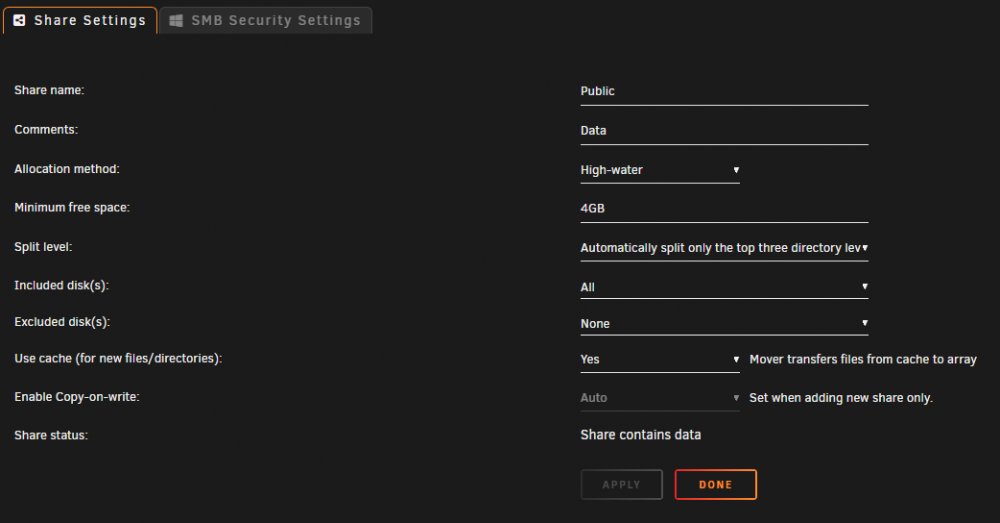
The movie folder exists only on the cache drive, the folder above it (Full) exists on Cache and disks 1,2 & 3, so that's not the cause for this unexpected behavior. Trying to get my head around the settings once more: Mover needs to move the following files from the cache to the array: /mnt/cache/Public/Media/Movies/Full/MovieFolder (2019)/MovieFile.srt /mnt/cache/Public/Media/Movies/Full/MovieFolder (2019)/MovieFile.mkv The "MovieFolder (2019)" does not exist on any array drive, so according to the Split Level help item: Public - Share Media - Level 1 Movies - Level 2 Full - Level 3 So a few questions come to mind: 1. Is my level numbering correct, or is the Share considered Level 1? 2. What is been evaluated first, the Split Level or the Allocation Method? Can it be that the Allocation Method marks a target disk that is not possible due to Split Level limitation? 3. Does mover calculate the size of the folder it needs to move, or is the calculation done per-file? Switched my Split-Level to "top four", and Mover moved the folder to disk #6 (creating the "Movies" and "Full" folders while doing it) so I guess that: 1. Share is considered Level 1 2. Split Level is evaluated first, that's why the Mover didn't move the files to disk #6 with the previous limitations 3. Still unclear about it - if Split Level limited me to the drives already containing the Full folder, why didn't the files move to drive #3 (which has 16.2GB free) instead of drive #1 (with 204MB free)? Will test again some configurations and report back with conclusions
-
Just did that - no go, same behavior - subtitles are moved to disk #1, mkv stays on cache due to insufficient space.
-
You mean Mover tries to keep the free space after moving files to disk to 4GB? If so, why doesn't it move the files to disk #6? And why doesn't it move the folder as a whole? why seperate the subtitles from the movie if there isn't enough space for the whole folder to be moved to the array?
-
Hi folks. I think I'm missing something basic, even though I've been through all the settings time and again. I've got a share set up for all my Public files, including the movies & TV shows, like this: Public |---Media | |---Movies | | |---Full | | | |---MovieFolder | | |---Kids | | | |---MovieFolder | |---TV Shows | | |---Show Name | | | |---Season 01 | | | |---Season 02 | | |---Show Name | | | |---Season 01 | | | |---Season 02 The settings are as follows: And these is the free space on all my drives: Now I have a movie folder on my cache drive (includes an MKV file of 16GB and a subtitles file of 95KB), that whenever Mover is running, moves the subtitles file to Disk #1, and leaves the MKV file on the cache drive due to insufficient space. I expected the Mover to move the whole movie folder to Disk #3 according to the settings above, so what the heck am I missing? Thanks for any help in advance S.G.

-
I think there's a misconfiguration in this container. The mapping of Appdata should be "/prometheus" on the container side, not "/prometheus-data", otherwise the collected metrics are been written inside the docker image file.