





Taddeusz
Community Developer
-
Joined
-
Last visited
Everything posted by Taddeusz
-
It sounds like you should be using the one with MariaDB. Do you already have a separate database set up?
-
Ok, I got it working. It appears I didn't follow the instructions to the letter.
-
BTW, the freerdp certificate store lines shouldn't be affecting this. I'm trying to figure out how to put the store in a different location. I get those lines in my own log and my RDP connections work fine.
-
What do your connection settings look like? For NLA to work you must enter a username and password in the connection.
-
I'm trying to get OAuth2Proxy working. It says it's listening on 4180 but I can't seem to connect to it.
-
I use 1Password as my password manager on my iOS devices. I've noticed that the password autofill in iOS 12 automatically recognizes certain websites like "facebook.com" and automatically recommends those passwords without having to open 1Password. This doesn't happen with my personal domain. My Google searches seem to be coming up empty. Is there some modification I need to make to my Nginx configuration to allow the iOS password autofill to recognize my web site and connect it with the saved password? It seems it's entirely possible this functionality doesn't work with http basic authentication. I've noticed when I go to my NextCloud page it automatically suggests passwords from my domain. It's only been since iOS 12 came out that any kind of password autofill has worked with basic authentication. If this isn't going to work with http basic authentication is there a way to configure a central authentication page that automatically redirects to the requested subdomain or subfolder when authentication is successful?
-
I'm sorry. I had apparently put the wrong tag in the template. The latest template should fix the problem. If you're still having issues replace the "nomariadb" tag with "latest-nomariadb".
-
Weird, have you tried downloading other Docker images?
-
It's hosted on Docker Hub, hub.docker.com. I was just able to pull it to my laptop with no problem. Can you nslookup hub.docker.com?
-
Since I updated to 6.7.0-rc2 TRIM has been giving me weird DMAR messages in my system's syslog. One of the noted changes was "patch: PCI: Quirk Silicon Motion SM2262/SM2263 NVMe controller reset". This is applicable to my own NVMe cache drive. It happens every morning at 7:00am when TRIM is scheduled to run. unraid-diagnostics-20190131-0846.zip
-
I know the letsencrypt docker from linuxserver.io includes fail2ban. That's what I use for proxying my home services.
-
The only way I know to change the admin password is to log in as the admin and change it in Settings on the Preferences page. That looks weird. What browser are you using? I would suggest Ctrl-F5 to force bypassing your browser's cache.
-
It looks like for TOTP to be supported the user must have the permission be able to change their own password.
-
Can you please post your catalina.out log from logs/tomcat8.
-
Since I upgraded to RC2 I've been seeing a bunch of DMAR messages from my NVMe drive at 7AM. It appears that the messages are coming due to TRIM running. I did a quick Google search and I see people saying to disable IOMMU but I've never seen this before. I noticed there was a change in the drivers that would affect the chip on my drive. unraid-diagnostics-20190127-2217.zip
-
Ok, the while statement didn't work because the device file already existed. I ended up putting a "sleep 4" in my script between the modprobe statement and the chmod & chown statements so it now, for anyone else who might be having issues, looks like this: modprobe i915 sleep 4 chmod -R 777 /dev/dri chown -R nobody:users /dev/dri
-
Ok, I got this figured out. After I upgraded to 6.7.0-rc2 this morning Handbrake was again not able to use QSV. I noticed that /dev/dri/card0 had owner root:video while the rest of the items in the /dev/dri folder are set nobody:users. I chowned card0 to nobody:users and it is working again. It's weird that that particular device file is not getting chowned on boot like the rest of the /dev/dri folder. The only thing that I can guess is that the card0 device isn't yet available when my user script is run. I'm going to change my script to wait till the card0 device exists to run the chmod and chown commands.
-
Weird, not sure what happened but apparently it's working again.
-
Under Settings -> CPU Pinning. Scroll all the way down.
-
I think it's showing that it's enabled. Not showing that it's not. [fix-attrs.d] applying ownership & permissions fixes... [fix-attrs.d] done. [cont-init.d] executing container initialization scripts... [cont-init.d] 00-app-niceness.sh: executing... [cont-init.d] 00-app-niceness.sh: exited 0. [cont-init.d] 00-app-script.sh: executing... [cont-init.d] 00-app-script.sh: exited 0. [cont-init.d] 00-app-user-map.sh: executing... [cont-init.d] 00-app-user-map.sh: exited 0. [cont-init.d] 00-clean-logmonitor-states.sh: executing... [cont-init.d] 00-clean-logmonitor-states.sh: exited 0. [cont-init.d] 00-clean-tmp-dir.sh: executing... [cont-init.d] 00-clean-tmp-dir.sh: exited 0. [cont-init.d] 00-set-app-deps.sh: executing... [cont-init.d] 00-set-app-deps.sh: exited 0. [cont-init.d] 00-set-home.sh: executing... [cont-init.d] 00-set-home.sh: exited 0. [cont-init.d] 00-take-config-ownership.sh: executing... [cont-init.d] 00-take-config-ownership.sh: exited 0. [cont-init.d] 00-xdg-runtime-dir.sh: executing... [cont-init.d] 00-xdg-runtime-dir.sh: exited 0. [cont-init.d] 10-certs.sh: executing... [cont-init.d] 10-certs.sh: exited 0. [cont-init.d] 10-cjk-font.sh: executing... [cont-init.d] 10-cjk-font.sh: exited 0. [cont-init.d] 10-nginx.sh: executing... [cont-init.d] 10-nginx.sh: exited 0. [cont-init.d] 10-vnc-password.sh: executing... [cont-init.d] 10-vnc-password.sh: exited 0. [cont-init.d] 10-web-index.sh: executing... [cont-init.d] 10-web-index.sh: exited 0. [cont-init.d] 95-check-optical-drive.sh: executing... [cont-init.d] 95-check-optical-drive.sh: looking for usable optical drives... [cont-init.d] 95-check-optical-drive.sh: found optical drive /dev/sr0, group 19. [cont-init.d] 95-check-optical-drive.sh: exited 0. [cont-init.d] 95-check-qsv.sh: executing... [cont-init.d] 95-check-qsv.sh: Processor: Intel(R) Core(TM) i5-8400 CPU @ 2.80GHz [cont-init.d] 95-check-qsv.sh: Device /dev/dri/renderD128 group is 100. [cont-init.d] 95-check-qsv.sh: exited 0. [cont-init.d] handbrake.sh: executing... [cont-init.d] handbrake.sh: core dump file location: core [cont-init.d] handbrake.sh: core dump file size: 0 (blocks) [cont-init.d] handbrake.sh: exited 0. [cont-init.d] done. [services.d] starting services [services.d] starting s6-fdholderd... [services.d] starting certsmonitor... [services.d] starting nginx... [services.d] starting xvfb... [nginx] starting... [certsmonitor] disabling service: secure connection not enabled. [xvfb] starting... [services.d] starting autovideoconverter... [services.d] starting statusmonitor... [statusmonitor] no file to monitor: disabling service... [services.d] starting logmonitor... [logmonitor] no file to monitor: disabling service... [services.d] starting openbox... [autovideoconverter] starting... [openbox] starting... [autovideoconverter] Processing watch folder '/watch'... [autovideoconverter] Watch folder '/watch' processing terminated. [services.d] starting x11vnc... [services.d] starting app... [x11vnc] starting... [app] starting HandBrake...
-
It seems that in v1.15.0 of your container it's no longer picking up the /dev/dri device correctly and so the QSV encoders aren't showing.
-
There was someone else I saw who had this issue because, I think, they had cores pinned to their Plex Docker that were also isolated. In practice pinned cores cannot be isolated.
-
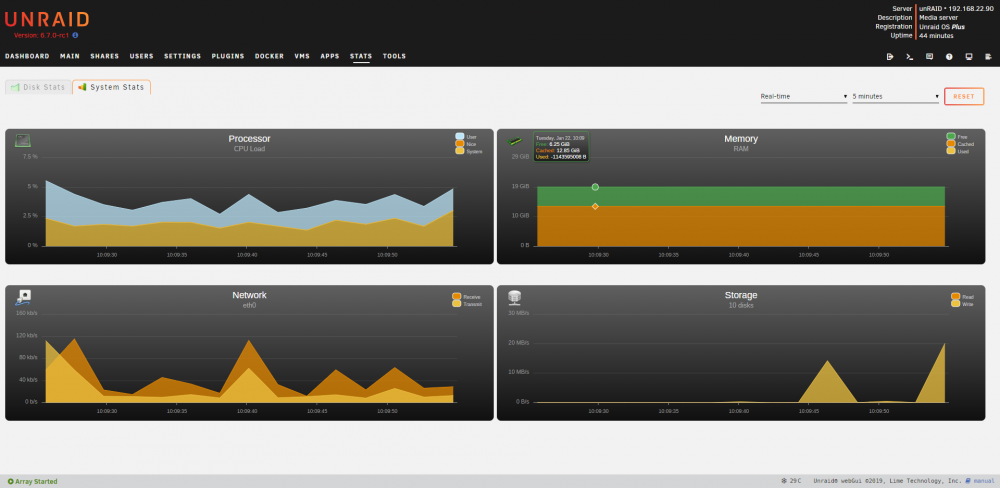
Funny you should post that. I have updated the stats plugin and then I just looked at my stats and memory is not showing correctly. I have 32GB of RAM. The used memory amount is showing as a very negative number. According to free I have 11GB used.
-
I updated to 6.7.0-rc1 this morning and the nct6770 driver is no longer finding my fans or other temps.
-
I realized in the last week that the linuxserver guys had redone their letsencrypt docker to use files in the nginx/proxy-confs folder. I moved things around and created a conf file specifically for Guacamole. If you follow Spaceinvader One's directions on how to configure letsencrypt he has you create a docker network. In his case he calls it "proxynet". This enables Docker's internal DNS resolution for any containers you place on that virtual network. One of the caveats I found is that the DNS is case sensitive but Nginx is not. As a result I had to change the name of my containers to change the uppercase characters to lowercase. Here is the "guacamole.subfolder.conf" file I created and placed into the proxy-confs folder. This assumes that the folder you want to link to is called guacamole and that your container is called "apacheguacamole". If you would like to instead link it to a subdomain there are examples in that folder that you can use to create a conf file. location ^~ /guacamole { # enable the next two lines for http auth #auth_basic "Restricted"; #auth_basic_user_file /config/nginx/.htpasswd; # enable the next two lines for ldap auth #auth_request /auth; #error_page 401 =200 /login; proxy_buffering off; proxy_http_version 1.1; proxy_set_header X-Forwarded-For $proxy_add_x_forwarded_for; proxy_set_header Upgrade $http_upgrade; proxy_set_header Connection $http_connection; access_log off; resolver 127.0.0.11 valid=30s; set $upstream_guacamole apacheguacamole; proxy_pass http://$upstream_guacamole:8080; } Here is the link to Spaceinvader One's video: https://www.youtube.com/watch?v=I0lhZc25Sro&t=955s


