






Can0n
Members
-
Joined
-
Last visited
Everything posted by Can0n
-
me as well i replaced a 3TB with an 8TB drive few days ago rebuild was slow and sluggish due to mover constantly running.....only way to solve this right now is to disabled the mover schedule or change it to weekly/monthly and change it back to your preferred setting after parity check/rebuild is completed.
-
just alt-tab with krusader tab in focus (option-tab on mac) i found is a slightly more graceful way to do same task as the on screen keyboard
-
Lev sir you are a genius! thank you was copying 4TB of files over from an external. 3hrs in i accidentally clicked removing it that is awesome edit found a slightly faster way A simple alt-tab brings the same selection (option-tab on Mac) without need for the on-screen keyboard
-
the restart command I posted was from unRAID 6.2 i think... is it back in 6.4? I have two unraid servers my test one is on 6.4 and is stable. my main one is on 6.3.5 and thats the one i need a gui restart command for
-
I occasionally see I have to restart the webgui which appears to be only available by restarting the whole server via command line with "powerdown" but today i noticed the webgui wasnt loading and powerdown wasnt doing anything so I had to do a hard shut down, now parity is being checked. is there any way to restart the webgui without rebooting the whole server? the only thing i could find was from way before 6.3x and doesnt work anymore Restart GUI /etc/rc.d/rc.nginx restart /etc/rc.d/rc.nginx reload
-
that actually makes more sense now....thanks
-
I see...I did apply the config I posted and so far it hasnt tried to run parity check. under my current setup I guess I'll have to wait to December to check Devs' what I would like to see is more options under monthly like you can for hourly in the mover.
-
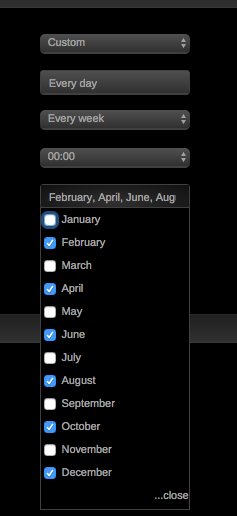
Hi wondering if you manually check every three months or schedule it via the GUI, im currently set for monthly but would like to change it to every 2 maybe 3 months the gui seems a bit confusing when i set to custom, it appears with Every Day and Every week then pick your months. too me it sounds like it will literally do this every single day in the months i pick
-
I second it I use 2x8TB drives and takes only about 20hrs sometimes 24hrs.
-
I agree its back up now all good here.
-
me too appfeed seems to be down and with 70 pages of posts im not feeling quite like looking for an answer through that mess hehehe anyone got the skinny of why its down? *** edit oh i see tonight appfeed outage is only on this page (page 70 so phew......) i switched to legacy and it loads so looks like just appfeed is down ill check again in the morning thanks @Squid
-
Yes I see it and have it now! thank you
-
Hi @binhex love your work... looks like the arch package is updated now so just curious how long automation takes to update your docker? ________________________________________________________________________________________________________ Git Clone URL: https://aur.archlinux.org/plex-media-server-plexpass.git (read-only) Last Updated: 2017-08-31 15:56 ________________________________________________________________________________________________________
-
You need to run a command via SSH terminal (Mac, Linux) or putty (windows) that shows what your username’s PID is. Once you have that digit you modify that value in to sonarr docker settings to that value and then using windows explorer or Mac finder have the permissions to delete and modify folders and files. Sorry i I do not recall the command but I’m sure a quick google search will help
-
just a quick update....I noticed shortly after writing my previous post that my Unifi Docker app would constantly tell me my user/pass was incorrect (verified with copy and paste on unifi.ubnt.com just to be sure i was indeed using the correct info) I deleted both Sonarr and Unifi and then used the CA Clean up App Data to purge the old docker files. reinstalled both set unifi back up in no time and took the hour or so getting sonarr back up. appears i had some corrupted data that somehow only impacted my two Linuxservers docker apps...hmm
-
as of today since adding an SSD to the array and forcing it for all my appdata shares (to free up cache drive pool) I am no longer able to load the sonarr gui...it stays at the bouncing white balls going back and forth indefinitely....this is happening on my Mac and a Windows VM hosted on Unraid 6.3.4 not sure whats going on so changed the appdata share back to use Cache and invoked the mover nothing moved. sonarr still wont load. having no issues with any of my other 7 dockers..i even tried the binhex Sonarr and it works. but I want my config back over 200 shows were on it and it took hours to set up any help would be greatly appreciated

-
Alternately you could have used the chown command on the folder to reassign i believe the docker setting in binhex-plexpass has PUID settings and GUID setting for setting permissions too
-
Mine did too I restarted the docker image and it worked after
-
so as for webUI i got that fixed (I have two WAN connections and on PFSense i only updated one port forward not both) not sure if deleting perm.txt or resetting things back to default but transcoding seems to be working now! thanks for your help
-
hmm port forwarding is not working now cannot get into the web UI for binhex-plexpass anymore. rebooted my firewall and other docker apps are working...
-
sorry meant to post logs before I got your perms.txt post. I have deleted perms.txt and restarted the container...waiting for a bit then will update my port forwarding in my firewall for the plex remote access and try again. as for user being used it doesnt really say in the logs but im not running the container as priviliaged and PUIG and PGID were never changed. i did rename my server from Tower to Thor not sure that would have anything to do with it. I also had to update unRAID to use port 81 as another container im using is in need of port 80
-
here is the error the logs spit out....now i have sent appdata to use only cache but bin-hex plex pass still resides on caches and 4 other disk's the mover wont move them to the cache so not sure but this error is odd and my unix is very limited Apr 4 10:00:15 Thor shfs/user: err: shfs_rmdir: rmdir: /mnt/cache/appdata/binhex-plexpass/Plex Media Server/Cache/Transcode/Sessions/plex-transcode-7hspljdyaey4repm2leuo3ru-2347ee14-948f-4a69-b47c-ba65e942c8d0 (39) Directory not empty Apr 4 10:00:15 Thor shfs/user: err: shfs_rmdir: rmdir: /mnt/cache/appdata/binhex-plexpass/Plex Media Server/Cache/Transcode/Sessions/plex-transcode-7hspljdyaey4repm2leuo3ru-2347ee14-948f-4a69-b47c-ba65e942c8d0 (39) Directory not empty
-
Hi thanks I have tried both. yesterday I moved my app data share to only reside on the cache (space is a tiny bit of an issue until i pull the SSD from my windows machine) but not a big deal. I then uninstalled binhex plex pass and resintalled it. logs when i tried to stream something need transcoding were odd. some about the transcoder folder with a long file name....directory cant be removed..not empty. I'll and capture it again and post it here. at my wits end last night i shut the docker plex down and went back to my windows version of the server software. the unRAID and my windows box are spec'd nearly identically. both are running Intel i7 6700K 4.0GHz quad core cpus with 16GB DDR4 ram. so processing power is likely not the issue. but one other thing about my set up has me wondering. in an effort to minimize all the scanning once my content was on the Unraid server I copied my Plex DB from the windows PC to the appdata/bin-hex Plex pass folder. that included all the metadata i updated and cached thumb.nail for post art and write ups. it appears to work but first think i found was almost all mkv's wouldn't work locally or remotely and mp4 content was sporadic at best. so wondering if maybe its permissions issue too as i ran the newconfig tool to set permissions when i first encountered issues. and specific the appdata share
-
hi binhex love your apps. just got unraid up and running about a week ago and all my media onto it...I am having an issue with any content that needs to transcode (mkv to mpg4 etc...) the service shows buffering....the client just gets spinning cirlce. I have compared transcoder settings between this docker app and the windows 10 version i was running before this. right now about 1/3 of my media is mkv and 2/3 is mpg4 so as long as client can direct stream it works. but any transcodes are failing. I placed the apadata folder on cache and disk shares. but specified the transcode folder for the disk shares. any help or suggestions you have would be greatly appreciated
-
installed and maxing out my gigabit connection now without using cache drive!


