






Can0n
Members
-
Joined
-
Last visited
Everything posted by Can0n
-
found it under /boot/config/plugins/dynamix/thor2freya.cron renamed it thor2freya.cron.old I have other crons I created there I am going to remove I created that almost 5 years ago when i had 3 unraid servers. the Freya ultimately died and i recycled it the 3rd one has become a windows Server 2022 Printer Server as the case drive bays was killing drives at an alarming rate. now its just a single 256GB SSD laying inside the case
-
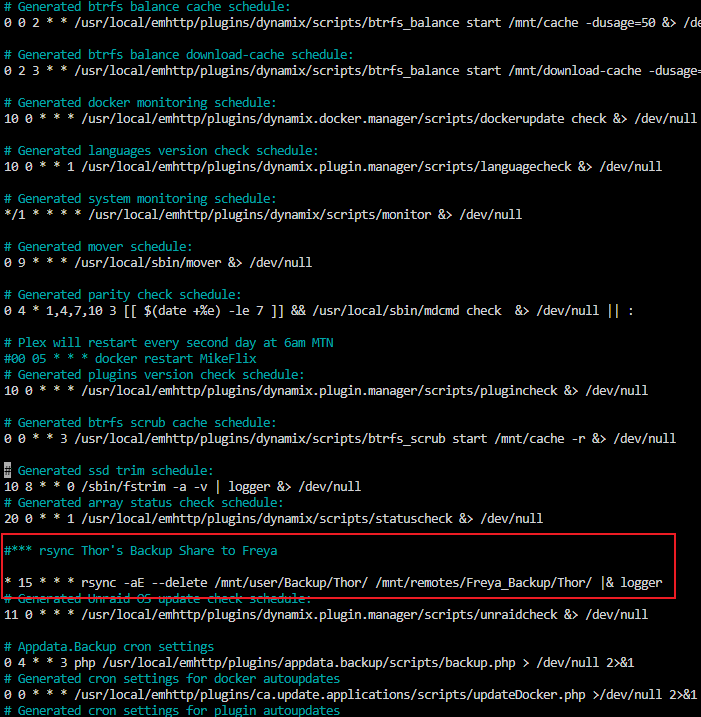
found it!! thank you for your help root@Thor:~# nano /etc/cron.d/root grep -r "Backup Share to Freya" /boot/ /boot/config/plugins/dynamix/thor2freya.cron:#*** rsync Thor's Backup Share to Freya
-
so looking up mover, now running it and its been over 7 hours trying to move to the array appears mover is just using rsync anyways so wondering what the full rsync string is in mover so I can try and do a copy not move using the same options as mover so I can keep a working copy of plex on the array should the move to the cache fail again for whatever reason is it by chance this script here? https://gist.github.com/fabioyamate/4087999
-
i used rsync becasue mover wont move files off of zfs the rsync moved all files from apps2 on the download-cache to appdata on the cache it retained the timestamps, permissions and users/groups from the download cache my plex config folder is approx 214GB so rather large no way to move it from one cache to other and it took over 4 hours to for mover to move from cache to array and array to download-cache once i tried to move it back to array it completely failed mover just stops for no reason so was stuck using rsync which actually took about 45min to copy all the containers from appdata that i put to "apps" I verified database files are there and all the files that should be there are... when i load from a URL i configured to get me there using internet DNS i get the interface and all my libraries have a triangle when i map the plex contain back to the apps folder on download-cache it loads my server and libraries just fine
-
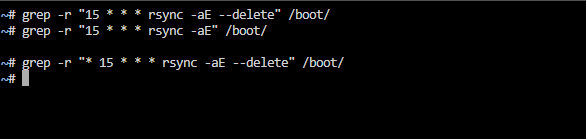
So just noticed it showed up again with no stop n start of the array here is a screnshot of the the /etc/cron.d/root file and maybe i using grep wrong but no results using the cron schedule with rsync command and its options (Attached too)
-
So a few days ago I decided I wanted to migrate my old dual 1TB Cache SSD’s from BTRFS to ZFS (unraid 6.12.2) I had already set a 4 disk zool pool i call download-cache I stopped docker and VM manager and set the share to migrate to the array (which is on xfs) when mover is invoked. I used mover to move the appdata folder to the array then used rsync -avz /mnt/user/appdata /mnt/download-cache/apps/ i updated the mapping to the for Plex to /mnt/user/apps/PlexMediaServer thats on the download-cache and saw Plex worked. I since shut it all down and used rsync again to move from the 4drive zpool (spinner disks) to the 2 Drive zPool (formerly a BTRFS pool) called cache Now when i launch plex it is setting up like a new server with a random name… if i stop it and update the config path to the 4 drive pool it works again. The claim code in the container config has not changed not sure where to look to make sure it launches the same name and instance of Plex on the new location with the 2 drives really struggling with trying to get this back on my SSD's if cant be the filesystem as the download-cache is zfs as is the cache when it didnt work the first time i went back to BTRFS and it worked again on the cache any help would be greatly appreciated.
-
yeah i will make a better note when it comes back after a stop and start of the array no luck finding it so far
-
sadly putting the old server name in the keywords only pulls old syslog files i might have to stop and start the array again to get it to show up in /etc/cron.d/root againi have a sneaking suspecision its an old user.script plugin file lingering and staying active but could be something else
-
i checked my go...issue with mine is the old job keeps coming back....its not in user scripts and not in my go file. if i stop the array and start it its back
-
still getting this too using unRAID 6.12.2 just stopped VM service to move domains from a zfs pool/dataset to array (mover isnt working to move data from ZFS datasets to xfs array by the way) used rsync -avx to copy the domains tried to restart libvirt and it fails with same umount error long standing but buit only docker that was running was Plex and i tied the main pid to that but could stop it as it was in use
-
it saves for me so not sure what voodoo magic my server is doing but i got some old Cron jobs there before I was using before User scripts came out and i even commented it out due to it not longer being valid and ocassionaly showing the invalid path in my logs when it ran. but after a massive issue last night with BTRFS errors flooding my logs and causing my VM and dockers to all crash I had to reboot forcibly due to stopping array failing and the comment # is still there so not sure what is happening to keep mine there User Scripts even puts its schedules in there
-
I even had a very old from to restart a docker container ever second day at 6am
-
It does work Any changes made to the operating system get written back to the USB immediately. Case in point I came across this post due to an rsync error I was seeing in my logs. I checked user scripts it wasn't there so i found the Rsync command I used to run on a server that doesn't exist anymore in the logs. I found it in /etc/cron.d in a file called root that server destination has been decommissioned for over a year My newest user scripts from less than a month ago were there too and my server has was restarted just 8 days ago
-
this is kind of old but you can edit cron on /etc/cron.d/root use nano or vi and you can enter what you want but i second user scripts you set it and it enters the cron schedule directly into the file i just mentioned
-
I am on unRAID 6.11.5 as well
-
I have an intel i7 10700K there is no packages in my nerd tools for edac_mce_amd or rasdaemon
-
Hello just saw a message from fix common problems that there were hardware events on my server. it recommends installing mcelog via nerd tools and posting diagnostics. I cannot find mcelog on NerdTools which has been installed for a long time I have attached my diagnostics perhaps one of you fine people might be able to tell me what the issue is? thor-diagnostics-20230429-0907.zip
-
I have an asus board Prime 590-v updated Bios and VM's get same error no SVM option i could find ***Edit downgraded bios and had to recreate the VM but its working
-
me too was about to post a link 4 plus years on the same Sandisk Cruzer Fit without need for replacement "knock on wood"
-
I had the official version of the container do a similar thing last night at 10:30 p.m. everything just crashed restarting the container never resolved it I had to stop my entire array and restarted and then it started working again
-
Space invader one has a comprehensive video on how to do this just search YouTube for his videos unfortunately I don't have it handy right now but if I get it I'll post it below it is very easy to migrate over I did it myself to the official container sadly it does not update on its own as it posts in the web gooey to update and all you have to do to update on the official container is restart the container but it would be nice if it sent a notification through Docker there was an update so it could update through normal channels other than that it's been Rock solid for me
-
I don't think 128 GB is overkill if you end up running a whole bunch of VMS or even a few VMS Lots of RAM is never a problem haha
-
I just installed server 2022 trial same issue, cant get IP as NIC drivers are not set yet so cant use RDP no accessibility options on the screen its just asking for crl+alt+del which i cant send ***edit i found the little side menu for noVNC and was able to send the 3 finder solute!
-
You should really remove user0 and make it /mnt/user/ The method you have has been deprecated and could be removed at any time and then you will have problems not to mention it does not touch your cache cool using user0
-
Hi @linuxserver.io I have recently been using Nextcloud with MariaDB on one of my servers and just wanted to move it to the other for my reverse proxy i used cp -arv command to move the appdata folders of nextcloud and mariadb both unraid server use same root password and profiles i copied using same command all the next cloud /data from old server to new and mirrored the /mnt/user/nextcloud set up as it was on the original server ****Edit found that i missed the updated server IP for both Nextcloud and MariaDB in the config.php file its working now

