nlash
Members
-
Joined
-
Last visited
Everything posted by nlash
-
Do you have to manually enable channels one-by-one as you build the lineup within the container? I have a SD account, created a lineup and added/removed the channels I wanted in my XML, but when I run the docker command to start the process, the lineup I choose seems to have no correlation to what I created on the SD website. It prompts me to add/remove/all/etc. channels.
-
How does one set this up along with the pihole docker and leverage it while on mobile and away from home? I can connect through Wireguard to my home connection without issue; I block ads while on my home network without issue.
-
Is there any way you can elaborate? I have a pihole container that works fine locally, but connecting to my server via Wireguard VPN allows ads. I'd appreciate nudge in the right direction to fix this.
-
You need it to be e1000-82545em...you forgot the first e.
-
I've been unsuccessful in passing through a 1070ti to a High Sierra install via this docker. Can anyone who has successfully done this with an NVIDIA card let me know what you've done with Clover Configurator to get this working? I've: Installed remote software Opened Configurator and check NvidiaWeb, ensured I was using 14,1 Mac model Used the script to install the drives as SpaceInvader suggested ...but the install still doesn't see the card. The NVIDIA software is there and the drivers are installed. I've had this card passed through to previous High Sierra installs using the "old school" SpaceInvader method, but I can't get Macinabox working.
-
Ah perfect, thanks a ton!
-
I run a Windows 10 VM and a MacOS VM and both share cores and GPU—obviously, they don't run at the same time. I switch between these somewhat frequently. Is it possible by way of script or otherwise to shutdown a currently running vm and start another without having to go through the steps of bringing up the UnRAID GUI, clicking the VMs tab, shutting down the currently running VM, etc.? Double points if this can be done with my Android phone. Perhaps a shortcut? I don't run in GUI mode and I typically have to do this with my phone via the browser. Any suggestions? I don't really know what's possible. Thanks.
-
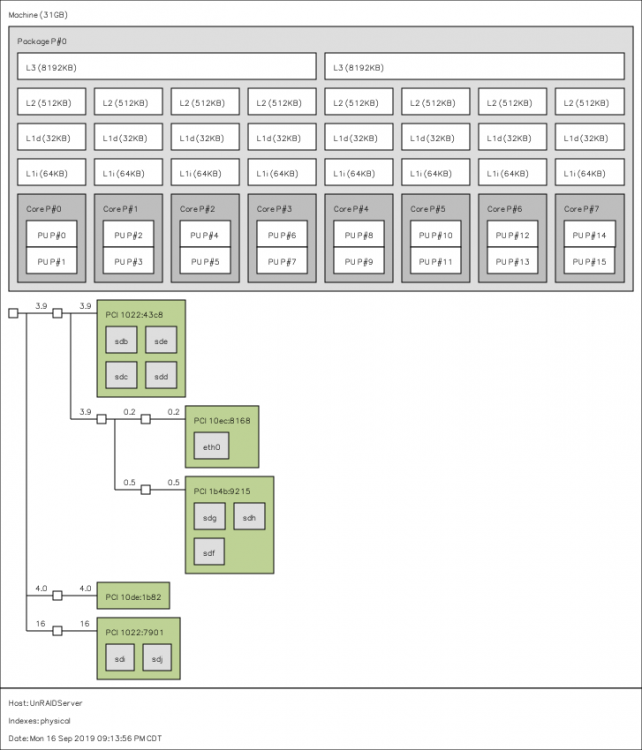
It's good to know I'm not crazy. Just to add another data point...I currently have cores 3, 5, and 7 isolated for my Windows VM. If I'm reading my architecture correctly, that's across two CCXs. It runs perfect. If I add another core—any core—guaranteed stuttering. My emulator is on core 0. Luckily this is only a gaming VM, so three cores is enough, but I've never been able to solve it. My MacOS VM that uses those cores plus core 1 runs like butter.
-
No, wasn't resolved. What cores I use doesn't seem to matter—adding more than 3 cores causes unfixable stutters. If I add a 4th, then reduce it back to 3, the stutters stay and can't be fixed.
-
Anyone out there with some insight?
-
Here's my lstopo output. Not exactly sure how to interpret it since it's a different type of CPU than spaceinvaderone's example.
-
For some reason I thought Ryzen chips only had the one node or whatever.
-
Anyone?
-
I have this working fine locally. I have OpenVPN-AS running on my server at home. Is it possible to use my home PiHole set-up and VPN to block ads while outside my network on my Android phone?
-
Using a Ryzen 2700x. I've tried various groupings of cores (always along with the grouped HT pair) and anything over two cores causes the entire vm (mouse included) to massively stutter every couple of seconds. I've tried everything under the sun and this is the only way I can get a stutter-free Windows 10 VM.
-
Same.
-
I installed this: http://forum.deluge-torrent.org/viewtopic.php?t=42887 And did this: ... and it seems to be working. I was getting 2-3MB/s and am now seeing 35MB+. I don't know why, but I hope that helps.
-
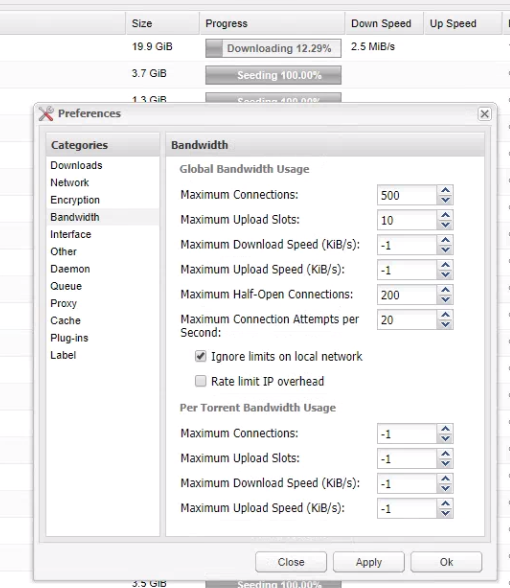
Yeah, I have the same speeds regardless of how I have my upload set. Rate limit IP overhead is unchecked. At this point I'll just assume it's because of the reverse proxy Deluge is behind.
-
I just noticed this error in the log: 2017-07-27 16:31:32,841 DEBG 'start-script' stdout output:Thu Jul 27 16:31:32 2017 Authenticate/Decrypt packet error: packet HMAC authentication failed Not sure if that has anything to do with my slow speeds.
-
Ah yeah, I realized that after I submitted. Anyway, here is how my Deluge is set up and the speed I'm getting:
-
I've been connecting to nl.privateinternetaccess.com and have tried others on that list. Speed never exceeds 2MB/s. Everything is working fine—just slowly .
-
My speeds are dreadful if I don't change it. I've tried various PIA servers and I get sub 2MB/s speeds on a 500MB/s connection on them all. If that's what's required to be behind the PIA VPN in Deluge, so be it, I just wasn't sure as I'm fairly new to all of this. Thank you for all the help.
-
Yes.
-
Every time I manually change the incoming ports in the Deluge WebUI it eventually reverts back. Manually editing core.conf does the same. Any idea why this is? I have Deluge behind a VPN and also a proxy (xxxx.deluge.net) so I want it to come in on port 443.
-
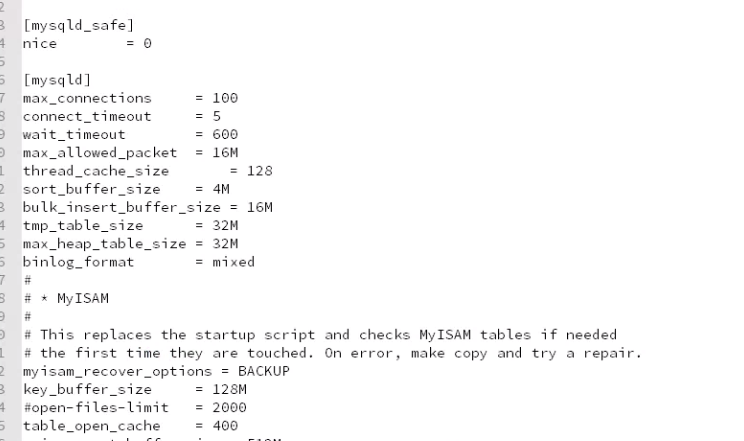
I have an issue where I need to set the binlog format to MIXED every time I restart my MariaDB for Nextcloud. I have BINLOG_FORMAT = MIXED set in the custom.cnf file, but every single time I restart the database container I have to reset the global binlog format. Any ideas where to begin? EDIT: Ah, turns out it was a permissions issue (isn't everything?). FWIW, the error I was getting in the MariaDB log was: "Warning: World-writable config file '/etc/mysql/conf.d/custom.cnf' is ignored" Fix that seems to have worked: sudo chmod 0644 /mnt/user/appdata/mariadb/custom.cnf