





yanksno1
Members
-
Joined
-
Last visited
Everything posted by yanksno1
-
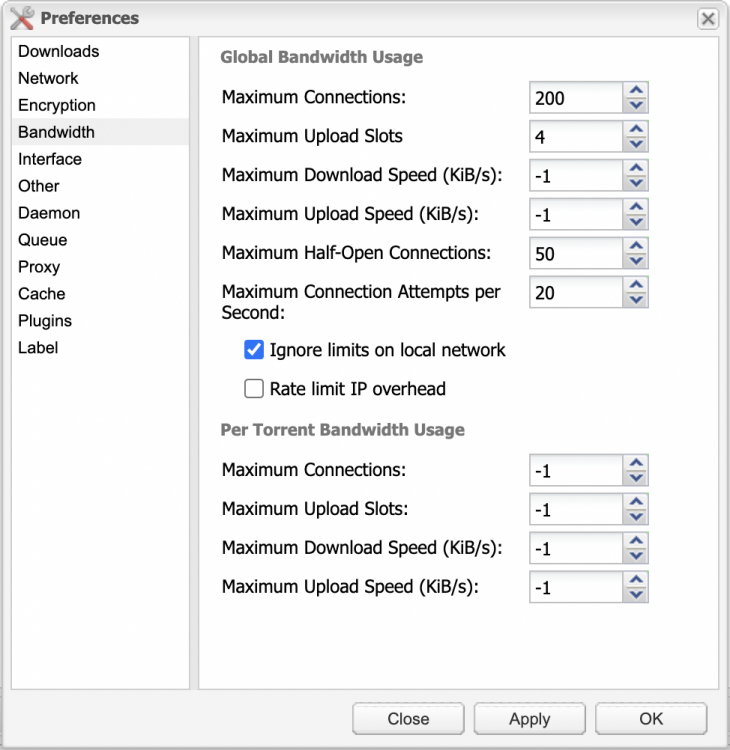
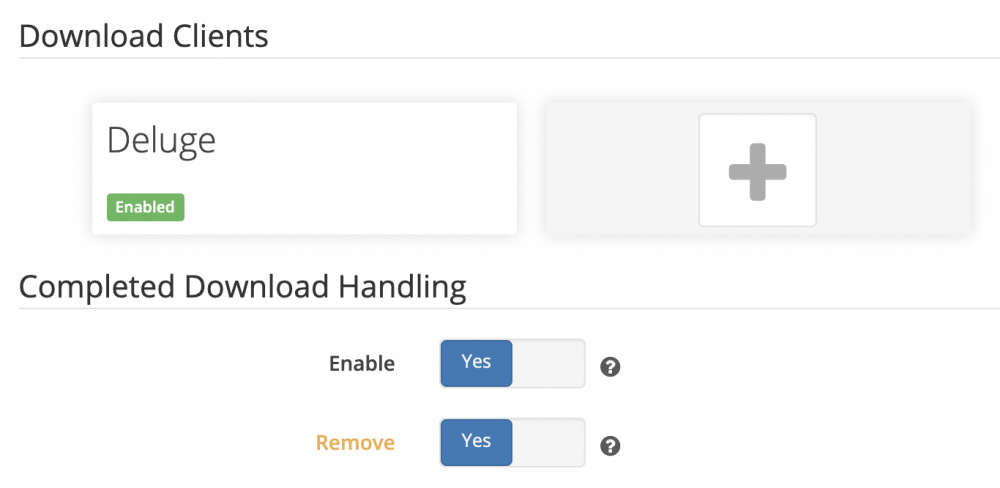
Deluge does move the torrent after it finishes, just doesn't delete it. It's moved out of the Sonarr client Activity section, but doesn't delete it from Deluge. Tried Pausing the torrent after it finished, stopped and restarted both dockers and still having the issue. Attached a couple screenshots, and my logs. If you need something specific, please let me know. Thanks for the help! tower-syslog-20210109-0444.zip
-
Hi, a few months ago my qbittorrentvpn stopped working with this docker. I eventually removed the docker image, then deleted the app folder. Reinstalled qbittorrentvpn and got that going again, but for some reason it won't connect when adding it as a download client. Not that big of a deal, because I also setup binhex-delugevpn, which after finally configuring it right do I have it working again and connected to this Sonarr docker. Not sure why qbittorrentvpn won't connect, but at least deluge is working again (for the most part) with it. My only issue now is I have Completed Download Handling Enabled and Removed both checked. But when I download something from Sonarr, after it finishes moving it won't delete the torrent. Is there something else I need to do in deluge that I'm missing? This option worked great before, so would like to have it set so it'd delete Torrents setup with Sonarr. Not sure where to go from here. Any suggestions? Any help would be much appreciated!
-
I did the same thing. Couldn't get it going for a while, then just gave up. Did setup qbittorrentvpn and got that going. After deleting the docker image plus the appdata folder, and then finally configuring it properly (didn't have the path's right) it's now working again. Got it going with Sonarr too (now just gotta figure out how to delete Torrents from Sonarr automatically).
-
I was having issues with this docker (torrents wouldn't download), so I just deleted it. Am using PIA as my VPN by the way. Tried installing binhex-delugevpn, but got the same experience there. I did try downloading new PIA OpenVPN files, but that didn't seem to make a difference. So after deleting the docker image plus the original directory file, I tried this docker again. It worked! So far every torrent I've tested it's gone through. So now I'm trying to get it going with the binhex-sonarr docker again. For the life of me, I can't get it to connect using the docker (setting up the Download Client). Anything I should be looking out for? I've attached my logs if you guys wanted to see those. Anything I'm missing on the Web UI? Hopefully you guys can point me in the right direction! tower-syslog-20201221-0324.zip
-
Didn't try that either (or wireguard). I just tried setting up qbittorrentvpn using the new Netherlands OpenVPN files again and it does seem to be working there. Every one so far has completed downloading. I can't seem to get Sonarr working with it again, but that's another story. Then copied those same files to this docker folder and still not working for me. So no idea what it is. But it does sound like we're experiencing the same thing. Are you on version 6.8.3 too?
-
Think I'm experiencing the same thing that redpathx is or at least something similar. Think it's something with the PIA OpenVPN files and I should try another server? Only weird thing is when I "turn it off" I still get the same experience and nothing downloads.
-
Hi, so a few months ago my Torrents stopped downloading. When I try to add a torrent it starts like it's going to begin downloading, but then eventually trickles down in speed and stops all together. I'm on Version 6.8.3 and before that it was working great. At first I didn't think anything of it while going away for a couple months visiting family up north. Then I get back and try to solve the problem. I restarted, stopped and updated qbittorrentvpn docker I was using at the time. No dice there. Restarted the computer and that didn't make a difference. I eventually decided to uninstall qbittorrentvpn, and setup binhex-delugevpn (I think) and same experience here. I tried updating the PIA OpenVPN files, but that didn't do anything. If I turn the VPN off, same experience. I've attached my logs for you guys to look at, hopefully one of you can spot something there. Should I update to 6.9.0-rc1? I see 6.8.3 is the most recent. Sorry for the long rant, but hopefully you guys can get me back on track here. tower-syslog-20201216-2349.zip
-
Is it possible to manually upgrade to this version? Wanna try DV on one of my MKV rips! If so, hopefully someone can point me in the right direction. Thanks!
-
Any reason I'm getting a not available under my Version in the Dockers section?
-
Been using this docker for the past couple weeks, working great. One thing I haven't figured out yet is the output directory settings. Is there a way to turn off the movie folder generator on it? I thought it might have been the "/config/data" path in settings, but restarting after removing the data part didn't update.
-
Thank you! That did it.
-
Hi, so I'm getting the error below and not sure where to find the option to mount it as the slave. They are mounted as SMB network shares, so does that have anything to do with it? Any assistance would be much appreciated. Docker application binhex-plex has volumes being passed that are mounted by Unassigned Devices, but they are not mounted with the slave option
-
Any of you guys using this docker to encode a 4K Blu-ray (to hopefully a good quality but lesser file size)? Wondering what settings you're using if you are. Thanks!
-
Is it possible to "assign" a USB optical drive when it's hooked up to Unraid? I see it in the devices when I look it up, but not sure if I can add a second opptical drive to it.
-
Thank you! That was it. Forgot to update when I re-downloaded Sonarr. Thanks a bunch.
-
Nothing changed there. That should do it right (or am I missing something obvious)? qBittorrent VPN: Sonarr:


-
I seem to be having a issue with Sonarr and qBittorrentvpn v4.1.9.1. It was working great before, but now it won't finish moving/renaming after it completes the download. I just get the warning "No files found are eligible for import in" and I check there and the file is there. Anything I should do to get it working again? I'm at a loss right now what to do.
-
I figured it was cause 2018 was missing. I just checked a bunch of S2 episodes and it does seem they all have 2018 in there. So hopefully for the rest of S3 they'll have that in there too. Any idea what might be going on with No. 2? Was working fine before, but I'm not downloading that many shows lately so it'll have to wait till the next one to see if it's working right.
-
I seem to be having a couple issues that I'm not sure what's causing them. I'm on unRaid 6.8.0 and tried updating the docker (just deleting image and re-downloading it). The first episode of Yellowstone (2018) this week didn't download. After checking on it, it looked like it was cause the torrents that were searched didn't have 2018 in the title and thus wouldn't allow me to download it. One 2160p did and after clicking on that (even though it wasn't in my profile) it downloaded and moved correctly. For Marvel's Agents of S.H.E.L.D. I now seem to be having a different issue. I downloaded some missing episodes (plus last nights ep) and after it finished in qBittorrent it didn't move/rename it. I had to do it manually. Any idea what's going on?
-
Hi, so it seems like my docker is set to a "log on state". If I restart/stop the docker it will always come back to a state where I last had it once. I did connect it to one of my other computers and that's one of the panels it always connects back to. I've tried disconnecting from it (when I could haha), then navigating to my local folder and restarting/stopping it. But it always comes back to this state. Anything I can do so it doesn't try to connect to this computer and always leaves off where I last had it at?
-
Any of you guys have Remote Access stop working for you earlier today? It was working fine and then all of the sudden can't access the port. Have a friend who on his Plex server (not this docker though) said the same thing happened to him. EDIT: Should mention Plex does seem to connect to Remote Access at first, then disconnects a short time after. EDIT #2: Looked and I'm on Plex Version No. 1.18.2.2058. Also see other people are having this issue. Took off port forwarding off Plex, reconnected and seems I'm back for now (*knocks on wood). Don't get it.
-
Switching the show that wasn't pulling to the Movie Database worked. Thanks, at least it wasn't just me and it's not the docker. Would be nice if the TVDB could get their act together and stop breaking things. It'd be even nicer if Plex had their own platform that pulled the metadata so it wasn't relying on 3rd party systems that breaks every so often.
-
Looks like we're having that metadata issue again (or at least me). Wasn't it before on the TVBD's side? Def annoying when it happens. Hope they fix it soon.
-
Think it must of been that, and I forgot about it. Sorry for the confusion. So I tested out ripping another blu-ray with MakeMKV and setting the watch directory and preset in the container. That went through fine, but didn't have the right compression output I wanted so I decided I'll still do it manually. I change everything back and update the docker, then this time I get an server disconnected (code: 1006) and can't get the gui going again (it's just a blank page). I've tried deleting the docker, deleting the docker apps folder, stopping/started docker, stopping/starting array, restarting docker, changing ports and nothing's helped. Any idea's what to do here? I can post my logs if you'd like to see those. Update #1: Think I got it. Checked in another browser, it loaded there. Deleted all my cache/cookies for unRaid and finally got it going. Update #2: So while --device=/dev/sg1 did work for MakeMKV, I did notice it had an output in the docker for the optical drive of /sr0. So I tried that on Handbrake, and sure enough using --device=/dev/sr0 worked! Read the same disc it wasn't earlier. Don't know why the output is different, but at least it's working.
-
Yup, I know that. It worked exactly like you said ripping the blu-ray disc using MakeMKV, then using this docker to compress it. But why does Handbrake on my iMac load the same disc and not here?




