plantsandbinary
Members
-
Joined
Everything posted by plantsandbinary
-
P.S. If you check the docker logs. You don't want to see this: 2022-11-24T23:02:48.854 INF ../../nat/upnp/discover.go:58 > UPnP gateways detected: 0 What you DO want to see is this: 2022-11-24T23:04:31.264 INF ../../nat/upnp/discover.go:58 > UPnP gateways detected: 1 2022-11-24T23:04:31.264 INF ../../nat/upnp/discover.go:60 > UPnP gateway detected map[deviceType:urn:schemas-upnp-org:device:InternetGatewayDevice:1 friendlyName:RT-AX88U-9B20 manufacturer:ASUSTeK Computer Inc. modelName:RT-AX88U modelNo:386.8 server:AsusWRT/4.1.51 UPnP/1.1 MiniUPnPd/2.3.0] That's my router. You want to see yours in there. EDIT: Mind you, I took my node offline very quickly after I saw how pitiful the earnings were and just how much of a waste of time it was. So I don't really recommend this container at all.
-
Alright boiz. Here's how I went from "restricted cone" and got "ALL" and here's the proof: That's the port range I chose. Pretty fair, 180 ports. Nothing insane like the default option. I installed the docker container as "HOST" normally, I have everything on a specific network called "public" that I use to connect via the web thanks to Nginxproxymanager. In this case just for the beginning, I kept it as Host as locust said it shouldn't require anything special. It's the only other container running the same way as Plex. Though my Plex server allows me to access it via Plex.tv so it doesn't need to be on my "bridge" network. The main thing that I think worked for me was in my Router (Asus RT-AX88U) I changed my NAT from "Symmetrical" to "Full-Cone" Which is blah blah less secure but I don't give a rat's ass. I've already got my entire network locked down like a fortress anyway. I then went to Port forward those ports above: 52820:53000 on UDP. I did that in the WAN > Port Forwarding tab I don't think the Port Forwarding step was necessary but I did it anyway. One way or another, the Myst container detects my router and immediately sets "fullcone" NAT type. That's literally all it took for me. I don't have any pfSense stuff or PiHole crap running on my network. This router is more than enough security for me, as is having isolated subnets. Anyway I hope this helps someone. I think the most important thing is changing to full cone NAT. EDIT: Trying later on my custom "public" network didn't work. I cannot get the ports open no matter watch. Bridge mode doesn't work either, and neither does my default "br0" network. I can run the container on another internal IP (eg. 192.168.1.67) and access it via that from my internet network but not from outside my network. I'll try later with Tailscale and see what I can do. If you have a pfSense dohickey this might help you:

-
I love your SearX docker mate. Works absolutely flawlessly! Any chance of you whipping up one for SearXNG? It's got a few more features that I'd like to make use of. Would be happy to throw a few bob your way. ❤️
-
So randomly this QWANT error has gone away, and now it's been replaced with an error regarding Soundcloud... raise httpx.TimeoutException('Timeout', request=None) from e httpx.TimeoutException: Timeout 2022-10-26 11:39:45,726 ERROR:searx.engines.soundcloud: Fail to initialize Traceback (most recent call last): File "/usr/local/searxng/searx/network/__init__.py", line 96, in request return future.result(timeout) File "/usr/lib/python3.10/concurrent/futures/_base.py", line 448, in result raise TimeoutError() concurrent.futures._base.TimeoutError The above exception was the direct cause of the following exception: Traceback (most recent call last): File "/usr/local/searxng/searx/search/processors/abstract.py", line 75, in initialize self.engine.init(get_engine_from_settings(self.engine_name)) File "/usr/local/searxng/searx/engines/soundcloud.py", line 69, in init guest_client_id = get_client_id() File "/usr/local/searxng/searx/engines/soundcloud.py", line 57, in get_client_id response = http_get(app_js_url) File "/usr/local/searxng/searx/network/__init__.py", line 165, in get return request('get', url, **kwargs) File "/usr/local/searxng/searx/network/__init__.py", line 98, in request raise httpx.TimeoutException('Timeout', request=None) from e httpx.TimeoutException: Timeout 2022-10-26 11:39:45,738 ERROR:searx.engines.soundcloud: Fail to initialize Traceback (most recent call last): File "/usr/local/searxng/searx/network/__init__.py", line 96, in request return future.result(timeout) File "/usr/lib/python3.10/concurrent/futures/_base.py", line 448, in result raise TimeoutError() concurrent.futures._base.TimeoutError The above exception was the direct cause of the following exception: Traceback (most recent call last): File "/usr/local/searxng/searx/search/processors/abstract.py", line 75, in initialize self.engine.init(get_engine_from_settings(self.engine_name)) File "/usr/local/searxng/searx/engines/soundcloud.py", line 69, in init guest_client_id = get_client_id() File "/usr/local/searxng/searx/engines/soundcloud.py", line 45, in get_client_id response = http_get("https://soundcloud.com") File "/usr/local/searxng/searx/network/__init__.py", line 165, in get return request('get', url, **kwargs) File "/usr/local/searxng/searx/network/__init__.py", line 98, in request raise httpx.TimeoutException('Timeout', request=None) from e httpx.TimeoutException: Timeout 2022-10-26 11:39:45,740 ERROR:searx.engines.soundcloud: Fail to initialize Traceback (most recent call last): File "/usr/local/searxng/searx/network/__init__.py", line 96, in request return future.result(timeout) File "/usr/lib/python3.10/concurrent/futures/_base.py", line 448, in result raise TimeoutError() concurrent.futures._base.TimeoutError The above exception was the direct cause of the following exception: Traceback (most recent call last): File "/usr/local/searxng/searx/search/processors/abstract.py", line 75, in initialize self.engine.init(get_engine_from_settings(self.engine_name)) File "/usr/local/searxng/searx/engines/soundcloud.py", line 69, in init guest_client_id = get_client_id() File "/usr/local/searxng/searx/engines/soundcloud.py", line 57, in get_client_id response = http_get(app_js_url) File "/usr/local/searxng/searx/network/__init__.py", line 165, in get return request('get', url, **kwargs) File "/usr/local/searxng/searx/network/__init__.py", line 98, in request raise httpx.TimeoutException('Timeout', request=None) from e httpx.TimeoutException: Timeout 2022-10-26 11:39:45,741 ERROR:searx.engines.soundcloud: Fail to initialize Traceback (most recent call last): File "/usr/local/searxng/searx/network/__init__.py", line 96, in request return future.result(timeout) File "/usr/lib/python3.10/concurrent/futures/_base.py", line 448, in result raise TimeoutError() concurrent.futures._base.TimeoutError The above exception was the direct cause of the following exception: Traceback (most recent call last): File "/usr/local/searxng/searx/search/processors/abstract.py", line 75, in initialize self.engine.init(get_engine_from_settings(self.engine_name)) File "/usr/local/searxng/searx/engines/soundcloud.py", line 69, in init guest_client_id = get_client_id() File "/usr/local/searxng/searx/engines/soundcloud.py", line 57, in get_client_id response = http_get(app_js_url) File "/usr/local/searxng/searx/network/__init__.py", line 165, in get return request('get', url, **kwargs) File "/usr/local/searxng/searx/network/__init__.py", line 98, in request raise httpx.TimeoutException('Timeout', request=None) from e httpx.TimeoutException: Timeout
-
Ok so it seems that Startpage just sucks and makes the searches take over 6 seconds. So I disabled it. I also disabled Brave because it has an average completion time of 3 seconds... which is too slow. With Google, Bing and Duckduckgo, the searches are much, much faster. Qwant has disappeared though after I disabled the others. Now I get this error which says the config isn't set correctly for some reason. Also the container is complaining that I am missing a line in my uwsgi.ini which is not true. That line does exist at the bottom. spawned uWSGI worker 11 (pid: 133, cores: 4) spawned 12 offload threads for uWSGI worker 10 spawned uWSGI worker 12 (pid: 143, cores: 4) cache sweeper thread enabled spawned 12 offload threads for uWSGI worker 11 spawned 12 offload threads for uWSGI worker 12 2022-10-21 22:02:52,630 ERROR:searx.shared: uwsgi.ini configuration error, add this line to your uwsgi.ini cache2 = name=searxngcache,items=2000,blocks=2000,blocksize=4096,bitmap=1 2022-10-21 22:02:52,631 ERROR:searx.shared: uwsgi.ini configuration error, add this line to your uwsgi.ini cache2 = name=searxngcache,items=2000,blocks=2000,blocksize=4096,bitmap=1 2022-10-21 22:02:52,633 ERROR:searx.shared: uwsgi.ini configuration error, add this line to your uwsgi.ini cache2 = name=searxngcache,items=2000,blocks=2000,blocksize=4096,bitmap=1 2022-10-21 22:02:52,646 ERROR:searx.shared: uwsgi.ini configuration error, add this line to your uwsgi.ini cache2 = name=searxngcache,items=2000,blocks=2000,blocksize=4096,bitmap=1 2022-10-21 22:02:52,648 ERROR:searx.shared: uwsgi.ini configuration error, add this line to your uwsgi.ini cache2 = name=searxngcache,items=2000,blocks=2000,blocksize=4096,bitmap=1 2022-10-21 22:02:52,653 ERROR:searx.shared: uwsgi.ini configuration error, add this line to your uwsgi.ini cache2 = name=searxngcache,items=2000,blocks=2000,blocksize=4096,bitmap=1 2022-10-21 22:02:52,654 ERROR:searx.shared: uwsgi.ini configuration error, add this line to your uwsgi.ini cache2 = name=searxngcache,items=2000,blocks=2000,blocksize=4096,bitmap=1 2022-10-21 22:02:52,655 ERROR:searx.shared: uwsgi.ini configuration error, add this line to your uwsgi.ini cache2 = name=searxngcache,items=2000,blocks=2000,blocksize=4096,bitmap=1 2022-10-21 22:02:52,657 ERROR:searx.shared: uwsgi.ini configuration error, add this line to your uwsgi.ini cache2 = name=searxngcache,items=2000,blocks=2000,blocksize=4096,bitmap=1 2022-10-21 22:02:52,672 ERROR:searx.shared: uwsgi.ini configuration error, add this line to your uwsgi.ini cache2 = name=searxngcache,items=2000,blocks=2000,blocksize=4096,bitmap=1 2022-10-21 22:02:52,691 ERROR:searx.shared: uwsgi.ini configuration error, add this line to your uwsgi.ini cache2 = name=searxngcache,items=2000,blocks=2000,blocksize=4096,bitmap=1 2022-10-21 22:02:52,694 ERROR:searx.shared: uwsgi.ini configuration error, add this line to your uwsgi.ini cache2 = name=searxngcache,items=2000,blocks=2000,blocksize=4096,bitmap=1 2022-10-21 22:02:53,370 ERROR:searx.engines: Missing engine config attribute: "qwant.qwant_categ" 2022-10-21 22:02:53,372 ERROR:searx.engines: Missing engine config attribute: "qwant news.qwant_categ" 2022-10-21 22:02:53,373 ERROR:searx.engines: Missing engine config attribute: "qwant images.qwant_categ" 2022-10-21 22:02:53,374 ERROR:searx.engines: Missing engine config attribute: "qwant videos.qwant_categ" 2022-10-21 22:02:53,375 ERROR:searx.engines: Missing engine config attribute: "qwant.qwant_categ" 2022-10-21 22:02:53,377 ERROR:searx.engines: Missing engine config attribute: "qwant news.qwant_categ" 2022-10-21 22:02:53,378 ERROR:searx.engines: Missing engine config attribute: "qwant images.qwant_categ" 2022-10-21 22:02:53,378 ERROR:searx.engines: Missing engine config attribute: "qwant videos.qwant_categ" 2022-10-21 22:02:53,379 ERROR:searx.engines: Missing engine config attribute: "qwant.qwant_categ" 2022-10-21 22:02:53,381 ERROR:searx.engines: Missing engine config attribute: "qwant news.qwant_categ" 2022-10-21 22:02:53,382 ERROR:searx.engines: Missing engine config attribute: "qwant images.qwant_categ" 2022-10-21 22:02:53,383 ERROR:searx.engines: Missing engine config attribute: "qwant videos.qwant_categ" 2022-10-21 22:02:53,384 ERROR:searx.engines: Missing engine config attribute: "qwant.qwant_categ" 2022-10-21 22:02:53,386 ERROR:searx.engines: Missing engine config attribute: "qwant news.qwant_categ" 2022-10-21 22:02:53,387 ERROR:searx.engines: Missing engine config attribute: "qwant images.qwant_categ" 2022-10-21 22:02:53,387 ERROR:searx.engines: Missing engine config attribute: "qwant.qwant_categ" 2022-10-21 22:02:53,387 ERROR:searx.engines: Missing engine config attribute: "qwant videos.qwant_categ" 2022-10-21 22:02:53,389 ERROR:searx.engines: Missing engine config attribute: "qwant news.qwant_categ" 2022-10-21 22:02:53,389 ERROR:searx.engines: Missing engine config attribute: "qwant.qwant_categ" 2022-10-21 22:02:53,390 ERROR:searx.engines: Missing engine config attribute: "qwant images.qwant_categ" 2022-10-21 22:02:53,390 ERROR:searx.engines: Missing engine config attribute: "qwant videos.qwant_categ" 2022-10-21 22:02:53,391 ERROR:searx.engines: Missing engine config attribute: "qwant.qwant_categ" 2022-10-21 22:02:53,392 ERROR:searx.engines: Missing engine config attribute: "qwant news.qwant_categ" 2022-10-21 22:02:53,392 ERROR:searx.engines: Missing engine config attribute: "qwant images.qwant_categ" 2022-10-21 22:02:53,393 ERROR:searx.engines: Missing engine config attribute: "qwant videos.qwant_categ" 2022-10-21 22:02:53,394 ERROR:searx.engines: Missing engine config attribute: "qwant news.qwant_categ" 2022-10-21 22:02:53,394 ERROR:searx.engines: Missing engine config attribute: "qwant images.qwant_categ" 2022-10-21 22:02:53,395 ERROR:searx.engines: Missing engine config attribute: "qwant videos.qwant_categ" 2022-10-21 22:02:53,398 ERROR:searx.engines: Missing engine config attribute: "qwant.qwant_categ" 2022-10-21 22:02:53,401 ERROR:searx.engines: Missing engine config attribute: "qwant news.qwant_categ" 2022-10-21 22:02:53,402 ERROR:searx.engines: Missing engine config attribute: "qwant images.qwant_categ" 2022-10-21 22:02:53,402 ERROR:searx.engines: Missing engine config attribute: "qwant videos.qwant_categ" 2022-10-21 22:02:53,407 ERROR:searx.engines: Missing engine config attribute: "qwant.qwant_categ" 2022-10-21 22:02:53,410 ERROR:searx.engines: Missing engine config attribute: "qwant news.qwant_categ" 2022-10-21 22:02:53,411 ERROR:searx.engines: Missing engine config attribute: "qwant images.qwant_categ" 2022-10-21 22:02:53,411 ERROR:searx.engines: Missing engine config attribute: "qwant videos.qwant_categ" 2022-10-21 22:02:53,415 ERROR:searx.engines: Missing engine config attribute: "qwant.qwant_categ" 2022-10-21 22:02:53,417 ERROR:searx.engines: Missing engine config attribute: "qwant news.qwant_categ" 2022-10-21 22:02:53,418 ERROR:searx.engines: Missing engine config attribute: "qwant images.qwant_categ" 2022-10-21 22:02:53,418 ERROR:searx.engines: Missing engine config attribute: "qwant videos.qwant_categ" 2022-10-21 22:02:53,424 ERROR:searx.engines: Missing engine config attribute: "qwant.qwant_categ" 2022-10-21 22:02:53,424 ERROR:searx.engines: Missing engine config attribute: "qwant.qwant_categ" 2022-10-21 22:02:53,426 ERROR:searx.engines: Missing engine config attribute: "qwant news.qwant_categ" 2022-10-21 22:02:53,426 ERROR:searx.engines: Missing engine config attribute: "qwant news.qwant_categ" 2022-10-21 22:02:53,427 ERROR:searx.engines: Missing engine config attribute: "qwant images.qwant_categ" 2022-10-21 22:02:53,427 ERROR:searx.engines: Missing engine config attribute: "qwant images.qwant_categ" 2022-10-21 22:02:53,428 ERROR:searx.engines: Missing engine config attribute: "qwant videos.qwant_categ" 2022-10-21 22:02:53,428 ERROR:searx.engines: Missing engine config attribute: "qwant videos.qwant_categ" WSGI app 0 (mountpoint='') ready in 2 seconds on interpreter 0x155493bcfb50 pid: 72 (default app) WSGI app 0 (mountpoint='') ready in 2 seconds on interpreter 0x155493bcfb50 pid: 59 (default app) WSGI app 0 (mountpoint='') ready in 2 seconds on interpreter 0x155493bcfb50 pid: 143 (default app) WSGI app 0 (mountpoint='') ready in 2 seconds on interpreter 0x155493bcfb50 pid: 47 (default app) WSGI app 0 (mountpoint='') ready in 2 seconds on interpreter 0x155493bcfb50 pid: 104 (default app) WSGI app 0 (mountpoint='') ready in 2 seconds on interpreter 0x155493bcfb50 pid: 22 (default app) WSGI app 0 (mountpoint='') ready in 2 seconds on interpreter 0x155493bcfb50 pid: 89 (default app) WSGI app 0 (mountpoint='') ready in 2 seconds on interpreter 0x155493bcfb50 pid: 10 (default app) WSGI app 0 (mountpoint='') ready in 2 seconds on interpreter 0x155493bcfb50 pid: 34 (default app) WSGI app 0 (mountpoint='') ready in 2 seconds on interpreter 0x155493bcfb50 pid: 116 (default app) WSGI app 0 (mountpoint='') ready in 2 seconds on interpreter 0x155493bcfb50 pid: 133 (default app) WSGI app 0 (mountpoint='') ready in 2 seconds on interpreter 0x155493bcfb50 pid: 12 (default app)
-
i'm getting constant error messages from the SearXNG docker that all of the search providers I want to use are banning me. Basically I keep getting: BRAVE - Timeout (error) Qwant - Banned (error) Startpage - Timeout (error) etc. etc. If I re-run the search or mash the enter button a few times the search usually completes. However, it's really unreliable. I am the ONLY one using this docker container, and I have it secured pretty heavily. It's not showing any other people connecting to it. Why do I keep getting timeout or bans or captcha failure errors from this container?
-
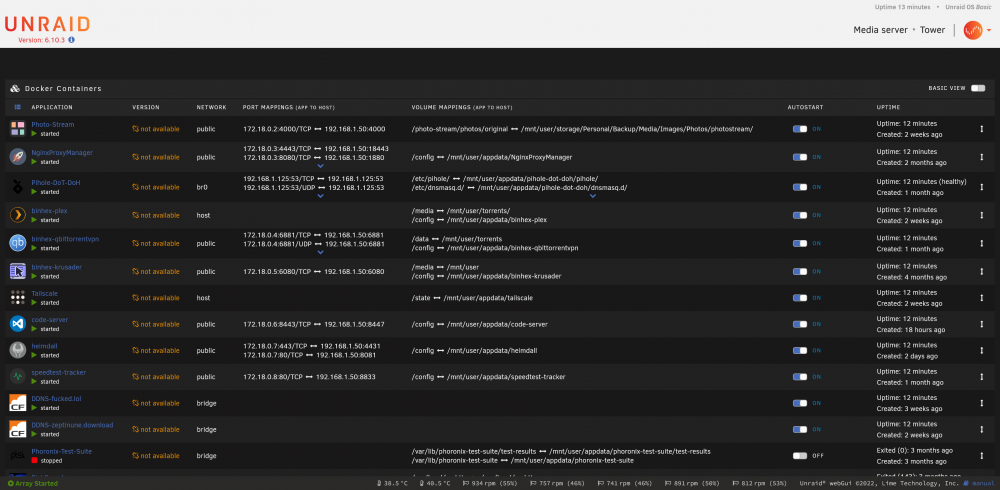
Well after a reboot, all of my images are now without links. How? So I fixed the above issue. It was a misconfigured PiHole. I just deleted the PiHole because I barely use it. However, it doesn't explain why my SearX container became orphaned. Thankfully deleting and redownloading SearX made it work again no problems.
-
Try and Google a couple of ways to repair your superblock. The data is very likely still there, but you've lost your metadata and the system doesn't know what to do with the files (let alone what they even are). I had the same issue due to a freak error that occured with my motherboard model. Not due to an unclean shutdown during rebuild. I'm just going to be really honest with you. If you cannot fix your superblocks, the only option you have is professional data recovery service. An unclean shutdown during a rebuild is one of the worst things that can happen to your array and you should always consult the pros before ever killing power. At the earlier stage you could have backed up your superblocks at the very least before killing the power. Often-times the best thing is to just stop the process, do a disk image and then try again. It's a lot more difficult if you have totally borked disks as you need to remember during a rebuild everything is being overwritten with what's in parity. I "lost" 11TB of data from the same thing, irrecoverable superblocks. Those drives are in my cupboard now waiting until a day when I bother to fork over a few thousand dollars to have the data restored or until some "magic" machine learning can fix it for me. The data is still there on the disks but nothing can tell me what it even is, how to organize it, etc. there's no metadata whatsoever. It's worse than just an accidental delete because I could recover from that. Good luck. P.S. Remember that every write operation potentially makes you data harder to get back. So pick your next steps incredibly carefully. P.P.S. I guess it does not need to be said but UNRAID is not a backup solution and you should always have a backup of the backup. The 3, 2, 1 method works.
-
So I was downloading some torrents. The cache drive filled up (I forgot to disable some). 1. My docker containers all crashed due to no space. 2. I stopped docker. 3. Started mover (but mover immediately stops) 4. Moved 190GB of files manually via CMD line 5. Cache still shows 99% full 6. Started docker again 7. One missing/orphaned image (SearX) and 3 docker images that suddenly don't have links anymore What happened? Normally if the mover stops immediately it's because docker is using something, but if I stop docker. It always works. Now both the cache is still full and the mover is not working. There's nothing useful in the logs I could see either. tower-diagnostics-20220821-1925.zip
-
How do I add multiple subdomains for the Cloudfare-DDNS container? @SelfHoster I've tried: www, subdomain and: www subdomain but it keeps telling me in the log "not found/failed to create subdomain"
-
Fixed it by killing the container and reinstalling it entirely. Seems the GDPR acceptance expires after 1 year.
-
Speedtest Tracker just spontaneously stopped working for me on the 20th of July. I haven't rebooted my machine. Haven't installed anything. Haven't changed anything. Graph literally just shows that after 3am on July 20th every single speedtest has failed with "invalid date" I wiped the SQL database from the settings page but this has not fixed the problem either. I can't even run a test because nothing happens. Has anyone else experienced this?
-
Any idea how to fix this? I get this error every time after a reboot. Running Version: 6.10.3 Model: Custom M/B: ASRock X570M Pro4 Version BIOS: American Megatrends Inc. Version P3.70. Dated: 02/23/2022 CPU: AMD Ryzen 5 5600 6-Core @ 3500 MHz HVM: Enabled IOMMU: Enabled Cache: 384 KiB, 3 MB, 32 MB Memory: 8 GiB DDR4 Multi-bit ECC (max. installable capacity 128 GiB) Samsung M391A1G43EB1-CRC, 8 GiB DDR4 @ 2400 MT/s Network: bond0: fault-tolerance (active-backup), mtu 1500 eth0: 1000 Mbps, full duplex, mtu 1500 eth1: 1000 Mbps, full duplex, mtu 1500 Kernel: Linux 5.15.46-Unraid x86_64 OpenSSL: 1.1.1o

-
Well I just forgo this entire thing. Removed the MyServers plugin entirely and just did the forwarding via cloudfare proxy, SSL and HSTS and using Nginx Proxy. Downside with this setup though is that it relies on the nginxproxymanager container which relies on Docker. But my machine is set up to automatically mount the array and start nginxproxy container anyway. Would have been nice to lower level config like just relying on Unraid being running (not docker or any containers) but I didn't want to have to hack around with SSL from cloudfare for that. I really don't like this "myservers" plugin. It isn't secure, is still in beta and even the backups are not encrypted.
-
Hmm interestingly: https://blahblahbigstringhere.unraid.net:35894/ seems to work fine... Why then is the settings page showing the URL in the top post, which includes the local IP with hyphens and uses "myunraid" instead of just "unraid"?
-
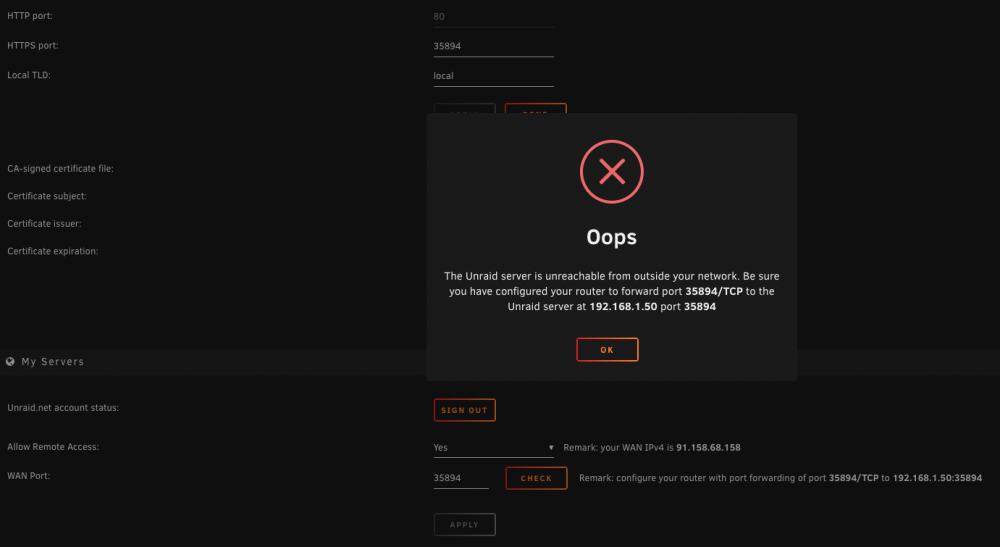
I recently enabled the myservers function at: https://192-168-1-50.blahblahbigstringhere.myunraid.net:35894/ In my router I mapped: External 35894 to internal 192.168.1.50:35894 I've been waiting a few hours now but the Settings page is just sitting on How long does this take? Perhaps a NOTE: could be added here if it takes some days or something to complete. As I would have expected this to come up relatively quickly.

-
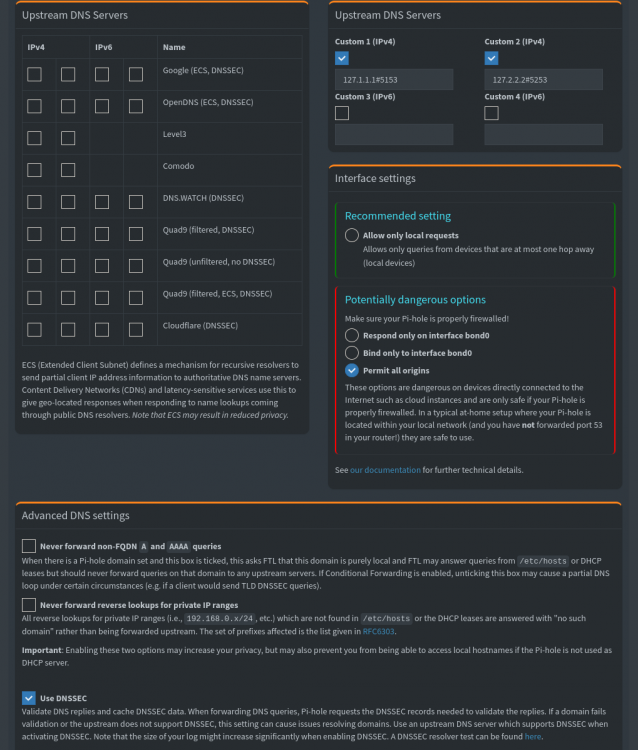
I am using the DNS-DoT-DoH docker container. I am curious to know. What DNS am I using? These are my settings for the PiHole (I left the custom DNS IPs alone in the container config but I did enbale DNSSEC): Here are my router settings (the router is using PiHole IP address, and if that fails it uses AdGuard DNS): Here are my DNS leak test results (I am not in Germany, not even close to it): Going by this, I can assume that DNSSEC is working fine? But what is my actual DNS, that is. What server am I using? Router points to PiHole, but what is the PiHole pointing to? Also, how do I know that DoT/DoH is working?
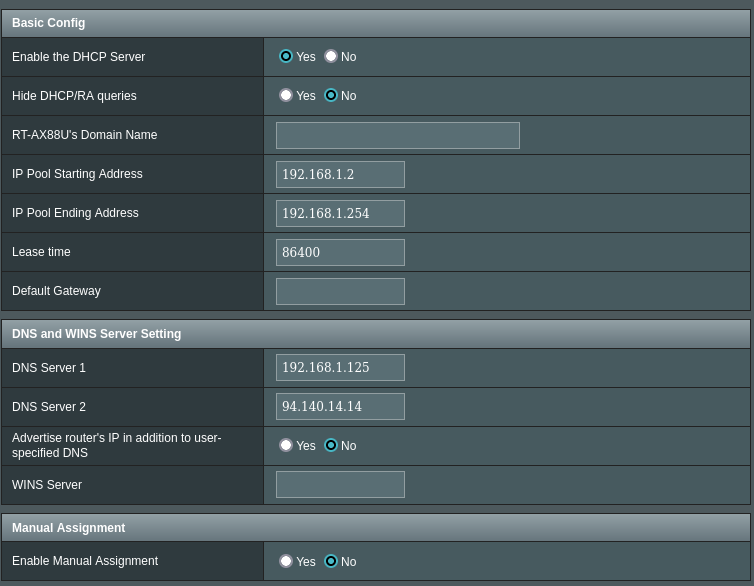
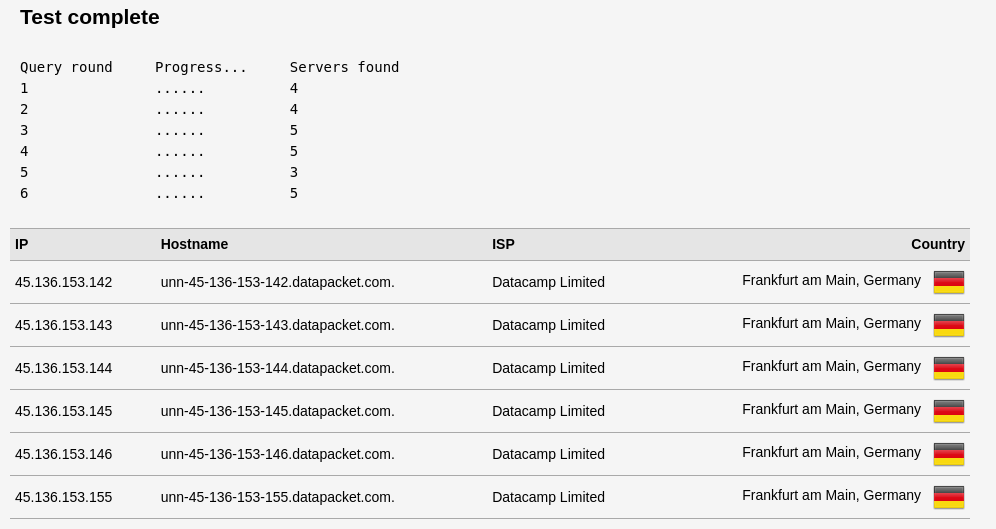
-
Why am I getting this in standard notes when I try to register an account? Puma starting in single mode... * Puma version: 5.6.2 (ruby 2.7.4-p191) ("Birdie's Version") * Min threads: 5 * Max threads: 5 * Environment: development * PID: 8 * Listening on http://0.0.0.0:3001 Use Ctrl-C to stop {"level":"INFO","time":"2022-06-14T14:19:38.325+03:00","message":"Cannot render console from 141.101.104.52! Allowed networks: 127.0.0.1, ::1, 127.0.0.0/127.255.255.255","ddsource":["ruby"]} {"level":"INFO","time":"2022-06-14T14:19:38.364+03:00","message":"{\"method\":\"GET\",\"path\":\"/\",\"format\":\"html\",\"controller\":\"ApplicationController\",\"action\":\"app\",\"status\":200,\"duration\":34.26,\"view\":31.62}","ddsource":["ruby"]} I have it running at https://mynotes.mysite.com It's using an HTTPS cert from cloudfare. I'm using NGinx Proxy Manager. Set up with websockets support also. It's forwarding 192.168.1.55:3001 > https://mynotes.mysite.com Whenever I try and register an account I get the above error though. I'm using the following .env file: RAILS_ENV=development PORT=3001 WEB_CONCURRENCY=0 RAILS_LOG_TO_STDOUT=true # Log Level options: "INFO" | "DEBUG" | "INFO" | "WARN" | "ERROR" | "FATAL" RAILS_LOG_LEVEL=INFO RAILS_SERVE_STATIC_FILES=true SECRET_KEY_BASE=[redacted] APP_HOST=https://[redacted] PURCHASE_URL=https://standardnotes.com/purchase PLANS_URL=https://standardnotes.com/plans DASHBOARD_URL=http://standardnotes.com/dashboard DEFAULT_SYNC_SERVER=https:/[redacted] WEBSOCKET_URL=wss://sockets-dev.standardnotes.com ENABLE_UNFINISHED_FEATURES=false # NewRelic (Optional) NEW_RELIC_ENABLED=false NEW_RELIC_THREAD_PROFILER_ENABLED=false NEW_RELIC_LICENSE_KEY= NEW_RELIC_APP_NAME=Web NEW_RELIC_BROWSER_MONITORING_AUTO_INSTRUMENT=false DEV_ACCOUNT_EMAIL= DEV_ACCOUNT_PASSWORD= DEV_ACCOUNT_SERVER= What else am I missing?
-
Since upgrading to 6.10.2-rc3 (also happens on 6.10.3-rc1) Whenever I try to install "some" docker containers I am not getting an actual working verbose output like I used to. One where I could see the images downloading and such. Instead the page will just infinitely load when I press "install" and I'll have a blank page with an infinite loading animation, and a url, eg: https://192.168.1.50/Apps/AddContainer?xmlTemplate=default:/tmp/community.applications/tempFiles/templates-community-apps/xthursdayxsRepository/standardnotes-standardnotesweb-stable.xml In my browser bar. Some docker images from the apps tab do work though without errors. I have tried restarting my machine and the docker service too. I have no idea why this started happening. Any ideas?
-
Alright fair enough, looks like I need more RAM on my machine then.
-
These containers seem to take a LOT of RAM. Check my image here. I've got 3 of them going, and it looks to be about 1.5GB used per container. None of my other containers take this much RAM. Is it something to do with verbose log writing or something? Any way to reduce it? It's not hitting the CPU basically at all, but I've not got much more RAM to play with
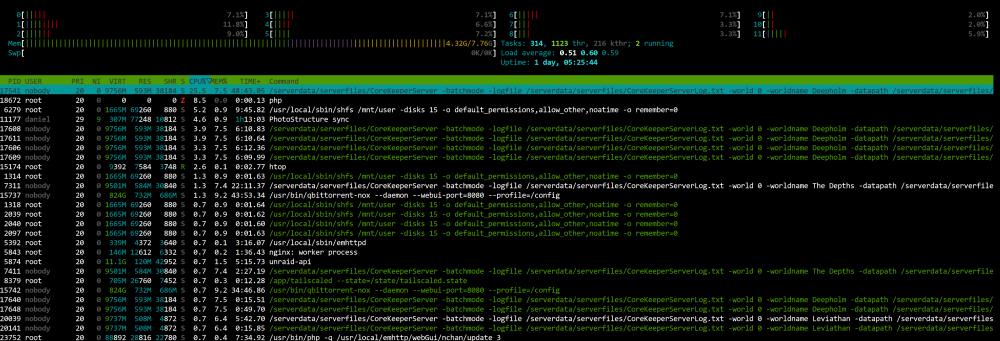
-
The new font that just changed in rc8 is basically totally unreadable on my Mac. Even if I increase the font size drastically. Letters are basically all squished together, so the "oc" in docker just looks like dccker. Please see the attachment. I don't understand what was wrong with the previous font...
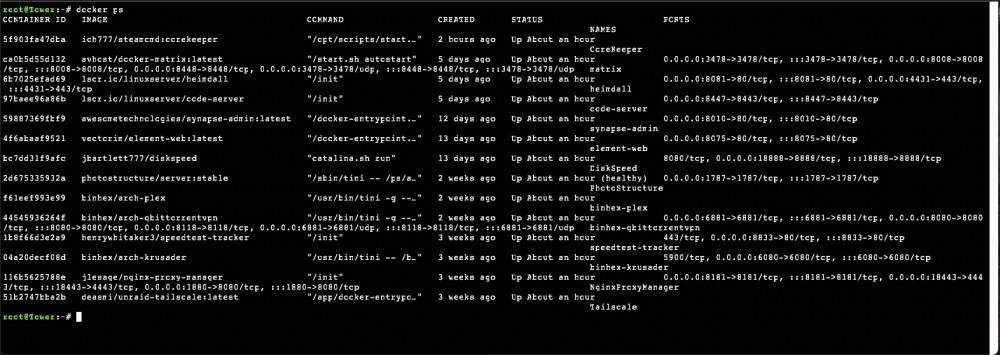
-
That's my line. Done and done. It's amazing how quickly you released this given that they only had this option available like 2 days ago. Thank you so much again. <3
-
I just opened the apps panel today and saw the Core Keeper dedicated server container. Dude I love you so much. I've been struggling for the last 3 days at trying to get one running in a container myself. This is exactly what I need. You are an absolute legend @ich777. Where is your donation link dude?
-
Your Matrix server name is wrong. Check the docker container. I changed it in the homeserver.yaml but forgot to change it in the docker container (it changed back on reboot). Basically you're missing something from the config. Did you use the one I provided in the .zip? Make sure you change the name of your matrix server in the file and also in the container. Then reboot the container. If that doesn't work. Kill the container and start again with the configs I provided.