plantsandbinary
Members
-
Joined
Everything posted by plantsandbinary
-
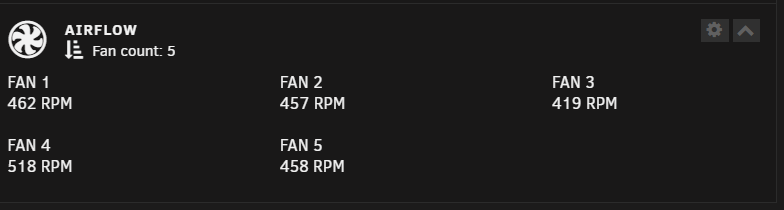
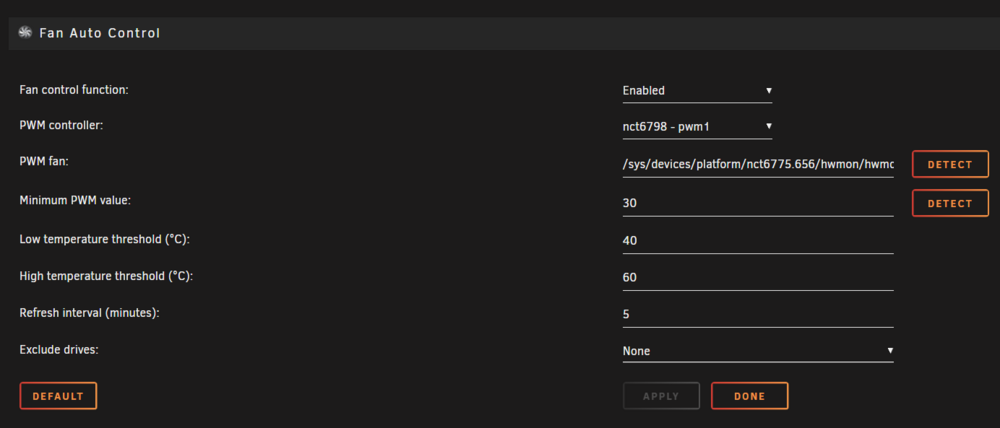
After changing Plex containers from binhex-plex which stopped working after many years for me, to linuxserver-plex I noticed that my server's fans were constantly ramping up and staying at very loud minimum values even when nothing was going on. My fans had always been reported below here: At 880rpm for every single fan. I know now it shows 450rpm average in the image below but NB! this is my NEW setting after following this guide. Previously on the bottom bar all my fans also showed 880rpm (0%) average (again before my new changes following this guide). I was also fine with that. The noise wasn't bothersome. My server is in the livingroom under my TV in the TV stand. I don't know how many decibels noisy it is in the livingroom but my fridge or air purifier generally makes the most noise. That said, the server was never "silent". However, as I said the noise just got too much. Especially as my wife and I started sleeping in the living room on futons and converted our bedroom into a study in preparation for moving overseas. With the noise of the server now becoming a minor annoyance, it was suddenly made a lot worse with the constant fluctuations from Plex, Resilosync and qBittorrent. I finally took matters into my own hands. How to properly use Fan Auto Control Plugin Go to the Unraid Dashboard and scroll down to the bottom and press the "Gear" icon on the top right corner which you can see in the first image in this thread. It'll take you to this page: What do these values mean? Enabled = Is the plugin turned on or off PWM controller = The detected controller which the plugin will use to control the fan voltage PWM Minimum PWM value = The lowest percentage of power that your fan can spin at without totally stalling Low Temperature Threshold (LTT) = The temperature at which your fans start spinning at the minimum PWM value High Temperature Threshold (HTT) = The temperature at which your fans will ramp up to 100% Refresh Interval (minutes) = How often do you want the controller to change the fan speed values based on temperature Exclude drives = Useful if you have one or more drives that are ALWAYS hot which will force the fans to always spin fast Short example: Minimum PWM Value = 20, LTT = 40, HTT = 60 > Fan will spin at 20% max speed/power when temp within 1-2°C of the LTT which is 40°C. Between 40°C and 60°C the fan will increase in speed up to 100% at the HTT. Enable the module and make sure the status on the far right in green is "Running" 1. Now for each of the fans listed that you have, click DETECT (the first DETECT button). It takes about 10 seconds to finish, you should also pay attention to the bottom bar (second image in this thread) and notice that the requsite fan should temporarily spin up to 100% speed. That is, one of the fans (eg. the first one for pwm1) should show eg. 1280rpm (100%) temporarily. 2. Do this for every single fan. Do NOT press the other DETECT button for the "Minimum PWM value". 3. Now all of your fans are properly synced with the plugin. 4. The difficult and in my opinion unreliable way would now be to go through fans pwm1, pwm2 etc. and click the second DETECT button for Minimum PWM Value. However, this is really unreliable and YMMV depending on your fans, motherboard etc. It is better to just pick a value and be happy with it. This is also because the plugin may set your minimum value to something like 65% when your fan can actually go as low as 20%. The lowest value depends on the model and quality of your fan with better fans still being able to consistently spin with low PWM values. Noctua fans for example can generally do as low as 20% of their maximum PWM. 5. I recommend experimenting with 20(%) first. If you get a fan at the bottom bar that shows --- rpm then you have set either the PWM value too low that the fan isn't even starting, or your LOW Temperature Threshhold is too high. To test your fans you should take the current temperature eg. 39°C and 40°C in second image above. Then set the LTT to 1-2°C above this. As you can see. My current temps are 39°C and 40°C so my LTT should be 40°C. Then do this for every single fan. In the meantime set the high temperature threshhold to between 15-20°C above the LTT or at whatever temperature you want the fans to spin at full RPM at. Keep the Refresh Interval at 5 minutes unless you want the fans changing all the time which is distracting. Also I would keep exclude drives to None. Just leave it. ----------------------------------------------------------- What is considered "silent"? In my opinion under 30dBm (if possible). Essentially 400-500rpm should be otherwise inaudible over the sound of the rest of your machine and living environment, at least if you have mechanical HDDs. If you are using entirely silent SSDs and the only moving parts are your fans. Then you still shouldn't really be able to hear the fans from a distance of 1.5 metres (5ft) if they are spinning at around 400rpm. Most fans won't really be able to spin much slower either without risk of not even starting. You can additionally set the LOW Temperature Threshold (LTT) to a higher number which will actually turn the fans OFF. For example. If I set 45°C as my LTT, then the fans won't even start up until my temps get to about 43.5-44°C. Bear in mind that your minimum temps with no fans can be quite high then so it's good to have them spinning even very slowly rather than not at all. Especially if you have mechanical drives as you will hear those anyway.

-
The Hexoblog container is basically unusable at this point. Each time that you start it, it expects a new directory and to initialize an entirely new blog. You have to give it a new appdata/hexoblog/config directory every time you start it. Then you have to copy over its files to the new DIR whilst the container is running and delete the old DIR for your blog. If the container stops for any reason or you need to restart your machine. You have to do this process all over again... The maintainer has also said that they won't update this container anymore. So it's for all intensive purposes out of date and unmaintained. RIP. Last update also seems to be: Nov 22, 2022 The container should be removed from the Unraid apps library.
-
After many years of running Plex without a hassle it finally failed today. I cannot for the life of me get it to start again. It just instantly closes. All I get in the logs are: My Plex docker container keeps crashing and I have no idea why it won't start. It was fine previously for many months. This is all I am getting in the docker container logs. When I try to start it, it just instantly stops again: Stream mapping: Stream #0:0 -> #0:0 (opus (native) -> pcm_s16le (native)) Press [q] to stop, [?] for help 2025-03-24 02:02:43,234 DEBG 'plexmediaserver' stderr output: Output #0, wav, to 'track-0038.wav': Metadata: ISFT : Lavf59.20.101 2025-03-24 02:02:43,234 DEBG 'plexmediaserver' stderr output: Stream #0:0: Audio: pcm_s16le ([1][0][0][0] / 0x0001), 16000 Hz, mono, s16, 256 kb/s Metadata: title : Utawarerumono 26 artist : impd album : impd-2025-12 date : 2025 track : 26 encoder : Lavc59.25.100 pcm_s16le size= 0kB time=00:00:00.01 bitrate= 305.9kbits/s speed=1.25e+04x 2025-03-24 02:02:43,502 DEBG 'plexmediaserver' stderr output: size= 9984kB time=00:05:22.60 bitrate= 253.5kbits/s speed= 645x 2025-03-24 02:02:43,733 DEBG 'plexmediaserver' stderr output: size= 10240kB time=00:05:31.30 bitrate= 253.2kbits/s speed= 663x 2025-03-24 02:02:44,002 DEBG 'plexmediaserver' stderr output: size= 19712kB time=00:10:35.13 bitrate= 254.2kbits/s speed= 635x 2025-03-24 02:02:44,085 DEBG 'plexmediaserver' stderr output: size= 21756kB time=00:11:38.48 bitrate= 255.2kbits/s speed= 645x video:0kB audio:21756kB subtitle:0kB other streams:0kB global headers:0kB muxing overhead: 0.000350% 2025-03-24 02:02:44,233 DEBG 'plexmediaserver' stderr output: size= 21504kB time=00:11:32.86 bitrate= 254.3kbits/s speed= 693x 2025-03-24 02:02:44,508 DEBG 'plexmediaserver' stderr output: size= 27506kB time=00:14:42.34 bitrate= 255.4kbits/s speed= 692x video:0kB audio:27506kB subtitle:0kB other streams:0kB global headers:0kB muxing overhead: 0.000277% 2025-03-24 02:02:44,540 DEBG 'plexmediaserver' stderr output: INFO: Created TensorFlow Lite XNNPACK delegate for CPU. Created by... ___. .__ .__ \_ |__ |__| ____ | |__ ____ ___ ___ | __ \| |/ \| | \_/ __ \\ \/ / | \_\ \ | | \ Y \ ___/ > < |___ /__|___| /___| /\___ >__/\_ \ \/ \/ \/ \/ \/ https://hub.docker.com/u/binhex/ 2025-03-24 22:17:38.657983 [info] Host is running unRAID Created by... ___. .__ .__ \_ |__ |__| ____ | |__ ____ ___ ___ | __ \| |/ \| | \_/ __ \\ \/ / | \_\ \ | | \ Y \ ___/ > < |___ /__|___| /___| /\___ >__/\_ \ \/ \/ \/ \/ \/ https://hub.docker.com/u/binhex/ 2025-03-25 02:13:12.554266 [info] Host is running unRAID 2025-03-25 02:13:12.643498 [info] System information: Linux Tower 6.1.118-Unraid #1 SMP PREEMPT_DYNAMIC Thu Nov 21 15:54:38 PST 2024 x86_64 GNU/Linux 2025-03-25 02:13:12.684607 [info] Image tags: BASE_RELEASE_TAG=2025022801,IMAGE_RELEASE_TAG=1.41.5.9522-1-01 2025-03-25 02:13:12.747451 [info] PUID defined as '99' 2025-03-25 02:13:12.857809 [info] PGID defined as '100' Created by... ___. .__ .__ \_ |__ |__| ____ | |__ ____ ___ ___ | __ \| |/ \| | \_/ __ \\ \/ / | \_\ \ | | \ Y \ ___/ > < |___ /__|___| /___| /\___ >__/\_ \ \/ \/ \/ \/ \/ https://hub.docker.com/u/binhex/ 2025-03-25 13:22:47.873211 [info] Host is running unRAID 2025-03-25 13:22:47.893395 [info] System information: Linux Tower 6.1.118-Unraid #1 SMP PREEMPT_DYNAMIC Thu Nov 21 15:54:38 PST 2024 x86_64 GNU/Linux 2025-03-25 13:22:47.912112 [info] Image tags: BASE_RELEASE_TAG=2025022801,IMAGE_RELEASE_TAG=1.41.5.9522-1-01 2025-03-25 13:22:47.937859 [info] PUID defined as '99' 2025-03-25 13:22:47.978253 [info] PGID defined as '100' Created by... ___. .__ .__ \_ |__ |__| ____ | |__ ____ ___ ___ | __ \| |/ \| | \_/ __ \\ \/ / | \_\ \ | | \ Y \ ___/ > < |___ /__|___| /___| /\___ >__/\_ \ \/ \/ \/ \/ \/ https://hub.docker.com/u/binhex/ 2025-03-25 13:23:14.269469 [info] Host is running unRAID 2025-03-25 13:23:14.289846 [info] System information: Linux Tower 6.1.118-Unraid #1 SMP PREEMPT_DYNAMIC Thu Nov 21 15:54:38 PST 2024 x86_64 GNU/Linux 2025-03-25 13:23:14.310779 [info] Image tags: BASE_RELEASE_TAG=2025022801,IMAGE_RELEASE_TAG=1.41.5.9522-1-01 2025-03-25 13:23:14.331581 [info] PUID defined as '99' 2025-03-25 13:23:14.358079 [info] PGID defined as '100' For this reason I deleted the image and also removed the entire appdata/binhex-plex folder. But now I see another docker container in the apps library "binhex-plexpass" what is the difference between this and "binhex-plex"? Both have the same description. I seriously don't see any difference between these: https://github.com/binhex/arch-plexpass and https://github.com/binhex/arch-plex Nevermind, I got my answer from this: Think it could be a little bit easier to tell the difference in the name/description/README.md that plex-pass is the beta/early access container. Th
-
Ok thanks! That's a clear answer. I'll have to think of something else then. Might end up going down the Intel N100 Route then.
-
For reasons beyond my control I am going to likely have to shut down and shelve my current Unraid server for at least a year or two. The short answer is due to an intercontinental move. Instead of rebuilding from scratch or trying to transport my Unraid server in pieces. (Let's save some money + time + hassle). I am wondering if it is possible to run Unraid on a Raspberry Pi 5B 16GB? or Rock5 B+ 16GB? My main concern is really just can I run Unraid on it with a reasonable amount of performance? Currently I am using this with Unraid: Model: Custom M/B: ASRock X570M Pro4 s/n M80-D9026600142 CPU: AMD Ryzen 5 5600 6-Core @ 3500 MHz HVM: Enabled IOMMU: Disabled Cache: L1 - Cache: 384 KiB, L2 - Cache: 3 MiB, L3 - Cache: 32 MiB Memory: 32 GiB DDR4 Multi-bit ECC (max. installable capacity 128 GiB) Network: bond0: fault-tolerance (active-backup), mtu 1500 Kernel: Linux 6.1.118-Unraid x86_64 OpenSSL: 1.1.1zb Uptime: 41 days, 11 hours, 40 minutes I am not expecting the same performance at all out of either SoC. My main concern would be compatibility with Unraid and being able to run a few minimum services (qbt, searxng, duplicati, hopefully plex etc) and connect either SoC to a 4TB SSD. For example does the Unraid license support being tied to an SDCard yet? Or is this only via USB UUID device again? Can I get around this with eg. a MicroSD/USB adapter? Or can I link the license to a bootable SSD? I realise that Unraid is meant to be run with multiple drives etc. in an array and that's kind of the whole point. However, in this case I would be running it with a single drive, making most of the use out of the Docker library and using Unraid still because well... it is the most familiar thing for me. I suppose I could swap to Ubuntu Server even or some other flavour of Linux or even FreeBSD or whatever. But I would rather just stick to how easy Unraid is to use, especially if I need a new service in Docker on-the-fly. Finally. How is the Linux Kernel support? I assume that the Raspberry Pi's Broadcom BCM2712 4-core CPU will fare more compatible than the Rockchip RK3588 8-core CPU. Is anyone running Unraid on either device? What else should I know? Thanks P.S. It is important to mention that I really am not using my current Unraid setup for much at all. Except mostly samba share hosting of all my files, Plex and running my own search engine. Aside from that, it's completely overkill for my current use-case and free time. So I really just want something that does a similar job and I don't need some crazy hardware requirements.
-
Thanks. Unfortunately their forums are completley dead. I have tried to tell my counterpart to just use SFTP like any sane person instead od this proprietary garbage.
-
Still having this problem. It's been almost 2 months now. Seriously anyone? @binhex Evenmoreso annoying as I just got my upload speed doubled. Here is the connection graph here. It shows that it reaches his max download speed, but then drops for some reason and disconnects entirely. Then it takes some time to return but only briefly and continues this trend.


-
Anyone?
-
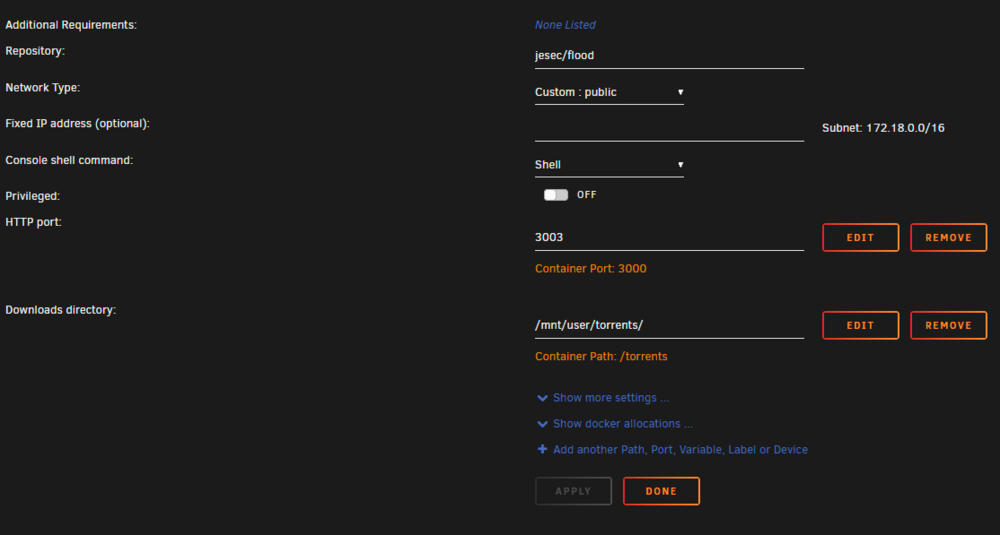
Thanks, I am using "jesec/flood" in the container settings and it seems to work flawlessly.
-
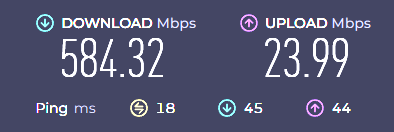
My friend is getting extremly slow speeds trying to download from me. For reference. My speed (1000/500M): (Europe) His Speed (600/25M): (East-Coast USA) He should be able to download from me at 50MB/s or so, because my upload is about 50MB/s and his download speed is above that. However, I should only be able to download from him, at about 2.5MB/s (which does seem to be the case). Instead, we get this: We both can only download or upload from each other at 2.5MB/s. Which makes no sense. Neither of us have a speed cap set in Resilosync. I am using listening PORT 10196 with uPnP port mapping checked He is using listening PORT 18544 with uPnP port mapping checked Both of us are using the latest resilosync version of 3.0.1 (1414) I seem to be able to upload to other people at 50MB/s roughly and I can download from others at over 100MB/s normally. Any ideas what the problem is here? I don't have my port forwarded in my router, should I? I also noticed that the Unraid port mappings are a bit weird: and they don't match the port I am using in the resilosync settings. Is that a problem?


-
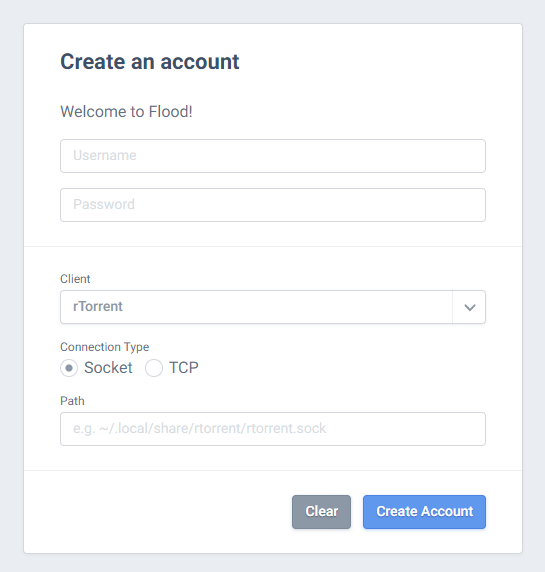
The FloodUI container does NOT support qBittorrent 5 https://github.com/jesec/flood/issues/818 @Figro Could you please update it. It is impossible to start/stop torrents with the existing version you have. I also have a problem that every time I restart the container, I have to set a username and password all over again:
-
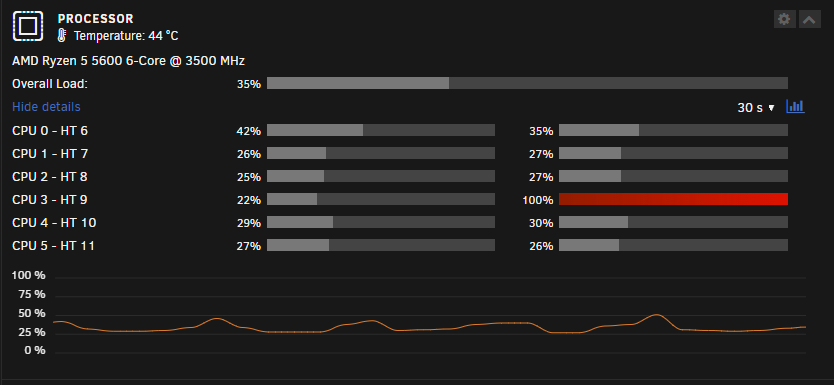
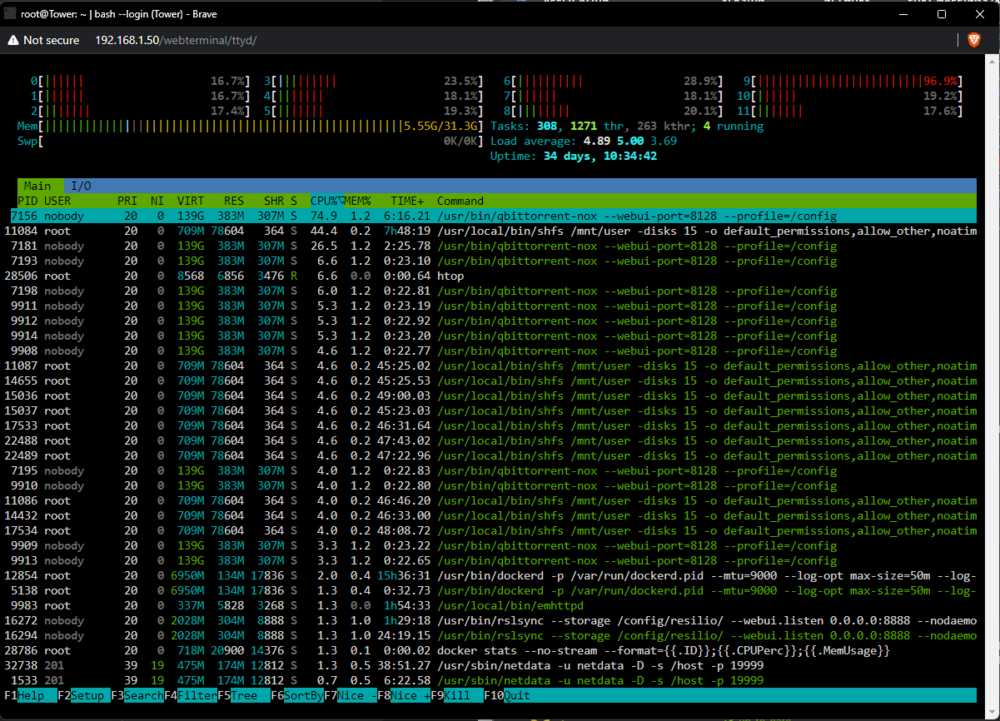
I've never seen this before. qBittorrentVPN-Binhex seems to be aggressively using one of my cores? The rest of the core usage is totally uniform except for CPU3 - HT9 htop shows the same weirdness. I have never seen one core pinned like this at max usage. Any ideas? I don't even know how to begin to debug this. Restarting the container has not done anything either. However, shutting it down does solve the problem.
-
This worked perfectly. I couldn't find this info previously. Thank you SO much. WOW. It finally works!
-
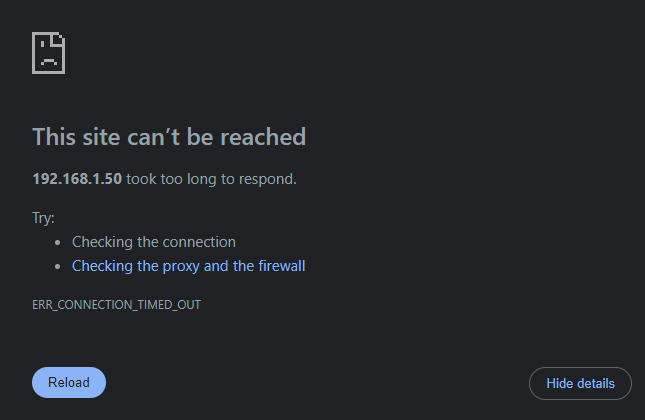
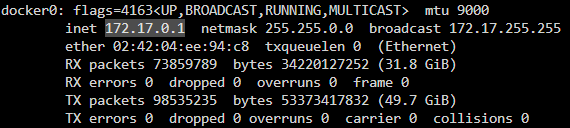
I have the exact same problem and I have followed the FAQ and input my CIDR correctly but it still does not work. There's something like 50+ other complaints over the years, on the forum here, Github and Reddit about the exact same issue due to the aggressive VPN/firewall blocking everything locally. So I have really checked and read through everything before coming here to request help. Container IP and Port Mappings: Custom Docker network for all my publicly accessible apps: I have the WebUI port set to 8128: LAN network variable is correct according to the FAQ: Unraid is running on: 192.168.1.50 and qbittorrentvpn has the same IP address, and should be accessible at: 192.168.1.50:8128 But I get the usual: Using cloudflare I can of course access qbittorrent via the internet, however I have this behind zero trust cloudflare access. So I have to auth into that first and then into qbittorrent. I still need local network access so I can use Radarr/Sonarr/Bazarr and the Flood WebUI. @binhex I am really sorry to ping you mate, but can you explain why this doesn't work still, even after putting in the right values?



-
Wallos is now a subscription tracker and not a finance tracker. The description could be updated.
-
Alright seeing as I have to do everything myself to get this container working properly and without any error spam etc. I've done the following and until the maintainer of this container decides to do this, everyone else will have to do the following to prevent errors and error spam in the logs. 1. In the UNRAID container template settings, do not put anything inside the "installed plugins" box, because the container template does not create the proper permissions to install any plugins. I just deleted the entire section from the template because I don't need to install anything. If you want it to check/install/update plugins you will have to fix the permissions yourself until the maintainer does it. 2. In your settings.yml remove the entire search engine block for both "gentoo" and "frisalibre". This stops the error spam that these engines aren't in <blahblah>.py 3. To get hostname_replace plugin to work again, you now have to use the updated plugin called "hostnames". So change hostname_replace to "hostnames". The relevant plugin block on my instance in my settings.yml looks like this: settings.yml enabled_plugins: - 'Hostnames plugin' # see rewrite-hosts.yml file for the removed/replaced hostnames # # these plugins are enabled if nothing is configured .. # - 'Hash plugin' # - 'Self Information' # - 'Tracker URL remover' # - 'Ahmia blacklist' # activation depends on outgoing.using_tor_proxy # # these plugins are disabled if nothing is configured .. # - 'Open Access DOI rewrite' # - 'Tor check plugin' # # Read the docs before activate: auto-detection of the language could be # # detrimental to users expectations / users can activate the plugin in the # # preferences if they want. # - 'Autodetect search language' # Configuration of the "Hostnames plugin": # # hostnames: # replace: # '(.*\.)?youtube\.com$': 'invidious.example.com' # '(.*\.)?youtu\.be$': 'invidious.example.com' # '(.*\.)?reddit\.com$': 'teddit.example.com' # '(.*\.)?redd\.it$': 'teddit.example.com' # '(www\.)?twitter\.com$': 'nitter.example.com' # remove: # - '(.*\.)?facebook.com$' # low_priority: # - '(.*\.)?google(\..*)?$' # high_priority: # - '(.*\.)?wikipedia.org$' # # Alternatively you can use external files for configuring the "Hostnames plugin": # hostnames: remove: 'rewrite-hosts.yml' I am using a second file inside the same settings.yml directory called "rewrite-hosts.yml" as shown in the docs: https://docs.searxng.org/src/searx.plugins.hostnames.html In this file I have removed the following garbage links which utterly infest search results with trash: rewrite-hosts.yml '(.*\.)?facebook\.com$': false '(.*\.)?instagram\.com$': false '(.*\.)?quora\.com$': false '(.*\.)?twitter\.com$': false '(.*\.)?x\.com$': false '(.*\.)?reddit\.com$': false '(.*\.)?youtube\.com$': false '(.*\.)?google\.com$': false '(.*\.)?apple\.com$': false '(.*\.)?tripadvisor\.com$': false '(.*\.)?tripadvisor\.com.au$': false '(.*\.)?tripadvisor\.in$': false '(.*\.)?deviantart\.com$': false '(.*\.)?shutterstock\.com$': false '(.*\.)?researchgate\.net$': false I'll add more later but this will do for now. 4. You need to create the file limiter.toml with the following contents to avoid the limiter file missing error spam. Put it also in the same location as your settings.yml limiter.toml [real_ip] # Number of values to trust for X-Forwarded-For. x_for = 1 # The prefix defines the number of leading bits in an address that are compared # to determine whether or not an address is part of a (client) network. ipv4_prefix = 32 ipv6_prefix = 48 [botdetection.ip_limit] # To get unlimited access in a local network, by default link-lokal addresses # (networks) are not monitored by the ip_limit filter_link_local = false # activate link_token method in the ip_limit method link_token = false [botdetection.ip_lists] # In the limiter, the ip_lists method has priority over all other methods -> if # an IP is in the pass_ip list, it has unrestricted access and it is also not # checked if e.g. the "user agent" suggests a bot (e.g. curl). block_ip = [ # '93.184.216.34', # IPv4 of example.org # '257.1.1.1', # invalid IP --> will be ignored, logged in ERROR class ] pass_ip = [ # '192.168.0.0/16', # IPv4 private network # 'fe80::/10' # IPv6 linklocal / wins over botdetection.ip_limit.filter_link_local ] # Activate passlist of (hardcoded) IPs from the SearXNG organization, # e.g. `check.searx.space`. pass_searxng_org = true 5. Lastly, disable automatic updates for the container if you are using CA Auto Update Applications plugin. Do not update the container manually either, without first backing up your settings.yml file and possibly your rewrite-hosts.yml if you are using that too. As the maintainer's template again doesn't have the permissions set correctly to update settings.yml and move your previous one to settings.yml.save. Which is shown in the permissions error spam in the container logs after updating the container. I save my settings.yml to another location and when I feel like updating it (once a month, if that). I overwrite the settings.yml with my backup. Not the cleanest solution but now my container logs have no error spam and no errors in general. At least I finally have a private instance of this running which excludes garbage results from Quora, Reddit, Facebook etc. is private, secure and works as intended without throwing errors left and right.
-
Could someone please tell me how they set up cronjobs for Firefly III using this container? I have just started using it and I put in a whole bunch of automations but it's telling me that the cronjob has never run. It would be really nice if when the container was made, some kind of cron could be expressed in the container template. I've checked the documentation but there's 10 different ways to do this so I am not sure which I should pick because obviously I need it to be persistent and survive docker updates. Thanks for any information!
-
Just updated and it's wiped my settings again. It didn't replace my old settings as settings.yml.save either which the documentation says it should have. So there's definitely some issues with this template. When SearxNG is updated it should replace the existing settings.yml with a new settings.yml but also add a copy as settings.yml.new and save the old settings.yml you made to settings.yml.save. The container doesn't seem to do this at all. It just replaces settings.yml with whatever is newer. I'm really lucky that I just backed up my settings.yml manually to a different location right before doing the update. I'm actually going to disable updates for this container because this is pretty annoying. I also have to shut down my instance for almost a full hour for Cloudflare to finally update it so my settings.yml is respected again. It would also be great if this container came with a basic limiter as @Krypto5 mentioned the log spam is a problem.
-
Please I need some support with this. I've never seen this before, but it came up in "Fix Common Problems" out of nowhere. tower-diagnostics-20240717-1148.zip
-
Thanks JorgeB. Is there a guide for this? I haven't had to expand my pool for the last 6 years and will likely not need to in the next 6 anyway as I am still barely even using 50% of my current storage.
-
I am going to necro this a bit for advice. Hopefully someone can help me out. I'm looking at moving away from my current drive setup (and all mechanical drives in particular): 1x WDC_WD40EFRX 4TB 1x WDC_WD40EFRX 4TB 1x WDC_WD40EFRX 4TB 1x TOSHIBA_DT01ACA300 3TB Now that I am using my server for heavy photo and video use I want something with much higher I/O and throughput performance. Stability though and protecting my data via parity is still of the utmost importance. I'm considering 4x 3TB SSDs. As I don't need as much storage at all, just faster storage. I would simply get 4 of the exact same model drive. We now do have Unraid 6.12 so is RaidZ an option? I don't see any news about it anywhere and nothing in the documentation at all. So I can only assume we are still waiting for Unraid to support it? There's a lot of questions about its announcement and so on. I just don't see it anywhere.
-
At extreme CPU usage, all graphs just stop working and disks totally disappear when the server is at extremely high CPU usage for a prolonged period. I am not viewing my dashboard from an external web URL but internal one (192.168.1.50) Started some transcoding jobs after installing a new container and the disks and graphs disappeared as the jobs increased. Stopping them brings everything back. Never seen this happen before. Before After
-
How on earth did you find this? I checked 8 different pages and couldn't see this link anywhere. 3 search engines don't even have this link indexed. EDIT: Seems I still can't change my email though.
-
Guys what the heck it's mid 2024. How come I have to dig and dig and dig to change my forum password? Google is useless. It's all about just how to login if I forgot my server password. Nothing on the forum is in the usual spot. I used to be able to change it NO problem but since you've merged everything into an Unraid.net account. I can't find anything anywhere. The account merge was AGES ago. So what's the deal? Where is it? How do I change my password? https://unraid.net/ https://forums.unraid.net/settings/ https://forums.unraid.net/settings/account-security/ https://forums.unraid.net/profile/77565-plantsandbinary/ https://www.google.com/search?q=unraid+change+password+account https://www.google.com/search?q=unraid+forum+password It's not there. It's not anywhere. I have CTRL+F "password" and looked and looked. All I learned is that I can't even change my email address either it seems. WOW. What kind of legacy garbage backend are you guys still using despite all the new subscription money? What kind of oversight is this? Best server OS in the world but a user can't change their login password conveniently. C'mon pick up the pace... Someone, please a link to the page I can change my password.. It's MID 2024. No I won't accept excuses. Even a bank will let me change my own email without a phone call.
-
Getting this with MySpeed after 2 days of having it installed. It just reloads endlessly and I never see the UI or dashboard. Any ideas? Logs show it's working fine though: Test #107 was executed successfully in 9s. 🏓 1 ⬇ 932.28️ ⬆ 492.6️ Looking for network interfaces... Found interface eth0 with IP 172.18.0.13 Test #108 was executed successfully in 13s. 🏓 0 ⬇ 931.65️ ⬆ 492.58️ Looking for network interfaces... Found interface eth0 with IP 172.18.0.13 Test #109 was executed successfully in 12s. 🏓 0 ⬇ 889.88️ ⬆ 492.56️ Looking for network interfaces... Found interface eth0 with IP 172.18.0.13 Test #110 was executed successfully in 10s. 🏓 0 ⬇ 898.87️ ⬆ 492.39️ Looking for network interfaces... Found interface eth0 with IP 172.18.0.13 Test #111 was executed successfully in 10s. 🏓 0 ⬇ 913.87️ ⬆ 492.49️ Looking for network interfaces... Found interface eth0 with IP 172.18.0.13 Test #112 was executed successfully in 12s. 🏓 0 ⬇ 922.01️ ⬆ 493.25️ I've done nothing to modify the docker container at all.