plantsandbinary
Members
-
Joined
Everything posted by plantsandbinary
-
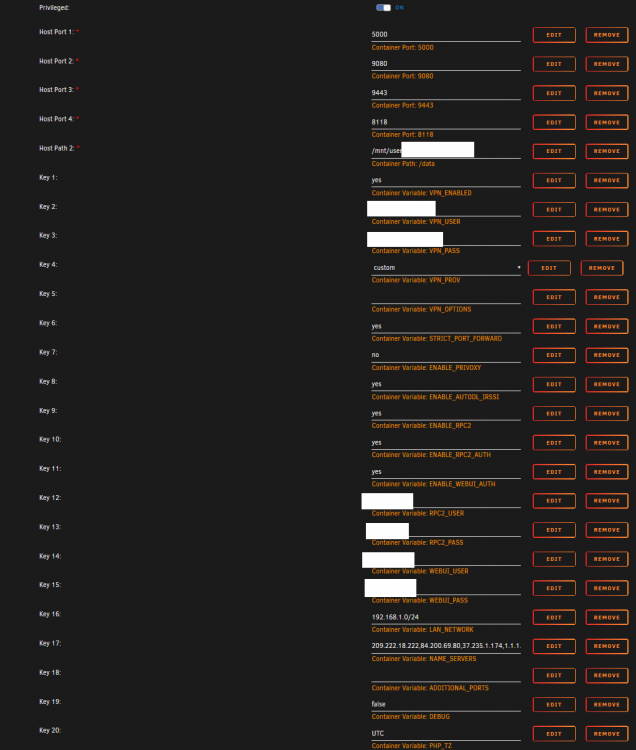
Why am I not seen as connectable? I've port forwarded the relevant port in my VPN provider. They have confirmed that it is open. I set ruTorrent to ex. port: 30514-30514 (only this port as it is the one I opened, and btw this obviously is only an example port here) But for some reason I am not shown as connectable. Do I need to edit something in the container config? My container config looks like this:
-
For some reason my container crashed whilst I was asleep. Wasn't doing anything out of the ordinary, tons of RAM and HDD space left too. I woke up with a 403 error. Log: cryptobin.co/8856i3f9 Password: 6BNny/lSO+lQhS7Obe583ugivfpv44Ylq8KtjCsXrIYlFWfRL3cXOh0rYrU393Em Also does anyone have any information on how to solve this weird thing that started happening out of nowhere about a week ago? Right click brings up the Firefox context menu in front of the menu for rTorrent.
-
Jeez man your containers are usually flawless but Jellyfin itself should be labeled an Alpha. Not only will it refuse to direct play literally anything, where Emby and Plex have noooo problems what-so-ever, it bugs out and crashes all the time. Now for some reason it won't even load and it's just stopped responding at all: 2020-05-20 22:49:03,681 DEBG 'jellyfin' stdout output: [22:49:03] [ERR] [59] Emby.Server.Implementations.HttpServer.HttpListenerHost: Error processing request: Could not find file '/config/data/transcodes/9e3f75effb6aeec1d9afbfb6845d2235.mkv'. URL: http://192.168.1.50:8096/videos/285a6f31-f7b3-381a-fe0e-71f6197d7aaf/stream.mkv?DeviceId=b2fa883e87f2745a&MediaSourceId=285a6f31f7b3381afe0e71f6197d7aaf&VideoCodec=h264&AudioCodec=ac3,aac,mp3&AudioStreamIndex=1&SubtitleStreamIndex=4&VideoBitrate=52267016&AudioBitrate=192000&PlaySessionId=f78afd9821a443efa2904d6e8edb7d11&SubtitleMethod=Encode&CopyTimestamps=true&RequireAvc=false&Tag=746d4f2465ec1d37763b2fa96e364bbf&h264-profile=high,main,baseline,constrainedbaseline&h264-level=51&h264-maxrefframes=4&ac3-audiochannels=6&aac-audiochannels=6&mp3-audiochannels=6&TranscodeReasons=SubtitleCodecNotSupported&allowVideoStreamCopy=false&allowAudioStreamCopy=false,false 2020-05-20 22:49:03,716 DEBG 'jellyfin' stdout output: [22:49:03] [WRN] [39] Emby.Server.Implementations.HttpServer.HttpListenerHost: HTTP Response 204 to 192.168.1.105. Time (slow): 0:00:01.7056576. http://192.168.1.50:8096/Sessions/Playing/Stopped 2020-05-20 22:49:05,694 DEBG 'jellyfin' stdout output: [22:49:05] [INF] [51] MediaBrowser.Api.Playback.Progressive.VideoService: /usr/bin/ffmpeg -i file:"/media/ANIME/Made in Abyss/Wandering Twilight 2019 1080p BluRay/MADE IN ABYSS - Wandering Twilight 2019 1080p BluRay REMUX AVC AAC 2.0 Dual Audio-ZR-.mkv" -map 0:0 -map 0:1 -codec:v:0 h264_v4l2m2m -force_key_frames "expr:gte(t,n_forced*5)" -vf "subtitles='/media/ANIME/Made in Abyss/Wandering Twilight 2019 1080p BluRay/MADE IN ABYSS - Wandering Twilight 2019 1080p BluRay REMUX AVC AAC 2.0 Dual Audio-ZR-.mkv:si=0'" -copyts -avoid_negative_ts disabled -start_at_zero -pix_fmt nv21 -b:v 43045300 -maxrate 43045300 -bufsize 86090600 -level 41 -vsync -1 -map_metadata -1 -map_chapters -1 -threads 0 -codec:a:0 ac3 -ac 2 -ab 192000 -y "/config/data/transcodes/9e3f75effb6aeec1d9afbfb6845d2235.mkv" 2020-05-20 22:49:05,704 DEBG 'jellyfin' stdout output: [22:49:05] [ERR] [51] MediaBrowser.Api.Playback.Progressive.VideoService: FFMpeg exited with code 1 2020-05-20 22:49:05,802 DEBG 'jellyfin' stdout output: [22:49:05] [ERR] [42] Emby.Server.Implementations.HttpServer.HttpListenerHost: Error processing request: Could not find file '/config/data/transcodes/9e3f75effb6aeec1d9afbfb6845d2235.mkv'. URL: http://192.168.1.50:8096/videos/285a6f31-f7b3-381a-fe0e-71f6197d7aaf/stream.mkv?DeviceId=b2fa883e87f2745a&MediaSourceId=285a6f31f7b3381afe0e71f6197d7aaf&VideoCodec=h264&AudioCodec=ac3,aac,mp3&AudioStreamIndex=1&SubtitleStreamIndex=4&VideoBitrate=52267016&AudioBitrate=192000&PlaySessionId=f78afd9821a443efa2904d6e8edb7d11&SubtitleMethod=Encode&CopyTimestamps=true&RequireAvc=false&Tag=746d4f2465ec1d37763b2fa96e364bbf&h264-profile=high,main,baseline,constrainedbaseline&h264-level=51&h264-maxrefframes=4&ac3-audiochannels=6&aac-audiochannels=6&mp3-audiochannels=6&TranscodeReasons=SubtitleCodecNotSupported&allowVideoStreamCopy=false&allowAudioStreamCopy=false,false 2020-05-20 22:49:06,008 DEBG 'jellyfin' stdout output: [22:49:06] [INF] [39] App: Deleting partial stream file(s) /config/data/transcodes/9e3f75effb6aeec1d9afbfb6845d2235.mkv 2020-05-20 22:49:06,008 DEBG 'jellyfin' stdout output: [22:49:06] [INF] [39] App: Deleting partial stream file(s) /config/data/transcodes/9e3f75effb6aeec1d9afbfb6845d2235.mkv 2020-05-20 22:49:06,009 DEBG 'jellyfin' stdout output: [22:49:06] [INF] [39] App: Deleting partial stream file(s) /config/data/transcodes/9e3f75effb6aeec1d9afbfb6845d2235.mkv 2020-05-20 22:49:06,010 DEBG 'jellyfin' stdout output: [22:49:06] [INF] [39] App: Deleting partial stream file(s) /config/data/transcodes/9e3f75effb6aeec1d9afbfb6845d2235.mkv 2020-05-20 22:49:07,513 DEBG 'jellyfin' stdout output: [22:49:07] [INF] [22] Emby.Server.Implementations.Session.SessionManager: Playback stopped reported by app AndroidTV 0.11.3 playing MADE IN ABYSS - Wandering Twilight 2019 1080p BluRay REMUX AVC AAC 2.0 Dual Audio-ZR-. Stopped at 0 ms 2020-05-20 22:49:07,619 DEBG 'jellyfin' stdout output: [22:49:07] [WRN] [22] Emby.Server.Implementations.HttpServer.HttpListenerHost: HTTP Response 204 to 192.168.1.105. Time (slow): 0:00:01.6436943. http://192.168.1.50:8096/Sessions/Playing/Stopped 2020-05-20 22:49:08,470 DEBG 'jellyfin' stdout output: [22:49:08] [ERR] [37] Emby.Server.Implementations.HttpServer.HttpListenerHost: Error processing request: Could not find a part of the path '/usr/lib/jellyfin/jellyfin-web/index.html'. URL: http://192.168.1.50:8096/web/index.html 2020-05-20 22:49:10,945 DEBG 'jellyfin' stdout output: [22:49:10] [ERR] [37] Emby.Server.Implementations.HttpServer.HttpListenerHost: Error processing request: Could not find a part of the path '/usr/lib/jellyfin/jellyfin-web/index.html'. URL: http://192.168.1.50:8096/web/index.html 2020-05-20 22:49:20,693 DEBG 'jellyfin' stdout output: [22:49:20] [ERR] [39] Emby.Server.Implementations.HttpServer.HttpListenerHost: Error processing request: Could not find a part of the path '/usr/lib/jellyfin/jellyfin-web/index.html'. URL: http://192.168.1.50:8096/web/index.html 2020-05-20 22:49:27,700 WARN received SIGTERM indicating exit request 2020-05-20 22:49:27,701 DEBG killing jellyfin (pid 49) with signal SIGTERM 2020-05-20 22:49:27,701 INFO waiting for jellyfin to die 2020-05-20 22:49:28,702 DEBG fd 8 closed, stopped monitoring <POutputDispatcher at 139741125176528 for <Subprocess at 139741125176576 with name jellyfin in state STOPPING> (stdout)> 2020-05-20 22:49:28,702 DEBG fd 10 closed, stopped monitoring <POutputDispatcher at 139741125177008 for <Subprocess at 139741125176576 with name jellyfin in state STOPPING> (stderr)> 2020-05-20 22:49:28,703 INFO stopped: jellyfin (terminated by SIGTERM) 2020-05-20 22:49:28,703 DEBG received SIGCHLD indicating a child quit Created by... ___. .__ .__ \_ |__ |__| ____ | |__ ____ ___ ___ | __ \| |/ \| | \_/ __ \\ \/ / | \_\ \ | | \ Y \ ___/ > < |___ /__|___| /___| /\___ >__/\_ \ \/ \/ \/ \/ \/ https://hub.docker.com/u/binhex/ 2020-05-20 22:49:34.683510 [info] System information Linux 08506501db65 4.19.107-Unraid #1 SMP Thu Mar 5 13:55:57 PST 2020 x86_64 GNU/Linux 2020-05-20 22:49:34.990609 [info] PUID defined as '99' 2020-05-20 22:49:35.312280 [info] PGID defined as '100' 2020-05-20 22:49:44.387501 [info] UMASK defined as '000' 2020-05-20 22:49:44.449177 [info] Permissions already set for volume mappings 2020-05-20 22:49:45.571889 [info] Deleting files in /tmp (non recursive)... 2020-05-20 22:49:45.699992 [info] Starting Supervisor... 2020-05-20 22:49:46,400 INFO Included extra file "/etc/supervisor/conf.d/jellyfin.conf" during parsing 2020-05-20 22:49:46,401 INFO Set uid to user 0 succeeded 2020-05-20 22:49:46,407 INFO supervisord started with pid 7 2020-05-20 22:49:47,410 INFO spawned: 'jellyfin' with pid 50 2020-05-20 22:49:47,410 INFO reaped unknown pid 8 2020-05-20 22:49:47,449 DEBG 'jellyfin' stderr output: It was not possible to find any installed .NET Core SDKs Did you mean to run .NET Core SDK commands? Install a .NET Core SDK from: https://aka.ms/dotnet-download 2020-05-20 22:49:47,450 DEBG fd 8 closed, stopped monitoring <POutputDispatcher at 140659088215248 for <Subprocess at 140659088215296 with name jellyfin in state STARTING> (stdout)> 2020-05-20 22:49:47,450 DEBG fd 10 closed, stopped monitoring <POutputDispatcher at 140659088215728 for <Subprocess at 140659088215296 with name jellyfin in state STARTING> (stderr)> 2020-05-20 22:49:47,450 INFO exited: jellyfin (exit status 145; not expected) 2020-05-20 22:49:47,451 DEBG received SIGCHLD indicating a child quit 2020-05-20 22:49:48,455 INFO spawned: 'jellyfin' with pid 53 2020-05-20 22:49:48,483 DEBG 'jellyfin' stderr output: It was not possible to find any installed .NET Core SDKs Did you mean to run .NET Core SDK commands? Install a .NET Core SDK from: https://aka.ms/dotnet-download 2020-05-20 22:49:48,484 DEBG fd 8 closed, stopped monitoring <POutputDispatcher at 140659089117920 for <Subprocess at 140659088215296 with name jellyfin in state STARTING> (stdout)> 2020-05-20 22:49:48,484 DEBG fd 10 closed, stopped monitoring <POutputDispatcher at 140659087414512 for <Subprocess at 140659088215296 with name jellyfin in state STARTING> (stderr)> 2020-05-20 22:49:48,484 INFO exited: jellyfin (exit status 145; not expected) 2020-05-20 22:49:48,485 DEBG received SIGCHLD indicating a child quit 2020-05-20 22:49:50,489 INFO spawned: 'jellyfin' with pid 56 2020-05-20 22:49:50,516 DEBG 'jellyfin' stderr output: It was not possible to find any installed .NET Core SDKs Did you mean to run .NET Core SDK commands? Install a .NET Core SDK from: https://aka.ms/dotnet-download 2020-05-20 22:49:50,517 DEBG fd 8 closed, stopped monitoring <POutputDispatcher at 140659087925104 for <Subprocess at 140659088215296 with name jellyfin in state STARTING> (stdout)> 2020-05-20 22:49:50,517 DEBG fd 10 closed, stopped monitoring <POutputDispatcher at 140659088215728 for <Subprocess at 140659088215296 with name jellyfin in state STARTING> (stderr)> 2020-05-20 22:49:50,518 INFO exited: jellyfin (exit status 145; not expected) 2020-05-20 22:49:50,518 DEBG received SIGCHLD indicating a child quit 2020-05-20 22:49:53,524 INFO spawned: 'jellyfin' with pid 59 2020-05-20 22:49:53,548 DEBG 'jellyfin' stderr output: It was not possible to find any installed .NET Core SDKs Did you mean to run .NET Core SDK commands? Install a .NET Core SDK from: https://aka.ms/dotnet-download 2020-05-20 22:49:53,548 DEBG fd 8 closed, stopped monitoring <POutputDispatcher at 140659089117920 for <Subprocess at 140659088215296 with name jellyfin in state STARTING> (stdout)> 2020-05-20 22:49:53,549 DEBG fd 10 closed, stopped monitoring <POutputDispatcher at 140659087414416 for <Subprocess at 140659088215296 with name jellyfin in state STARTING> (stderr)> 2020-05-20 22:49:53,549 INFO exited: jellyfin (exit status 145; not expected) 2020-05-20 22:49:53,549 DEBG received SIGCHLD indicating a child quit 2020-05-20 22:49:54,551 INFO gave up: jellyfin entered FATAL state, too many start retries too quickly I see all kinds of errors. No .net core? Subtitle stylizing issues despite the fact that Emby has no problem with them at all. Then what's this about: Could not find a part of the path '/usr/lib/jellyfin/jellyfin-web/index.html' How on earth did that happen...
-
Has anyone got this working with the thin client? aka the version you download to windows/unbuntu etc. and then connect to on your unraid server? I've tried everything but it shows the server offline all the time... To the guys above me having problems with PIA. Use a different VPN provider or at the very least redownload your .conf files, place them in the opvn folder and use custom with your username and pass in the container config page. It works that way also. EDIT: You know what, forget this. I give up. This thing won't cross seed and now after rebooting it's errored about 200+ of my torrents and deleted and is now redownloading them. This is is ruining business. I'm going back to ruTorrent.
-
@binhex Setting -1 for upload slots in Global Network Bandwidth seems to kill the daemon instantly (without saving the setting) and completely corrupt the list of torrents I have added. I went from having over 500 torrents added to less than 3. Files are still on my drive but they are no longer in Deluge. Restarted the docker container twice too, doesn't make any difference. I did this a second time after adding 100 torrents. Exact same thing. Interestingly setting -1 works if there are no torrents active in Deluge. -1 seemed to have been a valid setting before without throwing this error... no idea why it is for some settings but not this one. Is this a bug? EDIT: Seem to also be having a problem. No matter what I specify as the download location, it won't make the folder. Eg. if my "/data/" location is mapped to something like /tank/Downloads/Torrents where I have a subfolder for each tracker. It seems Deluge will just dump everything there, even if I specify /data/Tracker1 for example as the download location when adding a torrent. I thought it was a permissions issue but when adding the torrent, having it start in "/tank/Downloads/Torrents" instead of e.g. "/tank/Downloads/Torrents/Tracker1" because the former is "/data/" I can still right click, "Move Download" to /tank/Downloads/Torrents/Tracker1 and it will work... It just won't start from there, and more annoyingly it won't cross-seed properly. I need to start the torrent in "/data/" add it in a paused state (which doesn't seem to work either) and then stop it immediately, change the download location via right click and move the already downloaded files back and then manually force recheck. Is there any way to get this working normally?
-
How am I supposed to copy and paste links into jDownloader if the clipboard is always empty when I do it? Because the webGUI is running in some environment that won't accept the clipboard data that I have from another browser tab? Nvm, just saw the Clipboard button at the top of the container WebGUI page. Nice!
-
You aren't the only one. It's not much to go on though.
-
I shut down one docker before trying the other. I'm not trying to run them both at the same time for obvious reasons. I've even tried installing both with the other one not even present on the system. Secondly, I added absolutely nothing into that box at all. I didn't change any settings at all because there didn't seem to be any reason to and the ports it's asking to use are not being used by any other application or service. So I didn't add "type" and I'm quite sure the person above me didn't either. It's a problem with the container itself, probably a typo or something during the last update.
-
Thanks it actually worked. Although the next day I went back to qBittorrent because I can't handle how slow Deluge is and that I can't shift-select multiple torrent files.
-
I just installed this container and when I open it, all I get is: "403 Forbidden" Nothing else. Doesn't matter what I do.
-
Why am I getting this error? root@localhost:# /usr/local/emhttp/plugins/dynamix.docker.manager/scripts/docker run -d --name='binhex-tvheadend' --net='bridge' -e TZ="Europe/Kiev" -e HOST_OS="Unraid" -e 'UMASK'='000' -e 'PUID'='99' -e 'PGID'='100' -p '9981:9981/tcp' -p '9982:9982/tcp' -v '/mnt/user/tank/tvheadend':'/data':'rw' -v '/mnt/user/appdata/binhex-tvheadend':'/config':'rw' --device=/dev/tuner type 'binhex/arch-tvheadend' Unable to find image 'type:latest' locally /usr/bin/docker: Error response from daemon: pull access denied for type, repository does not exist or may require 'docker login'. See '/usr/bin/docker run --help'. The command failed.
-
A re-install managed to fix the weird problems I was having with the speeds. I got fed up with Deluge lacking so many basic features. This now works perfectly. Though I will leave a link to the post on GIthub that motivated me to try again, although I cannot say to others if this method will fix the problem for them, that I had. https://github.com/qbittorrent/qBittorrent/issues/7954#issuecomment-473487206
-
How do you restart deluge from within the container? The settings should be in the binhex-delugevpn/web.conf here: { "file": 1, "format": 1 }{ "port": 8112, "enabled_plugins": [], Except that mine is empty. I want the blocklist and label plugin to be enabled.
-
Thanks for letting me know!
-
@clowrym Hey there's way more providers supported by this container in Github than what is available when installing in Unraid: https://github.com/haugene/docker-transmission-openvpn For example. MULLVAD is supported but it's not possible to select it in the TransmissionVPN setup window. It's not in the list. Why is this?
-
Some questions about Deluge. 1. Can I not add more than 1 torrent at a time via the "Add+" button? It seems it only allows me to select a single .torrent to add. I can't hold control/shift and select more than one file at a time. This is highly unintuitive. 2. Turning on a plugin (e.g. blocklist) works fine, but as soon as the container is restarted the plugin is disabled and needs to be re-enabled again. 3. Is it not possible to select "labels" for torrents? It seems the only way you can sort them is by tracker, but the default view shows all of them. In my case a list of over 500 torrents with no way to sort them by label. I have some torrents from specific trackers that I wanted to separate into more than 1 group but it doesn't seem possible. I remember Deluge being way more intuitive than this. With ruTorrent being so slow at deleting files and the performance being pretty low and resource usage very high. qBittorrent having horrible speed issues but otherwise being flawless, and Deluge not having labels, muti-add of .torrents and that I need to re-enable plugins, it looks like Transmission is probably my last resort but you don't have a TransmissionVPN docker container.
-
Alright, well I might just go with Deluge. Your container for that works fine afaik. I just need to merge everything over to it. Either way I'm not putting up with getting only 3MB/s average out of 20MB/s. Thanks for the replies as always Binhex.
-
I was looking around and on the Github page people spent months trying to get to the bottom of it. In the end, people came to the conclusion that it's actually libtorrent that causes the fluctuations: https://github.com/qbittorrent/qBittorrent/issues/7954 Are you saying you don't have the problem any more? I really would like to use qBittorrent because it's still updated regularly. Deluge and Transmission haven't been touched for a long time. qBittorrent is so easy to set up and use but I might have to go to Deluge though... because I cannot get a stable speed at all...
-
Moved from your r/ruTorrent container to this one because r/ruTorrent is really laggy when handling a lot of torrents, especially deleting them (can take like 30 minutes to delete 200 torrents off the HDD via the ruTorrent WebUI) and also I don't need irssi support any more. So using this is amazing. It's almost flawless. Setup was so ridiculously easy. I'd suggest that the container creates the ovpn folder though even if the setting is set to VPN_ENABLED = no. Because when I went to add my .ovpn config file I couldn't find the folder until I switched it on and made the docker fail to load because the .ovpn config file could not be found (folder didn't exist until I did that so I had no idea where to put it). I'd just have the 'ovpn' folder created when the docker is created, regardless of whether or not the user wants to use the VPN function. My problem however is very fluctuating download speeds, which I did not get using r/ruTorrent. My speeds with r/ruTorrent were very, very stable at about 18 out of 20MB/s download whilst on VPN. With qBittorrent it seems like the speed wants to get there but then it always gets cut in half. Sometimes hanging down as low as only 3MB/s. When swapping back to r/ruTorrent (still got it installed). It goes straight back up to 19MB/s. No fluctuating. Here's a quick and short video showing exactly what's happening: Any idea what could be wrong with with qBittorrent? I'm downloading 55 torrents at once (only 12.3GB combined size) and my average CPU load is less than 10%. Got 16GB of RAM and a 256GB SSD for cache. Please let me know if you need/want any more information.
-
@tazman This container is no longer updated. Try this one:
-
Awesome post! Can't wait to swap from Controlr which is buggy as heck, to this! Would just like to know if 6.7.0-rc3 is supported.
-
Updating to the last version of 'Ghost' has caused all of the images across all of the posts on my blog to break...
-
After the last update I keep getting 'Port status unknown' from ruTorrent UI. Here's a log: [EDIT. I saw someone else asked about it, NVM.]
-
Ok thanks for clearing that up. Sorry for the confusion. So I could install FileZilla server on my Windows PC. Elect to share a file, make a user and then use this Docker client to connect to the server running on my PC? So I cannot connect client to client? That is, I cannot download the client on my Windows PC and connect it to the client running on this docker via WebUI? If that's the case, I don't have any use for this docker but I'd like to know for sure. All I really want to do is connect to my Unraid server back in Germany via SFTP to transfer some files from the storage partition "/tank". P.S. Do I need to have FTP turned on and enabled via the Unraid main settings?
-
Trying to get the SFTP docker working but I'm having some trouble. I've read the github page but it isn't exactly clear. So far I have created the users.conf file and added a single user as mentioned on the github page. The container now starts, but I am unsure whether or not I am supposed to run it in 'host' or 'bridge' or something else. It's just running on port 22. As follows: I haven't set a directory yet to share, but I want to share the main storage directory. In this case it's "/tank" The problem is, that I cannot even log in yet with Filezilla on my Windows PC. The connection just keeps timing out. I don't understand why. Can I get some help?