plantsandbinary
Members
-
Joined
Everything posted by plantsandbinary
-
Can I get some help guys? I want to connect to this Filezilla docker container from my Filezilla client application on Windows so I can transfer files between my laptop in the US and my HP server running this docker on Unraid in Germany. Is this even possible or is the docker for something else entirely? I've installed the container and made a PGP key on my laptop. What's the next step? Also should I be instead trying to connect directly to Unraid's FTP (usually over port 22) or something instead of the Filezilla docker? I'd really appreciate any help.
-
I've always wanted to know. Why the heck is rTorrent so slow at deleting files when I click 'delete data' from the ruTorrent GUI? Seriously Deluge and Transmission just deleted them immediately. rTorrent can take 15-20 MINS! just to delete 1TB. Whilst doing that it also times out again and again and won't respond to any other actions or show me any information about my downloads. Why is it so slow to delete files compared to any other client?
-
@binhex you literally replied about the problem. It's from the last page of this thread (page 50) Everyone had this issue with a previous update. I just left that repo active to solve the problem the update had. Well this issue was what happened after reverting to use an older repo/version than the one that was bugged. Anyway updating to the latest version fixed the issue entirely. Though I seem to be getting a lot of these errors in the log now with the latest version: 2018/11/30 02:24:46 [error] 1984#1984: *15 FastCGI sent in stderr: "PHP message: PHP Warning: count(): Parameter must be an array or an object that implements Countable in /usr/share/webapps/rutorrent/plugins/trafic/stat.php on line 163 PHP message: PHP Warning: count(): Parameter must be an array or an object that implements Countable in /usr/share/webapps/rutorrent/plugins/trafic/stat.php on line 163 PHP message: PHP Warning: count(): Parameter must be an array or an object that implements Countable in /usr/share/webapps/rutorrent/plugins/trafic/stat.php on line 166 PHP message: PHP Warning: count(): Parameter must be an array or an object that implements Countable in /usr/share/webapps/rutorrent/plugins/trafic/stat.php on line 166 PHP message: PHP Warning: count(): Parameter must be an array or an object that implements Countable in /usr/share/webapps/rutorrent/plugins/trafic/stat.php on line 163 PHP message: PHP Warning: count(): Parameter must be an array or an object that implements Countable in /usr/share/webapps/rutorrent/plugins/trafic/stat.php on line 163 PHP message: PHP Warning: count(): Parameter must be an array or an object that implements Countable in /usr/share/webapps/rutorrent/plugins/trafic/stat.php on line 166 PHP message: PHP Warning: count(): Parameter must be an array or an object that implements Countable in /usr/share/webapps/rutorrent/plugins/trafic/stat.php on line 166 PHP message: PHP Warning: count(): Parameter must be an array or an object that implements Countable in /usr/share/webapps/rutorrent/plugins/trafic/stat.php on line 163 PHP message: PHP Warning: count(): Parameter must be an array or an object that implements Countable in /usr/share/webapps/rutorrent/plugins/trafic/stat.php on line 163 PHP message: PHP Warning: count(): Parameter must be an array or an object that implements Countable in /usr/share/webapps/rutorrent/plugins/trafic/stat.php on line 166 PHP message: PHP Warning: count(): Parameter must be an array or an object that implements Countable in /usr 2018/11/30 02:24:46 [error] 1984#1984: *15 upstream sent too big header while reading response header from upstream, client: 192.168.1.108, server: localhost, request: "POST /plugins/trafic/action.php HTTP/1.1", upstream: "fastcgi://127.0.0.1:7777", host: "192.168.1.50:9443", referrer: "https://192.168.1.50:9443/"
-
Hi. I went back to repository: binhex/arch-rtorrentvpn:0.9.7-1-11 Because the last version had a problem with the webserver not loading. Today I just noticed a very serious error with this version though. My machine is at 100% CPU AND RAM usage because of this docker container. The ruTorrent WebUI is completely unresponsive. CPU and RAM usage when rTorrent-VPN is running: htop showing that rTorrent-VPN is the culprit: Here's a shot of the docker window which doesn't show high CPU usage but it shows high RAM usage: Here's my CPU and RAM after stopping the rTorrent-VPN container: My question is what am I supposed to do now? This version has been messing up doing this for a couple of days now, and the latest version has a webserver problem. What's the default repo so I can at least try the latest version, is it: binhex/arch-rtorrentvpn:latest ?
-
Anyone know if its possible to get this working with subdomains like eg. rutorrent.myddns.noip.com? Seems I can only set myddns.noip.com and that´s it. All of my stuff is hosted on separate subdomains.
-
Why would you want to do this? There's a specific way to configure a container if you want to run it like there would be two instances of it. However it's better to run just one with a custom config. What's your use case?
-
Ugh mine is broken too... I knew I shouldn't have updated without reading this thread first... I'll never do that again... @JohanSF Repository: binhex/arch-rtorrentvpn:0.9.7-1-11 Thank you, this fixed it for me. At least it's working again. I'll update in a week or so when I know the newest version works.
-
You shouldn't really need to use servers that are seriously so far away from you, unless you want to lose so much speed in exchange for a bit of extra privacy. I'm using Mullvad too now, and that was what I was using when I made my previous post. No matter what I did I couldn't get a connectable status. Even when other clients using the same settings could. So I removed the container.
-
Your question was literally answered in the page before me and actually even as an unintentional response to another question I had. NordVPN does not allow Port Fowarding. You will never get an open 'connectable' connection. I suggest Mullvad, they are who I have moved to.
-
Hi mate. Do you mean somewhere here? Or do you mean somewhere in the container settings? Thanks for the reply btw! EDIT: Okay Binhex said it might not do anything, I guess I could just disable the CPU plugin then if I wish or wait until something is done about it. Either way I only wanted to know if it's something to worry about. I thought maybe I needed to give the container more RAM or CPU or something, but I didn't think that was even possible as I thought Docker containers run straight through the main machine's resources rather than like a VM, taking a portion of system resources. Anyway if it's nothing to worry about, then I'll ignore it.
-
So I swapped VPN providers because NordVPN doesn't allow port forwarding and I want to actually seed better than I have been. No matter what I did, I couldn't get this qBittorrent client to be 'connectable' to other peers on the new VPN provider I picked (Mullvad). I tried everything I could think of. Changed ports. Even changed VPNs. Port forwarded my router. et cetera. I even turned off the VPN part of the container and just ran it without it, no matter what I did it was still impossible to end up being seen as 'connectable'. The rTorrentVPN container worked fine for me and I tried to mirror the same settings with this one but I couldn't do it. Maybe it's something to do with the iptables, or maybe it's just me. I have no idea. So I had to uninstall the container. I didn't like using the rTorrent container generally but it seems the closest thing to this that allows me to be connectable. Thanks for your hard work Markus! It's a shame because I love how aggressive qBittorrent is at connecting to peers. You can get from 0-80MB/s in about 1 second after starting a torrent. rTorrent is much slower by comparison and much less aggressive at connecting to clients. Still, I'll end up using irssi-autodl so I guess rTorrent is the natural choice. Thanks again!
-
The little CPU plugin in ruTorrent is showing really high CPU usage (80-100%) when I get to about 20MB/s but my connection can do a lot faster download than this. Any idea why this happens? My unraid control panel is showing my CPU usage at only about 10-15%. So it's not even close to 100% like ruTorrent UI is saying it is.
-
Hey Binhex, any idea how to reverse proxy this with Letsencrypt? I've made this proxy .conf file myself and it used to work but a couple of container updates ago it stopped working. I guess something to do with the websocket part of the container. # make sure that your dns has a cname set for krusader # serves krusader container at krusader.yourdomain # to enable password access, uncomment the two auth_basic lines server { listen 443 ssl; server_name krusader.*; include /config/nginx/ssl.conf; client_max_body_size 0; location / { proxy_pass http://192.168.1.50:6080/vnc.html; auth_basic "Restricted"; auth_basic_user_file /config/nginx/.htpasswd; } location /websockify { proxy_pass http://192.168.1.50:6080/vnc.html; proxy_http_version 1.1; proxy_set_header Upgrade $http_upgrade; proxy_set_header Connection "upgrade"; # VNC connection timeout proxy_read_timeout 86400; # Disable cache proxy_buffering off; } } This .conf serves a broken page with broken images and 'noVNC encountered an error'. It used to work perfectly
-
That's great to know. I wish it was a little more obvious. Edit: Nvm got it sorted.
-
See the picture. Whilst the update process is running, it's blank, but as soon as it finishes the text appears. I've tried using multiple browsers, Chrome, Firefox and Edge. All with plugins/extensions disabled, tried incognito window etc. I don't know why this happens. It started on 6.5.3 and now it still happens on 6.6.3. I'm reporting this now as I just did a fresh install and it's still occurring.
-
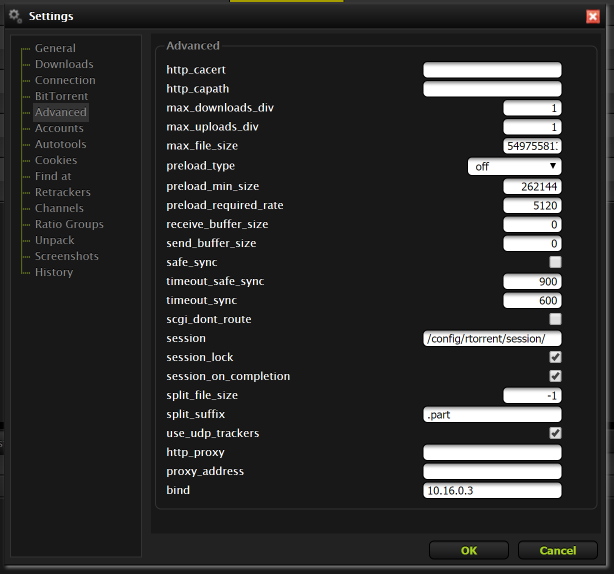
I'm not sure either. NordVPN is a bit confusing when it comes to torrenting. They have P2P optimised servers which I use, but they don't allow port forwarding. At least before I changed any settings what-so-ever in the RuTorrent WebUI or in the rtorrent.rc file. The line was commented out in the .rc file, but I uncommented it out after some trackers complained that I was using port 6881 which is blacklisted on almost all trackers. RuTorrent WebGUI said it was using ports 6881-6999 and for DHT it was 6889 or something, I can't really remember. At least 6881 was the port trackers were reporting that I was using on the client info page on-site. For those sites I just used qBittorrent for the time being. Anyway I uncommented out line 77 like I said and changed it to 49160-49160 (it still apparently has to be a sequence, because if I write just '49160' the container won't start). Now tracker sites are reporting that's the port I am indeed using. When I tried changing the WebUI's 6881-6999 setting before (whilst leaving line 77 commented in, in it's default state), it did nothing, and always changed back upon a restart of the container. I don't know any more than that and I'm not accusing anyone of anything. rTorrent has always been a bit confusing for me haha. Either way sites aren't complaining now and I don't care if I am not connectable, sure it's a bummer but if it was so important I'd just disable the VPN because my ISP doesn't block any ports except TCP 25 and UDP 53 for security purposes only, literally every other port is free to use. Still I'd rather not have them see what I am downloading Maybe one day all these trackers will swap to HTTPS. Seeding now at a steady 19MB/s, so I'm not complaining. Thanks for your work anyway. It's fantastic to have a container that I just can throw my .ovpn file in and it basically works without a hitch. Now I just need to wait until this subscription is over next year and I'll look for another VPN. Shame because I really, really like Nord.
-
Yes I know this, but regardless I'm still able to seed at line speed, trackers just don't see me as 'connectable' and nothing can be done about that.
-
Thanks for the reply. 6881-6999 is what it shows in the RuTorrent WebUI. It's also what is written by default inside the appdata rtorrent.rc file. I wasn't sure whether or not it mattered. When checking stats from many of my trackers they report rTorrent using port 6881. Unless I edit the rtorrent.rc file and change the port to something else. So are you absolutely sure that it is running on 49160? In my case my VPN sadly doesn't allow port forwarding so I don't have the option to open ports or use the ones they provide as they don't provide any. I'll change providers next year but for now this is what torrent sites report my port being listed as (6881).
-
Thanks a lot bud! It was the old repo. I just changed it.
-
Hi mate, thanks for the reply. How can I check and/or change my repo? If I remove the whole container and download it again is it going to have the right repo? Thanks a lot.
-
There are multiple problems with this docker container. 1. The container just stops at completely random intervals. There's absolutely nothing written in the log at all about why this happens. 2. There doesn't seem to be any proper updates being made. That is, there are still updates for all of the pi-hole components after updating the container itself. So the container is not pulling the updated FTL, web interface and pihole version from source. This container needs a lot of work. I wish I could help but I don't know the first thing about building or maintaining one. Perhaps OP could put this on Github and allow others to make pull requests and push changes.
-
I'm having an issue with the rTorrent container. I can't change the port from 6881-6999, and the DHT port from 6881. Pretty much every private tracker and ISP on earth blocks port 6881 and other common torrenting ports. How do I change this port? It's set to 8118 in the container settings but trying to change it from within the WebUI doesn't work. Changing it and stopping torrents does nothing. Sites still report it trying to use 6881. Changing it and restarting the container just sets it back to 6881-6999. @binhex You should consider changing the default port to something else far more obscure. Most ISPs are okay with ports above 60000 and not many ISPs block those.

-
I'm getting sustained download speeds of about 89MB/s and Upload speeds of about 31MB/s. This is on a 1000/350 connection and during VPN usage. If your implementation is slow then either your machine is just slow or your connection is slow. This container performs better than Binhex's RTorrent container, which by comparison is way less aggressive in connecting to peers for quick seeding and the rTorrent container tends to lock up if I tell it to delete more than 5 files at a time, even though my entire array is built from 4TB SSD drives running on 2 Xenon processors. Speeds are whilst connected to NordVPN.
-
Thanks for the eventual reply. Still get a 401 error when trying to open the UI via the Unraid docker panel so it's not fixed still. There's a method to fix it in one of my previous posts. Typing it in manually works fine though. Good to have you back and I hope you enjoyed your summer!
-
Ok so today for seemingly no reason what-so-ever the WebUI is telling me that my password is wrong. Checked the encrypted md5 hash and cracked it and sure enough my password is correct and is the same I've been using forever. Restarting the container didn't work. Forcing an update didn't work... So I guess that's it for me then. I'll use ruTorrent from now on. I really like qBittorrent but we don't seem to get any updates anyway. I'm not messing around with stuff like this that just randomly decides to stop working. EDIT: Fucking Bitdefender blocking the login because it sends the password unencrypted... Added the url to exceptions and it works fine. Also as others have said Mark doesn't seem to come here any more. I've messaged him twice about a month ago and am yet to get a reply.