






orlando500
Members
-
Joined
Everything posted by orlando500
-
i did, and it will not.. only to the sides.
-
yes i can reenable autoadd, but the box for select the file area that are monitored is very little and cant show the file structure for some reason. And therefore i cant save the setting.. .
-
Hi, after the last update it seems my watch folder stopped working in deluge. Been working ok for months. Have not changed a byte before upgrade of the docker. Any ideas where to look for a solution?
-
from crusader docker to move files from one unraid to the new unraid server
-
Hi, i have mounted a nfs share on a remote unraid server. And thats fine. But when viewing the remote share on the unraid that have unassigned devices running i cant see the files on the remote share. I guess its something very simple im missing, but im totaly blank here. Any tips/ideas?
-
Not sure, but i guess i have been adding more space to the docker.img for a while now. done it like 3-4 times before i figured out the application log. I guess i had the debug mode running in medusa for a long while so that may be it. Il monitor it.
-
It was critical space left so i had to delete log files. but it was several files yes. Application logs. And thats strange to as i have limited the logs in medusa to 10 MB 1 file
-
Hi, for some reason my medusa docker fills up docker.img with logs. i deleted 60 gb of log this morning. Anyone got a idea why thats happening?
-
same server. I didnt get it to work so im installing everything again and try to check every step to make sure i have done it all correctly
-
seach in medusa didnt get anything as it then searches tru jackett
-
nope i dont have a solution to this yet... has been bugging me. ill try again this weekend.
-
yes. i have downloaded a lot with this setup. just noticed this to day that i only got 3 of 10 eps of a new season. But still can search in jackett and find them there. Dont know if its a medusa or jacket problem
-
hi guys, i have a problem im not figuring out. I have jacket installed and use it with medusa. i just noticed that i have not gotten all of the eps for one series. And i then checked in jacket to see if the series eps would be available if i did a manual search in jackett.. and behold they where. But medusa still get no eps found. And i have the search settings correct setup in medusa. All series have the same settings SD, 720, 1080 etc. Any pointers? i was thinking there was a cache issue but as all eps are available inside jacket that should not be the case.
-
Hi, maybe its because im to tired or what. But i have installed all the dockers. And i can see in chronograf that telegraf is collection data. But im not getting any data on my made dashboard. Just one of the test cased in the guide. SELECT mean("free") FROM "telegraf"."disk" WHERE ("path" = '/rootfs/mnt/user') AND $timeFilter GROUP BY time($__interval) fill(null) where did i go wrong? im sure its a newbie and easy but im not seeing it :-)
-
Thanks... last question. What port is then forwarded? the one set in deluge? or need i do something at PIA`?
-
yeah i understand that.. but its just like enablestrictportforwarding= yes or what? is there a list of available config elements? tnx
-
where did you find the enable strict port forwarding config?
-
hi, im using this docker with PIA. How do i get to set deluge to listen to active incoming torrent port in this setup? or is this taken care of tru the vpn? In the old setup i had a port open for incoming traffic tru the firewall.
-
didnt have that setup within transmission. But went for deluge-vpn docker :-) But sonarr is driving me crazy for not having the function to set priority between index providers. So i may have to try out medusa. Thanks for all your support.
-
hi guys.. as the sicrage software is looking rather dead after all these years and medusa looks like the new "SR" is there a easy way to transfer the config from SR to medusa? I did it the hard way... build from scratch and added all the shows again. But so far the medusa looks better than sicrage so im still happy:-)
-
Hi, very new to sonarr, migrated from sicrage. But i hit a dead end. How do you guys handle torrents with RAR files? in sicrage it was handled within sicrage. I know i can use stuff like filebot. But i would like something thats on auto. Im using transmission as download client.
-
hi, i need some help here. Im very new to NUT. But have a bluewalker PW ups VI 2000 that i would love to get working. I have installed the NUT plugin. Setup the config to auto and use of blaze_usb driver. But how do i get it to start. ITs still not running status. And how can i monitor that there is a connection to my UPS?
-
The files should be download to same directory, but they are not named the same as the docker has a docker mapping to same area. So how can i fix this? without breaking sicrage setup that works great.
-
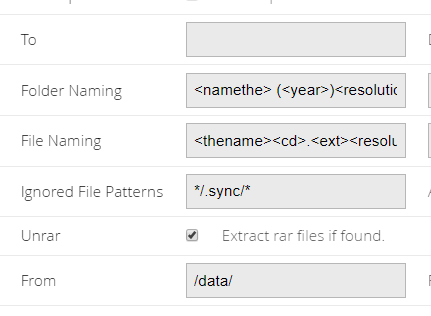
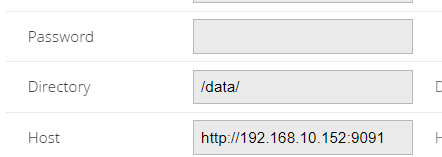
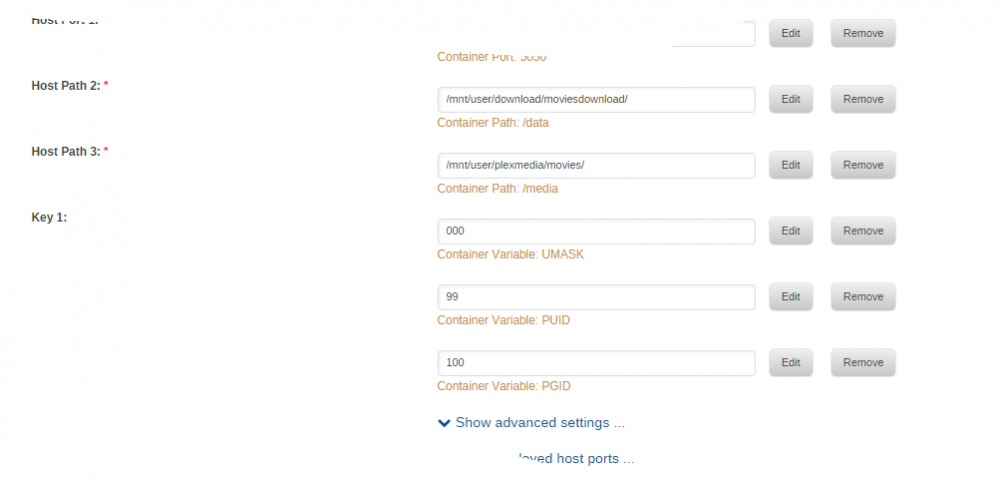
Hi, i think i have a brainfart here.. cant seem to understand how to setup couchpotato within docker. Se attached pictures for docker setup and settings in couch. But i cant seem to get the files downloaded to right directory, and the renamer to get into action. Anyone can give me a step by step here? thx.
-
hostpath2 is set to /mnt/user/download/ but now that you said path... i have set a path in sicrage to tell transmission to download to /complete as it did look like sicrage was viewing the hole structure. So i removed that and im testing now :-) Maybe you have some tips on the other question regarding script to remove torrent to? Btw. thanks... new unraid user and so far i just love the community. Fast and good answers are good to have for a newbie at linux
