





Andiroo2
Members
-
Joined
-
Last visited
Everything posted by Andiroo2
-
Same here...was on 6.9 RC2 with no spin down, and now on 6.9 stable I see the same...disks spin up immediately after manually spinning them down too. EDIT: I found the culprit: in Telegraf's config file (telegraf.conf) I had [inputs.hddtemp] enabled. Once I disabled this, my array stayed spun down like a good set of drives should.
-
Interesting, there are some shares listed in my /boot/config/shares that were long deleted from the system. Can I just delete the orphaned .cfg files from that shares file?
-
Hi all, Similar to user @chizll, I am seeing this message in my logs as well, every time mover runs: Feb 1 09:10:42 Tower root: /usr/local/emhttp/plugins/ca.mover.tuning/age_mover: line 171: [: no: integer expression expected Feb 1 09:10:42 Tower root: Mover not Needed. Feb 1 09:10:42 Tower root: Share Config: /boot/config/shares/Photos.cfg Feb 1 09:10:42 Tower root: Pool Pct Used: 5 % Feb 1 09:10:42 Tower root: Threshold Used: no Feb 1 09:10:42 Tower root: "0 Feb 1 09:10:42 Tower root: 0 Feb 1 09:10:42 Tower root: 80 Feb 1 09:10:42 Tower root: es Feb 1 09:10:42 Tower root: no Feb 1 09:10:42 Tower root: "1 Feb 1 09:10:42 Tower root: no Feb 1 09:10:42 Tower root: "1 Feb 1 09:10:42 Tower root: no Feb 1 09:10:42 Tower root: =" Feb 1 09:10:42 Tower root: no Feb 1 09:10:42 Tower root: =" Feb 1 09:10:42 Tower root: es Feb 1 09:10:42 Tower root: no Feb 1 09:10:42 Tower root: no Feb 1 09:10:42 Tower root: no Feb 1 09:10:42 Tower root: =" Feb 1 09:10:42 Tower root: es Feb 1 09:10:42 Tower root: 10 This same block of log messages displays for every share in my cache. If something IS moved from cache to array for that share, the "integer expression expected" message doesn't show up. The mover appears to be working correctly, so I just wanted to share in case this isn't expected. I am using cache % used (80%) and file age (10 days) in my Mover settings, and I am on RC2. Thanks!
-
Did you try to manually match a file in the WebUI yet? That’s where I was prompted to select the license file when I moved from Windows Filebot to Docker.
-
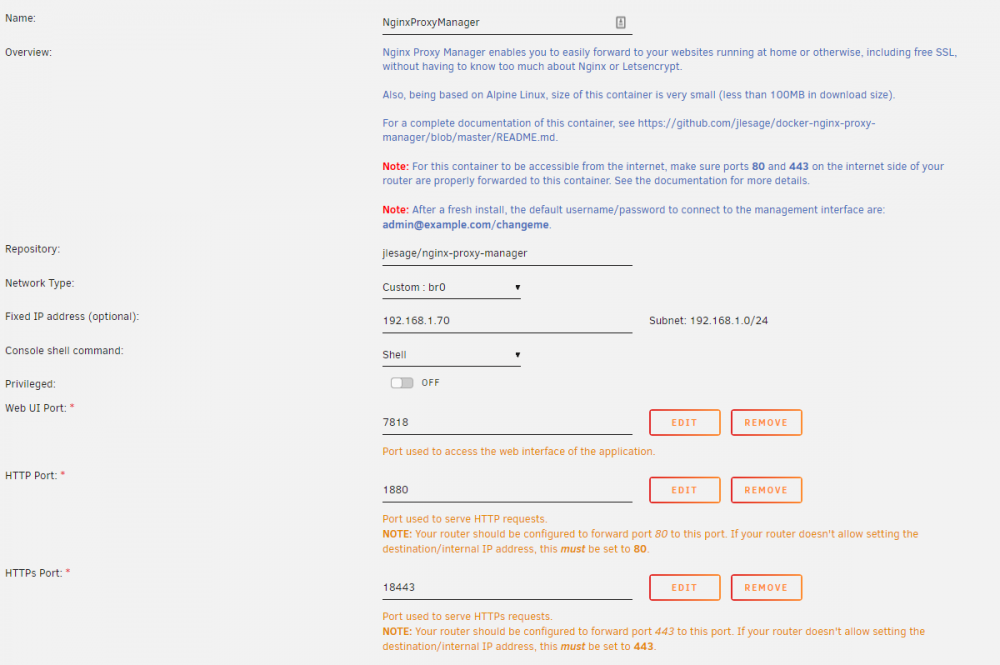
I set this docker up today and was pulling my hair out about why I couldn't get my apps set up correctly...the docker was complaining that the challenges were failing. I tried all kinds of things but noticed that while the docker settings showed ports 1880 and 18443 for the internal ports, the docker allocations section showed 8080 and 4443 instead. I changed my port forwards to those ports and BOOM, worked first try. Is this expected? Here are my docker settings, but 1880 and 18443 don't work for me:

-
OK, I can script something that will clean out that file regularly...thanks!
-
Is there a way to not use the amc-exclude-list.txt file? I'd like file to re-process even if they have been processed before.
-
I’ve created a 4GB Ramdisk folder for Plex transcoding and it’s working perfectly. It fills up and then Plex clears it out seamlessly. Thanks again for the reply.
-
Thanks. First line of the plugin is the appdata location. Duh.
-
This is a 6.9.x question. Not sure where I should put it. I have moved my appdata folder to a secondary cache pool. Will the plugin be updated to support this, or should i move it back to the main pool to use this plugin? Thanks!
-
That makes so much sense. Thanks for the info! Now to read back and figure out how to do it...
-
I find that when I use RAM transcode (to /tmp) on 4K video files, I use a TON of RAM. I have a 10th gen intel quick sync and I can transcode 4K files for users that don’t have 4K TVs. I have 48GB of RAM, and i sit around 50% utilized when idle. When I transcode a 4K file, I routinely get to 99% RAM and then panic. Plex/Docker can then crash. Is it expected that transcoding a 4K file uses that much space in the transcode directory?
-
What's the long term solution here? Is it an update in the Unraid core, or simply an updated Plex container (or both)? For now, the set of commands requiring compilation works perfectly for me, but I have to run them when I update the Plex container (I think). In the future, will the new container handle this?
-
Script worked for me first time on an i7 10700k. I'll wait for an easy docker install to change it. Thanks for sharing this!!
-
I just upgraded to an i7 10700k CPU and was having issues with heat compared to my previous Xeon. I followed some threads like this and found that the CPU was never stepping down to a lower frequency (it was always running the cores at 4.7GHz). I added the intel_pstate=disable flag and then set the tips & tweaks CPU governor setting to 'on demand". Voila! The CPU frequency now steps up and down depending on CPU load and my fans are a lot more calm. Thanks for your post!
-
Ok, happened again just now and we’re watching regular, non 4K Plex. 350+ MB/s loop2 reads for about 90 seconds.
-
I’m having a new issue where my Loop2 process is reading insane amounts of data (350-400MB/s) from my cache (2x 500GB WD Blue SSDs in BTRFS RAID1) when I’m watching 4K videos in Plex Docker. The bursts last for 5-10 mins or so. I know it’s Loop2 because it’s showing in IOTOP s the top process when it’s happening, and the read rate matches the Unraid interface. In this case, the Plex movies are on the cache, and my docker and all system/domains files are on cache. I have an E5-2699v4 CPU (42 threads) with 50% dedicated to Plex. All Plex metadata is on the cache as well. Now, I’m direct playing the videos in Plex Docker, so I’m not transcoding there. I don’t know that it’s related to the 4K movies playing, but that’s when I notice it (it eventually chokes the docker service and Plex stops for everyone watching). So, to trouble this from the Unraid perspective, how can I see into the Loop2 process to understand what those reads really are? EDIT: This doesn’t happen constantly, only in these bursts, which is why I’m not yet sure that it’s related to the Plex activity. Thanks!
-
I ended up scrapping this idea of passing the USB controller through. I simply pass through my video card (AMD R570) and I pass through a Logitech USB Unifying receiver for mouse and keyboard. When I use the VM on my monitor (instead of remote desktop), I switch my mouse and kb to the other dongle and it works like a charm. It's not perfect, but I'm very happy that it works.
-
Trying to get this wokring for my VM as well. It works the first time, but once I reboot the VM I lose the USB card passthrough. Restarting Unraid fixes it, but I still can't reboot the VM without losing USB. Working on it...will post if i get it working.
-
Updated from 3.10.10 to 3.10.11 today without issue. Nice work.
-
So, there may have been an issue with the latest Plex app released for the Fire Stick. My friends are trying with different settings there to see if they can work around it. So far, no issues on any other platform (and the RAM vs. SSD transcode doesn't appear to make a difference for this issue after all). Link for the post I am following: https://www.reddit.com/r/PleX/comments/f5r0ou/4k_with_new_plex_for_firestick_4k_disabled_with/
-
I recently set Plex transcoding to /tmp, verified that the sessions were showing up as expected int he /tmp folder. Seemed to be working fine, EXCEPT for users on Amazon Fire Sticks. They are able to browse Plex and select a movie, but as soon as they play it, they get an error "Playback has stopped because the connection to the server has been lost". I had 2 Fire stick users confirm this today, and at the same house their Rokus and other devices work fine. When I move transcoding back to the default directories on an SSD, everything works again. Could the Android clients be managing transcodes differently? I find this so odd. Xeon 2699v4, 32GB RAM. I thought this would be enough but maybe not?
-
Was on 3.10.8. Took a backup. Deleted UV appdata folder. Deleted UV recording folder. Deleted UV docker image. Reinstalled UV from CA Apps tab. Opened UV webpage. Restored 3.10.8 backup. Done. Not painless but not painful either. I lost my recordings but not super important for a one-time loss. Thanks to everyone that figured this out before I had to. Let's see if this helps with the iOS app crashes and connection issues.
-
Updated to 3.10.4 today without issue. Nice work!
-
I upgraded from 3.10.1 to 3.10.2 today and it was completely seamless. I had reinstalled 3.10.1 from scratch after the upgrade issues from 3.9, so perhaps that set me up for this easy upgrade? In any case, I am happy. I still have the JVM heap settings limited to 4GB. Has anyone that had the memory leak in 3.10.1 been able to remove this setting yet?


