





Crashdogy
Members
-
Joined
-
Last visited
Everything posted by Crashdogy
-
Solved missing drives, losses cables to lsi cards DAH LoL
-
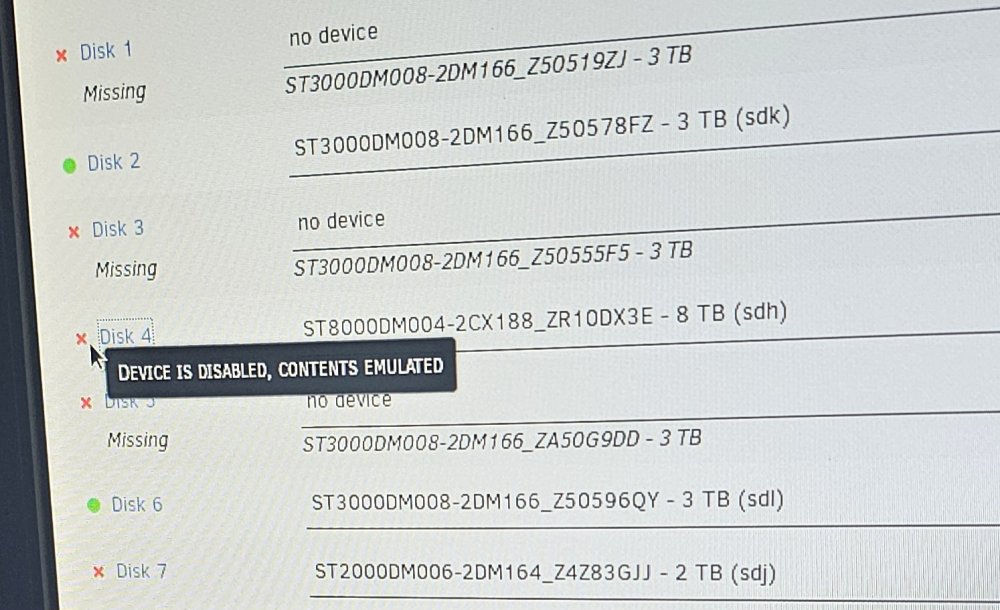
Ok so I had to chang my motherboard. I'm missing 3,5,1 I think I need to do a new config but I have 1 issue. Drives 4,7 are just disabled ran smart extended test they come back completed without errors. I don't want to loss the data on drives 4,7 how should proceed?
-
Is there a update for 1.19.51 ?
-
Is ther a update for 1.19.51 kids want to play lol ?
-
What shoul I set my bonded ethernet to in unraid if my switch is doing layer 2/3 Loadbalancing?
-
hello had to reinstall now get errors i figured it out. thanks.
-
installed app on the plugins side i get a error Warning: Invalid argument supplied for foreach() in /usr/local/emhttp/plugins/ca.update.applications/include/exec.php on line 100
-
thanks for reply, so its running why cant i see my ark server online ?
-
hello, i can see the ARK server on steam and getting this ? I did forward ports 7777,7778, and tryed 27015,27020 Setting breakpad minidump AppID = 346110 ---Checking if UID: 99 matches user--- usermod: no changes ---Checking if GID: 100 matches user--- usermod: no changes ---Setting umask to 000--- ---Checking for optional scripts--- ---No optional script found, continuing--- ---Starting...--- ---Checking if UID: 99 matches user--- usermod: no changes ---Checking if GID: 100 matches user--- usermod: no changes ---Setting umask to 000--- ---Checking for optional scripts--- ---No optional script found, continuing--- ---Starting...--- ---Update SteamCMD--- Redirecting stderr to '/serverdata/Steam/logs/stderr.txt' [ 0%] Checking for available updates... [----] Verifying installation... Steam Console Client (c) Valve Corporation -- type 'quit' to exit -- Loading Steam API...OK Connecting anonymously to Steam Public...OK Waiting for client config...OK Connecting anonymously to Steam Public...OK Waiting for client config...OK Waiting for user info...OK ---Update Server--- Redirecting stderr to '/serverdata/Steam/logs/stderr.txt' [ 0%] Checking for available updates... [----] Verifying installation... Steam Console Client (c) Valve Corporation -- type 'quit' to exit -- Loading Steam API...OK Connecting anonymously to Steam Public...OK Waiting for client config...OK Waiting for user info...OK Success! App '376030' already up to date. ---Prepare Server--- ---Server ready--- ---Start Server--- [S_API FAIL] SteamAPI_Init() failed; SteamAPI_IsSteamRunning() failed. Setting breakpad minidump AppID = 346110
-
Can I connect this server with android phones ? Dos it require steam account ect ? Where would one find the game parameters and maps ?
-
If I wanted to add more ops would I just add xuid for new OP or add a new line ? What's the format or can I get a example please
-
can the server be used for dune and tiberian Dawn ?
-
Thank you.
-
Hello there, there was a new update to minecraft now can't join server any ETA when you will be pushing. Thanks
-
Hello there, there was a new update to minecraft now can't join server any ETA when you will be pushing. Thanks
-
can you explain go to docker page in unraid ?
