





_0m0t3ur
Members
-
Joined
Everything posted by _0m0t3ur
-
I have used the Pre-clear plugin with no problems in 6.5.2 and 6.5.3. I have precleared 2 disks simultaneously with no issues. I prefer preclearing my disks manually. Sent from my iPhone using Tapatalk
-
No problem. Sometimes when you're so into how unRAID all works, it's easy to forget that a "simple" thing isn't so simple to someone just starting out. Keep at it. It's so worth it.
-
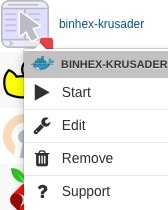
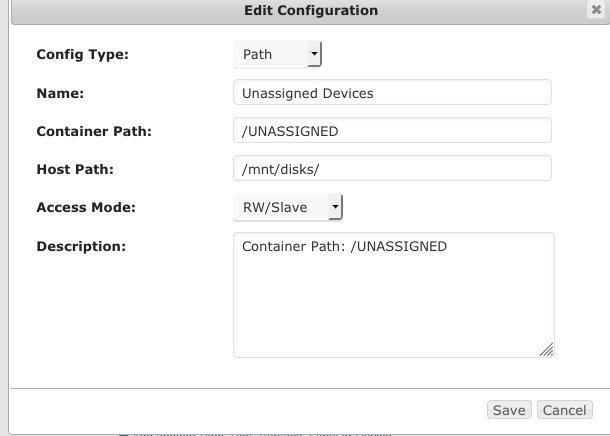
Go to the Docker tab. Find the Binhex-Krusader in the Dockers list. Click on it (see picture below) and select "Edit". The Binhex-Krusader Docker edit screen pops up. Go down the list until you see the /mnt/disks/ for the container path for unassigned. Click the "Edit" button to the right of it. The details pop-up for the unassigned devices paths. Go down the list to "Access Mode" and change that to "RW/Slave" and then save.

-
Do you have the Unassigned Drives plugin installed? Sent from my iPhone using Tapatalk
-
Yeah, new drives must formatted. I would unmount and pre-clear the drive outside the array, if it were me. Sent from my iPhone using Tapatalk
-
Have you tried running the pre-clear plugin on this drive before mounting? I am on my phone so can’t look at your diag now. Sent from my iPhone using Tapatalk
-
Used drive? Have you pre-cleared the drive? Sent from my iPhone using Tapatalk
-
Thanks. I wasn't sure if that was the case or "it works but don't ask for help." Lol. I'll have to do some searching around.
-
I have a Supermicro X8SIL-F. Just to clarify, this means that setting the fan control to "YES" will enable this function but there is no support?
-
Ok. I'll change to bridge mode. There were no pre-set options in the container for paths, etc. I wasn't sure if you meant that I should be adding them. Some containers that have paths specified, I've also been able to specify additional paths for other purposes. For example in Plex specifying a path for movies. Then creating another for tv shows. Thanks for your help.
-
Are you saying that I, in the container, should map local and host ports. And then open ports in my router to match the host ports listed in the DuckDNS container? I ask because the setup that @gridrunner put together on his Youtube channel didn't specify those steps. DuckDNS seems to be working. I'm new here. Any advice would be appreciated. Thank you.
-
This DuckDNS docker appears to be working. I learned about it from watching a video by Spaceinvader One on Youtube. I'm able to ping successfully. But when setting up another docker, I noticed that under "Docker Allocations" that in place of a port, there are several question marks. I'm curious why? Image below:

-
From diginc on github, "Automatic Ad List Updates - since the 3.0+ release, cron is baked into the container and will grab the newest versions of your lists and flush your logs. Set your TZ environment variable to make sure the midnight log rotation syncs up with your timezone's midnight." Looks like this container points to the latest release, so we should be covered, provided TZ is set correctly. Find your TZ here.
-
Do the logs still need to be manually deleted via script each day or so? Or has this been automated within the container?
-
Gottcha! Yeah, I probably should have provided UPS info in the post. My error. Sorry. So, I was reading your post and thinking that 3 minutes on battery is nothing. Especially, seeing that my system shows 83 minutes runtime left at 100% battery charge, which you did not see. I realize that the 83 minutes is probably inaccurate but since my target is shutdown in under 10 minutes, this should provide enough of a cushion. Your comment ended up being very helpful. Thanks. As a result, I looked at the settings page again. Apparently, the shutdown is invoked by the first trigger of the three. So the 180 second trigger should be invoked first based on current battery health. But I should probably have settings for the other two in a case where the battery health is lower than anticipated to prevent a hard shutdown, as you pointed out. As a result, I've set the "Battery level to initiate shutdown" to 50%; the "Runtime left to initiate shutdown" is set at 10 minutes. And my "Time on battery before shutdown" is set to 180 seconds. This should get my system beginning a shutdown at 3 minutes on battery, unless my battery immediately reads some low health setting. Then my system will hopefully be caught by the 50% rule and shutdown gracefully anyway. Thanks again.
-
I'm confused. The settings should allow the server to run on battery power for 3 minutes before shutting down. I'm trying to set this to shut off very timely. Am I missing something?
-
I've read a number of posts in various threads in the forum that recommend setting unRAID to shutdown after a power disruption puts the server on battery power somewhere between 1-3 minutes, essentially insuring a shutdown within a 10 minute window. I want to use only "Time on battery before shutdown" to get my server shutdown within a definite 10 minute window. If I use the following values for UPS Settings, do the zeros shut off the functions "Battery level to initiate shutdown" and "Runtime left to initiate shutdown"?
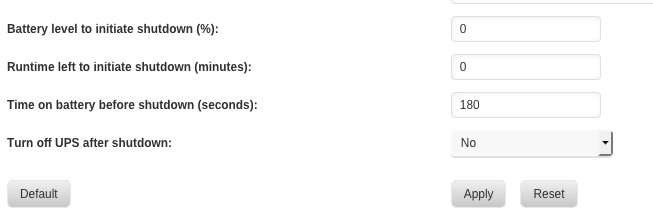
-
Helpful. I appreciate you. Hopefully I can take some time to get this set-up within the next couple days. Thanks.
-
I was just thinking about Time Machine. Thanks for this post. My last couple drives are finishing Preclear now. Then I'll be getting the drives assigned and so forth. In my house we have three MacBook Pro's to backup via Time Machine. Do you know whether I can use one HDD to backup the three devices or are you suggesting that I might be better having three separate HDD's? I haven't looked much into this part of the set-up yet, so any thoughts you have regarding this would be appreciated.
-
I ended up with the 860 Evo's because of a very good deal. And, though the HPE was a good deal, I decided to go with a Supermicro X8SIL-F with Xeon processor. When I need more HDD space, I'll be sure to check out those Toshiba's. Thanks for your feedback.
-
Great job, Mike! Glad you found success.
-
So here goes. It's fixed. What did I do? Haha. Hmm? Let's think. 1. Executed sensors-detect command, then rebooted server after preclear finished on one drive. 2. Navigated to and executed command: /boot/config/plugins/dynamix.system.temp# cat drivers.conf Output: coretemp jc42 w83627ehf 3. Navigated to and executed command to display available sensor info: /boot/config/plugins/dynamix.system.temp# sensors Output: jc42-i2c-0-1b Adapter: SMBus I801 adapter at 0400 temp1: +40.5°C (low = +0.0°C) ALARM (HIGH) (high = +0.0°C, hyst = -1.5°C) (crit = +69.2°C, hyst = +67.8°C) jc42-i2c-0-19 Adapter: SMBus I801 adapter at 0400 temp1: +38.5°C (low = +0.0°C) ALARM (HIGH) (high = +0.0°C, hyst = -1.5°C) (crit = +69.2°C, hyst = +67.8°C) coretemp-isa-0000 Adapter: ISA adapter CPU Temp: +32.0°C (high = +83.0°C, crit = +99.0°C) Core 1: +28.0°C (high = +83.0°C, crit = +99.0°C) Core 2: +34.0°C (high = +83.0°C, crit = +99.0°C) Core 3: +30.0°C (high = +83.0°C, crit = +99.0°C) w83627dhg-isa-0a10 Adapter: ISA adapter Vcore: +0.90 V (min = +0.60 V, max = +1.49 V) in1: +1.84 V (min = +1.62 V, max = +0.03 V) ALARM AVCC: +3.23 V (min = +2.96 V, max = +3.63 V) +3.3V: +3.23 V (min = +2.96 V, max = +3.63 V) in4: +1.53 V (min = +1.35 V, max = +1.65 V) in5: +1.25 V (min = +1.13 V, max = +1.38 V) in6: +1.44 V (min = +1.42 V, max = +1.52 V) 3VSB: +3.23 V (min = +2.96 V, max = +3.63 V) Vbat: +3.15 V (min = +2.96 V, max = +3.63 V) Array Fan: 1240 RPM (min = 712 RPM, div = fan2: 1985 RPM (min = 712 RPM, div = fan3: 1328 RPM (min = 712 RPM, div = fan5: 1231 RPM (min = 712 RPM, div = MB Temp: +35.0°C (high = +60.0°C, hyst = +55.0°C) sensor = thermistor temp2: +33.0°C (high = +95.0°C, hyst = +92.0°C) sensor = CPU diode temp3: +31.5°C (high = +75.0°C, hyst = +70.0°C) sensor = thermistor cpu0_vid: +1.513 V intrusion0: ALARM jc42-i2c-0-1a Adapter: SMBus I801 adapter at 0400 temp1: +37.2°C (low = +0.0°C) ALARM (HIGH) (high = +0.0°C, hyst = -1.5°C) (crit = +68.8°C, hyst = +67.2°C) jc42-i2c-0-18 Adapter: SMBus I801 adapter at 0400 temp1: +41.0°C (low = +0.0°C) ALARM (HIGH) (high = +0.0°C, hyst = -1.5°C) (crit = +68.8°C, hyst = +67.2°C) The sensors drop-down menu in Dynamix System Temperature plugin is now populated and working.
-
root@unCube:/etc# cat sensors.d/sensors.conf # sensors chip "w83627dhg-isa-0a10" ignore "fan4" chip "jc42-i2c-0-18" label "temp1" "CPU Temp" chip "w83627dhg-isa-0a10" label "temp1" "MB Temp" chip "w83627dhg-isa-0a10" label "fan1" "Array Fan" I'm seeing the contents of the sensors.conf file. The results make sense. Ignoring fan4 makes sense, since no fans are connected to that header. And the other results are the options that I selected in the drop down menu in the Dynamix System Temperature plugin. I did navigate to the plugin directory to look at the plugin drivers.conf file. /boot/config/plugins/dynamix.system.temp# cat drivers.conf coretemp jc42 w83627ehf This is what shows up. So how do I get this to connect up with the plugin? Is it a matter of copying the sensors.conf from the /etc/sensors.d directory to the /boot/config/plugins/dynamix.system.temp directory? I'm just taking a stab at this; not really knowing.
-
Cool. Sent from my iPhone using Tapatalk
-
Thanks, Squid! I’ll give it a go and report if I have a problem. Sent from my iPhone using Tapatalk


